In short
Accidental Tech Podcast Episode 663: Defending the Honor of The Cheesecake Factory
Episode Overview In this episode, the hosts explore a variety of tech-related topics, with a focus on Apple products, programming, and general nerd discussions. The episode touches on the Vision Pro, recent Apple rumors, and even a light-hearted defense of The Cheesecake Factory.
Key Themes
- Tech Experiences and Products: Discussion of recent tech experiences, particularly concerning the Vision Pro and Apple hardware.
- User Experience: Exploration of usability, design choices, and performance issues in macOS and iOS.
- Lighthearted Food Commentary: A humorous defense of The Cheesecake Factory's genuine culinary offerings amidst common misconceptions.
Detailed Notes
Pre-Show
- Marco's Airplane Observations: Marco shares his experience observing tech usage during a flight, particularly noting people using the app *Flighty*.
ATP Holiday Store Announcement
- The ATP Holiday Store has reopened with various merchandise.
- Featured items include new designs and popular products such as the *Chicken Hat 2.0*.
Follow-Up Discussions
Vision Pro
- Discussion of Mac Virtual Display limitations on Intel Macs, with limited resolution capabilities.
- Introduced the concept of tapping-and-holding to hide other windows in Vision Pro.
- Comparison of Vision Pro to ski goggles regarding fit and comfort.
Apple Hardware Rumors
- Speculation on potential use of vapor chambers for MacBook Air and iPad Pro.
- Mention of Apple's MLS deal and its international implications.
Apple Shortcuts Bug
- John experiences file deletion issues with Shortcuts, prompting discussions of community feedback and potential workarounds.
- Workaround identified: disabling the "overwrite if file exists" option.
The Cheesecake Factory
- A light-hearted defense of The Cheesecake Factory's culinary practices against misconceptions about frozen food.
- Discussion references from *The Daily Meal*, emphasizing that most menu items are made fresh but cheesecakes are delivered frozen.
Mac Rumors
- Insights into the rumored M6 and OLED MacBook Pro expected in late 2026.
- Discussion on Face ID integration for Macs and potential updates to existing hardware.
OS Updates
- Concerns about macOS Tahoe (version 26.0) being buggier than usual, prompting a recommendation to wait for version 26.1.
- Mentioned issues with Electron apps causing system-wide slowdowns.
User Experience on Vision Pro
- Marco and John share their experiences and opinions on the Vision Pro's immersive content.
- Discussions on motion sickness triggers and the challenge of maintaining focus on subtitles vs. the immersive video content.
Final Thoughts
- General consensus that while the Vision Pro offers exciting capabilities, it also presents challenges in user experience and comfort, particularly in relation to clarity and focus.
- The hosts reflect on the balance of compelling content and engaging storytelling versus the technological novelty of using the Vision Pro.
Sponsorship and Membership
- The episode is sponsored by brands including SKIMS and Paka.
- Encouragement for listeners to become ATP members for exclusive content, including ATP Overtime discussions.
Conclusion This episode of the Accidental Tech Podcast combines tech discussions with light-hearted commentary and personal anecdotes, offering insights into the hosts' experiences with the latest Apple technology while humorously addressing everyday topics.
Written by AI. May contain mistakes. Listen to the episode to check what was said.
Transcript
Automatic transcript. May contain errors.0:00I took a flight last week and I saw two sites that I thought were noteworthy for nerds like us. wait you saw somebody using overcast in the wild saw someone using overcast while wearing a vision pro neither of those things that's impressive well i don't know how you would see that but exactly but first uh here i'll send this picture in slack i saw this across the aisle and ahead ahead by one seat what app is he using lighty that's right that is our friend ryan jones's app flighty yeah this is look i'm always looking to see what people are using on their plane on planes and trains and stuff. Is this a rare sight?
0:36Isn't Flighty like super popular? I think it, but I sent it to Ryan and he said he's never seen it in the wild either. Wow. So not only was this person using Flighty, the guy behind him was also using Flighty. Everybody should be using Flighty. Like I don't even fly that much, but like seriously, if you don't have Flighty, if you, I fly so rarely, but it's still worth it for me to track other people's flights. I track my family's like my wife travels for work a lot. I have flighty just to track her flights. I'm not even the one flying. It's still worth it. Yeah, it's fantastic. And I should briefly interject that when flighty was new, it was priced fairly.
1:15But for someone who flies only a couple times a year, I found it to be very expensive. But since that time, and I'm not saying their price was unfair, just because I never fly. I didn't really need it. But they've since added a pay-as-you-go, like a weekly plan, which is five bucks a week. Yeah, that's what I get. Because I don't fly that much. I think it's something like 50 or 60 bucks a year if you want the yearly plan, but I don't fly that often. So every time I fly somewhere, I just buy the week pass and then end it when I'm back. And then next time I fly, I buy another week pass. It's super easy.
1:47Compared to how much you get charged for like a nickel and dime for stuff on flights, $5 for flight is well worth it. Absolutely. That's my whole point is that I think a lot of people, myself included, initially were like, oh, I'd love that, but it's out of reach expensive. But it's actually not. They've adjusted their pricing over the years such that it really is affordable, even for a cheapskate like me. So if you haven't looked at Flighty in a long time, you should check it out again. Because like I said, there are plans that are much less costly, or perhaps maybe a better way of looking at it is more attuned to a flyer of my frequency, which is to say like twice a year.
2:20Yeah, it's five bucks for a week. It's like if you buy a bottle of water in the airport, you're like, it's like it's so relative to, you know, the rest of air travel. It's nothing. Yep. So yeah. So not only was this guy using flighty on, by the way, on an iPhone air, which is the first time I've seen anyone with an iPhone air in the wild. Yeah, I didn't notice that. Yeah, I thought it might be in that. I convinced myself I was wrong. We probably won't put this picture in the show notes because I don't want to just in case. But suffice to say, it looks ever so slightly looks like an air. And as it turns out, apparently, yes.
2:49And this guy guy he was he was a tech enthusiast you talk as he was he was carrying multiple phones he had an iphone air and some kind of android something he was kind of alternating between them and the entire flight he was using a 13 inch oled ipad pro um like as like his main entertainment device so like this guy was obviously like a nerd of some kind um but nothing compared to the nerd that was sitting behind him who was also using flighty here and there here i'll send the second picture to the guy oh look at that look at that so we're looking at a picture of a gentleman with a vision pro on it's hard to tell you know you can't really tell if it's an m5 vision pro or not but i can tell you it 100 has the new dual knit whatever they call it headband which is the pro move uh and this man looks like he is watching a movie and living his best life this is the first time i've seen a vision pro being used in the wild outside of like apple events so this man was using a Vision Pro for the entire flight.
3:48He was, based on the fact that he was not moving his hands most of the time, I could tell that he was mostly probably just watching a movie or something the whole time. But I did see him do the relatively complicated, like, bring up control center and change the volume gesture, where you turn your hand upside down. I saw him do that once. Now, this is the brand new strap. This picture was taken last week, one day after the strap came out. and he had a third-party case that is not sold in apple stores so i'm thinking he probably did not just buy the vision pro that day or the day before sure sure because no one on on their day two of vision pro ownership nobody would know that gesture the volume adjustment like you know weird hand turn upside down i knew it on day two of having cases well you're you're an exception to the rule sir but i i do take your point but you're an exception you know unless it could be I hope this doesn't come across in a bad way because I mean this genuinely.
4:46But what if this was – he doesn't strike me from the way he looks. Again, I'm sorry. There's no picture in the show notes. But it doesn't strike me as a person who has saved up for two years to buy Vision Pro. But in the occasions when I am really amped about getting something and I save my money for it, you bet that me, of all people, has read the manual front to back inside and out 13 times before it arrives. If you bought it and had a flight, you'd definitely be using it on a flight just like you were trying to set up your new phone on the way to the airport. Exactly. Exactly. But because he had a third-party case, so my theory is either he's a John and has read everything and did everything and even maybe pre-ordered the case, or he has either bought both Vision Pros or he at least bought the new strap on day one and then immediately took a flight with it.
5:31But I got to say, seeing it in the wild, it was a weird look to see on a plane, to be honest. But we did find like one person in the wild who uses the Vision Pro on an airplane. All right, we should do a little bit of shilling. Let's talk about the ATP Holiday Store, which is BackBaby at ATP.fm slash store. John, can you take us through maybe not every single product, but at least the highlights or the new products for this season, please? yeah so to start off uh with the chicken hat 2.0 new version of our chicken hat or the reproduction of my really old hat it's a little bit bigger than the old one the logo's in the middle but that's not the important part we have some important chicken hat follow-up from ben kane last episode i was trying to describe the chicken hat for people who'd never heard of it and i said well you know when you put it on like it's kind of it looks kind of like a triangle on top of your head and when you wear it it's like vertically uh you know the it makes like a ridge in your head kind of like the comb on a rooster and i had said you know uh you know a rooster i know not technically a chicken but you know what i mean like the little flappy thing that's on top of the head of chicken ben kane writes a rooster is in fact a chicken male chickens are roosters female chickens are hens that is all thank you ben for the clarification i feel better about describing it as a comb on a rooster so anyway the chicken hat 2.0 is there limited quantities we had to guess how much we would sell we haven't sold them all yet hopefully we will sell them all but if you want one you should get one because they might sell out or we might be selling them for the next five years we'll see and speaking of selling out the mugs have sold out thank you everybody we last episode last episode we had 10 mugs when we finished recording the episode we had 10 mugs so nobody in the live chat room bought them but subsequently people have bought them the mugs are sold out hallelujah the mugs are sold out um other new notable products we've got an atp quarter zip which is proving popular for people who don't like their zippers to go all the way down it's got an embroidered atp logo looks nice uh we have the ugly atp tahoe shirt to uh memorialize tahoe which we may talk about in the topic section we have the very popular uh atp t568a and t568b ethernet wiring standard shirts that uh transform our logo like to change the six color apple stripe things in the atp logo to be the colors of the conductors so the wire jackets in ethernet connectors according to these two different standards there's different wires in different orders if you know you know uh lots of people ask hold on are you going to talk about quantities that's exactly what i was about to do lots of people asked uh how is that going how's 568a versus 568b what is selling more i can tell you that uh right now it's basically two to one b to a b is selling twice as much as a right now now on that topic because i always forget which one of these is which so i went to the wikipedia page because i personally don't have any experience in working with these wires i've never crimped an ethernet connector although i've seen these wires inside them and i'm aware of it conceptually so i don't know the cultural you know i don't know what the cultural weight of these different standards but i'm kind of surprised that it's two to one b day here's what wikipedia has to say on this briefly sorry for the tangent um 568 the 568 standard recommends t568 pinout for horizontal cables this pinout is compatible with one pair and two pair universal service order codes or usoc pinouts the u.s government requires it that is it requires 568a in federal contracts the standard also allows only in certain circumstances the t568b pin out quote if necessary to accommodate certain eight pin cabling systems i.e when and only when adding to an existing installation that uses a t568b wiring pattern in 90 in the 1990s when the original standard was published the most widely installed wiring pattern in unshielded twisted pair cabling infrastructure was at &t's 258a system acts, hence the inclusion of the same wiring pattern as T568B as a secondary option for use in such installations.
9:21Many organizations still use T568B out of inertia. So all you B people out there, two to one B, are you using B out of inertia? Because you're using an existing thing that used the 1882-58A system act standard in the 1990s? Why two to one B? It seems like A is the recommendation. I recall from our older conversation that one of these was compatible with like telephone system, like analog telephone system wiring, and the other one wasn't. But these two paragraphs from Wikipedia don't tell me which is which. But are you still using T5CC8B out of inertia? Did you buy the B t-shirt out of inertia?
9:57Two to one, B to A. Fascinating. I'm assuming this won't change. I don't want to change anyone's mind. Say you pick whatever you want, you know, B or A. I just, lots of people really like B. Some people, we have some follow-up maybe next week or something saying that they weren't even aware that there were other ways to do it like they just did b or just did a and that was just the less is the order they go and what do you mean there's another way so anyway we've got shirts for both and we've got our m5 shirt and our mac pro believe shirt and all our other atp stuff that's it for the store uh we've got i think one more week where we're going to talk about the store so don't dilly dally uh if you want something from the store you should get it now oh and we have a atp membership gift memberships available as well you can buy them anytime so you don't have to buy them during the store thing but just FYI, if you sign in to atp.fm with your membership account, or even if you don't have a membership, just sign in to atp.fm with the account that you made that you can buy membership or not with, you will get a link on the store page.
10:49You can email that link to anybody who you want to buy you an ATP membership for the holidays. Say, hey, I want an ATP membership. Follow this link. It'll let you buy one. All it does is pre-fill your email address in a form. But the email address has to match the email address that you sign in to atp.fm with. So anyway, gift memberships as well. So you have to tune in next week for our final pitch for ATP merch. But that's what we've got. Since John was courteous enough to speed run that pitch, I will just tell you that this is the time where I remind you that every single sale, someone will tweet at me and say, Oh no, I'm that person.
11:25I'm that person that forgot to do it. So if you are driving, use your turn signal like an adult and pull over and go to hp.fm slash store and make your purchase. If you're walking, meander your way to the side that is not traveled, typically the right in places like America. You know, kind of pull over as you're walking and go to ATP.fm slash store and make your purchase. Do not forget. Do not be that person. You will be made fun of mercilessly. Not really, but still. I will laugh. Don't be that person. ATP.fm slash store. All right, Vision Pro. Let's talk Vision Pro. And, you know, it's hard to argue with you or Marco when you talk Vision Pro things, particularly about blurriness, because I know that even though I have like 20-20 vision in one eye and like 20-25, 20-30 in the other eye when I have my contacts in, I'm not going to sit here and say I have stellar vision.
12:17Like even if clinically like measured vision is sufficient, I don't have stellar vision. And so it's hard for me to make a real, you know, full-throated pitch or defense of the Vision Pro when it comes to blurriness. but we had some feedback with regard to John's lamenting that the Mac virtual display was no good. So John, can you tell me about this, please? Yeah. I had said that basically using Mac virtual display with my 2019 Mac pro and my pro display XDR basically unretened my display. Like the display was the same as it was in physical space. Only now when I'm looking at it in virtual space, it looks like it was no longer a retina display.
12:49Thomas Chang was one of many people to write in to point out that Mac virtual display when used with an Intel Mac is only up to 3k resolution. and i had said can't you can you believe this works with intel well apparently it does work with intel sort of it's limited to 3k we'll link to the apple support document about this apple silicon is up to 5k and with sequoia 15.2 or later you can go up to ultra wide which is like 10 000 by uh 2800 pixels um and by the way 1.5k would be a true non-retning of a 6k display because you know every uh non-retina pixel becomes four retina pixels so that's how that math works i did try the vision pro once i learned this i tried it with one of my apple silicon max it's way clearer it's clearer to the point where i could feel like now the clarity is being limited by the displays in the vision pro again that's as we talked about when we did the math on this when the product first came out it's not as sharp there's not enough pixels inside that display for it to be as sharp as an actual retina display but boy is it better going from 3k to 5k does make a significant difference in fact i was using with the studio display connected to a mac studio fittingly and i did the thing where you're like i made the virtual display the same resolution as the physical display and i put it directly on top of the physical display you know like it snaps to like uh maybe you don't know uh when you're moving the virtual display around it will snap to the the vertical surface of the display like it knows that the display is there and then you can size it so that you're looking like you know put past the run and everything you're looking at your room you're looking at your display only what you're seeing is not the light up pixels that are in your display i think the display is turned off when this is when mac virtual display is happening instead what you're seeing is the virtual display and that's a great a b test um and yeah it does look a lot better uh it's not as sharp as the display but it is way better than 3k but just just for the for to save us some email john you're totally wrong that 1.5k is not the non-retina of 6k 6k is not talking about the area of the screen it's talking about how wide it is on the horizontal dimension the pro display xdr is 6016 pixels across the top and it's you know equivalent in size to a non-retina that would be 3008 pixels across the top so 3k really is the non-retina version of 6k it's not 6k is not the total number of pixels nope it's 6016 by something oh we should do the math to see if it comes out to be that and 5k was you know 5120 i think by something yeah yeah yeah no now that you say that you're exactly right well but like think about it hmm 6 000 yeah i guess so i mean the k's are you can guess so but it's correct yeah yeah well like what is for what is 4k though resolution wise it's depending it's either 49 to 6 or 38 40 um depending on there's like four different standards right but there's none of those are 4 000 yeah they round there's like weird there's like differences in standards between tv and other things and but it's 38 40 is the most common one right all right well anyway we should do the multiplication to see what the actual like i don't know you because there's no k number for that I guess.
15:47There's no like equivalent of 4K or whatever to that. The movie protection industry uses 4096 by 2160 which is DCI 4K. Intellivision 3840 by 2160 or 4K UHD with a 16.9 aspect ratio as the dominant standard. Yeah, and for computer monitors 2560 by 1600 was the old like, you know, big monitor size and then 5K was doubled the 2560. Oh, yeah, yeah, yeah. And then the XDR, it got a little bit bigger, but it was already retina. So there were there kind of was no one x like 3000 what is the xdr again 6016 by something 6016 by something yeah i don't know i at least know that bar come on all right i gotta get all right well i'm looking it up i'm looking it up yeah i just want to do the math and then secondly uh while you're doing that um again like for people who are who might be expecting like how this looks in the vision pro everything in a vision pro and this is this is true of pretty much any kind of vr thing everything rendered in a vr headset is going through a lot of different levels of sampling and of like warping of the image and dewarping of the image you know between you know what you're viewing like what's being rendered in the world is you know a polygon that shows your computer monitor textured onto it that could itself be positioned somewhere in your field of view possibly at an angle and not taking up all the pixels in your field of view and then your field of view is, you know, a square-ish screen that's being warped to create like a dome around you with optics.
17:20And so there are more pixels per inch in the middle of the field of view than there are as you get closer to the edges because of that warping effect. So the number of pixels being theoretically rendered of the source monitor in a polygon rendered in a warped view like you're going through a lot of different levels of sampling and warping here so it's never going to be sharp and and you're going to end up seeing effectively far fewer pixels than what these numbers actually are well i mean it could be sharp if the display has had way more pixels but as we calculated when the thing came out even dead center in the displays the best case scenario it doesn't have the number of pixels per degree as the actual screen does at normal viewing distances and speaking of getting close i did try that like what if i shove my face real close to the virtual display which happens to be mapped onto my physical display i think it makes it disappear when you get too close or something like it doesn't there's a point of diminishing returns where it gets angry that you're coming too close to it and it's shy it doesn't want you to see its flaws yeah and anyway like obviously if your nose is touching the monitor you can't really use the monitor that distance so um yeah i did it's uh 60 16 by 33 84 and that's about uh 20 million pixels um it's the 1.5k thing is interesting because the uh the number of points is 3008 by 1692 so it's kind of like 3k points but 6k pixels if you're going to use the 6k terminology um and i don't know what like when apple says it's limited to 3k do they mean is literally limited to 3008 by 1692 you know again throwing out these uh casual k numbers for things that are uh more exact the number of pixels is difficult to understand but it seems like 3k if judging by apple's uh pattern of using 6k for its monitors it seems like 3k may literally be a direct unwrittening of the 6k display all right and then nick wrote to point to point out which is something i knew but didn't think of in the heat of the moment uh tapping and holding on the x which if you imagine a vision pro window and you don't have to have vision pro to, to, to have seen this under the vision pro window is a bar.
19:31That's very similar to the affordance for, um, swiping, you know, the, the, like app switching affordance on the, on the phone. And it's just a horizontal bar. And to the left of that horizontal bar, there's a circle with an X and, and Nick writes tapping and holding the X lets you hide other windows. And the context here was John saying, there is no window management in the vision pro, which is mostly true. Uh, but Nick reminded me that, and reminds us that if you tap and hold the X, it'll let you hide every other window. Yeah, that goes a long way towards solving my problem, which is like, I don't want all these other windows there, but I also don't want to close them, but I also don't want to move them to the sides.
20:03Just hide others. That really helps. Yep. All right. So then there's something in the show notes and our internal show notes, Vision Pro fit in ski goggles. Tell me about this, John. Yeah, I meant to mention this last time. I was talking about how the thing fits on my face and wondering if I had the right size light shield and all that. And I was thinking about ski goggles because Vision Pro looks like ski goggles. And I have experience wearing ski goggles. and like these fit issues why did i never have this problem with ski goggles and the answer is ski goggles even though they look very similar and they even have the same kind of like foam around like the part that pushes against your face the thing with ski goggles is the goggles themselves are made of flexible plastic rubberized plastic and they bend they bend around your face so whatever size and shape your face is they curve in kind of a u-shape and the strap pulls them against your face and it bends them and then the foam makes up for the lumps of your face and all the other stuff uh envision pro obviously the aluminum part is not bending at least you hope now the light shield in theory could accommodate this by being more accordion like but the light shield seems pretty rigid like it's the light shield will deform a little bit and it does have the interchangeable foamy pads on them but the the sort of the gray body of the light shield i wonder if if they made that more accordion like more squishy so that it would uh that pressing it against your face would mold that i guess part of the problem is that in ski goggles the straps are pulling the plastic thing back on your face but the straps don't attach to the light shield so there's nothing pulling the light shield back on your face right like that's why i was saying i had little gaps by my temples because nothing is pulling that back on my face now obviously the entire metal frame is pushing the light shield against my face but you don't want that to push too hard so anyway that's just my thought on the fit of this i think if they make a second version of this, they should consider making the light shield more compliant.
21:52I'm not suggesting they make the body of it bend, although they should make it out of plastic. But I understand making the body of it bend is unfeasible with precisely aligned motorized displays inside there. Like, that's not going to happen. But that's my thought about fit for another week of wearing this thing. We are sponsored by Paka. You tried cotton, you tried cashmere, but have you tried alpaca? It's softer than cashmere, warmer than wool, and still breathable. That is the Paka hoodie. And it's about to be your new go-to layer. Paka makes performance apparel from Alpaka Fiber, one of the world's most sustainable natural fibers.
22:26Their best-selling hoodie is softer than cashmere, warmer than wool, and breathable. So it's lightweight, but still cozy. It doesn't stretch out. It doesn't pill. And it somehow keeps you warm, even when it's cold and cool when it's hot. Basically, it adapts to wherever life takes you. The Paka hoodie is built for your real life. It's thermoregulating. It's odor-resistant. It's durable and made to last. You don't have to baby it. You don't have to like especially like care for it very delicately. You can just treat it like a nice hoodie because it is a nice hoodie. Each one is handcrafted by in Peru by artisans who stitch their name right into the tag.
23:01So it's really personal and it's a signature of their quality and care. Over 100 ,000 people have already picked up the pack of hoodie. And it's also made sustainably and ethically from traceable alpaca fiber. And it supports the communities and artisans in Peru who bring it to life. So check it out. They sent me one to review. It's really nice. The fabric feels great. I haven't had too much time to see how it lasts over time yet, but it feels really durable. I don't feel like I need to baby it or make sure it doesn't touch anything. It feels good. It's a really nice fiber. I haven't used Alpaca before, but I've heard great things about it, and I was really excited to try it out.
23:36Right now, when you order your Alpaca hoodie, they'll throw in a free pair of their Alpaca Crew socks, which might be the only thing better than the hoodie. They're seriously great. They keep your feet dry. They don't stink, and they're just super cozy. and they also have a lifetime guarantee. So Paka dares you to wear these out and if you actually can, they'll replace them. So level up your hoodie game. This is your sign to do it now. Grab your Paka hoodie and a free pair of Paka crew socks by heading to go.pakaapparel.com slash ATP and use code ATP. That's go.pakaapparel.com slash ATP and enter code ATP.
24:11Thanks to Paka for sponsoring our show.
24:17All right. Andy Lang writes, now that vapor chamber cooling is a thing in the iPhone, do you think this technology would come to the fanless M5 MacBook Air? I have an M3 MacBook Air, and sometimes it does get quite hot. And then Mark Gurman wrote, when was this? Recently, because I can't tell. But Mark Gurman wrote, a vapor chamber in the iPad Pro is on the roadmap. Note I said the iPad Pro, not MacBook Air. Apple is now working on the feature with plans to integrated as soon as the next round of updates. The company's on an 18-month upgrade cycle for the iPad Pro, suggesting that the vapor chamber could be added around spring of 2027.
24:51A vapor chamber would help distinguish the iPad Air and iPad Pro lines. The Air has been drifting further into high-end territory. It got a Pro-size 13-inch screen for 2024 and is set to receive an M4 chip next year. So that doesn't answer the question about the Air, but it does mention the iPad Pro quite obviously. Yeah, so I think the vapor chamber is particularly useful for devices where you want move heat and it has to be really thin because as if you watch that vapor chamber video we linked ages ago the key feature of the vapor chamber is really really thin so if you're going to put this in a phone or in an ipad and the ipad pro is even thinner than the phone uh you want something thin and the macbook air they could just use a thermal pad or like a you know maybe there's not enough room for a heat pipe but like they have more options in the macbook air that said no one's gonna turn their nose up at a vapor chamber and a macbook air and it's conceivable the macbook air could get thinner over time so i think it is an appropriate i think the macbook air could use better heat movement let's put it that way i mean we've seen that with max tech always breaks them open and like adds whatever cooling thing they can think of inside their new thermal pads or some other thing and that just makes such a huge difference and so you're like there's there's room to make the macbook air uh spread its heat better and if it's not a vapor chamber then something would be useful.
26:10So I think Andy has a good idea, but it seems like Apple is going to put them into the iPad before they get to the MacBook Air, at least according to Garmer's rumors so far. I'm a little curious, though. We heard in the past, and I believe this has been verified, that the MacBook Air, because of various safety requirements, laptops can't get above a certain exterior temperature because they'll burn people's laps in certain regulatory requirements, or maybe just conventions, I don't know. But basically the MacBook Air does not conduct the heat from the processor directly to the exterior casing.
26:44Instead, it kind of just heats up the air cavity inside of the MacBook Air. And obviously that's limiting in certain ways, but it doesn't bond the heat directly to the exterior casing. I wonder if they would switch to something like a vapor chamber, what are they moving the heat to? Would it just be like, you know, some other larger piece of metal inside the case? No, they put it to the case, like just like they do on the phone. Like the whole point is if they had bonded the SoC to the case, it would make one little hotspot because it's harder for the heat to move through the thick aluminum case.
27:19The whole point of a vapor chamber is it moves heat real quick from where it's produced to the outer edges, right? So if you imagined a MacBook Air-sized vapor chamber, it would solve the problem of the hotspot in the case by not making the heat have to propagate through the relatively thick aluminum of the case and thus forming a really big hot spot that could burn your leg or whatever it would immediately spread it over a way bigger area and that would solve the problem like i think that's and i'm not sure they would bond it to the case they might just have the heat pipe moving it more efficiently to areas where there is cooler air because you still do build up heat inside the case where the soc is but i think they mostly vent i have to look at the recent teardowns but i think they're mostly venting the hot air from the macbook air out from like the little like the like the keyboard hinge the hinge holes yeah yeah whatever that like the it comes like that's where the fans blow on the uh on the ones that have fans without the fans i think it's venting out there uh and back in the day you remember they used to vent a lot through the keyboard i think they still they still kind of do i think yeah i think they do too because it's not like they're waterproof but but yeah at any time you can spread heat i think and especially since like the macbook air is granted it could make a hot spot or whatever but it's not you know the amount of heat produced by the macbook air is much lower than like and you know an m4 max in a MacBook Pro.
28:31So I think any kind of spreader would make it suddenly viable to bond that to the aluminum. I mean, also keep in mind, like the MacBook Air uses the same chips as the iPad Pro. It's like, you know, this rumor of it coming to the iPad Pro. I mean, that would kind of make sense. I mean, yeah, if they can spread it among a big enough area that it wouldn't create enough hotspots. I do wonder, though, there's also another component here of cost. You know, keep in mind, the MacBook Air sells for less than the iPhone Pro. Think about that. Like the MacBook Air, much larger screen, much more case, like much bigger computer keyboard.
29:10Like the amount of parts in a MacBook Air is substantial compared to a phone. You know, the phone has things like a cell mode that the MacBook Air probably will never have. But - And the phone has way better margins, I believe, than the bottom of the line MacBook Air does. Right. So whatever they're doing in a MacBook Air for the processor they'd probably do it to all macbook airs of that of that model line they might not be able to afford the margins for a large vapor chamber that's an interesting point i mean i i don't know how much those things cost but looking at them they they look like they're fairly cheap to manufacture right so who knows like it could be that they just don't i mean and i kind of agree with them like heat generation and thermal throttling it happens in the macbook air we know it does but who cares like that's the machine like the trade-off is you get thermal throttling in exchange for having no fan and that is a trade-off that a lot of people like and i think is appropriate for the bottom of the line macbook if you have if you need to do these massive sustained workloads don't buy a macbook air but like for almost all the people who buy one they're fine with it it's fine the thing's so freaking fast anyway like oh no i thermal throttled during some sustained activity who cares it's a thousand dollar laptop it's amazing right so it could be that apple continues to make the calculation and say yeah thermal throttles this is the one that thermal throttles but are the people who buy this it doesn't matter to them it's better to have no fan i agree with it honestly i do too like you know as as a frequent macbook error owner and i've never cared about thermal throttling i've never even noticed it in in my eye including you know doing things on it like software development i've just never noticed it um you know because i think you might notice it if you're doing like you know video encoding every single day some kind of batch job with the progress bar where you time and you're like boy this used to take 20 minutes but now it's taking 37 you know right yeah but yeah unless you're spent unless you're really stressing it for like more than a couple of minutes straight regularly i don't think you would even notice all right uh let's talk sports marco's favorite thing uh we were talking a lot about apple's mls deal and f1 deals in overtime last week and somehow we all lost sight of the fact that the apple mls deal is actually worldwide but it's for the american major league soccer um uh thing I can't think of the word I'm looking for.
31:21League? Thank you. Gosh. How did I get that? It's right there in L. It's the L in Major League Soccer. I literally just said it. That's okay. Anyways, reading from Apple's original newsroom post in June of 2022, the Apple TV app will be the exclusive destination to watch every single live MLS match from 2023 to 2032. Jake Lee also pointed out, Apple put up a billboard in Korea for it too. Sun Hong Min, one of the biggest players in Korea, recently moved to the Los Angeles football club and Apple was marketing that hard here in Korea. And we'll put a link in the show notes to that billboard. And as everyone will point out, having the worldwide rights versus the U.S.
32:00rights to MLS are basically the same thing because nobody else in the world cares about MLS. At least that's what they all tell us. We are sponsored this episode by Claude. Claude is the AI for minds that don't stop at good enough. Claude is the collaborator that actually understands your entire workflow and thinks with you, not for you. Whether you're debugging code in the middle of the night or strategizing your next business move at work, Claude extends your thinking to tackle the problems that matter. So we know a lot of the kinds of people who can't just walk past a problem without wanting to solve it.
32:34That's what Claude is for. Especially if you're a developer, Claude code can really be a game changer for you. It works directly in your terminal, understands your entire code base, and can handle complex tasks. And the best thing about Claude is that it's working with you, not for you. They have internal and external research capabilities in Claude that go way deeper than just basic web search. Comprehensive, reliable analysis with proper citations, so you can turn hours of research before into just minutes with Claude. And it can search across so many sources, it'll find connections that you never could have spotted yourself.
33:08And if you're a coder, they have amazing tools to help you code with CloudCode that can interact with all your other tools. So things like GitHub, Jira, HubSpot, Notion, Google Workspace. So CloudCode can become your command center with context from all of your work. Calendars, emails, all your go-to tools. It's like having a central brain for all your work. So you don't have to keep digging through multiple tools and everything like that. So it's a great tool. You can do so much with Cloud. I suggest you check it out because these days AI is everywhere. There's kind of some lazy bad ways to use it and there's some good ways to use it.
33:43And Claude is really great at helping you use AI correctly to help work with you, not for you. So if you're ready to tackle bigger problems, sign up for Claude today and get 50 % off Claude Pro when you use our link, Claude.ai.atp. That's Claude.ai.atp right now for 50 % off your first three months of Claude Pro. that includes access to all the features mentioned right here, claude.ai slash ATP. Thanks to Claude for sponsoring our show.
34:13John, your shortcuts bug. If you'd like, I can start reading this and you can interject. If you would like to cover it, that's fine. But we had some feedback with regard to this, and this was discussed in last week's after show. How would you like to proceed? Yeah, so the upshot is I'm not the only person who has experienced this bug. Is that an upshot? Yeah, you can read what's here, but this is just supporting evidence to say it's not just me. All right, so we'll start with Callum who writes, I've been experiencing the same shortcuts bug for about the past year. I have a shortcut that converts a PDF into images and then rearranges the images to create a new PDF.
34:50Every month I run it, rename the new PDF in Finder and upload it to Google Drive. Sometime later, it just disappears and I have to redownload it from Google Drive. I thought I was going mad. Then Fleet R writes I was using shortcuts to apply color correction to several hundred photos Pixelmator and ran into your bug With the output photos being completely deleted I eventually gave up finding a solution This was in early 2023 so it's depressing To know that it hasn't been fixed Lucan77 On Reddit back in 2024 Which was pointed out to us via Euro00 Writes I have a few shortcuts That create files but these files seem To keep disappearing I've not yet been able to identify any kind of pattern to this Such as whether it happens after X X occurrences or after Y minutes.
35:31When they disappear, it seems all files created by any of the shortcuts all disappear. I've not yet managed to ascertain if this happens at the same time. Then Gleeful chips in. Disabling the overwrite flag is a workaround that worked for me. So there's an image which we'll put in the show notes. The shortcut action is save resized image to get parent directory. And some of the options are ask where to save, subpath, and overwrite if file exists. and disabling that apparently is the trick yeah so i tried that because this is a screenshot from my actual shortcut i did have override file exists checked because that's what i wanted but in practice it's usually not overriding a file unchecking that box makes it so the files do not disappear in fact i just did one last experiment before the show started let me check yep that does it um so that tells me a lot that tells me this is a shortcuts bug shortcuts is the one doing it because when i uncheck that checkbox and shortcuts which makes no functional difference if i'm generating the files and there's no conflicting file like functionally it shouldn't make a difference but it is clearly shortcuts deleting lots of people are suggesting that i use fs usage or lsof or some other thing to uh find out which process is deleting the files it's some shortcuts related thing like it surely is because every other way i do this including by the way i made a shortcut that just runs a shell script those files don't get deleted either It is specifically this save files in directory shortcut option with the overwrite file.
36:56If it exists, option makes the files get written there, stay there for some period of time. Then later it deletes them. It's the only thing that, you know, and again, when, if you just have it run a shell script and the shell script runs like the SIPs, uh, command line tool that does image processing stuff that's built into this concluded with Mac OS that works fine. So I would say this mystery is essentially solved. This is a shortcuts bug. Apparently it's been there since 2023. lots of other people have experienced it the workaround is uncheck the overrided file exists checkbox in the save file things but boy what a bug and the fact that multiple people have seen it and it still hasn't fixed is kind of depressing not great bob all right let's talk about the iconic plateau uh gordon mcdowell writes the iphone only needs a protrusion sticking out as far as the camera on the opposite side to eliminate wobble it could be another bloody camera it could be one of the existing cameras moved there yeah this was about me saying like uh people who were saying they should make the plateau the same like thickness as the uh as the camera thing and that would be too much and like well you don't have to make the whole plateau thick just put the camera on the other side lots of other phones do this they have lines of cameras that aren't in kind of like a three dot cluster on one side like because apple evolved from their notion that the cameras were in the corner and they slowly expanded out from the corner until they were more than half the width of the phone but they were still clustered as if they were in the corner but they weren't and that led to the wobble so yeah apple could have done uh kind of a bug eye thing or a two-in-one thing or spread the three out there's lots of things they could have done to make their phones not wobble but apparently that is not an important design consideration at least thus far on their phone and it's not like that oh they don't they don't want to look like they're imitating the other phones that do they directly copied the google pixels like like thing on the back with the iphone air so i don't know what they're afraid of i still think they need to reconsider the camera arrangement um but yeah i mean hell they don't need to make a camera they just have to put a nub over there like like as i said just put some kind of like little nub or kickstand or ridge or who knows like like guys people don't care about their phones wobbling because i guess they're holding them most of the time instead of putting them on the table but oh well well and also like most phone cases will just put a huge lip around the camera bump and level it out anyway So like most people use cases on their phones and most phone cases remove this problem from being a problem anymore.
Read the full transcript
39:11I don't think most phone cases do remove it. Look at the bull strap case. That doesn't remove the problem. Like the bump is so big now that it doesn't, it's impossible to level out with any reasonable case. Even the bull strap case doesn't do it and they cover the other part of the non-camera part of the plateau on the pro phones. I don't know. The cheap clear case I got and the Peak Design case both level it out. Well, the bull strap leather ones don't. Anyway, Apple could solve this problem, but so far they haven't. All right. So from the ATP Insider episode on The Restaurant Season 1, we fairly briefly made mention of the Cheesecake Factory.
39:47And I think one of us, maybe John had said, oh, it was Marco. See, it's always— We were telling Marco about how fantastically huge the Cheesecake Factory menu is because for some miraculous reason, Marco has never been to the Cheesecake Factory. We recommend that he goes just to see the menu because it is so huge. Now that he's a restaurant owner, he can appreciate what it must take to have a menu this big. And Marco said, well, surely a lot of this stuff is frozen. And I agreed. It's like, it's got to be frozen. Like, there's no way you can have all this stuff available and not have stuff, you know, frozen.
40:17Yeah. So we found, I don't know who pointed this out. I'm sorry. But somebody pointed to the Daily Meal website, which reads, despite the fact that a long menu is usually a red flag, the food at a restaurant is pre-made and reheated. The opposite is the case of the Cheesecake Factory. All 250 menu items or more are made from scratch every day with fresh ingredients. But the same can't be said for the cheesecakes. All the cheesecakes are delivered to the restaurant frozen and then defrosted before serving to customers. There's no name associated with this because a lot of people sent this in. There's a lot of Cheesecake Factory fans out there who wanted to defend the honor of the Cheesecake Factory and say, no, it's not frozen.
40:52And how excellent is it that a place called the Cheesecake Factory has all fresh food except the Cheesecake Factory, which is made out of factory? Well, so if you go through the history of the thing, it started with somebody who was making cheesecakes in their basement and then she was making the cheesecakes for the restaurant until it became like untenable for her to do it. But anyway, frozen or not, the cheesecake at the Cheesecake Factory is good. If you like cheesecake, they make good cheesecake. So I'm not going to besmirch the frozen cheesecake. I don't care if it's frozen. It tastes pretty good.
41:18I will still insist that cheesecake is pie. Well, I'd have to consult the cube rule and I don't have it in front of me and I'm not going to do that right this second. All right. But let's talk topics. And we have a smorgasbord of Mac rumors to talk about, starting with the M6 or OLED MacBook Pro. So we can read from Bloomberg. Let's see. The company is readying a revamped MacBook Pro with a touch display for late 2026 or early 2027. The new laptops will feature OLED displays and will retain a full trackpad and keyboard. the new machine's codename K114K116 will also have thinner and lighter frames and run the M6 line of chips.
41:59For the revamped MacBook Pro, Apple is retiring the notch. In its place, the company will adopt a so-called hole punch design. This will be similar in concept to the dynamic island on the phone. The company has also developed a reinforced hinge and screen hardware to prevent the display from bouncing back or moving when touched, a common drawback of the existing touch PCs. Because of the price of your components, the new 14 and 16-inch MacBook Pros are likely to cost a a few hundred dollars more than the current versions. As of now, Apple isn't actively developing additional touchscreen Macs. Instead, it's waiting to see the market's reaction to the touch version of the MacBook Pro.
42:31Earlier, Mark Gurman had written in a different article, Apple's investigating the idea of bringing cellular connectivity to the Mac. Oh, hell yeah. Cellular connections are unlikely to come to the Mac before 2026 when Apple's planning a second generation modem that includes support for faster speeds. So this is a lot of existing OLED MacBook Pro rumors. Like again, the MacBook Pro, OLED MacBook Pro was originally rumored for this year. Then they said it's actually going to be pushed next year. So the rumors continue to say next year is the OLED year. When we were talking about the M5 MacBook Pro, just the plain M5 one, I was saying this generation of M5 MacBook Pros will probably be your last chance to get this design because the new design is coming.
43:07And it looks like the new design is going to be different in many, many ways. Being thinner, maybe, you know, do you like the current trade-off in terms of size, weight, and battery life? Will the thinner ones be better because of better battery chemistry we don't know but like if you if you want so a known quantity the known quantity of the size weight and battery life of these ones it is here for you touch screen this is the first time this has been rumored like in a substantial from like german who usually doesn't just make stuff up right lots of people have been talking about touch max for ages and ages this is a german rumor and there's it's corroborated by at least one other person so it seems like they're going to do this they're finally going to bring touch screen to a Mac.
43:45That involves a new hinge to make it so the display doesn't wobble as much. There's also the cell modem rumors, which again, the C2 in 2026, 2027, which is when they're supposed to be coming out. And of course the OLED screen, which is, these are the OLED MacBook Pros. So it's going to be a big change. This is the biggest change since the Apple, since these new, it's not the Apple Silicon ones because the first Apple Silicon ones look like the Intel ones, but since whatever we're calling this new design, the kind of boxy ones that we've had for the, well i guess m2 through m5 this will be the end of the line seems like for that design in the beginning of an all-new design with a lot of different potential trade-offs i'm not saying you should buy these because the new ones are going to be bad maybe the new ones are going to be great and you should wait all i'm saying is it's going to be a change and i find this fascinating because we've been waiting for touch max for ages not because we're dying for them we're dying for a solid auto mac but for touch max we're like you know people want it why shouldn't you do it it shouldn't be that hard uh there was another rumor i didn't put in here of like the exact technology they're using to put the touch sensitive thing in the oled display it's some new tech that embeds the touch layer inside the oled so it's not as thick and yada yada whatever um i don't there's no rumors about software related to the touch thing but and i don't i'm not predicting they should do this i'm not recommending it but i think if they simply added touch to mac os as it exists today be fine yeah it's not ideal it's you you're it's going to come with the trackpad you should use the trackpad but how many times have you seen somebody who's accustomed to touch using a laptop and they just want to scroll a web page and they reach out and do it our dialogue comes up and it's just easier for them to just stab the okay button with their finger instead of hit the thing it's a thing that people do and that's perfectly possible to do with mac os mac os is not made for your finger it's made for the pointer but there are things that your finger can do on existing mac os so i don't think apple needs to say oh everything has to become fisher price huge and everything has to be usable by finger i don't think they need to do that i don't think they should do that because that's called an ipad all right leave the mac the way it is but i think a touch screen would be a useful addition for the people who want fingerprints all over their laptop screen yeah and the reality is like this is one of those areas is that no matter what we as traditional Mac and laptop nerds think is right, I don't want a touchscreen on my MacBook Pro.
46:02However, how many people among us can say we've never unthinkingly just touched our laptop screen thinking it would scroll? Yep. That's madness. I would never do that. But I will say that I have literally pinched Zoom paper, print paper, more than once. more than once multiple many times over my life i have literally put two fingers down on like a magazine page and pinch to make the text bigger so i'm not above doing that i just say i haven't done with the laptop screen but yeah stab that okay button with your finger yeah and even if all it is is scrolling and zooming that would go a long way because like the reality is again no matter what we think as nerds this is what people are used to with every other device every windows pc of any you know note has had a touch screen or at least had a touch screen option for many years now and they added it because like the pc ecosystem is so diverse someone's going to try everything and once somebody tried it and they're like people but first of all people didn't object to it and second of all once it becomes like a thing that you have and you know your competitor has but you don't you're like well maybe we should add that too and people just got used to it being there now was windows redesigned to be a touch interface hell no no windows is design optimized for nothing right but like the the pc manufacturers didn't have to like it was like well we can't put touch on our laptops until windows is radically redesigned so that everything is accessible with your fingertip nope they didn't do that they just made they just put touch screens on it and people started using them and it's like the market has decided that this is a desirable enough feature to justify what i assume is the fairly minimal cost for the touch layer to be added to the screens of laptops.
47:47Yeah. And the reality is like most people out there in the world, especially as you go younger or more novice, most people assume that every screen is a touch screen and they will try to touch it. And if it doesn't work like a touch screen, they're going to either think it's broken or they're going to think it's not as good as things that are touch screens. So you have huge market pressure to do it. And, you know, it's one of those cases where we, I think, have talked a lot about like, you know, purity and like Like what John was just saying, like waiting until we can redesign everything to do it right, which would be a terrible idea for macOS.
48:18But, you know, like waiting until the perfection is possible. And this is the thing that Apple and us, but, you know, Apple often gets stuck in this kind of thinking of, you know, they can't just pinch those and do something imperfect. They wait until they can do something perfectly. And in the meantime, they don't address it at all or have something horribly broken, you know, like because the perfect is the enemy of the good. and sometimes they compromise on their perfect pure vision for instance slowly turning the ipad pro into a laptop which is what they have done like the ipad it used the ipad originally was like you pretty much only were intended to use it in portrait orientation unless you were watching some video then you could rotate it and remember the first keyboard for the ipad that came out with the ipad one that was portrait it was a stand with portrait and then everyone was like hey you know this thing actually can work if you just turn it to its side and put a bigger keyboard on the bottom.
49:16And then eventually Apple made the iPad Pro and made their own keyboard that held it to the side. But still the camera was on the wrong side and the logo was on the wrong side. And they were like, they were insisting this is an everything device, but mainly a portrait device. And it's definitely not a laptop. And then slowly what they've done with the iPad is turn it into a laptop. They gave you, you know, landscape uses. They gave you landscape cases with keyboards. They added a trackpad and a pointer. Now they have resizable windows and like the finder kind of sort of, and they have the dock kind of sort of like they've turned it into a laptop.
49:50All of this was in complete violation of their pure idea, the pure design, the pure ethos, but it's what customers wanted. And it made the product generally better for everyone because either you didn't have to use that stuff and you could keep using it the way you always were, or you could use it the way you actually wanted to, like more of a laptop. And it turns out the iPad is a pretty good laptop for a lot of people. And so I think thinking about touch on the Mac, we should think about it the same way. The Mac is not going to be a great touchscreen device, probably ever, just the same way that Windows PCs aren't great touchscreen devices.
50:28But a lot of people want that and are assuming that will be there and are disappointed when it's not there or they have bad experiences because it's not there and they try it and it fails. and so even though we don't want fingerprints all over our screens similarly to how many ipad users don't want or use any of the multitasking features and never connect the keyboard to their ipads there are so many people who want their macbook pros or their macbooks to have tuck screens and assume they will and have bad experiences because they don't that it's it should be there it's it has reached the point of popularity and user pressure now that they should have tuck screens i mean it reached that point a while ago but yes and the rest of us who don't want fingerprints all over our screens don't have to use it yeah and i think when apple executives always talked about this they've even back when steve jobs was still out i think he said similar things like oh your arm gets tired having your arm up touching a mac touch macs are no good but obviously with laptops especially if you're literally using it on your lap the screen isn't out in front of your eyeline like an ergonomically correct desktop display it's down it's where an ipad screen would be if the ipad was in laptop floppy laptop mode or if the ipad is just up on a stand it's lower uh it's tilted and it is more viable and i'm assuming that's what they'll say it's like we've always said your arms will get tired but with the laptop you don't have to hold your arm up it's down there and i don't i don't know how they'll spin it but it's like all i'm saying is i think that this doesn't mean that like the new apple display which they'll come out with someday i swear uh will be a touchscreen uh because look in the pc world there's not a huge number of desktop displays that are touch displays uh because it is tiring to have your finger up like that now i'm sure there are some and especially if you have like a drafting table style uh touch pc uh that's a different ball of wax but apple has never really made one of those they still could uh but they haven't although if they made one of those it should probably run ipad os or something but like if they do what i'm saying is if they do this with laptops i would imagine as the article says although god knows how he could possibly know this like oh they're gonna they're gonna do it on the laptops and then just wait and see and if people like it maybe they'll expand it out or whatever but yeah laptops first makes uh perfect sense for putting the touch on things and again it will be fun to see how they market this all right a few other quick grab bag items uh the other new macs of development include updated macbook airs with the m5 chip these devices are slated for release in the spring apple's also working on a refreshed mac studio mac mini and a pair of external mac monitors dubbed j427 and 527.
52:55Sure they are. You'll notice that I have not yet mentioned the Mac Pro. Apple is exploring another major Mac change as well, a shift from the Touch ID fingerprint scanner to Face ID, but that remains years away. Years away? Oh my god, put Face ID on Macs. You know where you could experiment with that first? Put it on the laptops. It's killing me that they don't put like... Yep. The thing is, laptops is the place where they have an excuse, like all the displays, who's in? They're going to come out with new displays, these long rumored Pro Display XDR successor and presumably a studio display successor with a 19 pro and whatever there's so much room in those displays for a face id sensor they're so freaking thick but face id on the mac stop what are you waiting for it's killing me i mean i know you guys are waiting for cellular but the face id on the mac is just it's just it's just brutal i don't i don't know what they're waiting for like just gather up those more only put it on your own displays it's another reason for people to buy your displays you don't even have to like have it be third-party display only put it on your first-party displays anyway yeah originally when i put this in here it was like these this His German article was like, other Macs in development, MacBook Air, Mac Studio, Mac Mini, just not even a mention of the Mac Pro from German.
53:58But then, Brendan Shanks to the rescue. Brendan Shanks writes, new in Xcode 26.1 Beta 3. This is, I believe, a constant. CPU family underscore ARM underscore Hydra, H-I-D-R-A, which is listed as H17G. We discussed that, which is apparently an island. Where is the island? I forget. Is it in life? I remember the discussion. I don't remember. Scandinavia or something. Yeah, somewhere up there, yeah. Yeah, it's not the multi-headed beast of Greek myth. It was H-Y-D-R-A. Anyway, this was supposedly the code name for an Apple Silicon chip that has not been released that is potentially a large, beefy chip that would be suitable for a Mac Pro, even though German's not even mentioning that.
54:43It's like, oh, here's some of the Mac rumors for the next year. They're going to update these Macs and those Macs and those. Not even a mention of the Mac Pro. not even like no news in the Mac Pro or Mac Pro, you know, like just nothing just doesn't even get mentioned. Like it doesn't exist. Maybe the product is canceled. But then in the new beta of X code, a constant sleep sneaks through that mentions the rumored code name of a chip that as far as we know has not shipped is not one of the M5 chips slated for the MacBook Pros. It could be a Mac Pro ship, or it could just be the beefy chip that they ship in the next Mac studio.
55:15And the Mac Pro really is dead. Who knows what will happen, but here I am out here trying to sell those MacPro Believe shirts, wearing mine in my heart every day. We are sponsored this episode by Skims. Now, I, like many of you, I probably, I wear underwear. In fact, I would say I wear underwear almost every day. And Skims is now making underwear for men. It's honestly really nice. So the first thing I notice about the skims they sent me a couple sample pairs i got the cotton five inch boxer brief and the stretch five inch boxer brief and the first thing i noticed is these fabrics feel great and they look great and they fit really smoothly on my legs and you know other stuff now granted i'm talking about underwear so you know it's a family podcast it can't be too specific here but let me just say it feels really nice and it looks nice so one thing is like fashion wise they hit right at the thigh you know it it looks modern it's a nice modern cut and they stay where you put them.
56:17So it's not like bunching up in your pants throughout the day or anything. It doesn't kind of get bunchy where it shouldn't get bunchy. So it's a really nice feel and it's a really nice fit. The fabric is top notch. It's also, it fits nice and smooth against your leg. So you don't have like a big thick seam anywhere. It's just smooth. I gotta say, it's very satisfying to feel them in the hand and on your legs. like you feel you feel like a cool person wearing these like i don't know what else to tell you it feels good it looks good it works great so check out skims shop skims men's today at skims.com skims.com now making men's boxer briefs and things like that let them know we sent you after you place your order select podcast in the survey after checkout and select our show in the drop time menu that you follows after that so skims.com afterwards they'll ask you where you found them save podcast, and select our show in the dropdown.
57:15Thank you so much to Skims for sponsoring our show.
57:21All right, let's talk some new developments or new-ish developments in the OS's 26 in the beta 4. In beta 4 for iOS 26, you can now tone down liquid glass. And I saw a lot of news articles about this, and they all frustrated me that they didn't have side-by-side comparisons, or at least not when I first started reading about it. But our dear friend Stephen Hackett did Yeoman's work to put these together. And so we'll put a link to Stephen's excellent post in the show notes. You go into, for iPad OS and iOS, you go into settings and then display and brightness. For macOS, you go into system settings, appearance, and there you'll find a new toggle that lets you swap between two looks, clear and tinted.
58:03Clears the look of liquid glass since iOS 26 launched, while tinted adds opacity and contrast. So I know that the names they put in the ui aren't necessarily connected to the names that of the apis behind the scenes but it was i initially saw this and i was wondering if this is the same as the api at least on mac os when you make a glass material thing you have a choice between clear and tinted like those are like the the constant numbers or whatever dot clear or dot tinted and when you do glass that's tinted you can also specify the tint color so like the the if you have switch glass my little app switcher thing that looks like the dock it has like a background or whatever and has materials you can pick for the background then i use all the deprecated constants that apple doesn't want me to use for the different backgrounds anyway in tahoe you can pick glass and you can pick clear glass or you can pick tinted glass and then when you pick tinted glass you can pick the color so i wonder if the tinted look is literally they just change all the things that are when they see the dot clear constant they just use the dot tinted one and they pick a fixed uh tint color it's hard to say because just because the name matches doesn't mean it's the same thing but But anyway, it seems like it might not even be new code and it's just simply like, oh, when they do dot clear, ignore that and really just use dot tinted with white as the background with some opacity level.
59:18All right. And then below these selections, there's little teeny tiny gray text because, of course, it's gray that reads, choose your preferred look for liquid glass. Clear is more transparent, revealing the content beneath. Tinted increases opacity and adds more contrast. and uh speaking of yeoman's work john has done us a service and we'll put a link in the show notes to some examples of tinted versus untinted uh john do you want to talk these through yeah so steven hackett's got a lot of uh before and afters lots of other people on the web since then have had a bunch of before and afters and i i picked some from this is actually running the beta and i took some screenshots of it and by the way the rc is out there release candidate is out now so this is a little bit old news but i don't think it's changed but side by side depending on the context, I don't see that much of a difference between the regular and the new setting, you know, between clear and tinted.
1:00:08you can see the background through both. it's not like it's not like reduced transparency where it makes it totally opaque like i was i was just in a messages thread that's what you'll see is like part of messages and it shows like a photo uh you know like it's a white background with non-white photos and the non-white photos clearly show through the tinted version they show through more in the clear one but it's there's still like if you're gonna make this setting it seems so subtle it seems like it's a little bit more opaque is that better just like if people don't want to see stuff that is behind their controls don't make them go all the way to reduce transparency and if this really is tinted as i said uh like the actual tinted control let people pick the opacity and the color put it like a you know or a put an opacity slider underneath it because it would be you know when you do tinted you can pick the color and you can put an alpha channel on that cover like i don't know like it's it's clear that they decided to do this because people thought it was too transparent but boy you give a setting like i was i'm gonna be hesitant to even tell this to like my kids because they complain a little bit about liquid glass stuff they're gonna be like what difference does that make it's the same i'm like well it's actually a little bit more opaque so if you could see them side by side you'd notice that yeah i guess if you see them side by side you would notice but i don't i don't know like it seems half-hearted to me i guess i can tell you so as soon as the setting was released in the bed as i switched to it for my iphone and then at some point later i didn't realize that there was also the option on the mac and so then like on my laptop that runs tahoe um at some point like a few days after using it on the phone full time i saw a notification show up in tahoe with the ridiculous overly glassy look and it was immediately i was like like it jumped out at me so much well well here's the problem on beta 4 changing that setting doesn't affect notifications oh great like i tried that's what i tried when i was trying to do the screenshots on tahoe you mean because on ios it does yeah i know but when i was trying to do the screenshots i'm like i know i'll do notifications because those are so clear they annoy me so i turned the setting on got a notification it didn't change it looks exactly the same now maybe that was a beta 4 bug and maybe in the rc it does change but that's what i'm saying about it being half-hearted on mac os it doesn't even look like it's applying the setting to lots of places where you wish it would be applied like notifications again it's beta 4 knowledge i'll i haven't installed the rcs yet but it seems a little half-hearted to me that's uh and hopefully mac os will eventually apply it everywhere but yeah maybe maybe it looks a little bit better in ios but um yeah reduced transparency really does reduce transparency but it it radically changes how things look and i think it makes things look even uglier so that setting is always there for you in accessibility but this is pointedly not an accessibility it's in you know settings appearance or settings display and brightness which is a weird place for it to be i guess there's no appearance equivalent in iOS settings.
1:02:59Anyway, when 26.1 comes out, this will be a setting, and if Liquid Glass is annoying you, you can give it a try. I can say also, again, on the phone, having used this now for what, it hasn't been like two weeks, I can say it's great. It has been going great, and it is generally better. Liquid Glass is not perfect with it, but I can say, like, after switching to this, and then seeing the glassy version on mac os it instantly made the regular version of liquid glass look garish and tacky and already old like liquid glass has been out for two seconds and it already once you see something a little bit more toned down it makes the shipping version look really old it always looked tacky to me and i think you can check this too but i think even on ios you know like the play pause controls that hover over playing video like in a pop-up window the ones that directly get in the way of your content that it's trying to spotlight yes yeah i don't think those honor the setting either i think they look exactly the same with the setting on or off well those were so that's that's the clear style i know well that's what i'm saying but like i just i'm it seems weird to me like those are the most egregious those are so because the content behind them is always you know it's guaranteed to be something you know uncontrolled because it's video and those are the glassiest of the glassiest things for controls that i don't need to be glassy like i think they're too big and obtrusive as it is i don't want them to have specular highlights and be warping and refracting things and all that crap so i wish this setting applied to them even if it only applied a little bit it's so weird to me that you would put the setting in and say yeah but the clearest controls those are accepted from this maybe but to be fair like that was those kind of controls the the ones like the playback over the video those were always a more clear version than the default that's not the default those are actual dot clear yeah those are like that's what i'm saying the constant it's confusing whether using the same languages as the constants because the settings here are clear and tinted but there's clear and tinted glass in the os and this clear tinted setting only seems to apply to the not clear api you know constants it's it's confusing yeah and i think and you know kind of broader picture i think the fact that they had to add this so soon shows that they're getting a lot of pushback and people have a lot of problems with liquid glass and ultimately there's a lot about the liquid glass design language that i don't think is good there are some things that i think are nice it's going to need a lot of tweaks it's going to need a lot of adjustments i think generally speaking it we will get to a place with it with a bit more iteration where it is actually pretty nice but it's going to need a lot it's going to need you know work and time and the fact that they're already fixing it number one you can say like wow lol what a failure that they had to fix so soon which is valid um but at least they are fixing it at least we are going in the direction where they're toning this down so quickly because maybe they got enough pushback that it needs it needs the work that it needs so that's promising at least to me um and i I think we will look back, you know, similarly to how when iOS 7 was first unveiled at its WWDC, the fonts were these like super thin, like ultra light Helvetica.
1:06:18And over the course of the beta that summer, they iterated the design of iOS 7 to be less egregiously thin so that you could actually read text anywhere in the OS. That's happening to Liquid Glass. It just didn't finish during the beta. but i think we're seeing that process now in the point releases that oh this the most egregious versions of this are being tweaked now yes it should have happened in july it didn't but at least it's happening now instead of having to wait till next summer well it kind of happened in the betas you remember there was i forget which beta was maybe beta 3 or something where it added basically this super frosty yeah right and i think someone should dig up these screenshots but i think it was the the beta 3 version of this showed less stuff through controls than this new version does with the tinted setting turned on so it's not like they because they they turned they turned it on and then there was some outcry from developers we talked about on the show like oh you've you know you said it was called with a liquid glass but now i can barely see through the controls it doesn't look like glass anymore and they and they so like during the beta it went really really opaque and then it went back it went back to be more transparent and the more transparent ones that the one they released maybe not as transparent as the very first beta but certainly more it was not the uh the uh most opaque of the betas right then after release now they're adding a setting to make it slightly more opaque i haven't seen a lot of outcry about this but we're all kind of sitting here waiting for when apple starts forcing this update on people which i'm assuming will happen 26.1 is that when they usually do it usually like and what we mean by that is like if you lots of people were surprised about they're always surprised about this every year like the new os comes out and they're like i went to system settings on my phone to get the new os and can you believe it was trying to tell me like there's a new version of ios 18 you have to scroll down it's like oh and by the way there's also a thing called 26 do you want that one but the top one on the phone was 18 they don't sort of like shove 26 in your face at least on the phone uh until the 0.1 release and then people's phones are gonna like they're gonna it's gonna prompt them it's gonna be in system settings it's gonna be a badge it's gonna auto update overnight like all sorts of like when they really push this out to the general public and it's it's a good move because 26.9 was a mess and you don't want to push that out to everybody 26.1 will be better i will note that on the mac the day mac os 26 came out system settings got a badge and it's still there and i can't make it go away because like you know 26 is out i'm like oh i don't have one i do it's been there since the day mac os 26 was launched software update available badge with a one in it cannot make it go away no matter what i do because there is one And if I go to system settings, it says, hey, Tahoe's available.
1:08:52Do you want it? Not only that, but every 15 update, like 15.7.1, if you weren't careful, like if you have auto updates off and you go to manually install it, if you weren't careful and you tried to install Sequoia, it would install 26. If you didn't go in and like uncheck the 26 checkbox, it was it's like it's been pushing 26 so hard on the Mac. I'm like, Apple, you don't want to do this. I mean, it doesn't really matter. So if you Mac users and we're technically more technically savvy than the average phone user, I suppose, and blah, blah, blah. but uh but yeah on the phone they hold back so i'm still kind of waiting for 26 to get pushed to quote unquote everyone to finally decide what the public reaction to it but i feel like the public reaction to 26 as it exists right now has been people aren't super big fans of it but i haven't seen any uh you know complaining on the level of like the new photos app and we'll see i don't remember did the new photos app complaining only start after they pushed 18.1 to everybody or did it happen with 18.0?
1:09:49Yes. It was both. Well, we'll see when they push it to everybody. But right now, even my kids who were like, who refused to use a Mac that had Tahoe on it, they've got it on their new phones and they grumbled a little bit, but otherwise they're like, eh, it's fine. And I think we're going to see like, what has happened throughout the course of computer interface history whenever anyone has used transparency because it looks cool. What happens over time? They make it less transparent because transparent UIs don't work very well. And that's happening here. We are going to see this progression. It will end up somewhere that is reasonably fine.
1:10:28And the translucency is not liquid glass's only problem. But this is probably its biggest. And so we're going to end up somewhere that's better. Yeah, unfortunately for liquid glass, it's in the name, the glass part of it. And you mentioned like, oh, we'll eventually find a happy medium. Like the correct move is not to show things through controls, especially controls that have text on them, because it doesn't serve a functional purpose. It's only there for aesthetics and it only hurts your legibility. So like, why are you doing this yourself? Why are you choosing this? Like, well, don't you understand?
1:10:58It's glass. OK, if that's your controlling metaphor and your aesthetic and your marketing, then you're kind of stuck with showing stuff through because glass doesn't show anything through really is like opaque glass. Like, I guess it could be shiny on the edges, but people think of glass as being able to see something through it. that's just a fundamentally wrong-headed idea nothing behind that button needs to contribute to the content of that button to the extent that you show it through the button it can only make the button uh more misleading and obscure so the correct amount of transparency in a button if there is content behind it is zero uh and they're like but what if we how close can we get we don't want to do zero because it doesn't look can we and yeah they'll probably find something that is like makes people it's like all right it's fine but it's a fundamentally wrong-headed idea i also think the floating controls off the edge is a fundamentally wrongheaded idea in terms of efficiency and space usage especially on the phone but that is a separate issue but yeah that's that's kind of the problem with this whereas the fonts like well we can just make the fonts thicker done and done but this is like our one of our basic ideas and it's like i said it's the floating the controls of the edge showing through the content and whatever third one that i can never remember the touch targets are too small everything has no contrast around it i mean there's multiple issues yeah well there's something pre there's there's some pre-existing problems but like but but it's kind of hard to have a thing styled on glass where you don't have it show stuff to, but they don't put content behind buttons.
1:12:17And if you do put it there through behind buttons, don't make the button show the content through. Don't make the text field show the content through like where I'm still seeing screenshots granted from the nerds that are in my circles on like Mastodon of like, look at this scrolling text region that is fading up behind some header text, making the header text completely illegible because right behind it offset by one pixel is other text and it's just it looks like an error and like this is the ui that you want like that whole fade thing where text scrolls behind text uh with with a with a gradient fade that's a bad idea you can never make that work you have to stop doing that and use the hard edge scrolling thing like like you know like an ios 18 and all the ones before there's no amount of fading and adjusting of a contrast or whatever they will ever make that a good idea it is just a bad idea and so we just have to live with it until somebody wakes up and says you know that thing where we put text behind text let's not do that anymore then uh one more quick item there's now an option to disable the lock screen swipe to get to the camera this is in settings camera lock screen swipe to open camera i didn't know this was a thing that people hated but i guess this is a thing that people hated it's accidental uh input it's not that people hate it if you use it it's great to have it but if you never use it intentionally but only ever accidentally use it uh that's the thing what they need is some kind of i don't know how to implement this but what they need is butt dial protection because my parents butt dial me all the time and there is no explanation like my the best i can come up with is they don't they don't sleep their phone before they put it in their pocket oh yeah that's a common thing i do that sometimes or they do sleep their phone like they press the sleep wake button but their their phone is like bogged down or slow or something and it doesn't like doesn't go to sleep until they've begun putting in their pocket but the bottom line is somehow their hands are touching the screen and activating stuff that's causing them to call me and i get a call from inside of their pocket and i can hear them talking and i say dad butt dialed me he usually can't hear me i just hang out but like and i've you know i've been with him when this has happened and like what did you just do tell me and he can't explain it but there is some kind of accidental input user interface thing going on here and again my leading theory is they just are simply not sleeping the phone but like so all right so say they don't sleep the phone how do you accidentally i'm probably in their favorites or maybe in their recents like but how do you accidentally initiate a call to me by accidentally rubbing your fingers slide slide to go to the camera i can see happening because that's just a pretty simple move you just slide sideways but anyway lots of accident i don't know what happening i'm glad to see this setting i'm sure it will still be on by default but if you find yourself accidentally going to the camera when you don't want to and you never use the shortcut now you turn it off All right.
1:14:57I have a question for you. Uh, is Tahoe safe to run yet? Because I am not currently running Tahoe and I've seen a medium amount of chatter, particularly, particularly around one in particular bug that we'll discuss in a minute. Um, but I've been reluctant to upgrade, which is not unusual these days, but I used to be like a day one person for everything. So what's the deal? Are you two running Tahoe? Do you recommend it? Do you recommend me holding off? Where do we go from here? Let me start with Marco. I am running it on my small travel laptop. I am not running it on my main, my desktop laptop.
1:15:37And so far, like what I, as I'm using it on my little laptop, and then I go back and forth between my desktop and my laptop, I'm not motivated to upgrade my desktop to Tahoe. so like when i'm not using tahoe i don't miss it there's no feature i miss there's nothing about it that's motivating me that i should update my desktop except that eventually sequoia will stop getting updates meaningfully from apple and but right now like there is there is no motivating reason for me to do it now also when i am on tahoe on my laptop i don't care besides my stupid glass notifications like it's fine everything looks different everything's lower contrast i don't think Liquid Glass holds up well at all on the Mac, especially the treatment of toolbars and sidebars.
1:16:25I think it looks ridiculous. The corners of everything are really massive, like the rounded corners, massive corners. So there's a lot of little noises with it, but whenever I'm on either computer, I'm never wishing that it was the OS of the other one. And I'm never looking at it and saying, wow, I love this OS. like it's it's fine everything looks different yeah it's a different skin on the os things work fine um i don't have many major problems with either one to be honest but again like it's not motivating a change in either direction that being said something's up with my tethering setup on my phone and i don't know i don't know again it's 26.1 on both and on you know i have the 26.1 beta on the Mac and I have the 26.1 beta on the phone.
1:17:20It's an iPhone 17 Pro. Cellular and tethering have been really unreliable to the point where I'm frequently having to reboot the iPhone to get cellular data to keep working. Now, I don't know if that's and that's oftentimes happening when I'm tethering with a laptop. So I don't know if tethering is somehow interact. Like, I don't know if it's like a Tahoe bug that's breaking the phone cell connection or if the phone has a broken tethering implementation this is also all to say that that was all only with the betas of 26.1 the rc came out i think what today or yesterday um and i've i've only just installed the rc like tonight so i i don't know if it's fixed in the rc but i i honestly it's been so bad in the betas i don't know how it would be i don't know how it would be fixed uh but something is really broken with cellular data or tethering or both with 26.1 on an iphone 17 pro and i don't know if that's part and i don't know if it's related to the way tahoe's using it from the mac or not i don't know but tethering and data are super broken for me and i it could be it could even be like my phone could be bad it's that bad to the point where i cannot get through a train ride without having to reboot my phone for tethering connectivity.
1:18:37Anyway, all that being said, Tahoe in general, again, it's been fine. The design is stupid on the Mac, but it's been fine. If you need to upgrade for some motivating reason, go for it. If you don't have such a motivating reason, I don't see any reason why you would need to rush it. Fair enough. What about you john uh is tahoe safe 26.0 no not safe i rarely say that about the point really the the point out releases i usually update them as soon as possible although that's been moderated in my podcast in years by whether or not the uh rogue amoeba like audio hijack stuff is updated or whatever but 26.0 just i've read about too many problems with that now 26.1 is going to be out soon so maybe this will change with 26.1 i've been running the betas but 26.0 just has so many problems i've heard about not just like little things like well i don't use tethering but like fundamental sort of os wide slowdowns that people don't have good explanations for and we're going to get into one possible popular or culprit here in a second but i'm not saying don't upgrade because it's ugly and it is uh or because of the ui just because it seems buggier than usual and there's one particular there's one known particular bug that may affect a lot of people and there's no real workaround for it dan morin has been chasing this for a while because he thought it was the bug we're going to talk about but he's like now i'm pretty sure it's not that bug and it's still happening to me lots of people complaining about slowdowns and i know it's like oh liquid glass is doing more effects and whatever but those effects are very well accelerated and maybe it'll use like someone tried to do a battery test recently like i'm going to use like liquid glass versus like uh i think with the setting on and off to see if like one uses more power than the other you could probably isolate that if you took great pains to do so but it's dominated by other things so i don't believe the hype that like liquid glass is so much more processor intensive that it's making things slow down and causing your battery to drain i do believe there are bugs that are causing things to slow down and make your battery drain and those are the things to avoid so i would say if you're not updated to tahoe and there's no thing that you really really want out of you know if there is something you really want out of like you like the new shortcuts features or you want like to be able to put a dark mode light mode toggle in your menu bar using the new control center thing, which is the thing that I do because it's convenient.
1:20:54Still wait till 26.1. Do not upgrade to 26.0. 26.0 is bad. And the main culprit is Casey, please tell us about it. Yeah. So there's an electron bug because of course there is. The bug is being tracked on the electron GitHub. It is a number four, eight, three, one, one. avar air writes i believe i found the root cause and it's not apple's fault it turns out electron is overriding a private app kit api underscore corner mask to apply custom corner masks to vibrant views this method is called by windows server to calculate the shadow of the window i'm speculating that apple uses some sort of memoization by reference and this method breaks the memoization and forces windows server to repeatedly recalculate and repaint the shadow What's particularly funny is that even a simple override that does nothing but call super, which is to say call, it's like parent, so to speak, still presents the issue.
1:21:5095Mac writes, recent Electron versions no longer utilize this private API, and developers have begun updating their Electron version to mitigate the issue. There's a detector app by Thomas Kafka that Craig Hockenberry pointed us to and posted about that will look at your system and tell you which of the apps that you have on your system are offending. and there's also a website where you can go to that is all about shaming electron particularly for this specific bug uh and you can see the status of of a whole bunch of popular apps and so we'll put all those links in the show notes so electron is the web rendering engine used by lots of popular mac apps because people don't want to make native mac apps they just want to wrap a web app in some chrome uh the slack app that uh we're all running right now probably does that and many many others uh they use the electron engine electron engine has this bug the electron folks fixed the bug but requires every single app that is built on electron to update their version of the electron engine that they're using and release a new version of their app that uses the new updated electron version and people are slow in doing that i'm not sure these apps even always use the latest version of the electron uh engine because you know that could affect things in the app and they might be a few versions behind or whatever so the this website the shame electron thing it's basically say here are the popular apps that use electron and here are the ones that have been updated and here are the ones that haven't uh from what i've heard from the people who suffer from this bug if you're using an electron app every day and it hasn't been updated with this bug fix again do not upgrade to tahoe because it's going to cause slowdowns like system-wide slowdowns i guess if you could not run slack and not run like but if you have to run those apps all day don't upgrade it now again is this technically tahoe's fault no like it was an electron using a private API blah blah but practically speaking it means that if you're perfectly fine in Sequoia and then you upgrade to Tahoe and you're running five Electron apps all day all of a sudden your whole system bogs down and again Dan Morin has that problem and he's like I think every single one of my apps has been updated to the new version of Electron and still I'm getting these horrendous slowdowns that I can't explain and that's 26.0 so just say no to 26.0 26.1 may be okay again we'll see what marco finds out about the tethering stuff but like tahoe is definitely a year where you might want to wait a little bit before upgrading especially if that like marco said if there's no thing that you really really want like you know if there's some feature that you gotta have or some new setting or whatever if there's nothing like that just wait like i'm you know i think roguemaba stuff is all updated so technically i could update obviously i'm running tahoe i boot reboot this into tahoe all the time to do dev stuff and test things my laptop is running tahoe over here um but like marco i feel no compulsion to upgrade and unlike marco i go back and forth with my laptop's over there my desktop's over here i go back and forth between them all the time uh and i i just like how secoia looks better so i i i definitely i have a uh an attraction to not looking at that hideous ui and looking at it so i'm enjoying this one while i can uh even simple things like the menu bar like they made the menu bar transparent and there's that option that says like oh make it kind of like the clear and tinted option the option on uh in tahoe that says don't don't make the menu bar not be there it instead of it being completely you know no background whatsoever uh it gives it a background that's like the barest of tint like it's like a really like a 50 transparent black like tint thing it's like people who want that option just make it opaque just like if they're clicking that option they probably just want to be opaque and by the way i have to use that option because if you don't use that option it puts like a one and a half inch gradient at the top of your screen that casts a gradient shadow onto the icons that are on your desktop which i don't i think that's a bug like it shouldn't do that seriously it does the gradient to try to make the text more visible like or whatever and and it depends on what your desktop background is because if your desktop background is um very dark it will do light and if it's very light it will do dark and yada yada right now in sequoia uh with my background that i'm using my menu bar is white-ish uh but with the same background tahoe my menu bar is black-ish and i don't like that because all my menu titles are in white and anyway i don't like how it looks so i don't know when i'm gonna upgrade but i'm not being compelled to do so especially since i can reboot into it whenever i want and i have a laptop that's running it all the time all right so it sounds like when 26.1 lands presumably soon then I'm probably okay.
1:26:16I'm just real nervous because I'm a very, very heavy spaces user and I believe Dan Morin has said that, you know, he is as well and that's apparently been a little janky. So yeah, like that's one of the slowdowns, like switching spaces is like slow and stuttering and people are like, is it because liquid glass is like, that's just a bug that some kind, and is it electron related? Doesn't seem like it, but maybe, but like I would say like Casey, what is making you want to update? nothing in particular i mean honestly i'm sure that well right i'm sure there's something there that i am interested in that i remembered you know that i was like uh oh during june but whatever it is i have forgotten about it since then so and granted yes haha my memory but um but no i mean i don't feel like there's anything that i've been like yes yes yes yes it's finally time you know what i mean and so maybe i'll just hang on for another month or two and see what happens yeah i mean there are cool features like the new control center thing that gives you more flexible you know customizable control center and put different menu bar icons in the menu bar although there's also bugs related to that someone posted a thing recently uh on their like macbook pro with some other laptop with a notch the right half of the menu bar was gone like it just wasn't there anymore the whole thing with like the you know the date and everything like that i occasionally get like a weird thing where when i log in for the first time the the date in time is pushed off the right edge of the screen and the only way to get it back is to log out and back in that's in sequoia that's bug has been around for ages but they their whole right side of the menu bar was just gone there was nothing there um which is weird uh but yeah like i just there are cool features in there um like there's the there's the new phone app uh the short people who like shortcuts there's lots of cool automations there although you as you can imagine with my recent bug experience i'm a little bit wary of shortcuts these days but if you don't upgrade to them you don't miss those features so you know just stick with what you got unless you uh if that's just some reason you want upgrade, like 26.1 is surely going to be better than 26.0.
1:28:14I can tell you from an app developer's perspective, they've fixed tons of bugs. But have they fixed all the bugs in their OS? Has every Electron app updated? Maybe wait until 26.5. Cool. All right. Thank you to our sponsors this week. Claude, Skims, and Paka. And thanks to our members who support us directly. You can join us at atp.fm slash join. One of the perks of membership is ATP Overtime, our weekly bonus topic. Every week, there is usually between 15 and 30 minutes more of the show that is in ATP overtime for members only. This week in overtime, we're going to be talking about making an app, an explanation of how an app is created for non-developers to kind of help understand the process.
1:28:56You can join once again to listen atp.fm slash join. Thanks, everybody. And we'll talk to you next week. Now the show is over. They didn't even mean to begin because it was accidental. Oh, it was accidental. John didn't do any research. Marco and Casey wouldn't let him because it was accidental. Oh, it was accidental. And you can find the show notes at ATP.fm And if you're into Mastodon, you can follow them at C-A-S-E-Y-L-I-S-S So that's Casey Liss M-A-R-C-O-A-R-M N-T-M-A-R-C-O-R-M-N S-I-R-A-C U-S-A-S-Y-R-A-C-U-S-A It's accidental Accidental They didn't mean to
1:30:06All right, John. So you've had some more time with, uh, I'm going to call it your vision pro, at least for now. Um, and I was wondering, you know, have you done any other things with it? You said in the main show that you, you know, tried another attempt at Mac virtual display and that went better. Have you done any of the other stuff? And like, one of the things I was most curious about, and maybe this will be a short conversation if you haven't done it yet, but When we talked a few months ago, there was that Bono documentary, one man show thing, not documentary, like a one man show that came out and they had the same source material, but they treated it two very different ways.
1:30:44And there's a non-immersive version where it's just him on stage by himself chatting and talking to you slash at you. But the immersive version is way, way, way different with lots of animations and stuff. have you had the time to at least watch a portion of the immersion immersive version of the bono thing that's uh when i talked about my experiences with the m2 with casey's m2 vision pro one of the things i left out was a lot of the stuff that i had already done with it uh just because it's kind of some of the same things that you guys had already done and one of those was watching a lot of the content and so yes i did watch the immersive version of the bono thing not the whole thing but i scrubbed around and watched because i'd seen the whole thing before and i didn't want to sit through the whole thing again uh and it is very different like they really do uh spend a lot of energy embellishing with graphics and stuff now i'm not sure if it adds much to the experience like it's it's certainly there's lots of more visual flair and lots of interest and makes it makes it so there's more things for you to look at than just like the guy's face talking or whatever um but i'm not sure how successful it is artistically uh it's an interesting experiment but i feel like the like the boring like non-vision pro you can just watch it on your television version gets you most of that experience and maybe less distracting so i wasn't that big of a fan of that um i did watch not all the other content in fact one of the things that i realized i forgot because steve trot and smith's got a vision pro now and he's going through some stuff and i forgot to try like the uh the disney immersive environments like there's one for alien earth which i just talked about in a recent rectifs and there's like star warsy ones and like there's a there's some marvel stuff i have to try that there's avengers avengers campus is one of them for example i didn't do that that marvel thing that you watched i'm going to watch that eventually but i did watch like a lot of the that that one line of immersive content uh i showed it to my wife with the demos and she's like where's all the immersive content i'm like you see that thing she's like that's it like that's it um i watched a bunch of that stuff uh surprisingly one of the ones i found most affecting was the uh the highline one where the woman is walking on a tightrope uh above thing and i'm not particularly scared of heights but i feel like that that was an effective use of a thing that is you don't get as big an effect on a flat screen as you do in a 3d appearance um i thought that was a cool one did you do the um the parkour one in paris because that was similar i agree with you that the the tightrope walking was more affecting but that also had a similar vibe to it well i think the thing about it i haven't done the paris one yet that's on my list but like i think part of the the um the tightrope walking one is like i'm also judging i'm not judging these just based on like how well it takes advantage of vision problem judging them the same way you like not technology wise it's like how good a story does it tell like these are all very kind of short things they're not you know they're they're more like little tone poems or whatever like how effectively do they convey a story and emotion i felt like the highland one did a good job of that even though it is very similar structure the other ones just narrated by a person talking about that i just i thought it was well written and affecting and the visuals match the other stuff and uh by the same token i also found the one with sharks even though it's just like a bunch of sharks swim around you that is very compelling content in 3d um i didn't think the story of that one was as good but that's a that's a good demo and surprisingly one of the other ones that i found was good again this is like has even less to do with vision pro and more to do with just the content was the uh the moto gp one the motorcycle i was just about to ask you the french motorcycle riding guy now here's the thing for reasons that make sense to me they did not have vision pro cameras on the motorcycles like they don't put them on the f1 cars and the motorcycle is even smaller like there's no room to put a gigantic like they're in a competitive race like here put this giant thing on the front of your bike no thanks um so if you think you're gonna be like now i'm gonna be like it's like i'm riding the motorcycle no that's not what it is this is actual competitive as they say in the thing it's like f1 but for motorcycles right they are professional motorcycle racers they're trying to run a race they don't care that apple is there so it was just shot like a documentary where like okay the cameras were on the sidelines watching the motorcycles go by and the cameras were on the guy when he was in you know getting ready in his trailer and talking you know to his coaches and everything like that and the reason i found compelling was one i thought it was like a good story of you know this underdog athlete it's a french rider uh a french person has not won this french grand prix in like 70 years and how is you know is he gonna do it and he he keeps falling and uh he's having problems and you know like it's it's it's underdog type sports story uh one of the things i found most interesting about it was to get an up close look at those motorcycles because that interests me yeah like like you're because you're like the cameras are like inches from these motorcycles you can and i guess it's part of the 3d is like it feels like it's really there because you've got the 3d camera but you're just looking at a more but these motorcycles are amazing looking i'm i'm more interested in these than i am at f1 cars at this point maybe because i know more about f1 cars than i do about the motorcycles but like just how they're put together and how they differ from like a road bike like these racing bicycles and like the equipment that he puts on and like just i found that fascinating and super interesting and uh that and i think i would have found that just as fascinating outside the vision pro just a flat 2d thing because again it wasn't really taking much advantage of the immersive thing maybe when you're up close to the motorcycle but uh like that was interesting i did watch submerged i didn't think it was very good interesting why not again not nothing to do with the vision pronus just to do with the like short film like it's very challenging to make a compelling short film and i think that one was like yeah like just i don't i don't know if it was scripted well and the the number of events took place and the characterization and just it didn't all work that well if if you have a fear of being submerged in water maybe you'll you'll find it more affecting but blah uh the metallica one i watched all of that one i am not a metallica fan but i feel like i know what it's like to be on a metallica concert now and i think job done short film right like it made like if you're ever wanting what those shows are like this is it feels like what they're like you know like it gave me that experience um and it let me see uh the band performing it was is a little bit uh the production a little bit hokey with sort of over dramatizing and slow-mo pans on the person's face backstage when they're probably bored out of their mind but you get to see how the band reforms how they're the you know what what what what do people like about metallica i think it conveys that again i don't like particularly like metallica but i you watch this and you understand what people like about metallica what do these fans like about it what do they have to offer why are they a famous good band um and before you move on from that the moment that Marco and I talked about a lot when the James Hetfield I think is the singer's name is like right in the face of the fan and they actually did I'm recounting from several months ago now but they actually held the shot on that fan instead of following James as he walks away and I just thought that was just such an incredible moment and if I recall correctly Marco you felt very similarly did that affect you in any way shape or form or you just kind of like yeah whatever yeah no i i remember you guys talking about it and i wasn't looking for it but when it came up i'm like oh that must be the thing they were talking about because it was affecting and here's the thing about the all these little short films the hard part is not the vision pro part the hard part is making a compelling short film that moment is compelling outside the vision pro the reason you're reacting to that is because it's one of the more affecting moments in the short film and other parts are less so so like it's kind of like any type of thing where there's a technology you know like the movie with like the you know the trains coming out of the screen with the first moving pictures like you can do that once or twice but eventually it's like okay well show me a compelling story i'm no longer interested in in the the fascinating medium of the moving picture now you got to actually write a good script good good actors and you know like and i feel like vision pro these little demo things demonstrate that because very quickly the vision proness takes a back seat to is this a thing that i find interesting to watch you know and you can make interesting little short things and you can also make ones that just feel kind of flat and what i find is that very quickly i started judging all these based on how much i would like them if i was just watching them on a tv even like i said even the highline one i think that's good even if you're not in a vision pro now the vision pronest adds to it but that that can only be an ad it can't make up for you know a bad script a bad story bad editing or whatever um and the other thing i'll add in all this content that i'm watching so far i haven't watched the parkour one so far fingers crossed zero motion sickness i'm genuinely shocked by that i'm sure i'm as shocked as you are i didn't have it in the demo either but i'm like of course i saw very little things i haven't watched the parkour parkour one i did watch all of the flying over like scenic places like the hawaii and all that stuff i thought maybe that one would make me motion sick but no they fly so they fly so gently you know i gotta say i am not prone to motion sickness but and i can't remember a specific example of a particular moment but there's been times particularly in flight where not that i've been motion sick but i've had a little bit of like maybe light vertigo where i'm kind of like in flight as in you're on an airplane wearing the vision pro pro no no no no i'm sorry when when you're doing like a soren in disney world like you know you're you're the perspective of the plane flying boundless i think those clothes yeah and i mean this will happen to or like, uh, I think during submerged, if I recall correctly, we talked about this, that there was a moment where the camera's moving and it's, it's just kind of off-putting, not I'm making it out to be worse than it is, but it's a little bit off-putting because your body expects to feel and all the feelings that you associate with your body moving because the camera's moving, but you're stationary and yet your body's expecting a feeling it's not getting.
1:40:22And it's, it's again it's a lightly off-putting and and i feel like i've gotten that from time to time uh when doing like flying scenes which is weird to say to hear you say that you're unaffected by it because you're you're affected by everything and i'm affected by nothing and there's occasions yeah like but the flying ones they fly so like they're not moving fast they're not swooping like it's just more kind of like a slow uh moving over stuff like i also watched the uh the um ice surfing in iceland i thought that story was interesting um but you know like you know i'm my memory of these and my ranking of them has nothing to do with the the how well they take advantage of the vision pro and i you know you guys talked a lot about like what's too much cuts what's not enough or whatever i you're right that like cutting too much doesn't lend itself well to the vision pro but also again if these were flat 2d bad editing is bad thing right like like it's it's a it's difficult to to pull this off with or without the 3d cameras um and it's a challenge to make compelling content yeah so i haven't seen every single thing but i've seen a lot of the stuff and i will go back and watch the rest of it just because each one of them i feel like you know i'd like to see someone you know and i don't blame like the submerged people or anything like it's new technology that let's let's figure out what we can do let's try some stuff this is stuff you try doesn't work like i think a lot of the shot design and editing and submerge does not work but someone's got to try to find that out you know it on paper it looks like it might be compelling in practice having shallow depth of field uh is not really great inside the vision probe because your eyes try to focus on the part that they can't focus on and it's never going to come into focus yeah that's that's the part that gives me i think a little bit of motion sickness like or at least like eye strain or like some version of it like i like whenever i whenever i try to focus on something that that is no that is not in focus and i can't focus on it that messes with my feelings i think more than the motion does yeah we talked about this when we were before the vision program out about like having variable focal the various technologies to do that but that doesn't exist in the vision pro it's a fixed focal distance um and so when anything's out of focus it will never be in focus um and the way that manifested not for motion sickness but for like eye-crossingly headache-inducing annoyingness it's on the moto gp one people talk in french and they have subtitles and this is i don't know if this is an inherent problem of the vision pro but the choice they made to deal with this was difficult because here's the thing with the subtitles the subtitles are on the screen as like a tinted black rectangle with white text on it or whatever right uh you're watching the vision pro you're watching these guys they're walking around by their motorcycle or they're sitting on a couch talking to each other he's riding on his stationary your bike or whatever and he's talking and the subtitle stuff appears very very often the subtitle stuff in like picture space on the screen was not at the depth it was in focus wise on the screen if that makes sense like my eyes would try to focus on where the text would be if it was floating where it appears to be in the scene like it looks like it's floating between this guy and that guy or like two feet in front of the couch but it's not there i have to like to look at these subtitles they're overlaid on top of everything i have to focus on whatever the fixed focal distance of the display is but my eyes would try to focus on not the fixed focal distance of the display but like further into the image where it looks like that thing is hovering in the space of the 2d image that's behind it and it would make me essentially go cross-eyed and double vision on I couldn't read the subtitles because I kept double visioning.
1:43:57I'm like, why is this happening? Are the subtitles blurry? It's like, no, you keep thinking the subtitles are somewhere in the space of the scene. They're not, they're not in the scene. They are, they are at the fixed focal distance of the, the, the display. And you have to focus on them there, even though looking at that part of the picture, which by the way, you can see through the little subtitle thing, right? Even though focusing on that part of the picture, like Marco said, would require you to focus on a distance that is not the same as the focal distance of division pro and so you're getting that marco when you just see a blurry version in you know on the the screen i'm getting it trying to read the subtitles and that's a difficult problem because they're it's so convincing that the subtitles are there floating in the scene that it causes my eyes to pick the wrong focal distance now maybe i could get used to it or maybe they could put the put the subtitles lower down or make them opaque or i don't know like make them go edge to edge so they so it's so clear that they couldn't possibly be floating floating between the ottoman and the couch you know like it's a tricky problem to have but it's something i didn't i didn't think of before subtitles in a fixed vision fixed focal length vr subtitles your brain might think they are not where they are and you might get double vision yeah it it's very when when you're i don't know if it's just like me or my eyes or like the way my eyes work i don't know what it is but like when i like in real life in regular life as i have needed reading glasses for up close focus over the last you know three three to four years when i am not wearing reading glasses or progressives and when i try to look at something up close that that i can't get sharp it causes similar kind of like eye strain like i and i think people who have lived with imperfect vision for their whole lives maybe they're more used to it than I am and maybe it doesn't have the same effect or noticeability for them.
1:45:51But for me, it's really uncomfortable and I start getting headaches and eye strain. It's very uncomfortable for me to be unable to focus on something that I'm trying to read or look at. And so I switch to glasses whenever possible or avoid doing those things close up when I can. In the Vision Pro, nothing is ever that much in focus and i have the reading inserts for it they don't seem to make a difference for the distance that it's rendering things at and it's because of as we were mentioning earlier all of those different layers of image processing and slight you know softening or sampling or warping that are occurring to make all the optics work in the vision pro nothing in the vision pro is super sharp to my eyes some things are more than others but like nothing is really really sharp all the time and when i'm watching immersive video that is made even more obvious to me and part of that's just because immersive video oftentimes is not shot super high resolutions or not delivered at super high resolutions yet because everything is so young around it but also part of that is just like the screens and the realities of it and the optics of things not being fully in focus and so when i'm watching that immersive video so often i'm feeling that same eye strain feeling that as if I'm trying to read my phone without my glasses on and I can't quite get it sharp.
1:47:14And it really throws me off. And it makes me feel like kind of unwell and certainly unpleasant. And I don't know if I'll ever be able to solve that problem. That might just be how my eyes react to that kind of thing. Maybe this will just never work for me. I don't know. I think the eye strain you're talking about, like it's less familiar to me because I'm nearsighted which means i can't see things far away uh and when you can't see things far away there is no thing that my my understanding at least my experience and some optometrists can write in and tell me if i'm wrong about this uh is that there's nothing the muscles that squish your eyeball can do to make you see things far away better they're far away they can't the muscles can't push they can only pull that's all muscles do is they contract they either contract or don't contract and there's not two opposing sets of muscles one of them that pulls your eyeball out of your face and one of them pulls your eyeball in there's no right uh if you're looking at something that's up close what you're trying to do is have those muscles in your eye squish your eyeball so that it can focus on the things that are closer to you and as you get older uh your lens gets less flexible because it gets harder and yellowed and gross and just like the rest of your body um and and the lens doesn't squish as much but damned if your muscles in your eye won't try to squish it and that's i feel like that eye strain feeling i can get that by either putting on my distance contacts or putting on my distance glasses and trying to look at my phone screen and my eyes are like come on squish those freaking lenses just a little bit more and you'll be able to focus and it's never going to happen because you're old and lenses just aren't gonna squish like that anymore and you get eye straight uh if that's happening inside the vision pro like maybe i don't know what the solution is but like i i went back and forth on this back when the vision pro came out and also for this m2 one to figure out what i was going to do with my contact lenses and stuff um i'm pretty sure apple recommends according to all the texts that i could find that you use your distance glasses prescription in the vision pro which makes me think Marco that you should not be using any kind of lenses if you don't need glasses to drive if your distance vision is uncorrected then you shouldn't have any lenses in the vision pro yeah I but I've tried it both ways like I spent I spent significant time with it both with with no corrections and with the the plus one reading glasses uh reading inserts and in it doesn't seem to make much of a difference like I I really can't tell any difference at all when I use them versus not using you get less eye strain with no inserts no it's exactly because when I'm when I'm looking in the vision pro the sharpest things in the vision pro are the ui it's like the windows the controls those are actually the sharpest things what is not sharp is video content and i and it seems like it's a combination of like low resolution of the signal and also you know the optics of not having everything in the scene be in focus and and it just it never looks good to me it always looks a little bit soft a little bit blurry or a lot blurry if i'm trying to look around the scene more and all like the only way i can watch immersive video on division pro without having really bad eye problems or motion sickness or other things is if i diligently never look at the periphery if i only look straight ahead and never look around the scene which is really hard because you can see the whole scene so i always want to look hey what's over there like it's really hard to not look around and to be clear what you're talking about is moving your eyeballs not moving your head.
1:50:53Yes. Like, I want to look around the scene and maybe even move my head a little bit. Sure. Well, because moving your head, you can keep your eyes focused on the center of the displays where most of the information is. Yeah, but the problem is the video itself is not shot with the edges of the scene in focus, but you can see what's there sort of. And it's just, ugh. That comes down to what the video content is. But like I was saying, when I was comparing the iPad to the Vision Pro, I can tell that the Vision Pro has less dots per degree than the ipad held at the distance close to my face that i in my retina ipad you know like it looks softer but i i mean tv looks softer before it was hd as well we're fine with it like 720p versus 1080 versus 240 or whatever standard def was um i i like softer video video with less information bothers me less it seems like what your eyes are constantly trying to make those sharper as if uh as if you have like your distance glasses on and you're trying to read your as if you're trying to look at your phone without your reading glasses right and you're like if i just if my eyeballs just squish a little bit surely that becomes sharper but like you're never going to add more pixels to that display uh and maybe your vision is good enough to really see the limitations of them i again i see the softness as well like i said with mac virtual display i see how much less crisp it is than the actual display but i also see how much more crisp it is and 3k display on the intel thing but my eyes are not saying if only you squish more that will get sharper it's just i'm accepting of the the resolution that it is um and speaking of steve trotten smith who's got his as well he's like i don't think they need to add any more pixels to these display i disagree i think you disagree as well marco they need to more add more pixels display like it's not pressing but like technology should march on in the next few decades if they can add twice or four times as many pixels to these displays first of all field division has to get bigger like the fov i forget what it is but it is narrow and that could be much better and second of all even within the existing fov we need more pixels like i think you should be able to get it so that it is the same number of pixels per degree as a retina display at normal viewing distances and even then i would say you could go a little bit farther if you wanted to make it look more realistic than a retina display because let's be honest even though you i can't see the retina pixels you can kind of see them a little bit if you get real close so do you have i'm sorry maybe you said this and i missed it do you have zeiss inserts yet or no i do not i'm working on that but i currently do not have them so i'm i'm uh you know knowing that i have to do vision uh that my distance vision i am trying to cobble together a set of distance vision contact lenses from old and new contact lenses that i have hanging around because unfortunately my eyes are my eyes are different from each other and my actual real current contact prescription intentionally has one eye for distance and one eye for up close which sounds terrible but it's better than not being able to read your phone with your contacts and believe me and your brain gets used to it right um so i'm cobbling together a slightly inaccurate uh prescription with contacts which means every time i want to use the vision pro i have to put in contacts because as soon as i'm done using the video i need to take those out because i cannot use a computer or a phone with those contacts in so it's kind of a it's kind of an ordeal to use the vision pro which is uh you know if if and when i get lens inserts that will go a long way towards making it easier just to pop on the vision pro what i will say though is i've become very good at using the vision pro without contacts in like i take off my glasses and i put on the vision pro and it's as blurry as hell in there it's like you know 2350 24 like whatever my vision is like without them but if you know what the ui looks like and you know can sense changes in like saturation and brightness like i can actually use the ui the problem is like when i was trying to like i was trying to test the like hold down on the x button thing that uh that uh who was it that nick wrote in about i'm like oh let me put the vision pro on and try that so here i am blurring the vision pro i get the x button i pinch to hold down the menu pops up i'm like does that say hide others maybe like because i knew what it was supposed to say beforehand, I could believe that.
1:54:58And then, you know, I could select the option and do it or whatever. So I don't recommend using the vision pro that way, but let's be honest, if I take off my glasses and walk around the house, it's a very similar experience.
1:55:11So sitting here now, what a week and a half, two weeks in or whatever it's been a vision pro quote unquote ownership, uh, granted the price was incredible. So the price was right for you, but do you, on a broad level, and I'll probably ask you this again in a couple of weeks, are you enjoying it? Do you not like it? Is it burdensome? Is it fun? Is it crappy? What is your current thinking on a macro level? I like having it here. It's a fun, cool gadget to play with. I'm glad I didn't pay for it. Fair. Like, it's ideal. Like, oh, if someone's going to lend you one for free for a while, sure, yeah.
1:55:45If someone offers you that, take it. You know, it's a cool thing to try out. But when I have to send it back to you, I'm probably not going to be too broken up about it. Beep beep beep.
From the publisher
- Pre-show: Marco’s airplane neighbors
- 🗣️ The ATP Holiday Store is back! Order before 9 November! 🗣️
- Follow-up:
- Vision Pro
- Mac Virtual Display
- On Intel it’s only up to 3K 🤭 (via Thomas Cheng)
- Apple Support
- Tapping-and-holding × allows for hiding other windows (via Nick Anthony)
- Vision Pro vs. ski goggles
- Mac Virtual Display
- Apple 🤝 Vapor Chambers
- Would it come to the MacBook Air (via Andy Lang)
- Coming to the iPad Pro?
- Apple’s MLS deal
- John’s Shortcuts bug
- Calum’s example
- Fleedar’s example
- lukens77 on Reddit (via eurozerozero)
- Is it all Shortcuts-related files?
- Fixing the “iconic plateau” (via Gordon Mcdowell)
- The Cheesecake Factory does, apparently, make everything fresh
- Vision Pro
- Mac Rumors
- 𝓍OS 26 β4 includes Liquid Glass toggle
- iOS/iPadOS: Settings → Display and Brightness
- macOS: System Settings → Appearance
- Example image
- Lock Screen swipe for camera can now be disabled, too
- Settings → Camera → Lock Screen Swipe to Open Camera
- Is Tahoe safe yet?
- Post-show: More of John’s impressions of the Vision Pro
- Members-only ATP Overtime: How does one actually make an app? (via not that coach mike)
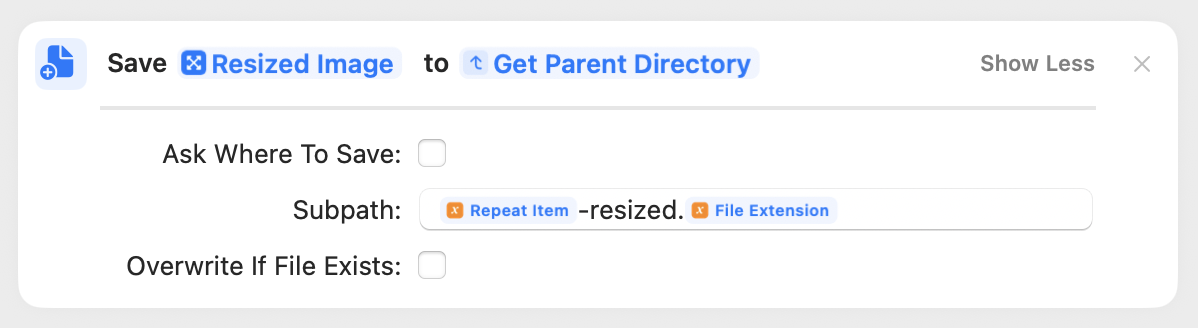
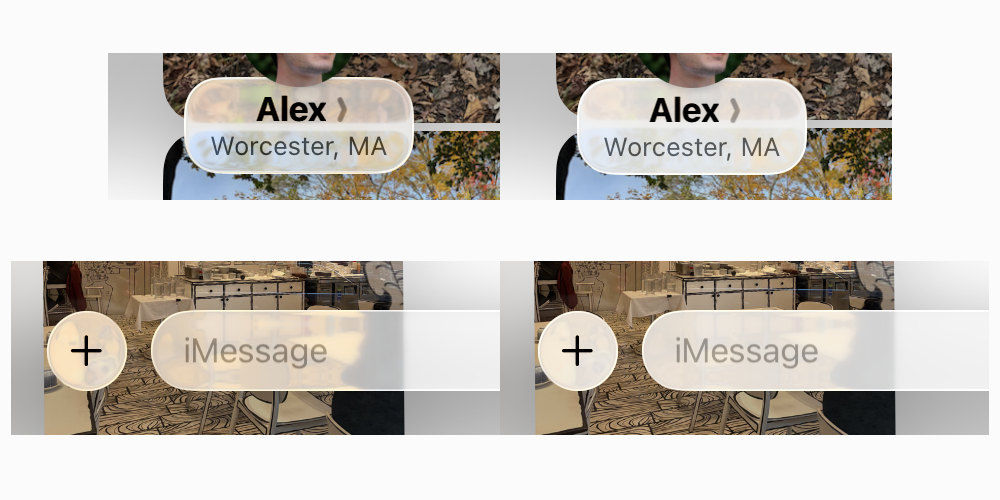
Sponsored by:
- SKIMS: Comfortable underwear, socks, t-shirts, leggings & more.
- Claude: Get 50% off your first three months of Claude Pro.
- PAKA: Performance apparel from alpaca fiber.
Become a member for ATP Overtime, ad-free episodes, member specials, and our early-release, unedited “bootleg” feed!