
 Ask ChatGPT


- Podcasts
- Accidental Tech Podcast
- 718: The Warp Zone
In short
The hosts catch up after travel, review seeing Goose in Charlottesville (including venue audio and a detailed stop at Bodo’s Bagels), discuss “ATP Insider Routine Maintenance” (including eyebrow upkeep), report final results from an ATP holiday shirt fundraiser for trans charities, and then cover Apple news: iPhone Duo iOS 27.3 beta adds front-camera unlock (with Touch ID still required for Apple Pay), plus a Duo option to lock when closed. They also debate what this means for Apple’s responsiveness and security design, share listener takes on the Duo’s outer screen, and field listener feedback about Siri AI behavior (including global differences and a “poison” safety alert read aloud via AirPods).
Guests
No named guests appear; the episode is primarily the hosts (Marco, Casey, and John) plus listener call-ins/comments.
Key claims
- Bodo’s Bagels are very close to New York style, with fresh dough and chew, but lighter “everything” seed coverage and slightly smaller size; the “authentic New York water bagels” claim is interpreted as using the New York-style kettle method.
- Apple’s Duo front-camera unlock is a meaningful compromise that improves usability without changing the higher-security requirements for Apple Pay and other gated actions.
- Siri AI can interpret message content enough to trigger safety guidance (poison exposure) read through AirPods.
Notable examples
- Goose at UVA’s Fidelity venue; re-listening within 24 hours.
- Fundraiser totals: $5,150 each charity from ATP+Cotton Bureau; then matching brings $10,300 each; final with additional anonymous match totals $15,450 each charity ($30,900 total).
- Siri reading a WhatsApp poison warning and advising emergency room.
Written by AI. May contain mistakes.
Chapters
0:45
Concert Experience and Venue Quality
Discussion on their recent concert experience and venue acoustics.
“And we went to see Goose at the University of Virginia's basketball stadium, which I maintain, going to an indoor concert is not great.”
2:30
Breakfast at Bodo's Bagels
Hosts discuss their visit to a local bagel shop and its unique atmosphere.
“Yeah, everyone's hustling, which, to your point, is a very, like, northeastern quality, complimentary.”
5:00
Reviewing Bodo's Bagels
Marco shares his thoughts on the bagels and cafe experience.
“The other way you could say it is all the water might be from New York, in which case the entire kettle.”
8:00
Bagels and New York Style
Examining the characteristics of New York-style bagels compared to Bodo's.
“I haven't found a better non-New York bagel chain out in the rest of the country that does a better job.”
10:00
Listener Suggested Topic: Routine Maintenance
Introduction to a new topic based on listener suggestions about maintenance.
“I don't think any of us mentioned it, should we?”
12:00
ATP Charity Donation Results
Hosts reveal final numbers from their charity shirt sale and listener contributions.
“And this time, it's not just me and my beloved Bodo's Bagels.”
14:01
Fundraising Success for Trans Charities
The hosts celebrate their fundraising efforts totaling $30,900 for two charities.
“and we mentioned Mark Zarin was matching, which is amazing.”
15:45
Discussion on iPhone Duo Unlocking Features
The hosts discuss the new unlocking option for the iPhone Duo using the front-facing camera.
“And Julie Clover over at MacRumors writes, Apple today, which was, I think, Saturday or Sunday?”
16:21
User Experience and Security Implications
Exploration of user feedback regarding security features and the implications for Apple.
“can be enabled in the Settings app under Touch ID and Passcode.”
19:25
Comparison of Duo's Camera Unlock vs. HomeView
Analyzing the differences between the iPhone Duo's unlocking method and the HomeView technology.
“And what this shows us is that it isn't just nerds saying, oh, we wish there was face ID.”
Show all 44 chapters
21:36
Apple's Feature Development and User Demands
Discussion on Apple's responsiveness to user demands in device features and security.
“And it has a camera that faces you and it recognizes you.”
24:11
Understanding iOS Security Levels
A comprehensive look at the various levels of security in iOS and how they apply to the new features.
“Even when you unlock with Touch ID or Face ID, it still makes you re-authenticate when you, you know, do Apple Pay or whatever and stuff like that.”
28:00
Exploring Biometric Security Layers in iPhones
Learn about the various levels of security Apple employs for app access and how it affects user experience.
“And then apps can do things like a bank app might say, we will use Face ID, but if you don't have Face ID, we won't let you use a passcode.”
30:52
The Appeal of the iPhone Duo's Outer Screen
Discover the benefits and trade-offs of using the iPhone Duo's smaller outer screen for quick tasks.
“And then moving on, Ryan Budish writes, I just wanted to give a short defense of why I've actually really enjoyed the outer screen on the iPhone Duo.”
37:24
Siri’s Evolving Contextual Awareness
Explore the unexpected ways Siri uses contextual information to enhance user interactions.
“And many of them seem to live in Cupertino.”
42:06
Credit Card Apple Pay Troubles
Learn about the challenges faced when adding a credit card to Apple Pay and the unexpected security features that assist in keeping sensitive information private.
“This is the account where basically all of Aaron and Maya's money is.”
43:51
AirPods Message Reading Issues
Explore the frustrations with AirPods' message reading capabilities and the desire for improvements to basic features.
“Before we leave this topic, going back to what Jeremy said about the poison announcement on the AirPods, can I have a request here?”
47:37
macOS 27.3 Beta Features
Understand the new features and changes introduced in the macOS 27.3 beta regarding app permissions and security settings.
“All right, we're going to meander kind of in the in-between gray area between follow-up and topics, and we'll see what I decide to do with the show notes.”
49:07
Changes in App Permission Settings
Delve into the implications of new app permission settings in macOS, focusing on user experience and security awareness.
“And finally, a transparency indicator when a requesting app is controlling another app using system and app protection override.”
56:00
Navigating macOS Permissions
Discussion on the complexities of macOS permissions and the implications for developers and users.
“And so that's why people would get into situations like, yeah, yeah, I turned on the thing.”
1:09:10
Feedback on HomeView
Discussion on the HomeView feature and feedback related to user privacy and device interactions.
“Two-thirds of your hosts have purchased a HomeView, and I'm not one of the ones that did.”
1:10:01
Issues with AppleCare One
Discussing frustrations with AppleCare One's family plan and account issues.
“stuff by, you know, bundling everything into a single bill.”
1:12:50
Initial Impressions of Home View
Marco shares his early experiences and thoughts on the Home View device.
“Anyway, I didn't have that experience with my home view, but I do have a home view, but I'll let Marco go first.”
1:15:52
Sound Quality and Screen Issues
Analyzing the sound quality and software experience of the Home View.
“system is really weird but it does kind of work that's nice i i set up like widgets and stuff and I put in some of my iPhone widgets.”
1:22:18
Problems with Multi-User Support
Exploring the challenges of multi-user functionality in Apple's Home View.
1:24:00
Challenges of Multi-User Support
Exploring the architectural limitations of Apple's multi-user capabilities.
“Oh, you're a different user with different data?”
1:26:20
Limitations of HomeView Customization
Discussing the frustrating customization options of the HomeView interface.
“devices, iPads, iPhones, anything like that.”
1:28:56
HomeKit Integration and User Experience
Analyzing the value of HomeView for HomeKit users versus general consumers.
“I spent some time trying to configure it the way I wanted it.”
1:30:44
Impressions of Siri AI Capabilities
Sharing experiences of using Siri AI with the new device and its potential.
“I'm like, thermostat, you don't have to do that anymore.”
1:35:28
Issues with Display and Interface Design
Critiquing the display design and user interface issues affecting usability.
“product, there is a lot of headroom to improve this software.”
1:38:00
Evaluating the HomeView's Design and Functionality
The discussion dives into the design flaws and usability issues of Apple's HomeView product.
“And I think the software is just, the software is not doing, is not living up to the promise of the hardware.”
1:45:16
Comparative Analysis of Sound Quality
A comparison of HomeView's sound quality against other devices, particularly HomePod.
“I didn't mention the audio on this, but this is the best-sounding thing in the corner with those devices, but only because those devices in the corner are just terrible.”
1:46:05
Improving the HomeView Experience
Suggestions for enhancing the HomeView product, focusing on user interface and functionality.
“I have a Google Home that is almost the same size as this, but it's so old and its speaker is so awful.”
1:49:10
Personal Preferences and Device Reception
Discussion on personal preferences regarding HomeView and overall reception of the device.
“Are we making you want to buy one of these, Casey?”
1:52:00
Visiting Friends for a Football Game
The hosts recount the arrival of Jason and Stephen for a weekend visit centered around a football game.
“So I keep making brief references to it, but this past weekend, Jason Snell and Stephen Hackett were in.”
1:54:45
Understanding Tailgating Culture
An exploration of the tailgating tradition before American football games, including logistics and social aspects.
“Um, and, uh, anyway, they, they seemed to really enjoy that.”
1:57:26
Cold Weather and Game Day Challenges
Discussion of the challenges faced during the cold game day, including clothing and warming strategies.
“Both happen to be named Brian and both of them have parking spots in a parking lot that's adjacent to a grassy area in front of one of the academic buildings at UVA, which is very, very close to the football stadium.”
1:59:46
Food and Fun at the Tailgate
Detailing the food enjoyed during the tailgate and the camaraderie shared among friends.
“So this particular Saturday, it just so happened to be unbefucking-lievably cold.”
2:02:36
Home Networking Renovations
Casey discusses the home networking upgrades planned with Stephen during his visit.
“And then we left a little bit before the end of the game.”
2:06:00
Setting Up the Porch Camera
Learn about the process of installing an outdoor camera on the porch.
“And that's When we built the porch, I had a feeling I was going to want a camera there.”
2:07:04
Troubleshooting Camera Connection
Discover the challenges faced when attempting to connect the camera.
“And then the entertainment center is connected via coax, via a MoCA bridge, to the stuff in the office.”
2:08:24
Navigating Crawl Spaces
Explore the experience of working in a crawl space for wiring.
“Before you went down to the crawl space, you don't have a continuity tester?”
2:10:34
Installing Cameras and Cabling
Learn about the installation of multiple cameras and the challenges faced.
“Then Sunday, we now need to mount this camera, and we need to do all the stuff in the front of the house.”
2:14:10
Reflecting on the Project
Hear reflections on the installation experience and teamwork.
“Again, apologies for not being able to verbalize what the heck it is.”

Ask about this episode
Get the gist, explore an idea or ask about something said.
 Claude
On Accidental Tech Podcast, what are the key points of this episode?
Searching your listeningTranscript
Automatic transcript. May contain errors.
0:00Marco Arment: We missed you.
0:01John Siracusa: Yes. And Marco, I've missed you for the last one. Six hours or whatever it's been. Yeah.
0:06Marco Arment: Yeah. I woke up this morning in Virginia. Casey and I went to Goose again. Yes, we did. With some friends. And it was a wonderful time. I'm liking this habit. It turns out going from Long Island to Brooklyn takes about as long as going from LaGuardia to Casey's house. I hope that's hyperbole, but I'm scared that it's not. It's not that difficult to get down there. And the flights and the hotels are almost free compared to New York prices of these things.
0:40John Siracusa: Yeah, so Marco flew in yesterday, and we went to lunch at one of my favorite local chains, and then picked up a couple of friends and went to Charlottesville, which is about an hour west of us. And we went to see Goose at the University of Virginia's basketball stadium, which I maintain, going to an indoor concert is not great. But I really think, since this venue is only like 20 years old, they did it well. And as an indoor concert venue goes, the Fidelity, I think, is about as good as one can reasonably expect. By comparison, I haven't been in Madison Square Garden in a long time, probably 20 to 25 years.
1:19John Siracusa: But last time I was in MSG, the audio Fidelity was somewhere between trash and unlistenable. I don't know, Marco, have you been there recently? You've been for Phish, right?
1:26Marco Arment: I have, and I agree.
1:28John Siracusa: Okay, there you go. So, yeah, we went and saw Goose, and it was great. I wouldn't say it was my favorite of the three shows I've seen. However, one of the great things about Goose slash Fish is that they put up the concert usually within 24 hours. And I've been re-listening to it because, I don't know, that's what I do. And I thought it was good when we went. And I think it might be better than good. It might be approaching great. So I got to properly sit down and listen a second time. But it was really, really fun. And I think the most interesting and important thing that happened was I got to take you to my favorite Virginian bagel shop this morning and we had breakfast together, the two of us and our two friends.
2:10John Siracusa: And I had set you up for failure with this bagel shop because I had hyped this for years. I'd hyped it on the show. I'd hyped it privately. I had hyped it up and down, inside out, et cetera, et cetera. This is Bodo's Bagels in Charlottesville, Virginia. And I would like to hear your full after action report, please.
2:31Marco Arment: okay so first of all entering the place the door handle is a big bagel everywhere decorated around the place are bagels and bale shaped objects even the lamps that hang over the tables are kind of evoking a bit they're like almost like you know upside down like flower like you know tulip kind of trumpet shapes but the way they're lit it kind of looks like a bagel from below i can't tell if this is going to be on the plus or the minus column fair honestly i found it delightful i like a good like you know kitschy restaurant vibe and it fit in very well with the vibe of this place so that was very nice operationally it was very high volume but it moved like the line moved fast they had a million people working behind the counter it was operationally very impressive this was not like your standard kind of you know midwest or southern like american eatery where there's like you know two people kind of taking their time like it was not like that at all It was busy.
3:26John Siracusa: Yeah, everyone's hustling, which, to your point, is a very, like, northeastern quality, complimentary.
3:32Marco Arment: And also, that's a sign that the place is popular because, like, there wasn't a huge line that took forever to go through and there wasn't no one there. It was a medium-sized line that moved very fast because there were a lot of people working. So, obviously, this place is a local favorite. Now, if you recall, last time Casey tried to give me bagels that he'd hyped up a little bit on the show, the bagel I had was fine. but obviously made the day before. In this case, that problem was solved. These were super fresh. Again, it's because it's a high-volume place. That's what you want. This place was properly baking.
4:05Marco Arment: You could see the kettle boiling. They were using it. It was still going. It was still an active volcano, an active bagel eatery. Okay. The bagel was pretty good. I would say it says on a sign, New York Bagels. Okay. Now, they're not New York bagels because they're not made from New York. They're not in New York. But I would say if they would have added a dash style, New York dash style bagels, I think that would have been fair for what they were serving.
4:37Casey Liss: You know what they say on their website? What? They say these words, authentic New York water bagels. I don't know what that means.
4:47Marco Arment: Do they fly in the – I mean, I can't imagine they would –
4:49Casey Liss: They don't say that on the page. Like, I'm looking now. I just thought, what is their claim about the water? I don't know.
4:53Marco Arment: So my guess, well, because there's two ways you can interpret that. One is for whatever water is in the dough, they use New York water, which I can't imagine the shipping would be worth it on that. The other way you could say it is all the water might be from New York, in which case the entire kettle. The boiling water? But like that, I mean, that's got to be, I don't know, 30 gallons a day. Like I don't know how much a kettle holds.
5:13Casey Liss: They make no other claims on this page about water.
5:15Marco Arment: So my most reasonable guess is probably that what they mean is they use the New York water boiling method.
5:23Casey Liss: That's what I was going to say. That's a reach.
5:25Marco Arment: Yeah, it is a reach. But like a lot of places that are not in New York don't boil their bagels because that requires –
5:30Casey Liss: And therefore don't make actual bagels.
5:32Marco Arment: Right. If you think about like the logistics of running a big commercial kitchen, you have to have an oven. That's step one, obviously. But like if you're making other types of breads or pizza, you will have a similar style oven like in the back of a grocery store or whatever. But to make New York style bagels, you need a giant kettle also. And that giant kettle is used for no other purpose. So if you're like, you know, stocking the back of a grocery store kitchen, you have like a unitasker here that's big and expensive and takes a lot of, you know, you got to fill up a whole bunch of water every day and uses a ton of energy.
6:03Marco Arment: So like you understand why if you're just like trying to make a half buddy kitchen out in the Midwest, you would just kind of skip that step. So my guess, I saw the kettle. They had one. So my and they were using it. So my guess is that's what they mean is the New York water method is being used here to make bagels in Virginia. So anyway, the bagel was very good. It was warm. It was fresh. It was close to New York style. The only things I would say were a little bit different are the dough was, I would say, a little bit denser and chewier, which actually I found very good. I actually really liked that about it.
6:36Marco Arment: But that did differ from the New York style, I think, in a noticeable way, but still very close and very good. And secondly, there were not enough seeds on the everything bagel. It was fairly lightly seeded. It was still the right flavor.
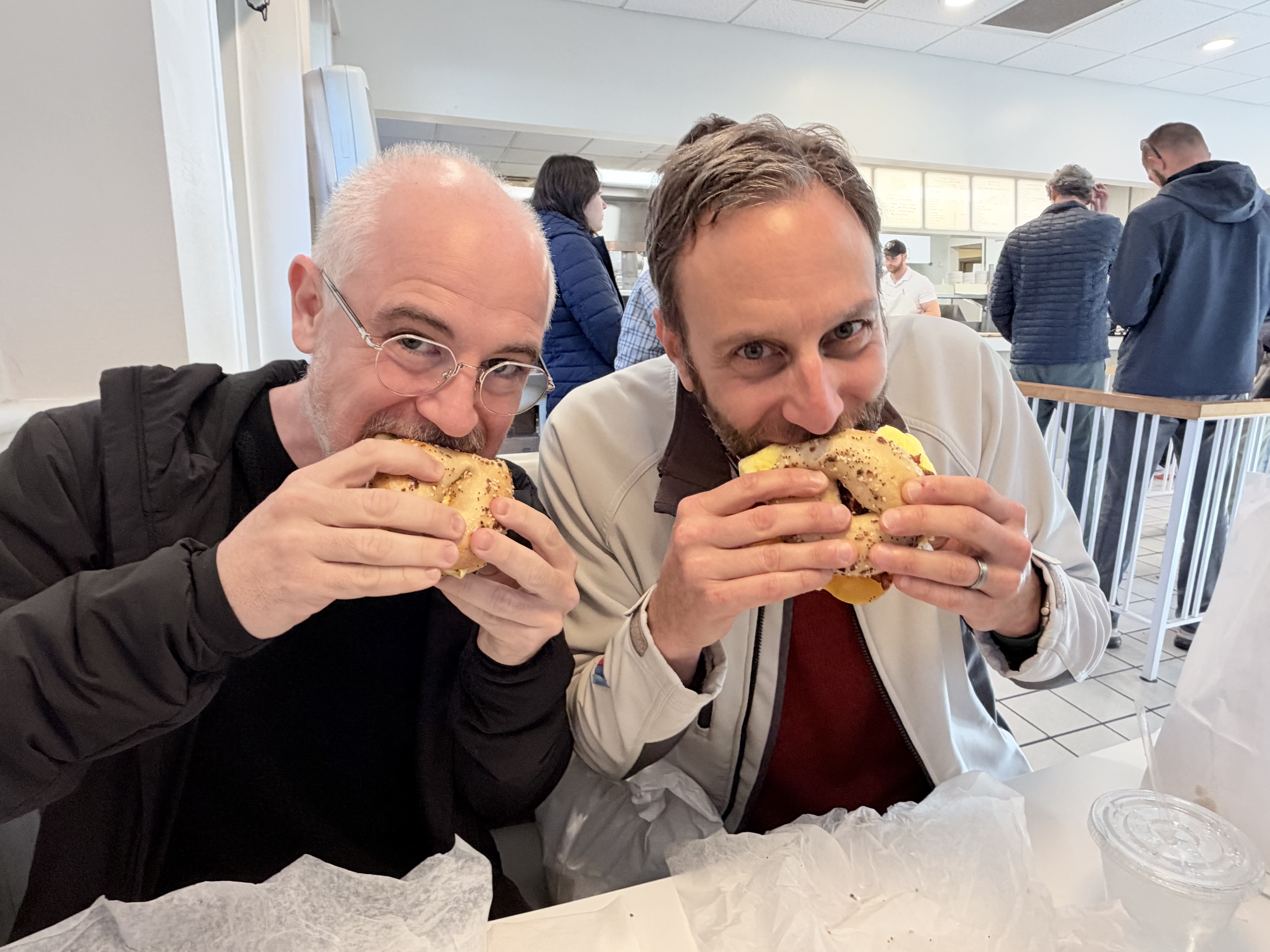
6:52Casey Liss: Oh, is that what you're eating in this picture? That's supposed to be an everything bagel? Well, I will concede.
6:56John Siracusa: It was very light on the seasoning. I don't think that's a normal occurrence, but 100 % Marco is correct for today.
7:02Casey Liss: I will say this, though. Based on my long-go experiences with New York metro area bagels, there is wide variability in coverage, even in New York area bagels. And people have preferences. Some people like massive coverage. Some people like lighter coverage. This is definitely on the lighter end, though.
7:19Marco Arment: Yeah, this was this was lighter than anything I've ever seen in New York. But the flavors were all right. And the final thing is the bagel was, I would say, probably about 20 percent smaller than most New York bagels. It was similar in size to if you go to like a Brugger's bagels, which, again, I long past sponsor of me. I used to work there when I was a teenager. So I'm a little biased. I loved working at Brugger's. It was it was delight. And I have very fond memories of it. I don't see them very often, but if I ever do see one on a road trip or something these days, I will stop there. I like Brugger's a lot, and I think it does a really good job.
7:52Marco Arment: I think it does a better job than Panera or Einstein or the other kind of Midwest US bagel chains.
7:59Casey Liss: If that's your comparison, then yes, I agree.
8:01Marco Arment: Yeah. I haven't found a better non-New York bagel chain out in the rest of the country that does a better job.
8:07Casey Liss: Low bar, though. So yeah.
8:09Marco Arment: But anyway, I would say it's a similar size and similar closeness to New York style as Brugger's, but a little bit better. Like halfway between Brugger's and real New York is where this landed. So I was very pleased with it. Again, with those small notes. Also, they really should have melted the cheese on the egg sandwich. Instead, they just kind of they cooked the eggs and they had cold cheese slices and they just assembled it from there. That's not great, but it was very good. Flavor was very good. Very fresh. and I really actually enjoyed that extra little bit of chewiness in the dough.
8:40John Siracusa: I mean, that is an absolute win in my book. So I'm taking that all the way to the bank. All right, we have a brand new member special, ATP Insider Routine Maintenance. This was a suggestion from a listener, which I do not have in front of me, so I'm not going to read it. But John, can you introduce this to us, please?
8:59Casey Liss: Yeah, this is one of the topics on our list again, just from a listener about things that we do, maintenance tasks. And the idea behind the topic is things that you do on a regular basis, even if they're not broken. But of course, us being us, we did wander a little bit into things that we do in a more reactive way. Like when things start to degrade, how do what, you know, do we watch for things to degrade? And then when they start to degrade, do we correct them or whatever? So take the maintenance part with a little grain of salt. But it was broad reaching. It could be computer maintenance. It could be household maintenance.
9:35Casey Liss: It could be personal maintenance. And speaking of that, I was – I couldn't – someone was listening to – no, they just saw the topic, right? I was talking to somebody and they were talking about this topic and I said that I wonder – I didn't know if I had mentioned this in this episode, but I should have. I think I might have mentioned it in erectives. But just to give an example, a thing that I believe is not in this episode but should have been eyebrow maintenance. I don't think any of us mentioned it, should we? No. we didn't bring that totally should have it might have been erected so that gives you idea of this of this span of things so there are computer things in there because there are computer things we do for maintenance there are household things in there there are some personal grooming things in there and it's kind of a little grab bag at the end by the way the answer has to be
10:17Marco Arment: like those little like twisty like fluffy things and scissors right it's it's a whole thing i don't
10:23Casey Liss: want to get i think i talked about an erective so i'm saying this person i can't remember which things i say in podcasts and which things i say like in text messages and which things i say in real life it just all blends together that's the life of a podcaster for you i mean the right answer
10:36Marco Arment: is every time you go to get a haircut have them do your eyebrows also no that was part of my thing is i never let them touch them oh why because i want i have very particular about it i want to do
10:45Casey Liss: it myself but everyone in my life wants to get my damn eyebrows and i have to fight them all my wife my daughter trying to tell you something my hair it's not no i do them myself but i get i get it sometimes they go a little far but i don't want them to do it i want it i will do it i'll do
10:59Marco Arment: it eventually that's like if every single person for every single holiday gets you deodorant as a gift you're like i think they're i think i think i'm the problem here no i no no one can smell my
11:08John Siracusa: eyebrows so it's fine this is this is almost like if i don't know i'm trying to make up an example what if you wanted to like get your windows washed and refuse to hire professional window washers
11:18Casey Liss: hard to hire good help but anyway i let me tell you this you won't hire any help my eyebrows right Way more frequently than I do my windows. I'll just say that. But I do do both of them eventually. This sounds like some awful middle school joke or something, but it's really literal. I tackle the eyebrows, especially the gray ones. If we've got a gray one, that's not going to last a day or two. Oh, my God.
11:42John Siracusa: I don't even know what to do with this. So if you want to get more lunacy along these lines, please join as a member. You can go to ATP.FM slash join. You should have done that for the merch sale, but you can do it now and check that out, ATP Insider Routine Maintenance. Now, John, we have more absolute wins happening. And this time, it's not just me and my beloved Bodo's Bagels. This is all of us. And it's not just the three of us. It's really all of us, all of us, because we have final numbers with regard to the ATP Holiday Store donation subset. So can you take us through this, please? Yep.
12:15Casey Liss: And on our holiday sale this year, we had two shirts, the ATP Pride and ATP Trans Pride shirt, both of which were like the ATP logo, but with the Apple six colors BMW stripes replaced with the colors from those two corresponding pride flags. And as we said, we were going to donate 100 percent of the profits from those shirts to two charities, Trans Lifeline and Transgender Law Center. Links will be in the show notes. the sale ended, but we only had preliminary numbers, which we announced, I think, in the last episode because we hadn't got to wait for all the sales to settle and people to deal with like fail payment methods or whatever.
12:47Casey Liss: And I said, when we get the final numbers, we will give them to you. So now it's time for the final numbers. Also, in the last episode, we mentioned that one of our listeners, Mark Zarin, said that whatever we donated, whatever ATP donated, that they were going to match it, which is amazing. One person was going to match the entire profits from both of those shirts. And, you know, our listeners bought a ton of them with the understanding that the profits would go to charity. And by the way, I mentioned this back when we talked about the sale, but like Cotton Bureau also kicked in$2 per shirt. That's part of our profits.
13:14Casey Liss: The way they kicked it in is they just reduced the cost to us by$2 per shirt. So these numbers include Cotton Bureau's contribution. This is all together. Okay. Last episode, I said the number was probably going to be, amazingly, from the sales around$5 ,000 per charity. So here's the final numbers. We, as an ATP and Cotton Bureau collectively, and all the people who bought all the shirts, have donated$5 ,150 to Trans Lifeline and$5 ,150 to Transgender Law Center. So that is amazing. We're over$10 ,000 for both charities. And of course, Mark Zarin matched that. So Mark Zarin matches our amount.
13:52Casey Liss: So now Trans Lifeline is getting$10 ,300 and Transgender Law Center is getting$10 ,300, which is amazing. Last episode, when we talked about this, we mentioned that it was going to be around$5 ,000 each. and we mentioned Mark Zarin was matching, which is amazing. And another anonymous ATP listener said, hey, I want to be like Mark. I'll match your donations too. So what we actually ended up raising as part of this holiday sale is$15 ,450 for Trans Lifeline and$15 ,450 for Transgender Law Center for a total of$30 ,900 across both charities, which is amazing. I can't believe that we did this. So thanks so much to everyone who bought one of the shirts, to Mark Zarin and this other anonymous ATP listener.
14:39Casey Liss: Yep. Absolutely incredible work.
14:40Marco Arment: Yeah. This is absolutely amazing. Like, thank you all so much. Again, I'll say it again. We really have the best audience. You all are awesome. And thank you so much.
14:51John Siracusa: Yep. No, this is really great. And I have already dispatched stickers to the anonymous listener. I will repeat for the final time, Mark, if you want some stickers, please reach out. This is really, really great. And I'm so incredibly proud of all of us, of the three of us, of our two matching individuals, but everyone who participated in this. And doubly so if you wear these shirts. I mean, I would be satisfied if you just bought the shirt and thus kind of donated. But I would be overjoyed if you could wear these shirts and show those who these shirts represent that they are valued, they are loved, and they are people.
15:26John Siracusa: And so I will be wearing mine, not loud, but figuratively speaking, loud and proud. And I encourage you, if you bought one, to do the same. And I cannot say enough thanks to all of the people who participated in this in any capacity. I am genuine. I know I said it a second ago. I'm genuinely so very proud of all of us. This is incredible work. All right, let's do some follow-up. Let's talk iPhone Duo. And Julie Clover over at MacRumors writes, Apple today, which was, I think, Saturday or Sunday? Maybe Sunday. added a new option for unlocking the iPhone Duo using the front-facing camera. I'm sorry, what?
16:00John Siracusa: The feature is available in the second iOS 27.3 beta. The option to unlock with facial recognition is only available on the lock screen and authentication via Touch ID is still needed for Apple Pay purchases, adding passwords and logins and more. Unlocking with the camera requires a recent Touch ID or passcode authentication and Touch ID is required again after about 45 minutes of inactivity. Unlocking with the front camera can be enabled in the Settings app under Touch ID and Passcode. Apple is adding a new option to lock the iPhone Duo when it's closed rather than transferring content to the front display.
16:29John Siracusa: This is available under Display and Brightness in the Settings app. So this is two different things. One of them is don't call it Face ID, fake Face ID. And we'll talk about that in a sec. And the other is the same thing that I first saw Stephen Robles do it, but a lot of people have put together like shortcuts for, hey, if you close the screen, lock the device. Or you do what I do, which Stephen also suggested. If you close the screen and you are on the home screen, lock the device but if you're in an app don't don't lock the device um i was with jason and steven uh steven hackett that is and we'll talk about that more probably in the after show i was with the two of them when this landed and jason immediately ran off to try this on his phone and in fact if you look at jason's coverage on six colors of this there's a hero image that's three uh screenshots from the iphone duo and the image of jason with the check mark over his face was taken in my living room that's him sitting on the left seat with the porch doors behind him nobody would know that but me and maybe marco and jason and steven of course but anyways uh so he tried that immediately and my my summary of jason's review was works pretty well yeah this
17:36Marco Arment: so the fact that apple you know kind of rushed and added this in software this is substantial This is a major event for Apple watchers because for Apple to add a second level of security to unlock a device, the risk of that to Apple is very large. They really take device security very seriously. I think they've shown over the years that that's actually a good thing and that they don't take it too seriously. like they really it is serious enough like it is it is warranted to be taken this seriously but also the iphone duo like the very first thing people notice is oh there's no face id and even apple like even when they when they announced it in that in the keynote video they even said like there was that quick line from jaws announcing it that like oh you can also unlock it with your apple watch because like even they knew right from the start like oh it's kind of it's kind of different and worse in some ways without face id so let's do what we can to make that, you know, to make it less bad.
18:42Marco Arment: And that's where the watch unlock probably came from. But anyway, having used the Duo for, you know, a week as I did, of course, like, Touch ID works, but the Apple Watch Unlock works a lot better. And not everyone wears an Apple Watch or not everyone wears one all the time. So to have this face unlock feature, and I even said, like, we've said on the show, I said it like a couple weeks ago, I wish Apple would just add like a lower security face unlock with the camera to the iPhone duo, even if it requires the touch ID for high security stuff. And that's literally what they just did. Like, so obviously they were already, I mean, they didn't do it as I said, they were obviously already working on it for probably weeks at least before that.
19:24Marco Arment: But this is a big deal for them to do this. And what this shows us is that it isn't just nerds saying, oh, we wish there was face ID. What this is showing is that this is this was a widespread opinion among duo users and buyers and potential buyers or why people chose not to buy it was the lack of face ID. So we can't call this face ID because it doesn't have that level of security and it isn't going to be used with that level of authority on the device. But this is a big deal. Now, what this can also theoretically mean if they are willing to use a front facing camera for device unlocking levels of security, well, why don't they bring that to the freaking iPads.
20:06Marco Arment: All the iPads that don't have Face ID, all the non-pro ones. What about the Mac? Oh, yeah, right, and the Mac. I mean, I think you can make a pretty good case, like, well, if it's good enough to be an option, now, granted, I don't think it was the default, right, but if it's good enough to be an option on the iPhone Duo, why not bring it to all of the devices that have front-facing cameras, which is almost all of the devices? That, I think, because that's, and obviously, you can also point out, this probably comes right from the home view, because the home HomeView has a very similar type of facial recognition feature.
20:39Marco Arment: So they have the tech now. Don't stop here. This is great. This is a very nice option to have for people. Don't stop here. Actually bring this to the other products. Man, what this would do to the iPad mini and the iPad Air. And obviously, as John said, the Mac. Yeah, get this everywhere. This is great.
21:00Casey Liss: so there's a lot of uh you know tea leave reading about what this means about um apple's responsiveness to user complaints and so on and also i think i wish i had saved the length of this but there was some i forget if it was an official statement or on background thing or whatever from apple folks trying to frame this because i think one of the questions that people have is like how is this related to what the home view does and we'll talk about the home view later this episode So the HomeView has a thing where HomeView doesn't have face ID, although it could totally fit there, but it doesn't, whatever.
21:35Casey Liss: It's$300. And it has a camera that faces you and it recognizes you. And it makes you do this setup that looks a lot like a face ID setup, but it's not. It's just flat camera stuff. And that's how different people in the family can go up to the HomeView and it will recognize them. It also recognizes their voice. It does whatever it does. And I think this semi-official whatever background response from Apple was like, oh, actually, it's two different things. The thing that the Duo was doing, it's not actually related to the thing that the HomeView was doing because the HomeView was made to, like, recognize you from far away.
22:06Casey Liss: You don't have to be right in front of it, whereas with the thing on the Duo, you pointed at your face just like with Face ID. So they're really unrelated technologies. But looking at the UI for both of them, I've seen in screenshots, boy, do they look like related technologies, right? Like, I can't imagine how they could not be related, okay? And second, given that the HomeView has this and has been done for a long time, maybe the hardware anyway, not the software, the idea that Apple released the Duo, then gauged the response of people to not having Face ID and then decided to do this based on that response seems pretty far-fetched to me.
22:47Casey Liss: it seems more likely to me that they just didn't have this ready for the duo in time for it to launch and as soon as it is ready in 27.3 they're going to ship it they always planned to ship it they just didn't have it ready in time because the the the timelines on apple deciding to do a thing and it appearing in an os release are such that 27 point what was going to be in 27.3 was probably set in stone before the duo was even released so yeah probably i think this is just like it was in the pipeline and it was going going along and you know and to the security point i think i saw this in some of the screenshots i believe on the screen when you're setting this up on the duo it says to you in text from apple this is less secure like you're like they're not hiding it they're not like oh you know nerds know it's less secure but users don't have to know which by the way they don't say about touch id versus face id they have said apple has said you know officially that face id is more secure by touch id they even gave numbers to i think it was like 10x or 5x or whatever it's a lot more secure than face right apple and themselves have said this but they don't you know they don't say when you get a duo they don't say by the way when you're setting up touch id you know this is 10 times less secure than face id no apple doesn't say that but for this they do say on the screen when you're setting this up this is a lower security now back when marco suggested that they do this um i argued against apple doing what i thought marco was suggesting which is having a way to unlock the phone and then but it wasn't really unlocked it was like partially unlocked okay and i was like apple will never do that because it's too complicated to have another sort of security mode where like oh you have real unlock and then not real unlock and go through that and it seems like i don't know you guys can tell me when you try this it seems like they haven't added a new security mode it is when you unlock with this thing it's the same as if you You had unlocked with Touch ID minus the 45 minute timeout and so on and so forth.
24:38Casey Liss: The same amount of stuff is unlocked. Even when you unlock with Touch ID or Face ID, it still makes you re-authenticate when you, you know, do Apple Pay or whatever and stuff like that. So it seems like that's the same, but I don't know because I haven't actually tried this in 27.3. So we'll see about that. But the fact that they're willing to do this, it seems like somewhere in the duo planning, they were like, we can't, we can't fit Face ID or it's like, we can't do it. and so what can we do about that let's develop this system for using the camera we're already doing it for the home view software let's just do that oh it's not going to be done in time whatever push it off to a future 27 release ship the phone with what we've got talk about watch unlock and then you know it'll come out shortly after that i didn't put this in the notes either because maybe it'll be in the future episode there's a whole bunch of rumors about the duo two already about you know face id being in there rumors about that they were going to do face id in the first duo, but they could only fit it for the outer screen and they wanted to have it on both the outer and the inner, so they didn't do it at all.
25:39Casey Liss: Lots of drama around this, but chocolate's up to yet another one of the things that you just have to do to get products out the door. And I think what they're doing is a reasonable compromise. It shipped according to Apple's schedule. It shipped in a form that is definitely usable and fine, and people didn't have to wait a long time for this thing to come along that people can decide to use or not use.
26:01Marco Arment: I think you are probably right that it probably was in the works for a while. But they do turn around kind of, you know, big feature requests from users quickly if they need to. So, for instance, you know, this is there's two of these features in beta. We breezed by it earlier. The other one was that there's an option now to lock the Duo when it's closed.
26:21Casey Liss: That's a little bit easier to do than the face unlock. Right.
26:23Marco Arment: Like that, they probably actually did that in response to initial user feedback when the Duo launched.
26:28Casey Liss: Yeah, because that's very easy to do in a point release.
26:32Marco Arment: Exactly. Whereas a whole new security unlock system, that's more involved.
26:37Casey Liss: Substantially. And again, it's got to help that they already had it for HomeView because the HomeView shipped. We have it. It has this thing in it. Like it's for all Apple's protestations that it's a different system entirely. It cannot be.
26:48Marco Arment: Right. Like it's probably the same system. But, you know, to your point about like, you know, what is it unlocking? It is not like it is not a different security level on the whole device. rather it is the same security unlock for one of the things that is gated by Touch ID and Face ID.
27:06Casey Liss: Right, but they don't let it at all for the others.
27:08Marco Arment: Right. So there's a whole hierarchy in iOS of things like keychain storage levels and how different data can be stored and encrypted and accessed.
27:18Casey Liss: And also in iOS, don't they have a thing where you can designate any app as requiring Face ID? I wonder if that feature lets you use this.
27:25Marco Arment: I'm guessing not. So there's a whole system of like, you can designate certain data either in an app or just have the app call an API, but you can designate certain data as this data is encrypted until the first time the device has been unlocked and then it becomes decrypted. That's like when you reboot the phone until it's unlocked, there's like a whole different encryption state the device is in. And then if it's never been unlocked, a lot of the data is just not even in memory and it's not anywhere. And then after it's unlocked, you can have things like, okay, well, as long as the device, you know, you have it unlocked, you can access it.
27:55Marco Arment: Then if you lock it again, some of that data gets re-encrypted again. And then there's other levels of like, okay, well, no matter what happens, if you're going to do things like enter a locked note, for instance, in the notes app, that will always require either the passcode or the biometric access to access. And then apps can do things like a bank app might say, we will use Face ID, but if you don't have Face ID, we won't let you use a passcode. You'll have to enter the password to our bank, you know, whatever. There's all these different levels of security. And then, of course, within Apple's system, they have purchases requiring biometrics, changing of the passcode or enrolling a new fingerprint in Touch ID or whatever.
28:33Marco Arment: That all requires entry first with passcode or biometrics. So there's all these different levels.
28:37Casey Liss: And the hardware acknowledgement as yet another layer on top of that where it won't just passively face ID your face on a face ID phone to do a purchase. That's why they make you press the side button twice or whatever.
28:48Marco Arment: Exactly. So there's all these different levels in the system that are already gated by an additional biometric or passcode check. And what they've done here is they just let you unlock the phone and start opening apps. But all of those other levels, as far as I can tell, every one of the other things on the phone that would previously require Touch ID, Face ID, or a passcode still does. but only device unlock will allow this. And I think this is a great idea because as I was saying a couple weeks ago, if you make security inconvenient, people just lower their security. And that's why everyone's passcode is 1234 because they're just so tired of typing it over and over again.
29:32Marco Arment: Every time they want to unlock their phone and touch ID or face ID fail them because it happens all the time. And that's why people set bad passcodes. And then it's super trivial to either guess it or someone to be over their shoulder seeing it and then steal their phone and do the whole thing, the whole scam we talked about months ago. So by making the regular path of unlocking easier, this will result in fewer people having to enter their passcodes all the time, which will result in overall more security. So this is a great thing.
30:03Casey Liss: Yeah, and I do wonder about them bringing it to the other device. Obviously the iPad is very analogous, but like the Mac is the weird one because Apple just seems to think that the Mac just doesn't need it. And I would love to have this. I mean, it's not a burden to put my finger on the keyboard, but you know, sometimes your fingers are wet and it's another thing to think about. I would love to just be able to sit down in front of my Mac and have it unlocked and do the same exact thing for Apple Pay purchases, for opening the passwords app, by all means require Touch ID, like whatever. It's still in Mac OS.
30:28Casey Liss: There are parts of the system, whether through neglect or intention that don't let you use Touch ID to unlock and require you to type your admin user password in. And I honestly don't know if that's intentional or not, but it is a difference. And so, yeah, like do the same thing on the Mac. Just let me unlock my Mac with a picture from my camera. But, you know, we'll see. The Mac doesn't seem to get any love in this area.
30:52John Siracusa: All right. And then moving on, Ryan Budish writes, I just wanted to give a short defense of why I've actually really enjoyed the outer screen on the iPhone Duo. Overall, I found something very oddly delightful about the small screen. The outer screen feels like the fun-sized Snickers bar of phones. So much of what I do on my phone is snack-sized. When I'm replying to a text, I often don't need to see the five previous messages. I just need to tell my wife when I'll be home or ask a question. I'd leave scrolling social media as a snack-sized activity. I only read one post at a time. Watching a reel while I wait for my coffee is a snack-sized activity.
31:23John Siracusa: Checking the weather is a snack-sized activity. So much of what I do are these discrete atomic moments that fit perfectly well on the small screen. Of course, sometimes I want a full meal, so it's great that I can open it up in those moments. But I was coming from a 16 Pro Max. And while I loved the larger screen for some tasks, it was a full meal all the time. I often felt like too, it often felt like too much when all I needed was a nibble. Perhaps the baseline test should be decide to get the Duo or not based on the outside screen. If you don't like the outer screen, it's unlikely you'll ever like the Duo, no matter how great the inside screen is.
31:54John Siracusa: I thought this was a really great perspective on it.
31:56Marco Arment: Yeah, I think so too. And I think like and I have to admit, like, so for this concert, you know, going these last couple of days, we went with two other friends. There were four of us in the group then. And two of us had duos, Casey and one of the friends. I got to say, there were times when these duos would come out and I was a little envious. Oh, like. Because the big screen is awesome. awesome it's really great using that big screen most of the time with the exception of text input mail and the glint the little glint from the camera on the inside but okay and to the margins being too thin on most text views and the text being too wide but okay setting aside all those things the big screen was really awesome for things like photos and looking at the web and stuff like that and there have been a few times over the last couple days during travel when i was like oh i like i had some server stuff i was dealing with i'm using various like ai agents to log into stuff and help me fix it and stuff like when I was away from a computer and that would have been a little bit better with a Duo so I see like the pull of this device it is really compelling in certain ways but it just comes with such massive trade-offs that again like you have to be really into those upsides and you have to really not mind those trade-offs and I don't know that I'm necessarily there yet but the other thing is that I measured for the sake of it, the weight of the Duo.
33:25Marco Arment: It feels really heavy when you first pick it up. But I happened to weigh the Duo. And also, I weighed my iPhone 17 Pro in the Peak Design case I've been using all year. And the 17 Pro in a medium weight case weighs about as much as a Duo without a case. So this thing that I thought was really heavy, it is but i've been carrying around a phone that's just as heavy for the last year basically so i don't know i at some point i it wouldn't surprise me if i waffle back and go back to the duo at some point but we'll see it it's uh i see why people love it so much it's still a pretty mixed bag for me but those parts that are awesome are really awesome yeah and i think one of the
34:09John Siracusa: things like i wasn't able to see nor was i really paying attention to what you were doing on your phone but i saw that you were certainly chatting away with some sort of you know ai thing and i don't know if that required going back and forth to like safari for example or something like that but one thing you could have done in a fantasy world where you stuck with the duo is that you could have had them two up on the inside screen and landscape right so you could have had like you know chat gpt or claude or what have you on one half of the screen and a safari window or whatever else you needed on the other half of the screen which i think uh there when i need to do that which admittedly is not terribly often but when i need to do that oh it's so refreshing it's so nice on the occasions that i need to do that and again don't let me overblow it this is happening maybe once a day but gracious it is delightful when it does happen yeah and like honestly
34:56Marco Arment: the the much better uh situation would be to have a duo and maybe an ipad mini but i'm not i'm never gonna have both those with me like that's that's the reality is if it's your phone is always with you. If it's not your phone, there's a lot of times when it's not with you.
35:13Casey Liss: It's got to go to the panini press technique. You take a duo and you put your regular iPhone 17 in it and you close it. What? Panini press. Your 17 is the sandwich. The duo is the press.
35:24Marco Arment: Oh, it wraps around it. I see.
35:26Casey Liss: Yeah.
35:26Marco Arment: Yeah. I mean, that might be a little heavy, but we'll see. We are sponsored this episode by ZocDoc. ZocDoc lets you find and book doctors quickly and easily. This is so useful. These days, honestly, there is nothing that can make me put off something more than having to make a phone call to book an appointment for something. It's just a slog. We all know it. And a lot of times, a lot of my doctors these days, you can't even call them. There is no number you can call that would actually reach them because they're behind some big system or whatever. ZocDoc flips this on its head. It just makes it so easy for you to find and compare local doctors that are in your insurance plan.
36:06Marco Arment: They have more than 150 ,000 providers within over 200 specialties across all 50 US states. So whether you need a regular long-term doctor replacement, or when you move to a new area, you need a new doctor, or maybe it's a specialty like, hey, right now I have a problem with my nose, got to see an ENT, whatever it is, you can go find a doctor quickly and easily with ZocDoc. You can read reviews from real patients of each doctor and browse their profiles and search and filter and everything. So it's easy for you to find the right doctor for you. And you can see actual appointment openings and click to instantly book a visit.
36:40Marco Arment: You don't have to sign up for a bunch of different portals and everything. You just get it all through ZocDocs. And you can usually get appointments quickly, sometimes even same day, maybe at worst, maybe a couple days. And all of this is super easy and free for you to use. So ZocDoc just takes all of that pain and inconvenience and just time wasting, honestly, out of trying to find a book, a doctor and just makes it super easy and fast. Your health matters and taking care of yourself shouldn't be complicated. Ready to be seen? Go to ZocDoc.com slash ATP to get started and check that appointment off your to do list.
37:14Marco Arment: That's ZocDoc spelled Z-O-C-D-O-C dot com slash ATP. Once again, ZocDoc.com slash ATP. Thank you so much to ZocDoc for sponsoring our show.
37:53Marco Arment: And many of them seem to live in Cupertino. But that's not the impression I get from many people. It's certainly not my experience. My experience has always been really spotty and really inconsistent with a lot of times where it times out or fails or gives bad results or does stupid things. But then sometimes it blows my mind because it works really well. So but that's the problem is like if it's not really reliable for almost everyone almost all the time people just aren't going to use it.
38:25John Siracusa: Yep. I agree. John writes not Syracuse. I'm a longtime listener from Istanbul. I wonder if there are differences in how Siri AI works globally. Slow Siri AI is not my experience at all. Setting a timer is instant for me every single time. In fact compared to the old one it's so much better that I now have it enabled for and listening for voice commands. I even use it to create shortcuts and works like a charm. Again, I mean, I'm not trying to refute these reports, but not my experience.
38:51Casey Liss: Not from Cupertino.
38:52John Siracusa: Yeah, fair enough. Gary writes, regarding Siri AI asking you for the correct pronunciation and then giving you a list of options to choose from, you can just say the first one or the second one, etc. And then I found after that it doesn't really ask for those clarifications anymore. Also, set my timer for X minutes also consistently comes in under four seconds max on average less than two. shrug.
39:14Casey Liss: I was so happy to learn about the first one or the second one because I was just kept being thwarted by having to like repeat the one that it said and figure out which snippet. And now I've definitely do first one and second one. Unfortunately, unlike Gary, I have not found that that stops it from asking me.
39:27John Siracusa: And then finally with Siri AI, Jeremy says, I'd helped my mother in law with some gardening this morning. And on the way home received a WhatsApp message from her that said, I hope you washed your hands after touching the poison you used in the garden. After Siri announced this message in my AirPods, it added, if you've been exposed to poison, and you should go to the emergency room immediately. I wasn't sure. I wasn't aware Siri did this. Did I miss the memo? Were you guys aware of this functionality? Siri is listening to the semantic meaning of my messages? Yeah, this was news to me. I had no idea.
39:53Casey Liss: Well, this gets back to the thing before about the semantic index that you know your Mac is building this dossier on you, learning about who you know and where you go and what your relationships are. Yeah, that's how this feature works. When you say, when does mom's flight arrive? It looks at your email, looks at your messages. Maybe it's a surprise that it can looks into WhatsApp messages. But like, I feel like anything that does like the app intense or is a messaging application or allows itself to be indexed or participates in Spotlight or whatever. That's how this works. And people are freaked out about it because they don't give it much thought.
40:24Casey Liss: They're like, yeah, yeah, I saw these demos or maybe I saw a commercial or something about Siri, this, say I that whatever, blah, blah, blah. But they if until it happens to you until it's like, how did it know that my mom sent me a WhatsApp message about poison? How did it know that? Is it watching all my messages? And the answer is it has access to all of that. Yes, that's the feature that they're selling you. You know, when it's in a commercial, it's abstract and it's not happening to you and people don't think about it. When it happens to you, it triggers everybody's like somebody's watching me things.
40:53Casey Liss: And then you have to get into this nuanced conversation about the difference, like we said last time, the difference between your phone locally knowing this so it can help you out versus sending this to a survey and indexing it versus selling ads against this versus all the other nuanced things. So I do think people are going to be freaked out about this a little bit, especially when it does something like this wasn't asked for. This was, you know, some safety thing. But like in Apple's own messages, they have all sorts of automated stuff that are like automatically blurring what it thinks are pictures of naked people when young people are messaging and all that stuff.
41:23Casey Liss: Like there is something happening to all content for like safety reasons. You know, when should it send an alert? Has your watch detected whether you fell and have stopped moving? like a lot of that stuff is it's in the similar vein to this balling now it's like with the ai things looking at the content of your messages and being able to interpret it and do stuff and figure out like oh they're talking about poison maybe they're poison let me give me some emergency instructions but the upshot is that my phone can see everything that happens on my phone yeah your phone can that's how it displays it on the screen i actually had an interesting
41:54John Siracusa: experience with this that i didn't even think to bring to the show but you made me think of it So when I moved to the Duo, I added my main bank account's credit card and debit card to Apple Pay. This is the account where basically all of Aaron and Maya's money is. That was not good English, but whatever. You get the idea. Anyway, the point is I also have another bank account that I have a small amount of money in, mostly just spend on gifts on Aaron. And I have a credit card for that. And I went to add it to Apple Pay, and it didn't work. And it gave a very Apple error message. I forget specifically what it said, but it didn't work.
42:27John Siracusa: and I've been going back and forth with the bank about this and I was like, all right, let me just record a video of me trying to add the card via NFC and when that inevitably doesn't work, I will try to add the card by typing in the card number and when that doesn't work, you know, I'll send this video so they can see what I'm talking about. And I did all this and then I realized, oh, even though I'm sending it to the issuing bank from that issued this credit card, it still seems not smart to put this video on the internet or transmit it via the internet such that my credit card number is on it, right?
42:58John Siracusa: And so I sucked the video into Final Cut Pro and was going to occlude, obscure, whatever word I'm looking for, the keyboard and the credit card number as I was typing it. And when I looked at the video on Final Cut Pro, I realized, oh, it's not showing any of those things. So Apple during capture, perhaps post-processing, occluded all of that. It didn't show the keyboard. It didn't show the credit card number. It just kind of hung on what was mostly a static looking screen until I was all done and moved to the next step in the process, which at first I was like, oh, and then I thought, oh, that's pretty great.
43:35John Siracusa: So I did not expect that at all, at all, at all. But it worked out pretty well. And I thought that was really neat.
43:40Casey Liss: I don't think it's AI. I think it's just the Apple security. No, no, no, not AI. You know, basic secure input system that like when this is a secure input text field and when it appears, it's not screen recorded.
43:50Marco Arment: Yeah, yeah, agreed. Before we leave this topic, going back to what Jeremy said about the poison announcement on the AirPods, can I have a request here? If Apple is improving the intelligence of the mechanism that reads messages to you in AirPods, can it please do a bunch of other things first before it starts figuring out?
44:12Casey Liss: Not reading URLs a letter at a time?
44:13Marco Arment: Yeah, or tracking numbers for packages. That's a fun one. So often, even just like so-and-so sent a long message. Would you like me to read it? Yes. Wait, wait, wait. And then the podcast resumes. Okay. Or there's so many messages it just won't read. Or it will literally interrupt itself in the middle of its own announcement, which then cancels the first announcement and doesn't do the second one. The system that reads messages aloud into your AirPods is so dumb and so unreliable. Well, please, if you're going to work on that system before you're going to spy my messages about poison, please just make it work better at the basics.
44:57Marco Arment: Thank you.
44:58John Siracusa: Yeah, there was I can't think of what it is specifically now, but I'll get a link sent to me. And Siri will say something like, you know, Marco Armin just sent you a link. Would you like me to read it? And I'm not I'm still not clear what read it means. I don't know if that means read the URL or read the title or like summarize the resulting Web page or whatever.
45:17Marco Arment: Don't worry, it won't do any of those things.
45:19John Siracusa: But here's the thing. 100 % of the time when I say yes or nod my head, it literally does nothing. It doesn't read anything. It doesn't read a URL. It just stops. So what in the name of Zeus's butthole is the point of this feature if 100 % of the time it ignores you? I don't get it. We are sponsored this week by Granola. Let me tell you, I don't have a traditional jobby job anymore, but when I did, one of the most stressful things for me anyway was being in meetings and not because of all the obvious junk, but because I need to simultaneously be present. I need to be available for answering questions and things like that.
46:00John Siracusa: I need to ask my own questions, but I also need to be able to copy down notes as to what's going on so I can remember it later. And perhaps most importantly, I need to remember action items, particularly my action items, so I can refer back to that list later and, I don't know, actually do them. Well, that's a lot for me to do all at the same time, and that's where Granola comes in. You can use Granola's app to listen in in a happy way on Zoom calls and other such things, and it will transcribe them. It will take notes. It will take notes in Markdown, I should add. And it will generate a whole bunch of stuff for you to come back to and refer to later, including action items.
46:40John Siracusa: John and I used this for a meeting back in September when we were talking about some member special ideas. And it really did an excellent job of not only summarizing all the different things we talked about with headings and bullet points and so on, but if I want to go back and see, well, how did it land on that summarization? I can go and look at the transcript summary or even the transcript itself. So if you are the kind of person like me that could really use a hand with your meetings, then you should definitely check out Granola. Granola is an AI-powered notepad that makes your meeting notes useful.
47:07John Siracusa: It captures what happens in your meetings and turns it into clean, structured notes with decisions and action items pulled out and made easy to find. Once you try it in a first meeting, it's hard to go without. You can try it totally free. Head to granola.ai.atp. That's G-R-A-N-O-L-A.ai.atp to get your time back. Go to granola.ai slash ATP and try it on your next call. Thank you so much to Granola for sponsoring the show.
47:37John Siracusa: All right, we're going to meander kind of in the in-between gray area between follow-up and topics, and we'll see what I decide to do with the show notes. But one way or another, if you recall, Apple had told us, hey, we're going to do some wild stuff with full disk access at some point, and we're not going to tell you right now what it is. And they have since told us in macOS 27.3 beta what it is. And so there is a news article on developer.apple.com, which we'll link in the show notes. And Apple says, in macOS 27.3 beta 2, we're introducing increased transparency and more granular options for two of the APIs, device control and data access and full disk access.
48:14John Siracusa: The changes include a split of device control and data access into two settings, system app and protection override, as well as accessibility. A single method for granting permissions by selecting the requesting app from a list. Guidance to encourage users to grant access to just the specific apps for system and app protection override or folders for full disk access that are required for their workflows. Increased visibility into the wide range of data apps. The wide range of data apps will receive access to or control over if full permissions are granted. I'm going to finish reading this, but you all should read it via text.
48:49John Siracusa: This is not well written for verbal discussion. Nor is it clear.
48:54Casey Liss: This is what Apple wrote. So don't play Casey.
48:57John Siracusa: So I apologize that I'm fumbling all over myself. Just go to the knowledge base or whatever it is and read it. Anyway, the last two. The option for users to configure apps to ask every time they require access. And finally, a transparency indicator when a requesting app is controlling another app using system and app protection override. Users will see these updates when approving new app permission requests. All app permissions previously granted by users will remain in effect. and again there is a developer like it's not newsroom but like a newsroom post about it and then additionally there's a support document which has a bunch of screenshots
49:28Casey Liss: john would you mind taking us through this please yeah so that description when they first just released that thing with those bullet points like what are you doing like how does this make it and as you fumbled over reading this like system ampersand app protection override does not roll off the tongue but they're trying to give things different names and that is accessibility and Anyway, they renamed a bunch of stuff, which means everybody's instructions for how to give their apps permissions now have to change because everything, every place you told them to go before when 27.3 comes out, those things won't be there, although it'll be called something different.
49:59Casey Liss: But anyway, this is what this looks like in practice. So for full disk access, they still give that the same name. But now when you go to give an app full disk access, they made a bunch of changes. I think this is true of the other one, but I think it's also true for full disk access. The first thing I think they did was don't let you drag apps into the system settings window anymore, which is a thing that a lot of apps like they have like little floating windows. They're like, hey, we're going to open system settings. And there's like a little floaty window underneath it with arrows. They're like, hey, drag our thing here.
50:31Casey Liss: And they give you like a proxy icon for their app. Drag this into this list. Like they're basically trying to they can't do it for you and they can't pop up an dialogue that you say allow. But they're going to try to lead you to the correct part of system settings and tell you drag our app into this list and do all this stuff. That dragon doesn't work anymore. No drag and drop. You have the user has to find the tiny plus button at the bottom of the list. Click it and open dialog box appears where you have to navigate the file system, find the app, click it and add it in. So that's going to make it a little bit more difficult.
51:05But before you even get to that thing, or maybe it's just after, it will say for like for full disk access and for the thing we're going to do in a second.
51:12Casey Liss: Instead of it just being like an on off, what they want the user to do is say, hey, I know it's called full disk access. But you could instead just pick like certain folders. And so the default button in the dialog that comes up is choose folder. Choose folder for whatever the app name is to access instead of all. I know you just said full disk access, but how about you just choose a folder or maybe more than one folder if you know how to do multi-select in an open dialog box. Wouldn't that be better? The user doesn't know what folders to pick. Like, can you imagine some person is trying to use like a backup application and is selecting folders and every time there's an error, picks a new folder?
51:51Casey Liss: On the other side of that dialog box, so there's choose folder, which is its fault button. Then there's cancel. And then way on the other side of the dialog box is a button that says bypass system protections. and a lot of the changes i would say the vast majority of the changes in 27.3 surrounding this basically come down to changing the words that are on the screen to try to communicate to users better because the words that were there before though technically accurate did not convey the necessary information to users people users did not know what it meant it seemed benign they didn't understand the consequences so now they're trying to like first they're trying to narrow it and say don't give full disk access give access to certain folders which folders i don't know you pick figure it out but whatever like full disk access that's a lot and the other button doesn't say oh no do full disk access it says bypass system protections which is where you're saying oh so you're not going to choose folders you're not going to pick specific folders that your full disk access app can have well if you're not doing that you are bypassing system protections the next thing that you'll see and this is for the other setting but they're all have uh scare sheets like this is and we'll move on to like the next one which is basically accessibility accessibility lets you like see other windows and other applications control them anything you would need for like accessibility controls or it's like a assistive technologies need to be aware of and be able to control all the windows and the cursors on the screen and everything right um lots of apps use that because that type of programmatic control is useful to things other than assistive devices as well So the next thing you'll see if you go through that, because it's the same dialog box for system and app protection override, which used to be called accessibility, although accessibility is still there and separate.
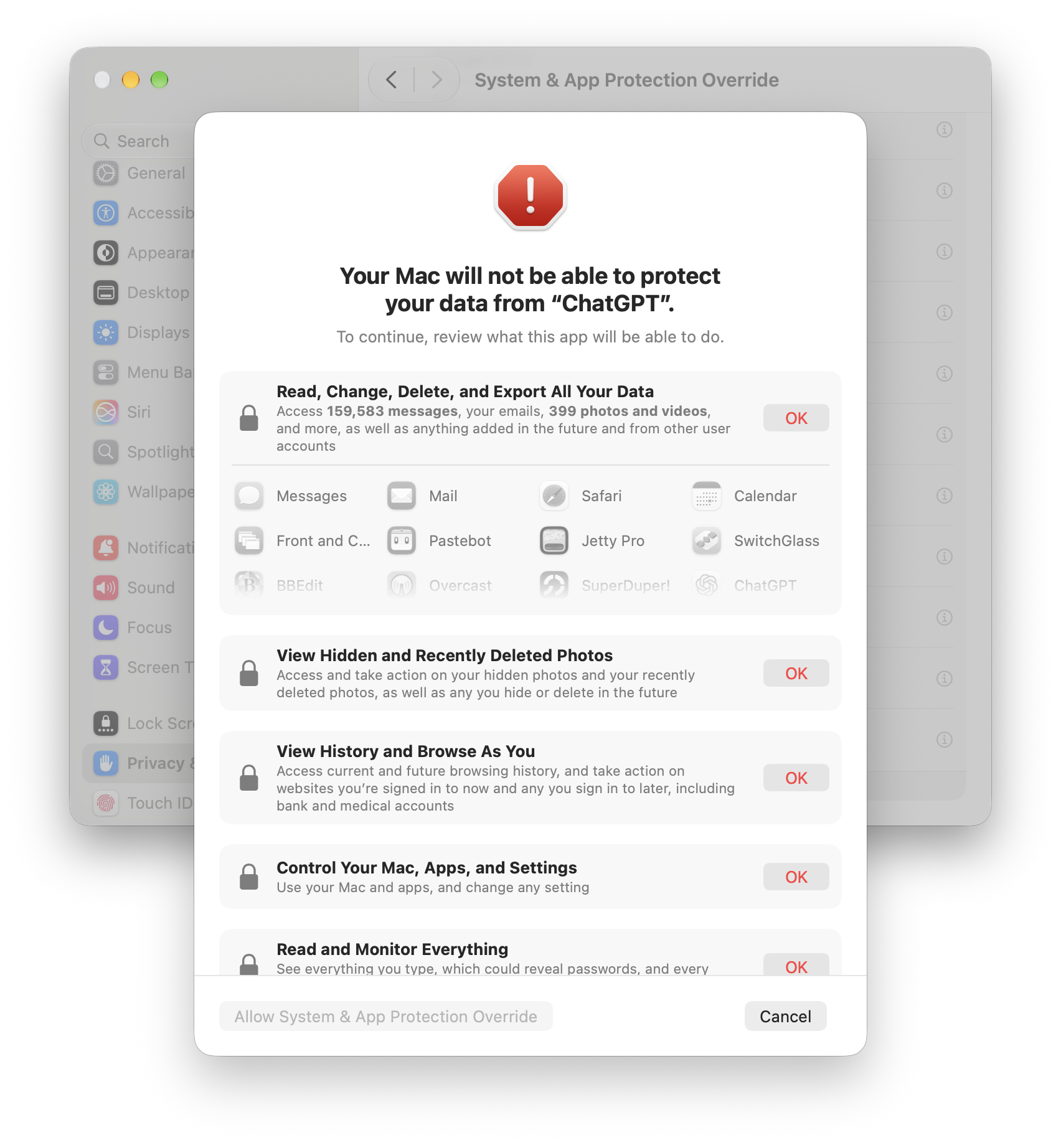
53:34Casey Liss: After you say, no, I don't want that one. It's not choose folders, choose apps. It's like, oh, do you want it to be able to control just one or two apps or do you want to control the whole system? Let's say you say, oh, yeah, bypass system protections. I want it to be able to control every app on the system. then it shows a dialogue that says and the example in this screenshot is from chat dpt your mac will not be able to protect your data from insert name of app here to continue review what this app will be able to do and then it has a series of five sections and they they say things like this read change delete and export all your data and then it lists all your recently used apps with their icons and their names in a scrolling list view hidden and recently deleted photos view history and browse as you control your mac apps and settings read and monitor everything and you have to go through each one of these and click the red okay button next to every single one of them to say yes that's okay yes that's okay this is not a menu that you choose from where you only pick certain things you i believe you have to say okay to all of them because here's the thing as far as i can tell they have not really increased the granularity of any of these permissions beyond doing the thing where you choose specific folders or choose specific apps.
54:47Casey Liss: Because essentially, once you have what used to be known as accessibility permission, you can do all of these things. So there's no way you can pick, okay, it's fine for it to, you know, view history and browse as you, but it's not fine for it to view hidden and recently deleted photos. You don't get that choice. They haven't made the control more or less granular, which makes sense. It's like, it's look, either I get to control, programmatically control stuff on your screen like an assistive technology would, or I don't. There's no like picking and choosing. And the thing about these text boxes, and they have like descriptions underneath them, is they're all true, but they're just examples.
55:21Casey Liss: They're trying to let people understand the consequences of saying yes to this by giving them examples. These are not new or different things. If you have accessibility access, you can do all these things and more. But they try to pick things that will make people think twice and say, huh, view hidden and recently deleted photos. that is meant to make people think my recently and deleted photos if you just say we'll have access to all your data people like yeah whatever data blah blah okay okay okay right if they read view hidden and recently deleted photos they're like wait a second hold on because they don't like the connection between like we'll be able to see all your data versus you know what all your data includes your hidden and recently deleted photos your your browser history your location history from your photos right like so they're giving concrete examples to to communicate to people to talk to them in a way that they will understand again not because these are specific things that like you this is just it's it's still like one one checkbox one toggle but when you check that one toggle here are all the things that are going to happen to you and people are calling this a scare sheet but i would call it a communication sheet because the old ways were not conveying to people the consequences of their actions.
56:37Casey Liss: And so that's why people would get into situations like, yeah, yeah, I turned on the thing. And then all of a sudden, this thing has access to all my data or whatever. So this is going to be a lot harder for developers and users to navigate. But I think it communicates more clearly. And what you would hope they would do is increase the granularity of these things further, because there are lots of applications, including my soon to be released one that need some of these things. But there's no more granular way to say, I just need to be able to do X, Y, and Z. And it's like, well, if you need to do that on macOS, your only option is the one checkbox that used to be called accessibility and is now called system and app protection override.
57:20Casey Liss: And it's like, well, that gives me access to tons more stuff than I want. I just need to be able to whatever detect when people click on this part of the menu bar or, you know, be able to intercept keystrokes so I can have a global key command to mute the audio, like whatever tiny thing your app wants to do. It's like, well, to do that, you need access to view hidden and recently deleted photos view history. And but like you need accessibility access because the underlying permission is that one big, giant, powerful thing. So Apple has not changed that or had time to change that again, other than making you be able to pick specific applications.
57:55Casey Liss: But in that case, you might have to make the user pick like choose apps, then find system UI server, which is in system library core services. You know, like what? So there'll be a little bit of a struggle for people trying to set this up. So I think this is a good change. It would be better if the UI for this could be further streamlined and to give people more of like a control panels type overview of everything. But this is a step in the right direction. And I think it's necessary because so many of the, you know, the applications for like AI agents that people run on their Macs require all these permissions and people don't understand the access they're giving.
58:37Casey Liss: And unlike something like, you know, a Mac app that lets you use like the media keys to control your volume in a different way universally or whatever, and you need accessibility access, unlike that tiny utility, if you give an AI coding agent or AI agent of any kind access to your Mac, not only can it do all the things listed on the sheet and more, that's kind of the point of that app, like that it can do all that stuff. Like you're not just going to ask it to change your volume or something. You're not just going to ask it to change how windows are minimized or something like you get like a window shade thing or something.
59:11Casey Liss: Oh, my window shade utility needs accessibility access. You kind of know what it's going to be doing. Unless it's nefarious, it window shades your windows. But what does an AI coding agent do? anything so this sheet is most representative of what a coding agent do but it is correct that the thing that does window shade once you give it accessibility access it could do all these things And it needs accessibility access to do the window shade thing. Like it's not asking for more permissions than it needs. The permissions are just not that granular in macOS. So that's on Apple to try to come up with more granular permissions.
59:49Casey Liss: And they're working on it like not fast, but like being able to choose folders and apps is in advance. Separating system and app protection override from accessibility is in advance. But the one that a lot of apps still want is going to be system and app protection override, formerly known as device and something. control. I got to look it up. Hang on. Device control and data access. So in all versions of macOS before 27, it was called accessibility. Then in 27 through 27.2, it's called device control and data access. And then in 27.3, it's called system and app protection override. Same thing, same exact permission.
1:00:27They're just giving it different names and it's not making
1:00:30Casey Liss: life easier for developers who have to deal with this. Oh, and by the way, when you do it manually, not only do you have to scroll and find the little plus button yourself, but let's say your app is already in the list because you've already done that in the past and you just want to see what it's configured to. Welcome back, our friend from system settings, the tiny I in a circle, which like the pie symbol in the corner of web pages in the net is the gateway to all information in system settings. Can't figure out where the hell something is in system settings? look for a tiny letter i in a circle and click it and when i say tiny i mean it's like smaller than a checkbox that is the only way to enter into the thing that will show you which folders is it allowed to use does it have this does it has that like you there's a giant row and you can't click on the row you've got to click on the little i and maybe they'll change that because again 27.3 is a beta so um yeah like i had to update my documentation and my app because my upcoming app needs all these permissions it needs everything and so it's going to be a little bit of struggle for users of the map to get it to work correctly because they're going to have to they're going to have to navigate this in 27.3 and they're going to have to click five red okay buttons and then the final button after you click the five red okays thing is allow system and app protection override and that's after you already clicked bypass system protections so yeah uh they are scaring you but they're also a correctly communicating the extremely non-granular permission structure in macOS for any app that wants to do anything remotely outside the bounds of what Apple expects.
1:02:03Marco Arment: I see every step of the way that gets them to this solution. Like, I understand how they got here. But where they are is a mess. First of all, adding more and more words to all of these titles and definitions does not make it easier to read or more likely than anybody will read it. it seems like they're introducing a lot of complexity for users, a lot of confusion for users, and a lot of burden on Mac app developers to try to explain all this to their users or navigate the support process for this. It's a mess. And I don't disagree with the need for this. I don't disagree with the need for these permissions to exist in the first place and for users to be clear on what they mean and what they're really giving up and what they're giving access to.
1:02:55Marco Arment: Like, I agree with all that. But this, first of all, it seems rushed. And it just seems sloppy and so incredibly wordy. Like, all of these, I literally, I've already forgotten what the system is, what the setting is called. And you just said it, like, 90 seconds ago. And I've already, like, I already couldn't tell you what it's called. It's ridiculous. Like, the amount of word salad they're using, it's like they're trying to, you know, cover their butts in words.
1:03:23Casey Liss: So the little tutorial things that I'm sure you've seen, like I said, that they'll put a little floating window under system settings with arrows and a proxy icon. Not only do those not work anymore, but in at least one app that I tried, the little floating thing ended up covering the control that I needed to get to in system settings. And of course, they always make the little floaty thing track the system settings window. So if you try to move the system settings window out of the way, the app that was trying to help moves its floating window so you can never get to the control you want. You have to basically quit the app and then do it manually.
1:03:53Casey Liss: So not only will people's Mac developers, apps that try to aid this, not be able to aid them, the aiding of this process may actually end up thwarting the user for being able to successfully to complete this process because the little floaty things will be covering the UI that they need to hit in system settings. Oh, and say you're like, well, I don't care about this. This doesn't affect me. I'm not installing any new apps. You just said that if an app already has permissions, you won't be prompted again for this. So I'll be fine. Well, when you get 27.3, if they don't change this from the beta, because again, it's a beta, so who knows?
1:04:25But I can say for the current Mac OS 27.3 beta, when any app that has accessibility, I keep calling accessibility version because it's one word and it's had that word for a long time.
1:04:36Casey Liss: When any app has system and app protection override permission, existing app that you've already got installed, you gave it this permission, whatever, years ago, it's got it, uses it all the time. When any app uses one of those APIs, you will see in your menu bar slash live activity blob on the new ProLed MacBook Pros, a black live activity thing with a dark blue icon in it for accessibility. And then a number next to it showing how many different apps are currently using accessibility. And if you click on that, you'll see a menu of all the different apps and processes that are using accessibility access.
1:05:10Casey Liss: And it's pretty glaring. It is more prominent than even the orange microphone icon that is in my menu bar right now because I'm recording a podcast because it's black. Maybe it will blend more on the ProLED MacBook Pros with the Dynamic Island thing or whatever because that's always there anyway. But there is currently no GUI control to get rid of that. But we will put in the show notes some defaults write commands and some directory. You have to turn on like Apple's internal feature flags directory and then put crap in. Anyway, we'll put commands in the show notes. If you're running the 27.3 bit and you cannot stand seeing that thing in your menu bar anymore, there is apparently a way to hide it for now.
1:05:53Casey Liss: This could go one of two ways. They could release that when this becomes not a beta and they release it for real. There could be just a setting in the menu bar system settings where you can turn that off if you're not interested in seeing it. or they could disable this workaround and make it so that no, you can never get rid of that. Because if you're using an app like, you know, that you need accessibility, let's say you're using again, a window shade app that makes your window roll up into the title bar. You're going to be running that all the time, which means 24 hours a day, seven days a week.
1:06:19Casey Liss: There's going to be a thing in your menu bar showing, hey, something's using accessibility. You're like, I know it's my window shade thing. I'm always running it like I don't need to see that. And then you're going to become blind to it. To Marco's point, you're never going to look at it. And when the number changes from two to three, because you do two utility apps that need it, and one day it changes to three, you're never going to see that. Because why in the world would you ever look at that number? Because, you know, it's just there all the time. When 27.3 came out, they put this wart in my menu bar, and now I just ignore it.
1:06:46Casey Liss: And while you're ignoring it, that number is increasing because some malware is now using your, anyway. That is the part that I think is the worst part of this. It's going to affect regular users. You set up an app maybe once. Fine, it's scary, it's boring, it's difficult to do, but you set it up once. but all day, every day, when you use apps that have these permissions, you're going to have to look at that wart if they don't give you a way to turn it off. So please Apple in the release of 27.3, put a toggle somewhere in system settings where we can turn that off.
1:07:14John Siracusa: We are sponsored this week by aura. We are hurtling ever quickly into the holiday season. And I have in the past gifted a couple of people or a frames. And let me tell you, that is the gift that I think they have been most happy about in years. Now, you could say that that's an indictment of my gift giving, which fair enough. But no, really, these gifts are truly amazing. And if you think of a photo frame, an electronic photo frame, and you think of the garbage from the late 90s and early 2000s, don't think about that. Aura frames are great. Not only do they look great and they're very understated, But you can upload an unlimited amount of photos to Aura's server-side stuff, and it's all private, of course, and you don't have to worry about space, you don't have to worry about swapping SD cards, you don't have to do any of that nonsense.
1:08:02John Siracusa: And let me tell you, what's really great about AuraFrames is that if you choose, if you ship an AuraFrame to yourself, you can do the tiniest little bit of unboxing. It's sort of kind of, you'd have to look at their website to see more. But the idea is you can get the AuraFrame prepped for the recipient's Wi-Fi information and stuff like that. So when they open it up, it can show a little message and it can be ready to rock immediately. AuraFrames really are great. And one of the best things about them is, is as you're looking through your photo library on your phone, if you see an image, say like I see Declan or Michaela as a baby, or even better, I see the two of them when they were itty bitty.
1:08:42John Siracusa: I can just use the share sheet in photos to share that to the Aura app. And next thing you know, it's on my frame. So Aura is the number one digital frame loved by millions of families. And their Black Friday slash Cyber Monday deal is the best of the year. For a limited time, visit AuraFrames.com and get up to$50 off select frames plus an additional$5 off your order. With the promo code ATP, that's A-U-R-A-F-R-A-M-E-S.com, promo code ATP. Support the show by mentioning us at checkout. Terms and conditions apply. Thank you to Aura for sponsoring the show.
1:09:16John Siracusa: All right, let's talk HomeView. Two-thirds of your hosts have purchased a HomeView, and I'm not one of the ones that did. So you guys just wake me up when you're done.
1:09:27Casey Liss: well let's start with some feedback from matt because i made a joke when we were when the home view was revealed i think and then like an announcement uh event or whatever uh based on the thing we just talked about that you can walk up to home view and it looks at your face and then listens to your voice and it figures out who you are so when you walk up to it and you say read my messages it reads your messages but then when someone else walks up to it and they say read my messages they don't see your messages they see their messages you have to register different people for it and they get the personalized experience because it's connected to their phone and their data and so on and so forth.
1:09:57Casey Liss: The joke I made was based on AppleCare1, the service I tried to use from Apple, which was ostensibly a way to save money on your AppleCare warranty stuff by, you know, bundling everything into a single bill. But the catch was that if you have a Mac and that Mac has multiple accounts on it, and if you ever log into an account that uses a different Apple account than the one you purchased AppleCare1 with, AppleCare1 would kick your Mac off of the warranty plan and send you a message that says, oh, we saw another Apple ID use your Mac. We've pulled it off of warranty. It is no longer covered. And that's why I had to cancel AppleCareOne, which cost me a lot of money because I lost a lot of my cheaper plans.
1:10:40Casey Liss: And now I'm paying for more expensive plans in perpetuity because the cheaper plans no longer exist and Apple could not bring them back for me. So that's, I was annoyed by that. AppleCareOne family came out. Same deal, by the way, only now the set of Apple IDs that is allowed to log into your Mac mac is expanded to include your entire apple family which is fine for most people but because i'm a developer i have sandbox testing apple accounts and if i sign into any one of those on my mac it would get kicked off apple care one so when i saw home view and they showed different people in the family walking up to it and seeing their face i'm like hey when someone comes up to this thing and asks it to read their messages and it switches to like their personal context or whatever does it kick the home view off apple care one well matt writes you just can't make this bleep up see i'm doing the work for you marco thank you and he put in a screenshot that is an email that says apple care one attention required a new apple account has signed into your home view to avoid losing apple care one coverage you must sign into home view with the apple account associated with your apple care one plan you have 24 hours from when you from when this email was sent to sign in or your home will be home view will be removed from your apple care one plan so this counts as one of the devices now i asked clarifying questions i said to be clear you have AppleCare one individual, right?
1:11:52Casey Liss: And then someone who is not you, but is in your Apple family, use the HomeView. And then Matt said, correct. The only thing I'm not sure of is if the email might have come before I ever added the second user, which would be even more absurd. The device and AppleCare were purchased at the same Apple with the same Apple ID used for the initial HomeView login. So maybe this was just a blip or a glitch, but it is hilarious that the exact thing I was joking about actually happened to someone and they got the threatening, hey, you have 24 hours from when we sent this email. Not from when you read this email, but from when we sent it.
1:12:24Casey Liss: Otherwise, we're going to yank your home view off AppleCareOne. That's not great, Apple. I'm assuming this is a bug and will be resolved. And, you know, because again, AppleCareOne family should allow this. But this person has AppleCareOne individual. So maybe you won't be resolved because like a Mac, multiple people can use a home view. It is an intended use of the thing. Again, Macs intentionally have the ability to have multiple accounts on them. but Apple does not acknowledge that that's a thing that exists when it comes to their warranties. So I'm super annoyed. Anyway, I didn't have that experience with my home view, but I do have a home view, but I'll let Marco go first.
1:12:58Casey Liss: How are you liking your home view?
1:13:00Marco Arment: Okay. Home views? Do you have more than one? No, I got one. Even heading into it, based on the reviews, I got to say I was not super amped to go pick mine up. Wow. But, you know, I figured I'll give it a shot. I want it. Obviously, I need it for some kind of overcast testing purpose anyway. So I got I kept my order, got the home view, set it up in the kitchen so the whole family can use it. So far, the other family members have shown zero interest in it. And I have asked, hey, why don't you set up your stuff? No, don't care. Like, so that's problem number one is that I can't get anybody to care about it.
1:13:42Marco Arment: But okay, I at least cared. So I have tried it for a few days. I haven't tried it that much. Again, I've only had it for a few days. And part of those days, we're traveling to Casey. So I didn't bring it with me. So you can't really use a home view on a plane. So I haven't had a ton of use of time with it. But so far, step one, I think the onboarding process is very nice. Like the ambient sound it plays during setup and all the graphics and animations and the steps it makes you go through. They're all nice, peaceful. Sounds kind of like a spa. You know, very nice. Actual usage. It is smaller than I thought it would be.
1:14:25Marco Arment: It fits nicely on the counter. Sound-wise, I think it's a mixed bag. What was sitting on that counter before was a full-sized HomePod 2. It sounds significantly worse than a HomePod 2 and a HomePod 1, in my opinion. It sounds like a HomePod Mini with a subwoofer. And when you look at what kind of speakers it actually has, the actual drivers, what size drivers are dealing with, where they're facing, how it's constructed, that actually makes a lot of sense. The HomePod Mini is not a bad-sounding speaker for its size and for its price. But for the HomeView, I expected more. I expected music to sound better.
1:15:11Marco Arment: So it has okay bass. For its size, it's good bass. But the mid-range, vocals, guitars, it sounds like a laptop speaker turned way up. And yeah, that makes sense. It's really small speakers coming out of a really compromised enclosure for good sound. Because it's not made for that. It's made to be a screen that happens to have speakers firing at the sides. so as a speaker it's really mediocre now as a screen it's decent the ability to see timers counting down and to navigate music slightly although it's weird it's carplay and that whole system is really weird but it does kind of work that's nice i i set up like widgets and stuff and I put in some of my iPhone widgets.
1:16:06Marco Arment: I have Carrot Weather instead of Apple Weather on one of the screens. Except I walked up to it and tapped it the other day. And it just instantly gave me a widget error. Because it couldn't load the widget from my phone, I guess. Even though my phone was in my pocket. So I was like, okay, well, third-party widgets work. But not well. Not reliably. Third-party music apps. Again, it works. It's weird because it's going through the CarPlay API. and apps can't really control that very much and it's limited and it's, again, it's weird. So, okay, using Siri on it. It works as well as Siri works anywhere.
1:16:45Marco Arment: So I had a timer fail, like to set a timer, like it just spun forever for one of them that I tried. The rest of them that I tried or the rest of the things I tried did work, but some of them were very slow. And the actual process of using it, But first of all, the very first thing I ran into was the app screen is littered with every app on my phone that has CarPlay support. And so my first thing I wanted to do was delete most of them. You can't do it. You can't delete apps.
1:17:15Casey Liss: Yeah, there's no minus button. It does go into wiggle mode, but you expect to see the little minus hovering over them so you can delete them. Nope, not there.
1:17:20Marco Arment: Yeah.
1:17:21Casey Liss: Not for all of them anyway. I think some of them might have it, but most of them don't. Yeah.
1:17:24Marco Arment: So I just had to like, you know, rear range a screen, like put all the apps that I don't care about down below all the ones that I do care about.
1:17:30Casey Liss: And to be clear, it's not like you can delete third party ones, but you can't delete Apple ones. No, you can't delete most third party ones either. Yeah.
1:17:37Marco Arment: And the experience of setting up widgets and managing the home screens and, you know, like kind of like the locking and unlocking processes and going in and out of different panes and views and everything. I ran into a few little bugs and things that I think we've heard the official rumor story from Mark Gurman and everything is that the software has been done for a while. The hardware has been for a while, but they were waiting on Siri. They might have been waiting on Siri, but the software was not done for a while.
1:18:08Casey Liss: The rumor was just that it was waiting on the software, and the major part of the software was Siri, but I have a feeling that all the software wasn't ready. So even though the hardware has been done for a year, I feel like this is the software in total, not just the Siri part of it, not just the Siri backend, but all the software wasn't ready, and that includes everything you've talked about. and conceptually and navigationally, the software on the home view is a mess.
1:18:34Marco Arment: Now, it's pretty. It's a pretty mess. But it's like a parts bin special of Apple software. Like some of it works like an Apple Watch. Some of it works like Apple TV. Some of it works like an iPhone or an iPad. There's all these different like mixed UI paradigms and metaphors and there There are different modes and stuff that it can be in. What it reminds me of, honestly, is Pocket PC.
1:18:58John Siracusa: That's a throwback.
1:18:59Marco Arment: In like the PDA days, the early 2000s PDA wave, right before smartphones really became a thing. You know, in retrospect, everyone loves the iPhone, but then was criticizing Windows. Because what Microsoft did when they made Pocket PC was they basically made a PDA that looked a little bit like Windows 95's UI. It had the start button in the corner of the home screen of the PDA, and you would tap with the stylus, and you'd tap the start button, and you'd find your app, and you'd tap it in there. I had one. It was fine. Same. In retrospect, everybody was like, yeah, that was not the right move. They took what they had.
1:19:34Marco Arment: They had the start button. They had that paradigm. They took what they had and just shrunk it down and said, all right, we're done. The home view feels kind of like that. It feels like they have all of these mechanisms they've built up over time with their popular platforms. And they just think, okay, well, now that we have this other form factor, this other device family, what parts of that do we pick and choose to shove onto here? And it really just feels like shovelware. It feels like it has not really been a priority for the company to think really hard about this product. That's what it seems like.
1:20:11Marco Arment: So it does work, but it works because we're all in the Apple ecosystem already and we all already are, you know, we know how to do all these things and we are going to tolerate it because it looks pretty and it's nice. But like, you know, I recently used the phrase, I recently used the concept of like Apple, like even when Apple is like half budding their design shops to make a half budded product, they're still way ahead of the rest of the industry most of the time. this is one of those situations where like apple is really not like this is not their a game this product is software wise a mess but because everyone else in this category has such crappy products their their product is is going to get away with being you know being a mess but still being better than everyone else's so i if i want a screen in my kitchen to do this kind of stuff I will still end up using this product, but it doesn't make me want to keep using it more.
1:21:09Marco Arment: It doesn't make me super happy. It's not like, oh, this is going to change everything. This is like a bunch of half-ass stuff came out of Apple and they're trying to sell this new thing. And I worry, like, are they going to support this? Are they going to actually work on this software? All of the different bugs and things, is it going to really get meaningful updates after next month, say? it feels like the kind of product that apple would neglect for a long time like software wise and and hardware wise but you know certainly software wise so we're starting out from a place that's pretty slop it's pretty sloppy pretty i would say um under polished and under considered and with weird conceptual ui and it's just kind of all over the place and i don't i don't see how it's going to get meaningfully better.
1:21:58Marco Arment: I think they picked the wrong paradigm. We still say, maybe the Apple Watch shouldn't have apps the way it has. I think this has that kind of conceptual problem right from the start, but I can't see this product ever selling well enough for them to really rethink it or care that much about it. So I think it's just going to be this weird mishmash forever and i kind of just feel like they they could have done better so uh i echo
1:22:29Casey Liss: some of the things you said uh let's start with the hardware it is smaller than i thought it would be and not that i i you know i know what size it was when you see it in person you're like oh that is a little bit smaller and in particular the screen is pretty small i mean the whole thing is small the screen is small because it's square it looks even smaller but i will say that they did a good job making the hardware feel expensive i still say for their 300 price unlike the apple tv you get this device and you're like 300 it's got a nice screen it's sturdy it's made of metal i saw the iFixit tear down and one of the reasons it feels so nice and expensive is they have like this they basically have it's not lead weights but like a big metal thing inside the the little base that surely is there partially to make it so it's less tippy like its job is to be weighty and so it feels heavy and it feels stable on its base and it looks like a nice piece of hardware and it looks cute and it's small um in the setup process it seemed to me that this product is made for short people because i put it on like like a side table of course a side table that is actually taller than my table and it's actually higher than my kitchen counters as well but when they have you do like the face like you know camera face setup process it's looking right up your nose i have to like tilt it so that because the screen tilts obviously i have to tilt it so the screen is basically facing the ceiling or i'm not in the circle like you know who is who's putting this with it with the screen like in all the screenshots the screen is like it's not vertical but it is much more vertical than it is horizontal you know what i mean whereas my thing is practically staring up at the ceiling all the time which makes it you know kind of weird to see what's on the screen because you have to kind of be hovering over it but whatever um i agree that like the software just does not decide what it wants to be when it grows up part of this is actually i feel like architectural that they have kicked the can for so long on multi-user support on their non-mac operating systems that now those chickens are coming home to roost because here is this product and we talked about this when we were talking about a home pod with the screen how are they going to deal with the fact that multiple people need to use it because if you have a thing with the screen especially that runs software or whatever and it's central to your house it has to know who the different people are and has to you know react to them and their solution to that is this mishmash here where it's carplay because not because this thing can't run apps like it's it's i forget what i think it's like eight gigs of ram and a18 or whatever it could run apps just fine but they're the architecture of the os that this is based on whatever it's some hybrid of like again watch os ios audio os all mixed together in there but it is not like a mac os derivative they all have darwin under the covers but anyway uh there's no true multi-user support so how the hell let's say this thing had real apps and like you you could run a real version of some app on it like a phone app or whatever how is that going to work when a different person comes up to it because real apps that run on ios don't have any facility or expectation for dealing with like uh-oh a new person uh oh where is their data this the ios solution to that is erase your phone and start or at the very least sign out of your apple id but probably really erase your phone and start over.
1:25:35Casey Liss: Oh, you're a different user with different data? Yeah, you need to erase this phone. There is no facility to take a single application and run it for different people who walk up to the device. And so that's why one of the many reasons why setting aside the part spin thing, why CarPlay is their solution. Because, okay, well, the apps will just be on the individual person's phone. Problem solved, right? The apps don't really run on the home view. We don't have to worry about all that messiness of like, well, you know, a different user has come, where's their data, whatever, like they don't have to solve the hard problem of multi user support and iPad OS, iOS, and so on and so forth.
1:26:12Casey Liss: So that hurts this product. And it is not something they can fix in a future software update, because it is fundamental to their thus far, their decision not to add true multi user support to any of their i devices, iPads, iPhones, anything like that. and now home view home view appears to have multi-user support but really it's just delegating everything to your phone because that's what they want to do and their advantage to that because people's phones are potentially more powerful than this device and it's fast and you know like i get it like it makes some sense from a technical perspective but it also means that they can't decide oh we're taking you know you mentioned uh margot like the watch um should the watch even have apps or whatever well it does and it can because it's a single user device and if you want to use a different user you erase it or whatever um but this i feel like is the opposite the question for this one is should this have real apps because the carplay apps are not great like they're a little bit weird and like they're not certainly this late early stage they're not really tailored for this experience they don't expect to be running on it all of a sudden they're running on the home view and certain app experiences that like their app experiences that you would want a phone app to have that are not appropriate for a moving car but this is not in a moving car it's on your counter so i'm like why can't i have a full-fledged ios or ipad app experience i'm standing in my kitchen like you know the limitations of carplay do not apply when i'm not in a moving vehicle in any way and yet this adopts those limitations uh you know structurally because it's you know a thing being projected through the carplay apis so that is extremely limiting um the things that i find frustrating about watch os anytime i try to set up any granted i'm not an Apple Watch user, but I'd set up my wife's watch once every year or two.
1:27:56Casey Liss: And she asked me questions about it. And the input mechanisms on the watch are so limited and so weird. Like, how can I get my watch face set up the way I wanted? I used to be able to have it showing this and that and this thing, the other thing. Boy, do I have trouble figuring out how to make that happen. Well, the HomeView is the same way. It's like a big, giant watch. And you're like, oh, so home screens and lock screens are configurable and you can put widgets and apps and blah, blah, block how hold your finger on the screen don't hold it there hold it in this place now it comes up oh there's two controls on the screen i've tried both of them neither one of them gives me what i want maybe i can swipe maybe i can swipe from the edge what if i want to have a photo thing and i want the clock to be here in a widget there nope sorry it's too much customization here are the menu of six things you can pick from and if you don't want one of these six with one of these two options each that's it so it's really inflexible for for a device where it's got this square screen you're like can tailor it to your desires no not really you can tailor it in the same way you can tailor watch faces but like rewind history when watch faces have like two options you can put two complications but on this watch face you can't use this complication you can only use these set of complications and good luck figuring out how to even get to the point where you can pick the complications but home view doesn't have complications it just has widgets and preset home screens and it's extremely limiting so i spent some time punched over the sideboard table which is not a, I should have set this up somewhere.
1:29:19Casey Liss: I had more time to do it. I spent some time trying to configure it the way I wanted it. And I eventually gave up. I'm like, I can't make this look the way I want. The best I can do is like Marco. I laboriously dragged the apps that I can't delete that I don't want to use down to be lower. So at least the ones, the widgets and the apps that I thought I would use were above the fold. And the other ones were just hidden below that. And then the lock screen, I just did a photo lock screen with a small clock with the font that I wanted. And even though there's plenty of room on that screen for, for example, weather widget in the corner or something nope can't do that or maybe you can i just haven't figured it out yet that's the thing i'm not confident that there's not a way to do that i just haven't figured out because it's so hard to figure out like you've got this giant screen put controls on it when i'm in edit mode put controls like that's the mode that i want like no even in edit mode there can only be two things on the screen and one of them is the okay button very frustrating i am at a disadvantage here and i think marco is too like in one aspect in that if you are bought into the HomeKit ecosystem and you've been dying to have a device with a screen that will be sort of a master control panel for your HomeKit enabled house I bet this device is a lot more valuable than this is someone like me who has very few HomeKit enabled devices very few smart home things at all and no real desire or need for some kind of central control panel for that stuff so that's not fair to the product like it's just not a need that I have but if you are waiting patiently for apple to make a thing with the screen that lets you control your home kit stuff i bet this is better because you can control on like the home screen thing which widgets do you want where do you want them what do you want to be in those widgets and i bet you can make a pretty good home kit control panel for that and like marco said timers they used to just be disembodied in your cylinders that you would talk to but now you can actually see them and interact with them on a touchscreen and so that's nice and everything too the main thing the main value that i find from this product so far is i guess two things because this where i put this was sort of in the corner on my sideboard table alongside my other cylinders there's a google thing there and there's an amazon thing there and now this thing is here and previously apple didn't have a presence in this corner it did have a presence in this room because technically my uh ecobee thermostat you can say hey ding this too and it just it calls up apple's agent and stuff but i turn that off on the thermostat.
1:31:37I'm like, thermostat, you don't have to do that anymore.
1:31:41Casey Liss: We have a new thing here. And the main value for me is now I have a device within shouting distance in my kitchen and dining room that has an A18 in it that is able to use the new Siri AI that we're all complaining about to do more sophisticated things than any of my HomePods. Because I do have a bunch of HomePods, but correct me if i'm wrong even the most modern home pods the mini and the home pod 2 can't do all the siri ai stuff am i right about that i think so like apple's been cagey about like oh what can you do with apple intelligence like well what about just network stuff like can't you just do it over the network but like you know the phones had to have a certain amount of ram for apple intelligence or whatever i have home pod ones and they do not have an soc capable of apple intelligence word a phone maybe they've upgraded it so that'll do everything to the server but I'm not entirely sure.
1:32:33Casey Liss: But I could tell you talking to my HomePods is not productive. Like sometimes I can ask them to turn the lights on and off. And if they're in the right mood, they might do it or they might say, hmm, or do something weird, but they're HomePod at once. Like, let's give them a break. But I didn't have anything else in the house that I could talk to and communicate with Apple's latest agent. And this thing fits the bill. So one of the first tests I did was right out of Apple's commercial. And I said, hey, dingus, what was my daughter asking me? What software thing was my daughter asking me about earlier today?
1:33:10Casey Liss: And, you know, this is a silly test because I already know the answer, but I'm testing the little thingy. And it went back through my message's history and found the thing that I was thinking of and summarized it in an absolutely accurate way. I was like, wow, we live in the future. I just did. What time is mom's flight arriving? Right after I set the thing up, too. It knew my personal context. It found the message. And lo and behold, it even summarized it correctly. And it was a nuanced conversation that involves sarcasm and other things that can trip up agents. You know what I mean? And it correctly summarized.
1:33:43Casey Liss: And I think, I think maybe even my wife was impressed. I can't say for sure. She was there because when Siri ever does anything correctly, I think we should all be a little bit impressed. But it was like, you know what? That is a level up. when my wife set a timer today on a thing that she was cooking. She asked, I think for the first time ever, she asked Siri to do it. And I was listening from the other room and I'm like counting the seconds. One, two, three. Oh, and it did do it. Now it didn't do it as fast as the Google Home or the Amazon thing did it, but it did do it and she did decide to ask it.
1:34:20Casey Liss: So there's some, this is like watching like a wild animal go into, Like there's some trust building going on in here between the family. And by the way, she's the only other person in the house so far that has set up her identity. I mostly just want to humor me if I ask her to do it. She doesn't understand why or what she just did, but she does talk to it and it does answer her. And that, I think, is the the promise of this product. A device that is not too expensive, that I think is a hardware device that I think is reasonably priced for the hardware you get with software that is currently. incredibly underwhelming and that is being kind but once you have the hardware there first of all it gives you access to apple's latest agent stuff which is something you didn't get from the other as far as i can as far as i know you didn't get from the home pod mini or the home pod 2 and certainly not the home pod 1 so now you have a thing that you can talk to that does that that's not your phone and by the way it happens to have a pretty big screen on it so you can walk up to it and touch it and do stuff with it or whatever and it does do home kit control stuff or whatever, and it does have widgets.
1:35:25Casey Liss: And there is the possibility that if Apple cares about this product, there is a lot of headroom to improve this software. It is just really a hodgepodge. Now, I don't expect them to say, oh, now we're going to add multi-user support and, you know, solve all those problems and make it a real app platform. I don't think they'll do that. They probably won't just because they won't sell enough of these and app developers won't pay attention to it. And yeah, there's a million reasons why they won't. But I do think of all Apple's platforms, this one actually would benefit from being a real app platform because you can run real apps on it it's like a little square ipad and the processor is plenty powerful you could run full-fledged real apps right on there if only they could solve the multi-user problem but they can't you can't run paprika or whatever on there and look at your recipes because what about when someone else comes up to it and they want to see their paprika recipes up throw up your hands but it would be a way better interface than all these things people are doing now which is like making weird shortcuts and services that will take something from a recipe manager app on their phone create an html page i have it upload it to a server and then tell the home view look at this web page of a recipe that i just uploaded that is such a rube goldberg machine for what should be a basic functionality of this which is like hey i've got a favorite recipe app you're in my kitchen you've got a screen put the recipe on it and home view right now is like sorry that's just not the way i made and the final thing i complained about is um well people already complaining about the rounded screen corners when they put like the full uh the full uh show art for our show if you have the member the member feed you have like this uh stitching in an alcantara kind of thing it's another car joke but the stitching is around the square show art and of course the rounded corners on the home view screen cut off the corners of the stitching and people always say you should round the corners of your stitching yeah round them to what radius because there's a million things in the apple ecosystem that cut off those corners and they all have different corner radiuses so it's a you know it's a losing battle we just go with square um but they also choose to do in some contexts i'm not don't recall which ones a glass warping effect around the edges
1:37:29Marco Arment: of that rounded yeah screen which honestly i was not a fan of like because you kind of you see it a lot even in like a fixed state like it doesn't go away yeah it just seems like oh this is just
1:37:42Casey Liss: always going to warp these icons now right it basically around the entire rim of the display it makes it seem like there's like a lump of glass around the whole rim so you just lose you know i don't know five or six points of space to the warp zone because there's a border around the screen that is warped it's just and and if anything is in there it's all wavy if text is in there you can't read it if your icons are in there they're warped in some respects it's letting you it's a way of letting you know that there's more to scroll like most apps try to do that by showing you half of the remaining row but for a system like this where maybe you end up in a situation where nothing on the screen is truncated by any screen edge how do they communicate that there's more to see if only we had solved this problem in the 80s with a thing called scroll bars but of course scroll bars have been lost technology that humans no longer know about so we can't use them anymore and instead we have to put a warping effect that's on the screen all the time to let you know hey there's more content down there actually if nothing's cut off maybe the warping effect wouldn't work either anyway it effectively makes the screen smaller for no good reason other than it looks kind of cool and i think it's dumb there was something about that in i forget if it was uh maybe it's ipad os or when you do the screen capture region is this ipad thing when you drag out a region to do a screen capture they made that warping effect around the square so if you drag out to a small region the warping border is so thick that the entire thing you're trying to capture is warped and you can't even tell what the hell you're dragging across apple please stop this this is like an allen die hangover but anyway that's the least of the home use problems but i'm i i forget what i said about this it was ended up being an episode title was like medium expectations or something like that and i think this is basically met my medium expectations and that i think it is a well-designed reasonably sized and priced hardware device with reasonable capabilities and an okay screen.
1:39:36Casey Liss: And I think the software is just, the software is not doing, is not living up to the promise of the hardware. It is very early. It is very confused. It is held back by fundamental limits and Apple's choices for its eye operating systems. And for me personally, it doesn't have that many uses, but it does now at least make Apple a sibling to the other devices in that little cluster in my corner, and now it can enjoy competing on more occasions and not being funneled through my thermostat, which must have been a disadvantage in past competitions.
1:40:10Marco Arment: I think in many ways, when the Kindles were very early on, which was, what, about 2007, the first Kindle came out, something like that, and with those early Kindles, Amazon actually did a pretty reasonable job of the software design on them. It was pretty good. And part of the reason it was pretty good was that there just wasn't that much capability to do that much. So Amazon, they didn't have enough hardware capabilities and computational capabilities to really crap it up and to try to make it do more than it really could and crap it up with ads or everything else. and over time as Amazon got more of those capabilities in the hardware, both as eventually they did like LCD screen tablets and then eventually things like this, like smart speakers with screens and everything, versus like the old Kindles or the old Echoes that were just like a black and white screen or a speaker.
1:41:11Marco Arment: The more capabilities Amazon got, the worse their software design got and the worse their user experience got because when it was just like a black and white screen or just a speaker, it could only pretty much serve its function directly. And then they started crapping it up with more and more crap as the capabilities were offered to them. In many ways, the HomeView feels like a HomePod in the sense that it's something that serves a function, but the HomePod has always served that function with a good deal of mediocrity. the HomePod is an amazing sounding speaker with really not that much attention from the company on the software side.
1:41:55Marco Arment: But it was okay because all we were asking it to do most of the time was be a speaker that occasionally would answer questions poorly.
1:42:03Casey Liss: I was always asking mine to turn my lights off and it really annoyed me when it couldn't handle that test. So I will say that I will ding. They weren't just the speaker. The quality of the speakers in the HomePods does not make up for the fact when I ask it to do simple things and the old Siri and it was like, I have no idea what you're talking about or the device is not responding or whatever. So that's not great either.
1:42:22Marco Arment: But the reason I make this analogy is like, now it seems like we have a new entrant from the HomePod division of the company, basically, but it's a way more ambitious product. But it's not probably going to have a lot more effort from the company than the HomePod ever did. What they have here is a mishmash of a bunch of ideas half-baked thrown together that will probably be poorly supported i think it's going to end up a lot like you know the amazon shows and whatever else like those these kind of half-assed you know products is like i don't see like one of the common critiques that our friend merlin mann often um you know says about the apple tv is that it often feels like no one at Apple loves this product, or at least that he loves it more than anyone there does.
1:43:14Marco Arment: And I think the HomeView is going to have exactly that problem. It feels like a product that it wasn't a high priority for the company. They put it out anyway. It needs a lot of, I think, polish and rethinking, and it needs a lot of love. But I don't think Apple loves it, and I don't think they ever will, because it's always going to be this weird accessory product that they're not going to sell in very high volumes, just like the HomePod. So I don't see any path to get from where they are to excellence. I see this staying kind of mediocre and neglected and a little bit weird forever. I don't know.
1:43:58Casey Liss: I think with their current software stack, making it more configurable and flexible is the thing they can do with point releases, and that would go a long way to making it at least better at what it does now because it just seems it's so unnecessarily limiting like all the limitations and configurability and appearance and customization have nothing to do with the hardware and are not like things that apple software can't do like the phone is so incredibly customizable in every possible way if you're going to the parts bin man rummage through that parts bin like let us customize the home view like we could a phone from 10 years ago and we'd be happy this thing is so unconfigure it's less configurable than the apple watch it's considerably less configurable than the Apple watch and the Apple watch a tiny little screen on your wrist.
1:44:38Casey Liss: And this has got this giant display. And it's like, no, there's a very limited number of things you're allowed to do. That's just dumb. Like, I think they can't update that. But like the things that this really needs, again, I think it needs to be a true multi-user system. I think it should run real apps because it's fully capable of doing it. That's not going to come unless Apple substantially changes their investment in this. But we'll see. Like, it's new. It's a new CEO. It's a new day for their home products. at the very least you can say this is the most ambitious hardware home product they've ever made and so that at least signals that they are investing more in this area so i'm not i understand why you're pessimistic about it but i'm not uh entirely writing off the possibility that this might end up differently than the big home pod i hope it does because the big home pod
1:45:21Marco Arment: has been a pretty sad story but we'll see or that also remains a product in the lineup by the way it's not yeah canceled and and by the way if what you want is the best sounding countertop speaker and approximately this size, it's still the HomePod, like the full-size one. I hope they don't kill it.
1:45:37Casey Liss: For audio, yeah. I didn't mention the audio on this, but this is the best-sounding thing in the corner with those devices, but only because those devices in the corner are just terrible. So it is an upgrade for our kitchen-slash-dining-room sound system, but it is not competition for the big HomePods in the other room. So, you know, it depends on what you're comparing it to. Like if you already have a HomePod mini or two HomePod minis, keep that as your sound system. But if you want something with a screen that happens to have a speaker that is better than an Amazon Echo dot, and I'm talking about the old dots that were not spheres, or a Google Home.
1:46:14Casey Liss: I have a Google Home that is almost the same size as this, but it's so old and its speaker is so awful. So this is actually the star speaker-wise. But yeah, you know, once you, for$300, like you're comparing to the big HomePod, the big HomePods are not$300 and they don't have a screen. So it's kind of not a fair fight. So I think it does an okay job for its size and cost in terms of the sound quality. But yeah, it's not an audio file speaker for sure.
1:46:37Marco Arment: No, not even close. The other thing, I think if you wanted to make this product awesome, I think you could. But what it would take would be, I think, two things. Number one, make the software UI significantly more focused. Right now, it's very unfocused. there's a million different layers a million different things a million different car play apps that you can't delete there's just there's so much going on that it's very difficult to really like make it feel cohesive and focused and the smaller that that set is that's like right at your fingertips of features and everything the faster you can get used to it the better you can use it with like you know wet hands or by voice or whatever okay number two give it a local model that can instantly recognize timers.
1:47:27Marco Arment: These devices, we've learned, like smart speakers and smart displays with speakers like this, these are kitchen devices for many, many, many people. When you say, hey, Dingus, set a timer for five minutes, that should not go to the cloud for anything. That should be recognized instantly with an on-device model. And that model should be smart enough to figure out if it has low confidence in what you're asking, okay, this should go to the cloud. This is not a question for me. But timers, maybe even reminders, but that might be a stretch for Apple. Timers, make timers awesome, because that's what people use these products for.
1:48:05Marco Arment: Give named multiple timers, make them show up nicely in the UI, not just the big Apple Watch app, but make them show up nicely in the UI, optimize it for that screen, and give it that local model so that when you say set a timer, it is already there. And I know because like, I've done something very, very basic like this and unforgettable. I know how fast it can be. The transcription of your speech is lightning fast now, especially on these new processors that we have. It is lightning fast. And it doesn't take that complex of a model to recognize timers with names and durations.
1:48:38Casey Liss: You're assuming that they're not already doing this because it's slow. I know why you would make that assumption, but I'm not entirely sure that they're not already doing it locally and it's slow for other reasons. It seems inconceivable that it would be local. Because again, if you implement, like you said, you implement this in Unforgettable, you know how fast it can be. But that doesn't mean they're not using local models for it now and screwing it up in some other way. So what I would say is just make it fast. If you're not using a local model, yeah, you should be. If you're already using a local model and you think your job is done, it's not.
1:49:10Casey Liss: Are we making you want to buy one of these, Casey? Nope. Nope. Not even a little bit. You may have the most home kit stuff, though. Maybe you can get one of the wall-mounted ones just so you can have a little thermostat and a thing that's better than a bunch of light-up LCDs to tell you whether your garage is always open. Although, I guess you'd probably have to make your own custom CarPlay app to make that happen.
1:49:27John Siracusa: Well, right. That's part of it. And the other thing is that, again, we're going to talk in the after show, but I had Stephen Hackett and Jason Snell in last weekend. And both of them, I think much to their own surprise, were extremely complimentary about my status board in the kitchen. And most especially, hey, you ask them. If you think I'm full of it, you ask them. But what they were most especially impressed by, I think, is how subtle it is. And while I would love a, not giant, but giant screen telling me the state of the world and letting me mess with different HomeKit entities and so on and so forth, I don't think the rest of the family would.
1:50:05John Siracusa: And certainly, I think that the way I have it now is a much more reasonable, happy medium. And again, way, way, way more subtle. so yeah i i was never particularly i think this is a clever and interesting device but even before the very meh reviews not just from you two from basically everyone it's not something that i think
1:50:26Marco Arment: i'm terribly interested in all right thanks to our sponsors this episode aura frames granola and zocdoc and thanks to our members who support us directly you can join us atp.fm slash join one of the many perks of membership besides the merchandise discount that just went by all the exclusive content, including the member special that just went by, and our bootleg and everything. Another thing is every episode ends with ATP Overtime, a weekly bonus topic that only members get to hear. This week on Overtime, we're going to be talking about what John Ternus wants from Craig Federighi. Some news there, or some rumors there, rather.
1:51:02Marco Arment: We'll be talking about that. And Overtime, you can join or listen to atp.fm slash join. Thanks, everybody, and we'll talk to you next week.
1:51:10Marco Arment: Now the show is over. They didn't even mean to begin. Cause it was accidental. Oh, it was accidental. John didn't do any research. Marco and Casey wouldn't let him. Cause it was accidental. Oh, it was accidental.
1:51:31Casey Liss: And you can find the show notes at ATP.FM. And if you're into Mastodon,
1:51:39Marco Arment: You can follow them at C-A-S-E-Y-L-I-S-S So that's Casey Liss, M-A-R-C-O-A-R-M-N-T, Marco Arment, S-I-R-A-C-U-S-A, Syracuse It's accidental, they didn't mean to
1:52:08John Siracusa: So I keep making brief references to it, but this past weekend, Jason Snell and Stephen Hackett were in. And it was funny because they decided together months ago to come in and visit. And in my personal estimation, they were coming for very different reasons. I think Jason was most interested in a University of Virginia, University of California football game. If you recall, Aaron went to UVA. I went to UVA's big rival, Virginia Tech. But we've had UVA season tickets for a long time now because UVA is about an hour away from us and Virginia Tech is nearly four. And let me tell you, it's a lot easier to drive an hour to tailgate and then go to a football game and then an hour home than it is to drive nearly four hours.
1:52:55John Siracusa: do a couple hours of tailgating like a three hour football game and then drive home so uh jason came in for the football game steven i think was interested in the football game but mostly wanted to do things in the walls of my house i just wanted to but was obligated to i believe and then was later obligated to i think steven read the tea leaves and it's not that i didn't want steven to do anything inside my house but it seemed kind of bs for him to fly across the country from memphis tennessee to virginia to richmond virginia only on his own dime only to then be put to work in my house and so i kept pumping the brakes on it uh over and over again because i that just really didn't seem appropriate to me despite the fact that steven genuinely loves doing this stuff like he really truly does um but then at some point without my knowledge i was looking at the saint jude uh podcast or the the not just podcast on but the um the goals, the different stretch goals that we had for different, you know, dollar values.
1:54:00John Siracusa: And one of them was Stephen flies to Casey's to mess with her to renovate the wiring in his house, sort of, kind of, or to the networking in his house. And I thought, oh, well, I guess we're doing this, aren't we? So, yeah, so they came in this past Friday as we record, nearly a week ago now. And, uh, they flew in at about the same time. Coincidentally, uh, Jason got in about an hour before Steven. And then as Steven was on his like final approach in the plane, uh, that's when the ground stop happened. So thankfully, thankfully he had already, or they had already made it by the time, uh, by the time, uh, Steven was, uh, was here, uh, or what, and, and, you know, he didn't have to get stranded somewhere.
1:54:45John Siracusa: But, uh, we, we, they arrived, we went and, uh, we got dinner with the family at one of my favorite barbecue spots, a Q barbecue, um, at which Marco we went to, I believe when you, you were here for fish, if I'm not mistaken. Um, and, uh, anyway, they, they seemed to really enjoy that. That was Friday, Saturday we left. Uh, it's, I don't remember exactly when in the morning, but we left, uh, Aaron and I caravanned. Uh, Aaron had the kids and all of the tailgate stuff. And I'm sorry, I should be clear for those who are not from America. The tailgate of a pickup truck is the very, very back gate that the flat is the flap between the outside world and the stuff in the bed of the pickup.
1:55:30John Siracusa: Right.
1:55:30Casey Liss: Do they have a different word for that? You're talking about non other English speaking countries have a different word or do they just not have pickup trucks.
1:55:35John Siracusa: I don't think most have pickup trucks. And forgive me if I'm dead wrong. I think they do.
1:55:39Marco Arment: They just have smaller, more reasonable ones and not everybody buys them to just drive around their highways.
1:55:43Casey Liss: But anyway, this, this is a, we're walking towards the different kind of tailgates.
1:55:48John Siracusa: Right. And so the, the genesis of the tailgate I'm talking about is that oftentimes what people would, Americans would do is they would go to the parking lot for a sports ball game and they would drop down the tailgate of their pickup and perhaps sit on it or perhaps put some things on it and they would eat food and chit chat and oftentimes drink alcohol in the parking lot of the venue for the sporting event i have some i have some tailgating questions for you
1:56:11Casey Liss: yes having never participated in this activity would you like to no okay what uh are you tailgating before the game has begun or are these people who don't have tickets and are therefore attending the game but never leaving the parking lot explain to me the timing so either is valid
1:56:29John Siracusa: But generally speaking, well, at least for our family, although I think this is fairly common, we will show up typically about three hours before kickoff for an American football game. And American football games tend to last about three hours, give or take a little bit. We will show up about three hours in advance and we will make some sort of food or occasionally we will bring food. Typically, it'll be constructed on site. We will drink alcohol if that's your thing or just, you know, fun, whatever beverages if that's not your thing. chit-chat and just generally hang out. And this is all done outside.
1:57:03John Siracusa: Now, generally speaking, when one tailgates, you would do this at the back of your car. It does not necessitate a pickup truck. You could do this in an SUV or a car-shaped car, John. That's perfectly valid.
1:57:12Marco Arment: But no one in America has those. So it's all SUVs and trucks.
1:57:16John Siracusa: That's true. But that being said, as it turns out, our particular parking lot, there's two dear friends of ours, Both happen to be named Brian and both of them have parking spots in a parking lot that's adjacent to a grassy area in front of one of the academic buildings at UVA, which is very, very close to the football stadium.
1:57:40Casey Liss: So you're not even in like the parking lot for the stadium. You're just in a parking lot near the stadium.
1:57:44John Siracusa: Correct. Because there's way not there's nowhere near enough parking to fit 60 ,000 fans in the stadium just around the stadium because you're thinking of like a like a professional. Right. You're thinking of whatever that god-awful place is near the Patriots. Foxborough, yes. I am not a Patriots fan. Do not at me. But you're thinking of Foxborough or Giant Stadium or something like that. No, with this, this is a full-size football stadium, but it's in the middle of a college campus, or in the case of UVA, their grounds. They're very particular about this.
1:58:14Casey Liss: Another practical question regarding tailgating. You're there hours before the game starts. You're in a parking lot. You're eating food. You're drinking. Where do you go to the bathroom?
1:58:23John Siracusa: Well, it's funny you ask where you go to the bathroom. So again, one of the reasons that we have escalated our tailgate to the next level is because the Bryans concluded that they wanted to park in a particular parking lot where there's this particular grassy area right next door. Across the street from this parking lot is a dining hall. A dining hall that is wide open on the weekends, and you can go in there to use an honest-to-goodness bathroom. This is why the Bryans, one of the Bryans in particular, has often asked everyone else, should we move closer to the stadium? Now, mind you, it's a like five minute walk to get to the stadium from our tailgate.
1:59:00John Siracusa: But he has asked, should we move closer to the stadium? To which I have always said, over my dead body, because over there, there's porta potties. And where we are, there's a bathroom. So yes, we have a very unique setup. Generally speaking, you would walk to the edge of the parking lot where the university will have a bunch of port-a-potties and that's where you would tingle. Other logistical questions, John?
1:59:23Casey Liss: Yeah, we can continue. Oh, I think you should finally also clarify that in American English, the other meaning of the word tailgating is when you are following too closely behind another car on the road. Oh, yes. It's considered a bad, rude, and dangerous thing to do and you should not do. These are all used the exact same word for related reasons, but be aware that that is another kind of tailgating. That is not what Casey's talking about.
1:59:44John Siracusa: Right. Thank you. I forgot about that one, but that's exactly right. So this particular Saturday, it just so happened to be unbefucking-lievably cold. It was astonishingly cold. It was somewhere between 30 and 40 in good units, and that makes it between like negative two and, I don't know, 50. I don't know how Celsius it works. No, it's like between negative two and five in your god-awful stupid units. Please don't at me.
2:00:10Marco Arment: Yeah, I don't know what's going on with Richmond. It was when I left this morning, it was colder in Richmond than when I landed in New York.
2:00:17John Siracusa: Yeah. Yeah. We've we've had some pretty cold evenings, but the days have been very, very mild. Like today, I think it was like mid 60s, which in Celsius is something like low. It's probably like 30.
2:00:29Marco Arment: I don't know.
2:00:30John Siracusa: Yeah. Who? How? It's unknowable.
2:00:32Casey Liss: It's I swear it's a low batting average on on the fly conversions.
2:00:36John Siracusa: I actually as much as I snark, I have gotten to the point that I'm conversational in Celsius, despite what it sounds. But no, Celsius should not be what you use for ambient air temperature. We may be made of a lot of water, but we are not water. The only people that should be using Celsius for ambient air temperature are the absolute lunatics in like Finland or whatever, where it's frozen the entire freaking year. That's my TED talk. Thank you for coming. Anyway, it was absurdly cold. And Jason, for all of his many, many, many perks, is a fragile Californian. And I have to say, in the defense of Jason, he was an absolute champion about it and steven i he gets colder weather than jason but he does not get cold weather by my personal opinion also an absolute champion about the entire day they were both great there was no fussing uh jason got a little tense when it he he thought and understandably so he thought i had lost his gloves and i would have been tense too but as it turns out i had just accidentally left them in the trunk of my car and hadn't realized it so all was well We had a Costco-sized box of chemical hand warmers, the little pouches that you shake or whatever, and then they start warming up.
2:01:47John Siracusa: We had a propane tank that we had affixed a heater to so you could stand in front of the propane tank and kind of rotisserie yourself in front of it in order to stay warm. It was astonishingly cold. As hot as it was at the Memphis game for all of us at last year's Podcast-a-thon, that's how freaking cold it was this time. It was very not fun. in that regard. But we went, we tailgated. What did we have? We had sausage and veggies and hamburger or cheeseburgers or whatever. That was the main meal that was grilled on site. And then we have a whole bunch of sides and other drinks, both alcoholic and non.
2:02:25John Siracusa: And then we went into the game. The game ended up very good for Aaron and by proxy me. It did not end up well for Jason, but again, absolute champion, incredibly good sport about the whole thing. And then we left a little bit before the end of the game. And that was Saturday. Sunday, we went to my other favorite local barbecue joint, which is the first one I took Marco to, which is called ZZQ. And this is a Texan expat and his wife who do some really incredible brisket and other things. We met our friend Chip Sutter there who came up from Raleigh, which was very kind of him. And Stephen and Jason and well, and Chip all agreed that ZZQ was the real deal and excellent, which made me happy because Chip has incorrect opinions about barbecue, which is to say that he thinks vinegar-based barbecue sauces are good.
2:03:12John Siracusa: And Stephen lives in freaking Memphis, so he is allowed to have strong opinions about barbecue. Memphis is known for their barbecue. But all three of them said it was great. Jason said he was particularly enamored by the barbecue sauce, which I guess had like a molasses base or molasses involved or something like that. And that was really fun. And then Saturday evening, we started the wiring process, which was I had kind of compromised with Steven. I think he had a vision of like running fiber throughout the house, which I would like to do at some point. I know we talked about this years and years and years ago, but that seemed too involved for me.
2:03:47John Siracusa: So the plan was I had no camera in the backyard. Do I need a camera in the backyard? Absolutely freaking not. Do I ever think there will be anything nefarious happening in my backyard? Nope, not at all. But am I a dork and would I like a camera in the backyard? Yes. Thank you for asking.
2:04:04Casey Liss: You want to watch your dog? Do you let your dog in the backyard?
2:04:06John Siracusa: We do. And it is already becoming at least occasionally convenient to see if she's just wandering around like a dummy or actually doing her business. And so that is exactly one of the reasons why I thought it would be nice.
2:04:19Casey Liss: What is the business of dogs? All I know is that the business is good.
2:04:23John Siracusa: Yeah, right. So I wanted to put a camera back there. And then in the front of the house above the garage, I had put, I forget the actual model name of this camera. They're all Unify Protect cameras. So this is Ubiquiti's security offering. In the front of the camera, or in the front of the house, excuse me, I had, I want to say it was a G4 Instant. I will try to remember to put a link in the show notes. But basically, it was a Wi-Fi camera, which is fine. There's nothing wrong with that. But it was a Wi-Fi camera hardwired to power. And if you're in the Ubiquiti ecosystem, what you really want to do is use power over Ethernet.
2:04:58John Siracusa: You want to get the camera off the Wi-Fi because it's constantly spraying video footage back to your video recorder. And beyond that, it's going to be a lot more responsive and you don't have to have two different cables or one cable for power, etc., etc. So I wanted to replace that camera with a different one that was PoE. But the problem is that the thing that records all the footage, which is a cloud gateway fiber, that is a Ubiquiti router that I put a SSD sled into. Thankfully, I did that when it was only mildly expensive and not ruinously so. But anyways, that is, if not literally, but for the sake of conversation, the northeast corner of the house upstairs.
2:05:44John Siracusa: The camera that I wanted to make POE is on the bottom floor all the way on the west side of the house. And so you need to get cabling from one to the other. Additionally, the porch camera was going to be in the kind of southeast corner of the house, broadly speaking. And that's When we built the porch, I had a feeling I was going to want a camera there. And so I'd ask the electricians, hey, can you run an Ethernet drop to basically this particular corner of the covered area of the porch? You know, the porch is mostly screened in, and then there's a little bit of a completely outdoor area. And I'd asked them to run an Ethernet cable there.
2:06:24John Siracusa: A couple of months ago, I had dug it out of. They basically just dropped an unterminated Ethernet cable in, I don't recall what you call it, but the mount for like an outdoor light. So you have the light in there, and then they just left this Ethernet cord in there. And then I terminated it. Junction box? Yeah, kind of like an electric box. And so I terminated it, and as it turns out, I had to take a guess between T-whatever-whatever-whatever-A and T-whatever-whatever-B, and I chose the wrong one. Did you refer to one of our shirts for... No, I should have. Just hold the wires up to your chest.
2:06:59John Siracusa: Yeah, exactly. I chose the wrong one, so I had a feeling I was going to have to re-terminate it anyway. But yeah, so they ran that from the corner of the porch basically to the entertainment center downstairs in the living room where I have a POE switch. And then the entertainment center is connected via coax, via a MoCA bridge, to the stuff in the office. So in theory, I was set up to basically just plug in and go. So that turned out not to be the case. So Saturday evening, Stephen and I get to burr up our butts to start this process and see if we can at least get the outdoor camera, which was a 180 camera.
2:07:39John Siracusa: I forget the full name of it. I'll put a link in the show notes. But Ubiquiti, Unify, Protect, whatever, 180 camera. And the theory being that it could see 180 degrees of the backyard. and we started by, okay, can we plug the camera, can we fish out the cable from the electrical box and plug in the camera just in our hands and will it turn on and will it work? And we tried that and it didn't work. And we tried a whole bunch of things. We re-terminated that end and things were not going well and we weren't sure what the heck to do about it. So we eventually wound up in the crawl space under the house now again every every country is different every every geographic region is different but where jason's house for example is on a concrete slab and that's the bottom of his house and granted there's you know a floor on top of that but the bottom of his house is a slab uh i believe john you've said many times that your house is on a basement so you can actually go down beneath the house but it's i wouldn't i don't know if i shouldn't say well i
2:08:44Casey Liss: guess part of it is finished right part of it is finished yeah okay yeah so there's some finished
2:08:48John Siracusa: part some not so finished part and with my house there's what we call crawl space which is to say there's effectively dirt under the house and a small amount of space between that and the very bottom of the house a crawl space gets the name because sometimes you have to like army crawl through a crawl space i am lucky in that our house sits a bit higher than that and so it's more of a hunched over really badly space and so um it like i could actually a better way of looking at it is if i sit on my bottom i can sit fully upright but there's not a lot of room above my head so So it's really not that bad at all.
2:09:19Casey Liss: Before you went down to the crawl space, you don't have a continuity tester?
2:09:23John Siracusa: I do. Well, I have the world's most crappy link tester. And basically you put something on the one end and you have a different thing on your end. And you just wait and see if the LEDs for the eight different lights light up in sequence. And so I looked and I saw it. It seemed to, I think if I recall correctly, they did light up, but they were slightly out of sequence because I crisscrossed like one end was A and one end was B. And so, or maybe that was a crossover cable. Yeah, right. And so at some, I believe actually at some point we re-terminated it to verify. It did verify. And we tried to plug in the camera and the camera would try to start, but it would eventually give up.
2:10:00John Siracusa: Like it would start to boot, but it never got fully booted. It never got to the point.
2:10:03Casey Liss: It was a POE camera?
2:10:04John Siracusa: That's right. And it never got to the point that we could, in Unify's term, adopt it, which is to say to like activate it. so all sorts of troubleshooting later what we ended up doing was rerunning a different cable from the wall plate in the house to under the house where we melded the two together and and or joined the two together and so now the existing cabling that the contractor left behind is mated to this new cabling that we ran through the walls and that was able to get it to work And so that was Saturday. Then Sunday, we now need to mount this camera, and we need to do all the stuff in the front of the house.
2:10:45John Siracusa: And we also need to get from the living room on the one extreme end of the house to the garage on the other extreme end of the house, which means doing a bunch more in the crawl space. And that actually went reasonably well. Suffice to say, Stephen reached his hand up under the – oh, shoot, what's the stuff that's on the – oh, God, I can't think of the word. Oh! Insulation? No, no, no, no, no, no, no. If you're looking at where the roof ends and, oh God, this is going to drive me nuts. Yes, thank you. Oh my God, John, you saved my life. The soffit. Oh my God, I was dying. Thank you, John. Oh, I owe you one.
2:11:21John Siracusa: But anyway, so he just happened to reach his hand up under the soffit near where that electrical box was. And he said to me, oh my gosh, I think I've got my hand on the ethernet cable. And so he was able to pull the cable back and get it to where we wanted it to mount. And so he was able to cut a little notch in like some of the flashing and a little baby notch in some of the soffit, if I recall correctly, and get everything wired right. And he mounted the 180 camera and it looks great. And I'm really, really happy with the job he did. I helped to the degree I could help, but that was basically being a gopher.
2:11:53John Siracusa: And I'm fine with that because that's what I'm good at. and then we went to tackle the under the house situation and basically steven had me buy like 250 feet of uv rated cabling because at least a portion of this would be you know in full sunlight and what we did was we ran it from that same uh wall box all the way across the house in the crawl space which we tried using fish tape uh or not fish tape excuse me fish sticks again i'll put a link in the show notes um but basically these are very flexible sticks that you attach one another. And the idea is you tape the Ethernet cable to one end of the stick and you shimmy the stick through walls or under the crawl space or whatever and hope that you can get most of the way there so you don't have to crawl the whole way there.
2:12:37John Siracusa: And we tried doing this and it ended up that when I asked Stephen to adjust the fish sticks, just the teeniest little bit to get closer to me, because they are so wibbly wobbly, he could not get them any closer and in fact ended up getting them further away. So I ended up crawling the whole darn way across the house, which was not his fault. But we were able to get the stuff into the garage, the ethernet cable into the garage. And then he stapled it up the side of the garage because it doesn't have to be pretty. It's a freaking garage. Up around the corner of where the ceiling of the garage meets the side of the garage.
2:13:10John Siracusa: And then all the way out to the front where he mounted whatever camera it is that I can't recall that's out there. And then that worked great. Now, I won't talk about how many times between the two of us we had to re-terminate this wire, because we would realize that, oh, we can't go through this portion of the garage door mechanism because it doesn't ruin the opening and the closing of the garage door, but it got pinched by the door itself. And then, oh, we've already stuck it through the hole in the outside of the vinyl siding, but we actually need to do a different thing, so we've got to cut it again.
2:13:41John Siracusa: Oh, shoot, now that we've re-terminated it, we've got to cut it. We must have terminated this thing literally six times. It's good practice. It was very good practice.
2:13:48Casey Liss: In the future, learn that don't put the end on it until it's all the way to its destination.
2:13:52John Siracusa: Well, we thought we had it because it was where it was necessary. And then we realized, oh, crap, we got to go around this thing. Oh, crap, we got to go around that thing. It was entirely our fault. But I will say I was three for three on terminations that day. I was very, very proud of myself. But in the end of the day, what ended up happening is we have the garage camera up front. Again, apologies for not being able to verbalize what the heck it is. But there is a garage camera up front, which is now wired over PoE, which I'm very happy about. that is, now I have in front of me, that is a G5 Flex that, again, I will put a link in the show notes.
2:14:25John Siracusa: And then there's a G6 180 in the back of the house. And I already had, I had done myself a G4 Doorbell Pro for a doorbell. And so now I have three cameras capturing the front and the rear of the house. And I'm very happy about it. And Steven did a much better job than I would have done if I had done any of this. And I'm feeling pretty smug and pretty happy. And so So that's how we spent most of our, that's how Stephen and I spent our Sunday, excuse me, well, a little bit of Sunday and some of Monday, if I remember right. I think I'm getting my days mixed up. But anyways, but Jason mostly recorded Upgrade in this very office and then sat around.
2:15:00John Siracusa: That was Monday. And on Sunday, he sat around and drank a couple of beers and watched the 49ers beat the snot out of somebody. I forget who.
2:15:07Casey Liss: What you should really feel smug about is in this entire story, I have heard zero trips to the hardware store.
2:15:13John Siracusa: There was one trip to the hardware store for minor bits. We needed the staples to staple the Ethernet cabling to the side of the garage. And then Stephen actually provided the G5 Flex. I bought his old G5 Flex off of him that he didn't need anymore. And it turned out he didn't have the mounting screws for it that he needed. And so we needed to get a couple of screws and we needed to get staples for the Ethernet cabling. And I believe that was it. I don't think we needed anything else at the hardware store.
2:15:39Casey Liss: Well, so one is still way below average. So good job there. I will say you're probably going to get some feedback about your repeated reference to stapling wires to things.
2:15:48John Siracusa: Well, no, it's one of those. It's like you get a staple, but it has like a plastic bit between the wires.
2:15:55Casey Liss: I know what you're talking about. I just want people to know that you're not stapling.
2:15:57Marco Arment: Yeah, it has a little hoop in it to, you know, account for the wire. Yeah, basically.
2:16:00John Siracusa: We're all saying basically the same thing. Yeah, so it actually, it was great. It was so wonderful, genuinely, to see Stephen in his element. It was wonderful to get to hang with Jason. And I feel like for this portion of the story, it's like Jason was a bystander and that that's kind of accurate. But first of all, he was an absolute sport about kind of not being involved in a lot of this. He could have been if he wanted to, but he didn't want to. So he kept himself busy and was not a whiner in any way, shape or form. and then Stephen was so great about doing all of this work that he really it was a self-created obligation but it was an obligation and he shouldn't have felt obligated to do it but he did it and it was so great to have the two of them in and then Marco literally the next day I will say I've been to the Richmond airport more times than I'd like over the last five days but a small price to pay to see all of my dear friends
2:16:48Casey Liss: At least it's not constantly under construction like Logan
2:16:50John Siracusa: Well, you know
2:16:51Casey Liss: Every time I go to Logan and I go to it frequently it's like a different airport like oh where will the roads lead this time it's like a procedurally generated airport
2:17:02John Siracusa: amazing oh my word uh yeah so it was it was really great and i'm really happy with how it turned out and my many thanks to steven and jason for again uh being such great sports about everything involved it was it was so much fun for me and as far as i can tell they're not just blowing smoke up my butt and they really did have fun as well uh and i i am i am happy to perhaps in a future time have Steven in again to actually put fiber in the walls, but we'll see what happens.
From the publisher
- Pre-show: Marco, Casey, 🪿, and 🥯
🗣️ New ATP Member’s Special: ATP Insider: Routine Maintenance
Follow-up:
- ATP Store donations: final numbers
- ATP
- $5,150 to Trans Lifeline
- $5,150 to Transgender Law Center
- …matched by Mark Zeren 💙
- …and another anonymous ATP listener 💙
- …for a total of $15,450 for each charity
- …and thus, $30,900 donated altogether. You all rule. 🏳️⚧️🏳️🌈
- ATP
- iPhone Duo
- Face unlock in iPhone Duo in iOS 27.3β 😱
- A different perspective (via Ryan Budish)
- Siri AI
- ATP Store donations: final numbers
- Apple’s Full Disk Access changes (Previously on ATP) and changes in macOS 27.3β2
- Support document
- The Net (1995)
- How to hide the ridiculous indicator
- Turn on feature flags
sudo mkdir -p /Library/Preferences/FeatureFlags/Domain - Hide the indicator
sudo defaults write /Library/Preferences/FeatureFlags/Domain/TCC AX_TRANSPARENCY_INDICATOR -dict Enabled -bool false - Restore the default behavior
sudo defaults delete /Library/Preferences/FeatureFlags/Domain/TCC AX_TRANSPARENCY_INDICATOR
- Turn on feature flags
- HomeView
- Matt’s AppleCare One issue
- Pocket PC 2002 (a representative example of the Windows CE / Pocket PC operating systems)
- Post-show:
- Q Barbecue
- Tailgate Tub
- ZZQ
- Cloud Gateway Fiber
- Ubiquiti G6 180 (Backyard camera)
- Fish sticks
- G5 Flex (Garage camera)
- Members-only ATP Overtime: Ternus pushes on Federighi
Sponsored by:
- zocdoc: Find the right doctor, right now.
- Granola: The AI notepad for back-to-back meetings.
- Aura Frames: Frames for every memory, gifts for every occasion.
Become a member for ATP Overtime, ad-free episodes, member specials, and our early-release, unedited “bootleg” feed!
More from Accidental Tech Podcast
All episodesWe use cookies.They keep VO running smoothly and help us improve it. Privacy policy