In short
Accidental Tech Podcast Episode 651: Your Judgement About Pockets
Episode Summary In Episode 651 of the Accidental Tech Podcast (ATP), the hosts dive into a variety of tech-related topics, personal anecdotes, and opinions about Apple and its leadership. The episode features discussions about vacations, tech news, user interface design, AppleCare, and even a segment on retro computing. A significant portion of the episode is dedicated to a heated debate about Tim Cook's relationship with Donald Trump and its implications for Apple.
---
Key Topics Covered
- Pre-Show Discussion
- Vacation Recap: John and Casey share their vacation experiences, including unexpected mishaps with sunscreen.
- Tim Cook's Controversial Actions: The hosts discuss Tim Cook's recent appearance with Donald Trump, which prompts a deeper conversation about corporate ethics and leadership.
- Follow-Up on Various Tech Topics
- TV Reviews: Discussion of recent HDTVTest reviews on Sony and Panasonic TVs.
- AppleCare One: Introduction of AppleCare One and its coverage details, including an iCare Calculator web app to help determine the cost-effectiveness for users.
- Retro Computing: Exploration of eWorld, an Apple-created online service reminiscent of AOL, and its archived representation.
- Tahoe Beta Discussions: Changes in the design of macOS Tahoe and its implications for user experience and accessibility.
- User Interface Design
- Game Design Concepts: How principles from game design can be applied to software UI, focusing on user experience and interface usability.
- Art and Science of UI: Discussion on the challenges faced in UI design, particularly in the context of Apple's recent design choices.
- Apple's AI Development
- Apple's New "Answers" Team: Exploration of Apple's new initiative to develop an AI platform similar to ChatGPT, focusing on structured data retrieval and knowledge management.
- AppleCare Discussion and Personal Experiences
- Express Replacement Process: Casey shares his experience with Apple’s Express Replacement program after breaking his phone, emphasizing the ease of the process.
- Screen Protector Chaos: Discussion around screen protectors, their frequent replacements, and the importance of protecting devices from damage.
- Spam Management for Mail Servers
- Running a Personal Mail Server: A discussion on the challenges and recommendations for managing spam if one runs their own mail server, including suggestions for using MailRoute as a solution.
---
Key Takeaways
- Tim Cook's Ethical Dilemma: The hosts argue about the implications of Tim Cook's actions and how they impact Apple's brand and values.
- User Experience Matters: The conversation on UI design illustrates the challenges Apple faces in maintaining user-friendly interfaces amidst corporate and competitive pressures.
- AppleCare Benefits: The benefits of AppleCare and the Express Replacement program highlight how Apple provides support for its devices.
- Spam Filtering Approaches: For those managing their own mail servers, using third-party services like MailRoute can provide better spam management compared to relying on built-in options.
---
Conclusion Episode 651 of the Accidental Tech Podcast presents a blend of personal anecdotes and in-depth discussions on pressing tech issues. The hosts provide insights into Apple’s leadership, user interface challenges, and the importance of device protection, all while maintaining a lighthearted and engaging conversational style.
Written by AI. May contain mistakes. Listen to the episode to check what was said.
Transcript
Automatic transcript. May contain errors.0:00we missed you all. we did but uh john and i i assume john you had a relaxing uh time on long island nice pretty pretty okay weather good i saw a lot of bird pictures do we get any kind of uh any kind of vacation dump here for like a technical side of it or uh i i didn't even get to i did record erectives last night i didn't even get to vacation results on rectives yet because we in typical fashion got uh derailed onto other things but i will eventually have vacation results on rectives but for here there's there's no real tech updates i don't think yeah cameras held up everything worked the way you wanted it yeah although i think i might have i've either lost my camera lens cleaning kit in the house or i left it there because i was going to clean my cameras today and i couldn't find my kit it's just like a little you know microfiber cloth and lens cleaning solutions like it's not expensive stuff so i just ordered some new stuff uh from bnh in fact uh but i ordered it in the hopes that as soon as i placed the order i would find it in the house and that didn't work.
0:57Don't you wear glasses? I do. Okay, I've been wearing glasses for like two seconds and I already have like the huge box of Zeiss lens wipes and I use one almost every day. I know, I don't use fancy camera quality lens wipes on my glasses. They're the same wipes, the Zeiss lens wipes. I know, I don't use any lens wipes on my glasses. I use water. I use water on my glasses and soap. Oh, no, no, no. That seems nuts to me, but you do. I've been wearing glasses since fourth grade. It's perfectly fine. I assure you. You're looking through smears all the time then. I'm not looking through smears. My glasses are pristine.
1:31My family is looking through smears because they don't even clean their glasses. They make me clean their glasses for them because I don't think they even know how and they get sick of looking through smears. My glasses are very clean. Oh, yeah, yeah. Well, I'm glad your vacation results were good. We did a good job this year and scheduled our vacations concurrently, definitely on purpose. Definitely, definitely on purpose oh i've one vacation result relevant to this show marco cursed me uh with all of the eye stinging sunscreen things i'm like oh you know yeah it does sting if you get it in your eyes but i'm usually pretty careful that doesn't happen i got the worst eye stinging of my entire life on this vacation in like my left eye only on one particular day i have no idea what happened differently that day but i think for next year i gotta get some of that fancy stuff oh you find you're gonna come around huh you cursed me it was like you know it's normally like oh it gets in your eyes if you're not careful and just a little stinging and remember i talked about like well some people you like you made it seem like some people maybe don't feel the stinging or you may feel it worse than other people i don't know if any of that are true all i know is this was the worst thing i've ever felt in my entire life from sun it's the same sunscreen i've been using for like a decade right and just it was a disaster i'm like well no that's you know this is a sign i well i got news for you every sunscreen available in the u.s will have exactly the same problem i know i know it's i mean thanks off of benzone yeah i'm aware like i'm aware of the stinginess i'm very familiar with the stinginess but normally it's like oh just i got a tiny little bit a tiny little sting towards the end of the day when you get sloppy with the sweat or whatever but but like this was just this first of all was not at the end of the day it was early in the day and it was terrible it only takes one little slip up one misplaced finger or wiped edge or even just a drop of sweat yeah i don't even know what happened i didn't did i it's like cutting hot peppers and rubbing your eyes like at least you know what happened there i didn't even know what happened this time but it was bad sometimes you don't know also it can migrate it's really fun i've heard about the migration yeah it's it's amazing yes we know but mineral sunscreen that has its own trade-offs we talked about it a few episodes ago please don't write it yeah no i'd rather have my eye sting than have that damage to my car yeah honestly maybe me too the eye feels better but the car never never recovers so honestly like since since i have been using the Japanese sunscreen, it has radically changed my relationship to sunscreen.
3:44Now I am putting it on every day. I'm reapplying if I put it on in the morning and I go out in the afternoon. I have worn more sunscreen in the last two weeks than I have probably in the last five years. It becomes like, oh, there's no downside anymore. It's major downsides for every other kind that's available in the US. And this has just had, oh, there's no downsides. It's like wearing moisturizer. It's fine. You just put it on. It's fine. Life-changing. We need to acknowledge Tim kissing the ring yet again. It's so freaking gross. I hate this so much. I hate it. You have a little bit of admiration for making a gold trinket?
4:23No. I have a little bit of admiration for that. I hate it. I hate it. I hate it. It's so gross. It's so transparently kindergarten. He likes shiny things. Get him something gold. When does Apple ever make anything gold aside from the Apple Watch edition? Can we drop the pretense that a lot of Apple commentators have, that this is all part of some big strategy and he has to do this? He doesn't have to, but he's choosing to do it. Yeah, this is direct support and a** kissing. Tim Cook is clearly a Trump supporter. He's not. You've got to stop with that. Oh my God, he's not. What's the difference?
5:03Honestly, between this and any other support, what's the difference? The difference would be that he would have campaigned for Trump to get elected and he would have been at rallies jumping up in the air making a giant X with his body and he would have been, you know, donating hundreds of million dollars to the campaign to get him elected before he was president. He would have expressed support for the president for the for him when he was running for president. Both times, he would be constantly saying how much he loves Trump and loves everything he does. Yada, yada, yada. Now he's kissing his butt because he thinks that's what he needs to do as part of his job.
5:32He's supporting. He can disagree with that, but he doesn't actually like Trump. He doesn't actually support Trump, but he is debasing himself to essentially bribe our corrupt president and our corrupt system, embarrassing himself and our country and all Apple supporters to kiss up to this idiot. That's what's happening. Okay, so that's a very generous read, but I urge everyone out there who's trying to bend over backwards into the shape that you would have to be to kiss your own butt, trying to defend Tim Cook here. Why are you working so hard to try to excuse this as obviously not him actually being a Trump supporter?
6:10When he gave him a million dollars for the inauguration, he was there with all the other tech billionaires who everyone says are obviously Trump supporters. He's there doing all the same things that all these other people are doing. He's directly supporting him with money and gifts and trinkets and support and public endorsement, effectively, publicly doing things with him. How is that different from support? I honestly don't see a huge difference. And by the way – There's a difference in motivation. It's why are you doing it? And in this case – Actually, in this case – No, we don't know. we don't know the motivation right well but but it's pretty obvious what it is but is it you know yeah no see what it is so and and before when he gave the million dollars when it was just tim cook personally giving him the million dollars and we could all say oh well it's it's distancing it from apple this is now this new this is this is apple this is an apple logo on a gift made of gold sitting on trump's desk like this is apple supporting supporting trump directly don't you think that's a clever manipulation no i think it's direct support and it looks bad for i'll tell you a quick little story here i when i was when i went to go pick up my kid from from camp it was a nerd camp and so i always wear nerdy shirts when i go to because there's like you know like a little like ceremony opening and closing for the camp so it's an audience full of nerds so i always wear my nerdiest shirts in the past i have worn apple shirts and i and i i actually put on an apple shirt like you know some apple shirt i got from the visitor center over the years like they have pretty fun designs.
7:39So I put on an Apple t-shirt and I almost, and I'm like, you know what, actually, I don't think I can wear this right now because Apple in the past, the brand of Apple used to be neutral to liberal and, and pretty, pretty widely accepted today. I don't think it is today. Tim Cook and Apple now are directly cooperating with supporting and sucking the ass of Donald Trump. The brand damage that is happening here, not to mention the fact that it's a huge middle finger to all of Apple's employees who do not agree with this, which is many of them, and all the groups of people that Trump is actively committing violence against, who also happen to work for Apple.
8:26This is unconscionable. And why? The last time everyone and said, oh, well, obviously Tim Cook wants to make sure Apple survives the tariffs and everything. And that's part of it. By the way, those are problems that Tim Cook created. But OK, that's part of it. But also Tim Cook wants the Justice Department out of Apple's business. They don't want regulation. They don't want antitrust. There's a lot behind this. Also, Tim Cook's a billionaire. We don't question why other billionaires support Trump. It's obvious. It's for money and power reasons. Tim Cook might have those same reasons. We don't know.
8:59We don't know much about tim cook so what i'm saying is not only is tim cook obviously directly supporting trump the same way lots of other billionaire ceos do and we we didn't try to defend them at all but also he has roped apple in so much that he is doing profound damage to apple's brand it's time for tim to go what are we waiting for right i agree with you i agree with you on that point but for different reasons but but i have to say like in this particular case what he's you know his little dog and pony show and his little bribe and everything is actually about a thing that apple was doing anyway and is as a good thing in this case like putting money into u.s manufacturing like it's not that big of a deal like again we talked about this the first time they did this that in the previous year apple had put had made basically this same exact press release with an inflation adjusted amount that is the same amount but either way apple investing in u.s manufacturing is a thing Apple should be doing and is a good thing that I think we can all agree is a good thing.
10:00So that is what is actually being done here. The embarrassing part is obviously doing a dog and pony show in public with Trump, which is essentially supporting him and lending him Apple's name, and then giving him the gold trinket thing, which is a very low-cost bribe in the grand scheme of things because instead of having to give him a million dollars, you can give him a gold trinket that he'll be just as happy about and is probably more effective when you're, you know, bribing the idiot dictator. I think you're ignoring the cost to the brand. Yeah, well, so we'll see what the cost of the brand is long term.
10:32Obviously, this is not good for the brand. But we'll see what the brand damage is. I don't think it's going to be beneficial, but how much damage really depends on how much people pay attention to this and the specifics of Apple doing this versus all the other people who are kissing up to it. To give an example, I would think that the reputational damage to Columbia University is worse than Apple has endured so far with its bribes. So Tim continues to try to walk that line. But he's not walking the line. He fell over the line. We'll see, because Apple is reaping benefits from these bribes. I mean, they are getting they are, you know, avoiding some of the worst of the tariff stuff and getting exemptions for things.
11:12And it's it's a terrible situation. Our company, our country is in a bad situation. And this is how Tim Cook is dealing with it. And I don't think he should be CEO anymore, but not for this specific reason. but it's certainly on the pile for reasons. But if we had a different CEO who was acting differently and was stridently against it or whatever, there'd be other harms to Apple from that as well. And, you know, maybe that's the better way to go. But there's no really good, there's no win scenario in this. It's just a series of loss scenarios. And it depends on what kind of loss you're willing to endure.
11:45What damage are you willing to do to what parts of what things and which people? And obviously, Marco disagrees with the damage that uh tim is choosing to uh inflict on apple and its employees and its reputation uh but tim seems to think this is the right thing to do anyway he should go for other reasons but you know whatever reasons you have for wanting tim cook to step aside and let someone else uh run the show uh if we can all agree on that then we're making some progress see tim cook he knows exactly as much about Apple's brand as he does about computers, software, and design. God help me for defending him because I think this is disgusting, but you've put me in this position, Dan.
12:28You're not defending, explaining why something is happening is not defending it, right? I think there's two different things there. Like I disagree with Marco about why this is happening, but I agree with him that it's bad. Yes, exactly. So the reason this is happening is because Tim Cook is the head of this giant ass company with thousands upon thousands of employees and he knows that to some degree this company is screwed if he doesn't bend over and kiss the ring but no honestly are they yes are they like can we challenge that for a minute because that's that's what everyone i'm not saying that you are wrong that's what everyone else is saying too what would the actual damage be if apple had to pay the tariffs like everyone else does first of all wouldn't that just be fair second of all like okay their prices would go up they would take a hit to margin their stock price might suffer a little bit they're not going to go out of business we're all going to we're all going to still have iphones you know like every tariff the the cost would be mostly borne by the public the public who by the way voted for this guy um so they kind of deserve it that's what we're talking about and the department of justice would probably continue its you know various investigations towards various anti-competitive and monopolistic behavior that apple does i think they're going to do that anyway By the way, I don't think they're getting out of the DOJ stuff, no matter how much they bribe.
13:41Oh, well, we'll see how that goes. To be determined, right? But certainly, I guarantee you that's part of this. But what everyone is arguing who's saying that Tim Cook has to do this for various strategic or financial reasons is that participating in direct support of this dictator is a better idea than taking a couple of quarters of a stock price hit because they would be subject to the same rules that literally every company would be subject to. No, you're putting some words in my mouth here. And I understand why, because if I were in your shoes, I'd probably say the same thing. But what I'm saying to you is, it is Tim's responsibility to do right by Apple.
14:19And I agree with you, Marco, that I think I would like to think I would make different choices. But ultimately, he is responsible to do right by Apple. That literally his job is to do right by Apple. And when he looks at the chessboard in front of him, the way you do right by Apple is give the toddler in the Oval Office a shiny toy to play with. I agree with you. It's disgusting. It's deplorable. I hate every bit of it. I'm not arguing any of that. But I can absolutely see that if I'm Tim and if I am willing to do whatever it takes to make Apple successful, then I'm doing this. Now, I don't think I would make that same choice.
15:00I think I would say, well, you know what? Tough nuts. This is the world we, you know, like you said, this is the world that the American public somehow voted for. So this is where we are. But that's why I'm not Tim Cook, right? And I think that his actions, while I simultaneously find them deplorable, are extraordinarily explicable. yeah i mean it's it's the you know having to be subject to the same rules as everyone else it's a situation where all the other big tech companies are doing essentially the same thing and if everyone else is doing the wrong thing and apple sits it out and does the right thing presumably they would suffer more than their competitors so whatever hit that we think it would be and you know maybe tim cook has numbers on this and we just have speculation about what it would actually be whatever damage it would be would be magnified by the fact that they would be a standout in a company that is not kissing his butt um but i think the universities have shown uh that trying to kiss his butt uh is a losing proposition so uh well so so far it's been working better for tim cook than it has for the universities because universities that bent over backwards said yeah we'll do whatever you want they just have more and more demands right whereas apple and tim again with his you know with his his uh one of his greatest skills as we've discussed in the past is knowing how to deal with uh dictators from his experience with china right knowing how to deal with uh governments that are uh you know not not working according to the normal rules so yeah i think he thinks he's navigating this well history will see how well uh he is actually navigating it there there are a lot of risks here like there the risks uh probably outweigh the short-term benefits, but soon Marco will be retired.
16:35Soon Tim Cook will be retired, and it'll be the next person's problem. He can tank the company's reputation, and yeah, and then just pass it along. Great. Good job as American CEO. That's perfect. All right, let's move on. Let's do some follow-up. HGTV Test has done things. I don't think anyone cares, but John, so let's move on. No, they've done things. This is important to Marco about the TV. I'm kidding, I'm kidding. This is my favorite TV reviewer, Vincent Teo, from HGTV Test. he got around to reviewing the sony bravi a2 and also the panasonic z95b um and so we'll link to those two reviews in the show notes which i hadn't heard from him on those two things he's my favorite reviewer even if i don't always exactly agree with him i like the way he approaches things and he always has lots of good information uh related to that there was the tv shootout results the value electronics tv shootout that uh the verge uh anelia patel participates in what a link to that You're skipping something important here, sir.
17:30What am I skipping? Now that's how the tables have turned. Ha ha. So almost immediately, and to your credit, you did note this in our internal show notes, but almost immediately in the HDTV test review of the Bravia 8-2, he says the Bravia 8 what? I didn't note that. Margo did. Bravia 8 Mark 2. But he lives in the UK. So yeah, they say all sorts of weird things. I didn't note anything. Maybe I did. I think Casey put that in and forgot that he put it in. That's probably true because this was like two weeks ago. But yes, that's probably true. And yes, he did say the Sonya is apparently what I put in our show notes.
18:05Wow. Anyway, Sony Bravia 8 Mark II, which if you recall, a certain co-host of mine, John, was making merciless fun of me for calling my AirPods Pro Mark IIs Mark IIs. You're not from the UK and that's not what the company calls it. And also, he says Panasonic Z95B. You want to start saying Z? No, that's ridiculous. But I'm taking the W on the Mark II. Anyway. All right. So in the TV shootout, the shocker headline from The Verge was like, actually, they put the word shock in there, inside the LG G5 shocking last place finish. So I'll just give some context on that. There were four televisions in the shootout.
18:44It was the Sony Bravi 8 II, the Samsung S95F, the Panasonic Z95B, and the LG G5. And the LG G5 came in last place, which means fourth place, against the other top three TVs. and you can read the article to explain why i'm here to say that having seen both of these reviews from vince teo on the solid new bravi a2 and the panasonic c95b my recommendation to marco is still the lgg5 because the bravi a2 just isn't better enough than the a95l and has lots of weird compromises especially when it comes to gaming samsung is out because of no dolby vision i don't like how they handle colors the panasonic is weird and doesn't flush mount against the wall very well and has a speaker on the bottom and i think it's ugly uh and the lg5 is just brighter than all of them it does hgig really well marco's familiar with the lg interface uh and it's a really good tv and so that's why it is still my recommendation for marco and i would personally probably get the bravi 8 mark ii i would not get the panasonic because it's too ugly and i hate their fire interface thing but is actually a decent tv but yeah the lgg5 is just brighter than all of them and i have faith that lg will continue to update its firmware to deal with whatever issues were causing it to end up in last place on this thing they already did fix the firmware problem that was causing it to lose out to some other tvs earlier so they are fast on their feet still my recommendation for macro specific case lgg5 it wall mounts real easily it looks real good it has the lg interface you like it gets real bright and it's an oled so one one other um you know point to add to the pile so i do have an lg uh oled that you know whatever like the c7 the 2017 one i guess um i forget whether it's c5 or c7 whatever it is like one of those that that has been fine but that was a long time ago my more recent tvs are the samsung frames which are terrible one of them already has a giant blue stripe through they were even terrible when they were new and working perfectly anyway um those are the ones that i'd be looking to replace at least one of them the Samsung frame the other day as I was watching a show put up a big notification in the upper right corner saying something like our privacy policies have been updated.
20:55And I had to dismiss it. I had to dig out the Samsung remote, which I never use. I'm just using the Apple TV remote usually. Find the Samsung remote and dismiss this thing that's overlay from the upper right third of my screen. What I would like... Now, I also like... Samsung's interface also even when it is not bothering me about that kind of stuff the interface they have to switch inputs is the most convoluted like it basically has it's own like app list on the bottom across the bottom of like the home screen because it's trying to be the smart TV and to switch inputs you can't just push one button like on every TV that came before it you have to like you know hit whatever like the home menu button is and like navigate through that giant menu, which as it very slowly tries to load whatever the hell it's trying to load, I've never had a TV that I've hated more than my Samsung TV.
21:51Now, at the restaurant, there are two other Samsung TVs. They are just as annoying, and they're from different times. So I have to imagine that whatever the five-year-old one I have in my house here, and then however old the restaurant ones are, I have to imagine this is a thing that Samsung is presumably presumably still doing. I don't like Samsung's interfaces either. Whatever TV I get next, I don't care if it has smart features or not. I wouldn't use them probably. I want to be able to turn off any of that complexity and just like, let me switch inputs with a button on the remote. Can you do that on your current LG?
22:31I think so. I mean, I'm not as familiar with the new LG interfaces but i think if you could do it on your c7 you should be able to do i know i can do it on the sony one it's just it's a single button it's input although i rarely press it because i have a receiver so it's always on the same input but you know i know i can do it on the sony and i'm assuming on the current sony's you can do it i i recommended lg2 because you've been using the lg interface and it hasn't been driving you nuts so i hope you can turn things off on that i mean all the tvs are smart tvs there's actually a video from vincent ceo of hg tv test on how to turn off all the things on the sony thing like turn off all the apps turn off all the information gathering like it makes the interface faster if you use that interface which i don't but there are things you can turn off and i'm presumably in lg there's other places where you can turn things off but yeah that like there's no getting around the fact that every tv is a smart tv there is no such thing as a dumb tv for consumers that you can buy that has as good a picture as the ones we're describing here yeah but but all this is to say like even if samsung made the best option available i would never buy it because i hate using samsung tv so much and they don't so don't worry good but so all this to say like the the exact best specs if the number one model has an annoying interface and the number two model doesn't i would pick the number two model even if it's not quite as good a specs just because i've learned that's a thing that matters to me yeah that's one of the things that's soured me on panasonic is they they have a i don't know if it's just i you know this was in the i don't know if it's just in the uk or but anyways they use the fire tv interface which i really dislike uh and they used to roll their own which was very minimal and i kind of enjoyed but yeah you know sony uses google which i find passable but again i don't use like like you i don't like i never see the smart tv interface ever so it doesn't really matter what it does as long as it doesn't present itself to my face so again i still say lgd5 get a return policy if the if the software has really annoyed you but form factor wise and performance wise i think that is your pick and second pick if you can't tolerate that one as i go with the sony bra vh because i know their interface and it is uh fairly unobtrusive that's glowing reviews uh all right let's talk apple care one uh dave penn writes a reddit user called you independent 69 15 has created an app called i care calculator currently in test flight that you should take a look at uh then so reading from that reddit post that person's reddit post i made a small ios app called i care calculator it's now available in test flight just to add all your apple devices to the list and the apple recommend the most cost-effective plan showing a quick monthly price comparison between apple care plus and apple care one when possible it even recommends a smart split that combines both plans to help you save even more money uh then there was a different link where that or we will put it in a link that was a link to the i was trying to save you from all that which i think you added in that was the in the reddit link if you follow it you'll find out oops it's been removed by the mods for whatever for whatever subreddit reason apparently the mod said that kind of post is not allowed and everyone in that reddit thread uh the post has been removed but the comments are still there everyone in the reddit thread said this should be a website instead of an app so the test flight doesn't work anymore test flight link doesn't work anymore i don't even know if the app still exists but guess what now it's a website indeed and so you can go to i care hyphen calculator dot versell dot app and you can try it out yeah and this i feel like this is something that apple's you know interface to apple care one should be telling you just like it does when it initially gives you the come on hey join apple care one and you'll save x number dollars per month that calculator should always be active so when you add devices it should be telling you don't add that you'll be paying two dollars more a month or do add that you'll be saving this much more month but it doesn't so that leaves room for this app uh so check it out we'll put the link in the notes um i've been battling with apple care one i mentioned last time that i had added my son's macbook air and showed me some orange text uh that it was going to be removed soon and i had to like sign into it with my apple id because everything in apple care one has to be on the same apple id so i made an account on my son's mac and signed into it and the orange text went away and then i got an email that said it had been removed and just this is battle right and every time it gets added it like cancels the previous one and gives me refund and gets impeded back or whatever anyway um a couple things in this one people asking me about this on mastodon and i realized even though apple's own documentation which we read last episode said all the devices on apple care one have to be on the same apple id it prompted me with its initial come on to say, you should add John's iPhone 16 Pro, Tina's iPhone 15 Pro, and one of the Macs in the house or whatever.
26:58My wife's phone doesn't have my Apple ID on it because someone asked, do you share an Apple ID with your wife? I said, no, she's got her own. I've never signed into my Apple ID on any of her phones. They're her phones. And yet it prompted me that that's one of the three devices that should be part of the$19 a month or whatever. So currently, my AppleCare One plan has my phone my wife's phone and a mac on it or no and i and my ipad i think as part of the three that you get for 1999 or whatever so i don't know what explains that maybe in the initial apple care one thing it doesn't care what apple id things are on but every time i try to add my son's macbook air it lets me add it and then sends me an obnoxious email a day later that says your apple care one add-on has been canceled per your request oh no i'm sorry it's not per my request you just did it yourself and i keep getting emails per your request we've canceled your apple care one and issued a refund for three dollars and 86 cents and it's like and then what do i see when i go into the uh you know settings general apple care on my phone i see alex's macbook air coverage expired and then orange text it says eligible to add to apple care plan is it eligible because it seems like it's not it will let me add it and then two days later it will say your apple care one has been canceled per your request and so i've given up i cannot add my son's macbook air because every time I add it, two days go by, and then I get an obnoxious email telling me it's been removed from my request, and then my wife yells at me because our credit card bill is like, you know, minus$5.99 plus$3.86, minus$5.99 plus$4.24.
28:28Like, it seems broken to me. So, I don't know what the deal is, everybody. It seems like the come on that tells you how much you can save is real, and adding your own devices should work fine. But if you're trying to add a Mac that happens to have an account with your Apple ID on it, apparently they'll let you do it and entice you to do it and ask. I mean, I'm being prompted everywhere. Add this, add Alex's MacBook Air, but, and it will let me add it, but then it rejects it. So I'm a little bit soured on AppleCare one, but now I'm kind of committed to it. Cool. All right. Uh, with regard to buying new Macs, uh, Bruce Steinberg writes, one amazing thing about B and H photo video is that they stock built to order Macs available for express shipping overnight in the New York city region, often at a discount, even better.
29:11they sell off their inventory of last generation Macs at sometimes enormous discounts. Several years back, I got a MacBook Pro M1 Max with maxed out RAM for 50 % off. Not a reefer, brand new, shortly after the M2 MacBook Pros had come out. You can also add AppleCare Plus directly to your order, and they have all the build-to-order options for the current generation Macs. There's really no reason to choose to buy from Apple rather than B &H, especially because they provide a 30-day return window rather than 14 days, aside from the Mac Pro, which they only sell via special order for obvious reasons.
29:40So I took a look at this and this is mostly true. Like I went to see if I could find my Mac or the M4 equivalent of my Mac, cause I have an M3, uh, on, uh, in, in mine was a built order and blah, blah, blah. And I tried to find it and I couldn't find an exact equivalent. Uh, but I got surprisingly close and, uh, this is an eight terabyte hard drive. This is, um, 64 gigs of ram like this is not a terribly commonly built computer i don't think and it got really really close so i was i was surprised yeah the key to this one is you have to wait until the new ones have just been released and buy one of the old ones which is not what tech nerds want to do they want the latest and greatest but you can get good deals and these are not like refurb it's just them clearing inventory in the old-fashioned sense so it's a thing to watch out for uh sometimes you can get super good deals oh sorry just to be clear what i'm talking about was i i tried to find an m4 a brand new equivalent of my current computer just to see you know what build to order style options do they have and the point i'm trying to make and maybe i failed was that they do have a surprising amount as bruce said of build to order like options where you can get a lot more than you would expect you know a lot more different combinations than you would expect um and certainly more than what it what an apple store would carry um but your point is about discount yeah i guess they just buy the inventory and like guess at what people will want and then that's why they end up being on sales because they bought, they have to guess what configurations are going to sell.
31:02And then eventually they've just got them hanging around and the new computers are coming out and they just got to get rid of these old configs that didn't sell. Yeah. All right. Let's talk about retro computing on the web. This is, I presume a carry on from overtime last week where we're two weeks ago, whatever, where we spoke about that really cool website where you can use all the different versions of Mac OS and look at preferences and settings and whatnot. Tell me about eWorld, John, what the heck is eWorld? uh e-world was uh it was remember aol remember the original aol interface um i believe the company that i don't know the historical details of this but i believe the company that made that aol interface at least on the mac sort of like white labeled that thing where they would make an online service like that for anybody and you just supply like the artwork so apple essentially made their own aol type thing called e-world based on the same software as the aol client for the mac i believe at the time uh and it was a silly online thing in the sort of pre-widespread internet days uh anyway this is an archive.org web link to a website that is no longer online that tries to reproduce the experience of using e-world similar to the like control panel thing we talked about in overtime last time that has like it shows you the computer right with like the monitor and everything and then it runs the like the crt has little scan lines on and everything and then it runs but this is not emulation this is not running the original mac software this is like a reproduction using i don't know does he use flash does he use i don't even know what it uses but it's not the real software um one of the fun things about it not using the real software is that it can do things that actual emulation has some difficulty with so for example making the modem screeching noise when you connect like that's not part of the the modem noise comes from a hardware device that's connected to your mac so if you emulate macOS you're not getting that noise but in this little thing they'll they'll give you that noise right the reason i know it's not emulation though is because it's very convincing they do a really good job like i recognize a lot of the software it's running is because of one of the things that we discussed uh when talking about the control panel thing from uh overtime um the way the menus work whoever wrote this forgot to implement the thing where if you click on the file menu and hold down the mouse cursor and then move the hold down the mouse button and then move the cursor down and release that it should select a menu item they just forgot that that's how one of the ways that you could use mac menu so that doesn't work at all as i'm like okay this isn't running mac os this is a clever web-based simulation of mac os and i thought that was a interesting to see because that's one of the beauties of of like actually running the the real mac os software through 15 layers of you know javascript and web assembly or whatever they need to do is because you get the real behaviors when you try to simulate it you're relying on the person who's creating the faked interface to know how everything worked and this person obviously just assumed well of course you click on the menu and then you release the button and then you go into the item you want and you click on it again that's how menus work they work another way too at least first of all they work that way now so they should have known if they're using a mac now that you can do it that way but second of all they definitely worked that way back in classic mac os days so i thought that was funny i also think it's cool this website works on archive.org because so many things with just images in them break on archive.org so if you want to see e-world uh or a weird simulation of e-world check it out link will be in the notes all right let's talk about tahoe and the new beta and so on Uh, apparently a friend of the show, Gus Mueller wrote, and we'll, we have a screen capture of this.
34:41Uh, I honestly thought that the checkbox button was missing in this Mac OS Tahoe screenshot. And there's a screenshot, right folder and trash. The folder trash is currently in the trash. Uh, then there's a message. Do not show this message again. Okay. And I looked at this after having read his message about the checkbox for a solid 60 seconds before I found where the checkbox was. it's to the left of the words do not show this message again i could not find it i am not making this up i genuinely was deeply confused for a really too long amount of time yeah so this is this is not beta 5 this was i believe beta 4 and it's relevant because just like the day or two before i saw this post i was talking to someone about the disaster that is the tahoe interface and i said have you seen what unchecked checkboxes look like that was the specific example i chose because I couldn't believe it.
35:30And anyway, apparently people are discovering what unchecked checkboxes look like in Tahoe. And on the background of a dialogue, they're basically invisible. I didn't look at the RGB values for this, but I encourage you to look at his toot, see the original image as posted to Mastodon, and see for yourself if you can see the checkbox. And if you think that's what an unchecked checkbox should look like in any circumstance. It isn't what it should look like ever. And I believe, also, I believe it is not a disabled checkbox. This is an enabled, actively clickable unchecked checkbox. Yeah, it's real bad.
36:06You know, when the rumors were that there was going to be a big redesign of all the systems, I believe one of our concerns was that, you know, the Mac seems like it hasn't got a lot of attention recently in design. And that when it does get attention, it seems like it is the last priority. it seems like its design kind of has like the least effort put into it and problems take a long time to get solved i think that's panning out like this new design all the liquid glass era stuff like it's on the mac it seems like it makes the least sense on the mac and there has been the least testing and this is the kind of thing you know like like what we saw last time with the disc image selector which we're i guess we're about to talk about um but this is one of the kind of stuff on the Mac of just like ways in which the new design just falls down not because it can't be good but just because like stuff was changed and it wasn't tested enough or it wasn't considered enough on the Mac and that's the reality of them doing a redesign these days so it just kind of goes along with the territory someone in the chat room tried to pull up the RGB values from I'm assuming from Gus's Mastodon post and it's RGB 237 versus RGB 239 so a difference of two they could get it he'd get it better if they just did 238 to 239 well they're great anyway one more thing from uh gus muller had another toot um he says trick question is this tahoe slider enabled or disabled the answer is either it draws exactly the same either way neat so i found this as well when messing with my mac apps that a lot of times controls that are enabled look like they're disabled and then apparently in the case of this slider the enabled and disabled state are exactly the same that's wonderful that seems like a fundamental problem like i've i've been you know adopting the new design for overcast and and just going through different screens and figuring out you know how to how to do certain controls and everything one of the challenges i'm having with the new design in adoption is there's a lot of controls or design consideration where I'm just like, I don't think I can make this look good.
38:23With the current design language, so I'm left with do I buck the design language and go my own way, which has a lot of downsides and a lot of costs and I think is risky, or do I adopt the design language and make something that I think is a little bit hard to see or hard to distinguish or hard to use and that has its own set of trade-offs This has been a very difficult design language to adopt. As soon as your app does not look exactly like Apple's pretty screenshots, and even when it does sometimes, it's very hard to work with this design language effectively. And certainly by us running into this as we try to adopt our apps to use it, certainly Apple's internal developers for Apple's apps have probably had similar challenges.
39:13Like, it's a really hard language to use in a way that is usable and clear and versatile across lots of different content. And so, again, I mean, I don't know who uses computers more, Alan Dyer or Tim Cook, but it's hard to see, like, how do they get out of this? like i'm not asking them to throw away the whole design but there's a lot of parts of it that need i think substantially more tweaks than what we are likely to see in the next handful of weeks before release so this is what's going to ship basically uh and we're gonna have a lot of stuff you can't see on the mac and we'll have to deal with it well good news on the tweaking front now getting to tahoe beta 5 which was released today i believe um they did quote-unquote fix the startup disk thing uh and by fix i mean uh they changed it to be the same amount of contrast it had in sequoia which as i said in the last episode when we talked about this it was already bad in sequoia so changing it back to be what it was like in sequoia is not really fixing it but at least it's doing no harm so previously in beta 4 it was like a 1.5 percent difference in uh dark and rgb values between the gray of the background and the gray of the selection now it's back up to 3.1 which as double what it was in beta 4 which is pretty much exactly what it was in sequoia so i don't know if that was on purpose or by accident probably by accident because that seems a lot of things happen here but yeah they should really be cranking up the contrast dial on a lot of things in tahoe and at least this one little corner of the us is no longer getting worse in beta 5 but who knows what beta 6 will bring oh and they changed the hard drive icons to be the hideous uh things where there's no vanishing point but uh there was a whole surprisingly large dust up about that across the entire little uh community including multiple web i think even the verge ran a story on it over the hard drive icon anyway it is hideous it is bad it doesn't look good it's dumb it's really like so much in in liquid glass but in the end it's just a hard drive icon so it's whatever but it's like the perspective is so comically like when you see it it kind of breaks your brain a little bit and it makes you wonder like how did this get into it like how did this get out of apple how did this get out of like the designer's desk who made it like it's really weird like the perspective is so comically wrong did you see the thing that i uh retweeted of someone who 3d modeled it in blender to show how it would work like an l-shaped l-shaped so when you you make it l-shaped so when you turned it head on the l-shaped one looks exactly like apple's one because it doesn't make any sense from from it has no vanishing point and you can see the top of it completely but also the front of it and it's just it's it's bad uh whatever like hopefully they will tweak these icons and next year's release and we'll get some kind of improvement i'm i'm mostly upset that they don't they don't look appealing to me like i don't i don't think they look good especially for things like hard drive icons it's like it doesn't really have much of you know it could have been a place for them to try to come up with it it's a difficult problem right because hard drives are no longer physical drives inside our computers they're like chips that are soldered onto our motherboards or you know like they're it's hard to think of how i'd represent them with an icon so it's a fun problem and apple's like no we're not we're not dealing with that problem we're just going to show for the internal drive we're going to show an abstracted version of what external drives look like in the past decade in an incorrect perspective and unappealing art style so good job like i like i understand i mean granted you know this is this must this got to hit home with you with the hyperspace icon but i understand that they wanted to get away from the old hard drive icon because it looked like a hard drive and no modern macs really have hard drives anymore a spinning hard drive yes a hard drive yeah so i understand wanting to get away with wanting to get away from that and wanting to freshen up the icon but don't do it if you're gonna do this like if you're gonna freshen it up do a good job like if no one is forcing they haven't sold hard drives on macs for a long time this didn't have to happen right now like no one's forcing you to do this icon today go back do take a few days do do a better one it'll be fine you have plenty of time yeah when i i came up with the design idea for the hyperspace icon i was talking with the artist at icon factory who was doing it we discussed this very point are we sure you want to do a spinning disc and i was like no it should definitely be a spinning disc like i'm not saying that people have spinning discs or that you should use my app with spinning discs but it looks better in the icon for it to be a spinning disc and anyone who's going to buy my app is probably old enough to remember spinning disks and i was like it's it's gonna you know i saw to be clear i'm not changing my icon it's going to be spinning disk forever think of it as a retro thing all right justin bradford writes with regard to ejecting usb storage on windows in version 1809 of windows 10 which was around 2019 microsoft changed the default behavior of usb storage devices to disable cache rights to allow removal of a drive basically anytime the drive appears idle there's an option for the old method but then it is recommended that you click the dialogue that Marco was talking about to write the cache and then eject the drive.
44:17I have to imagine this was the result of many, many users corrupting a thumb drive by removing it while it were right was active. Here's a link with more info, which we'll put in the show notes. The default removal policy from that link, the default removal policy for external storage media was changed by Microsoft and windows 10 version 1809 from better performance to quick removal, which for some users may translate to faster removal times with degraded performance. Quick removal. Yeah. We'll just make it be slow all the time to give you the ability to yank it out whenever you feel like it because you can't be trusted to unmount things.
44:46This is why you can't have nice things. Then finally, we have a couple topics with regard to the art and science of user interface design. Anonymous writes, Syracuse is probably almost right in that the science is lost in UI design. It's not lost in the games industry. I work at a very large games company. We employ UX researchers and all aspects of our games are tested on regular people. Their reactions to the menus, game mechanics, et cetera, are recorded and studied. This is an interesting case here because what's different about the games industry than the computer industry today the difference is the games industry is fiercely competitive especially if you are making a game and you're not one of the platform like this you know there's not too many platformers but lots of companies make games if you make a game there's not much barrier for someone deciding not to play or not to buy or not to subscribe to or whatever your game and to go to somebody else's game because there's not a lot of game lock-in so you have to like there's competition i'm saying people want to make games that people enjoy playing and so in a competitive environment yeah you better believe they employ ux researchers to figure out can people figure out how to play our game do they get frustrated is it easy to use like all these user interface things that the games industry wants those people because it contributes to their bottom line in what situation would that not contribute to the bottom line what if there's massive platform lock-in like on windows or mac or ios or android or whatever where there's not a lot of platforms to choose from and then once you commit to one it's a monetary investment it's an investment of skills and learning how the ecosystem works buying apps for it all that other stuff it just shows how uncompetitive our technology market personal computers and phones and ipads all that all that stuff is compared to another technology-based market of games where there are tons of game companies and tons of games fighting tooth and nail to get those consumers to play their game and not somebody else's and i i mean i think that that's my explanation for why you know why it's so important for them and not important because just look what's happening with uh with liquid glass which i will continue to call liquid metal accidentally um yeah they're shipping it people are grumpy about it but people are like yeah what are you gonna do switch to android it's it takes so much to uh you know there's so much platform lock-in that like apple could be like yeah we ship an interface that people don't really like or ship a version of photos that people complain about if we mess up the phone for a little bit or whatever we can probably weather that storm because we'd have to really really mess up for people to give up all the apps they bought and all the things they bought on all services and all the skills and experience they have with our platform for them to leave us versus like you come out with a cruddy version of call of duty and people go play a different FPS.
47:27And that happens all the time and people aren't, you know, abandoning platforms as much. So I think this is a, you know, the lack of scientific rigor and user experience design at Apple and other major platforms is further evidence of the lack of competition. And then with regard to game design concepts and software, Wes Davis writes, when you guys talked about using game design approaches for software, John talked about the coyote time approach of letting a player jump moments after leaving a ledge. for years i've thought about exactly that concept every time an ios notification pops in right as i'm about to tap a control at the top of the screen and hijacks what i was trying to do please apple give me a coyote time for banner notifications coy notification time and uh the that that name is ridiculous but and i know it was said in jest but this happens to me freaking constantly so this is a tricky problem the reason i put this in here is because it's not as simple as the coyote time for like ledge jumping and stuff like that there's no like oh they should obviously do this and it fix it because the problem is you see the screen you have a thought and then it takes some time for that thought to translate into motion and your finger is touching the thing that's on the screen and between the time you decide to tap that button and the signal goes down your arm and do your finger and you're going to tap like there's between that when that happens a notification appears and it turns out your finger hits the screen just as the notification appears you could kind of coyote time that to say okay notifications aren't tappable for the first end milliseconds but then if you're really quick on the drawing you know notification is coming and it comes up and you tap it and nothing happens it feels broken yeah because you're like well i i just tapped it and so what do you what do you how many milliseconds do you set that time to be so it's this is one of the things that's really hard to like dial in unless you have a very controlled situation where you know exactly what the person is doing exactly what their reaction time is because both ways like ignoring the clip click uh or tap or allowing the tap or like it's like allowing the tap to go to the things underneath the notification because that's what you intended to hit because your finger started moving before the notification appeared it's a really hard problem um a lot of the problems like the coyote time thing and platforming are not that hard there are sort of known solutions for them and you just have to implement them the right way but yeah this this happens to me this happens to everybody uh it's tricky uh and that's that's one of the things about interfaces like you have to rethink like say you were trying to make an interface for i don't want to do the uh like the navy ship that crashed into something because a bad user interface but if you're trying to do an interface for like uh steering a gigantic uh you know, boat on the water, maybe don't have things that pop up on the screen over controls that people try to hit.
49:54Whereas on the phone, that's the part of the interfaces. Notifications appear and they just cover things that are on the screen. We just accept that because the miss hitting a notification is not the same as miss steering a boat into another boat. But yeah, that's part of the, the design of the interfaces. If you, if you, if it's really important for that never to happen, don't pop up new interface elements unbidden on top of other ones. We are sponsored this episode by Squarespace, the all-in-one website platform for entrepreneurs to stand out and succeed online. Whether you're starting out or managing a growing brand, Squarespace makes it easy to create a beautiful website, engage with your audience, and sell anything from your products to your content to your time, all in one place and all on your terms.
Read the full transcript
50:35Quite simply, Squarespace makes it super easy to make really great websites for you and your business. So you start out with their amazing design intelligence. This combines their two decades of design expertise with cutting-edge AI to unlock your strongest creative potential. It empowers anyone to build a beautiful, more personalized website tailored to their unique needs and craft a bespoke digital identity to use across their entire online presence. When your customers are ready to check out with your storefront, Squarespace Payments handles everything all in one place. Onboarding is fast and simple.
51:07You get started in just a few clicks. You can start receiving payments right away with more ways to pay than ever with all sorts of payment methods. of course, the credit cards, and of course, things like Klarna, ACX Direct Debit, Apple Pay, Afterpay, ClearPay, and so much more. So your customers can always pay the way they want to. They're constantly adding new stuff and you don't have to really do much to get it. You normally get everything just by sitting there. So it's a great platform to keep your business moving forward and it's super easy for anybody to use. You don't have to be a nerd.
51:36You don't have to write code. You don't have to deal with software updates. None of that with Squarespace. So what's great, If you're a nerd listening to our podcast, because let's be honest, likely, you can probably do this. But there's other people in your life who maybe don't want to rely on nerds to do their websites. Or you have a website for yourself and you don't want to have to write it from scratch because it's a waste of your time. Squarespace lets anybody, it empowers anybody to make a great website. So check it out today at squarespace.com slash ATP. Start a free trial. You can see how it works for you.
52:06When you're ready to sign up, squarespace.com slash ATP will save you 10 % off your first purchase of a website or domain. Thank you so much to Squarespace for sponsoring our show.
52:18The iPhone 17 Pro's rumored new MagSafe design. We're reading from MacRumors. Leaker Jin Boo today shared a photo of the alleged MagSafe magnet arrays for third-party iPhone 17 Pro cases. On existing iPhone models of MagSafe, the magnets form a complete circle, but the new layout has an opening in it. and there is a link to myjin's official website and we will also link the picture of the iphone 16 pro with a mag safe case where you can see clear as day that there is a circle of mag safe magnets the apple logo is pretty much directly in the center of it and in the 17 pro allegedly the apple logo has been moved down so it's kind of in the way of the bottom of the magnet circle and so there is no magnet circle.
53:03So here's the thing. If you look at the My Jimbo things where like the parts that he's got, if you scroll down the page and see like those teal little pieces, you see that? There's no Apple logo on those. So while I'm willing to believe that this incomplete mag safe circle is the design for the back of the phone because these parts leaks seem, you know, it's around that time that we'd be getting these types of leaks. I'm currently wondering what does that mean for the Apple logo on the back of the phone? Because I don't think they're going to put it where this Mac rumors mockup put it. Like they, what they did is they, the back of the iPhone 17 pro basically has a full width camera mesa and then below it has another rounded rectangle.
53:47And they put the Apple logo in the center of the lower rounded rectangle, but the center of the lower rounded rectangle is not the center of the MagSafe circle. It's lower than that. So that's where the mockup put the Apple logo. I guess you could just move the Apple logo up and put it in the center of the partial circle? Or, what do you think of this? No Apple logo on the back of the iPhone 17 Pro. No way. So what's your guess for where will the Apple logo be positioned or will there be one? Assuming that this MagSafe design is true. I think it'll be where it is today. There's just going to be less MagSafe stuff beneath it.
54:22So you think it'll be centered in the partial circle? Mm-hmm. It's interesting they chose not to do that because I think one of the other rumors, you'll see i think there are separate rumor stories that are like the apple is going to be centered in the rounded rectangle not where it used to be i don't know what to think i mean the actual back of the phone you don't see the mag safe shape so this is only an issue when you have like a clear case this kind of thing i can see apple just maybe like discontinuing the clear case if that's gonna be a problem but like that's fair i i think ultimately the apple logo i think will remain in the middle of the circle, not in the middle of the flat area.
55:05Because with the Apple logo in the middle of the flat area of the back of the phone, it puts it pretty far below the overall center of the phone, and I think it kind of just makes it look droopy. You don't want the Apple logo to look like it's beneath something. Obviously, Tim Cook is beneath a lot of dignity right now, but you don't want the Apple logo... Couldn't help yourself. No, of course not. you don't want the apple logo to be down on on the shape of the phone you want it to be like prominent center or up like you don't want it to be on the lower half and that's what this is depicting i can't see apple doing that yeah i think they're still going to have the clear case i think the apple logo does actually look better centered in the in the rectangular part just because if if it is styled as they're showing here where it's like two color two tone like it's a different color than the rest of it so you can clearly see it but uh i'm thinking back to do you remember the um the case the apple case with a bunch of holes in it i think it was on that was it on the c phones yeah it was on the 5c i remember how badly those holes lined up with like the apple logo or whatever that was on the back of the phone and people it looked very on apple like i think they're willing to have awkward alignment between the phone body and the case but we'll see this is one of the more interesting rumors this because these phones have been so thoroughly leaked with like down to the fraction of a millimeter models of every single phone in the lineup of being out for months now uh that this is this is one thing we that that it seems there seems to be disagreement on is where the apple logo will go because the mock-ups for case designs don't actually include that information because it's not important when you're designing a case because the apple logo is not it's not indented it's not poking out it's just part of the flat surface so keep an eye out for where will the apple logo be or will there be one i agree that will probably still be one All right.
56:52Apple's new Answers team eyes ChatGPT-like product in AI push, writes Mark Gurman. Apple has a new Answers team developing a stripped-down rival to ChatGPT to help users access world knowledge. Earlier this year, Apple formed a new team called Answers Knowledge and Information, or AKI. This group, I'm told, is exploring a number of in-house AI services with the goal of creating a new ChatGPT-like search experience. The AKI team is led by our former friend, Robbie Walker, a senior director reporting to AI chief John G. and Andrea. Walker previously oversaw Siri, but lost control of it after engineering delays.
57:25Following that shakeup, he was assigned to the New Answers initiative and has brought along several key team members from his Siri days. While still in early stages, the team is building what it calls an answer engine, a system capable of crawling the web to respond to general knowledge questions. A standalone app is currently under exploration alongside new backend infrastructure meant to power search capabilities in future versions of Siri, Spotlight, and Safari. Apple's recently begun advertising job openings for the team on its career site. Several listings specifically mention experience with search algorithms and engine development.
57:55I can't tell from this rumor whether the answer engine thing is a search engine or is an LLM or both. because this is described as a chat GPT-like search experience. When I think of an answers team... i mean i guess it depends on what they're being asked to answer but like i think there's still a place in Apple's software stack for something they can answer questions from like a knowledge base. You know what I mean? Not make up statistically likely answers from a knowledge base that it was trained on, but like literally look stuff up. Kind of like what Gruber is going on about when they have the whole thing about who won the Super Bowls.
58:39You can just put all the Super Bowl winners and the scores and info in like a structured database and have a thing that knows how to pull that info out. And it won't be wrong because it knows as long as it correctly interprets which Super Bowl you're talking about, it can look it up in the structured database and just give you the answer that it has in its database. And I guess the info in the database could be wrong. But you know, once you get the database, right, there's not a lot of variability, it will give you the scores that will give you the teams will give you the years, it will give you whatever is in the database.
59:05That's not an LLM. The LLM may parse your question. But this could be a tool that the LLM uses to say, hey, if anyone asked you about Super Bowl, if you interpret whatever mumbo jumbo, they told you that they're asking about the Super Bowl, LLM thing use this tool and then the tool would be the answer engine that goes and looks up all the state capitals the populations of various countries you know like facts to have a fact right and I think there's a place for that Siri used to do that like that was basically how Siri worked if you asked it sort of quote-unquote world knowledge questions it either had some kind of database with the structured information that it could give you or it didn't and it'd be like I couldn't tell you that but in the age of LLMs with quote-unquote world knowledge they'll make up anything you can ask them anything and they'll tell you something all right and that's why people are trying to make lms to be essentially like tool using devices where their their job is to interpret what the request is and to figure out which tool to use and then those tools are not probabilistic word generator things but are instead specific tools that do a particular task like look up some data in a database or whatever i hope that's what they're making because one of the things that i feel like is a frustration with uh lm type stuff is we expect from our experience in the past with computers we expect computers to be good at the things that humans are not good at so computers can do math really really fast humans can't and computers get the answers right all the time unless it's a hardware failure computer humans don't but with lms that all changes all the things that we expect them to be good at of like their their speed and infallibility don't exist anymore and it's sometimes tricky to find out how to get value out of a thing like that like we want them to be like well the computer says it must be right i asked it about the super bowl and it understood my question it told me this team won and this was the score but it turns out that's just statistically probable nonsense and it's wrong right um having a plain old boring set of structured data retrieval tools like an answer engine that can be used by an LLM to look stuff up once it understands what the user wants.
1:01:11Seems like a really great idea for me. And I really hope that's what they're doing. But then seeing the names associated with this, like Robbie Walker who got all that bad press about the Siri stuff, it also seems kind of like, well we kicked all these people off Siri, so we need something to do, so give them this other thing. And it doesn't make me feel like it is a high priority project. I mean, we'll see what happens with all their AI efforts and projects. Like, it's obviously finally in a state of significant flux. That's good. We know that's where we wanted them to be because they I think we can agree they were heading in some bad directions before or simply not heading nowhere.
1:01:47Right, yeah, exactly. There's going to be a lot of fits and starts and big attempts, small attempts. I think this is great. At least they are trying things now that seem like they are both achievable and important to their customers. um you know like if they were gonna have some big moon shoot projects i'd rather than try to build a world knowledge ai than a car or a vr headset honestly um so i think this is good news like even if it never becomes anything or even if they try it and it sucks i'd rather they try this kind of stuff than not i can't tell if you're saying moon shoot as a as a humorous reference to your past saying of that word or you just forgotten that's i forgot all right now i remember yeah i like here's the thing do you remember when they whatever the announcement might have been a wwc at the the apple intelligence one they're like and we've fed it siri knowledge about our products and now you can ask about our products and people tried it and it would just tell you to go to settings that don't exist in settings and stuff like that like the value of features like that essentially goes to zero if you can't rely on it giving you answers and it's kind of embarrassing for like Apple's own products that like they're advertising the fact that you can ask your phone how to like you know how do I turn on dark mode and it tells you go to settings go here go this like if it's wrong you're like you're the phone the one thing you should know about is where the stuff is in you it seems it's and once you get a wrong answer once or twice from that you're going to stop asking it because it seems like it's just wasting your time this is where an answer engine can come in handy I feel like you could structure that data in some way that it would always give you an answer that is relevant to whatever operating system your phone is running whatever you know like it should it should know this right this is a knowable tractable thing it's just so much more work to do it that way than to just feed all the knowledge base articles and documentation to an lm and then cross your fingers which is what everyone wants to do they're just like we'll just throw all the stuff at it and and then put it in front of customers and it it's right most of the time so that's good right yeah so i've my fingers are really crossed about this knowledge engine thing because i want this to be a deterministic tool that is used by the lms and i don't want it to be we just fed a bunch of documentation to a different lm so it can give you a different set of maybe right answers yeah i mean i agree with you that i think this is definitely something that they should be exploring i also agree that if if the reporting about robbie walker in particular and gian andrea actually are is anywhere near true and they are not as great as maybe they should be to be put in these positions i don't know that scares me a little bit and it's certainly like a well we don't want to fire you but just go over here and play for a little while like a toddler right like distract distract it doesn't seem like it's the a team right exactly which i mean may and maybe we're darn wrong maybe robbie walker and john gian andrea were completely riddled with...
1:04:44Well, I mean, all we know is that they didn't produce results. We don't know why, but we do know that they had a job and they didn't do it. Exactly. But we'll see. I'm really hopeful that this will turn out to be something fruitful. I don't even really care if it's an LLM or not, as long as it works, but yeah, we'll see. We are sponsored this episode by Delete Me. Delete Me makes it easy, quick, and safe to remove your personal data online at a time when surveillance and data breaches are common enough to make everyone vulnerable. So there's a whole business out there of data brokers. Data brokers basically profit off your data.
1:05:22Your data is valuable, it's a commodity, people buy and sell it, and this can lead to a bunch of problems for you, and it's just kind of annoying and gross. And it's super easy to just type in anybody's name into a search engine and have all these services pop up that will offer, usually for some kind of money, their home address, your social security number, your family members' names, your phone numbers, like all this stuff. It's really gross. So what DeleteMe does, this goes and opts you out and files takedowns to hundreds of data brokers. And whenever they can find new ones, they add them to the list and they opt you out of those too.
1:05:56This is an ongoing service. So it's an ongoing subscription. You pay them and they keep your data out of all of these hundreds of data broker websites. Whenever there's a new one, again, they'll take it down for you. So you don't have to go around and even know about these because, I mean, who can do that really? So it's a really great, valuable service. I went looking for one of these a few years ago before they were a sponsor and I ended up choosing DeleteMe because I did the research and they're like, oh, they seem pretty good. And they have been, so I can recommend it. So if you want to take control of your data and keep your private life private, sign up for DeleteMe now at a special discount for our listeners.
1:06:32Get 20 % off your Delete Me plan when you go to joindeliteme.com slash ATP and use promo code ATP at checkout. The only way to get 20 % off is to go to joindeliteme.com slash ATP and enter code ATP at checkout. That's joindeliteme.com slash ATP, code ATP. Thank you to Delete Me for sponsoring our show.
1:06:55All right, let's do some Ask ATP where Steve writes, I have a desktop laptop, MacBook Air. It has an external SSD permanently attached, which I use for time machine backups. Whenever the MacBook wakes from sleep, it pings a notification, disk not ejected properly. Eject M1 time machine before disconnecting it or turning it off. Can I stop this from happening without having to dismount and remount the drive every time I walk away from the computer? It's annoying and worrying that I might be corrupting my backups. Before John starts fussing about desktop laptops, we know that desktops would solve this problem, but you can't move a desktop, John.
1:07:26That's the other problem. I don't know if desktops would solve this problem because the problem is like going to sleep and waking from sleep. Desktops also go to sleep and wake from sleep. That's fair. All right. See, I was trying to get ahead of all the complaining and moaning about laptops, but it turns out you're not complaining and moaning. What I'm saying is you're worried you might be corrupting your backups? Yeah, you should be worried. If it says disk not ejected properly, that's not an annoyance that you should live with. That's an indication that something is going wrong. We've talked about this in past episodes.
1:07:54What's going wrong? is it whatever chipset is running the interface on your external drive mechanism is it some driver issue with your version whatever it is it's a problem and you should do something about it because you can't allow this to stand anyway one of the workarounds believe it or not there is an app for this uh from uh uhst claire software what else do they make they got keyboard maestro and a bunch of other stuff anyway um it's called jettison the tagline is manually take control of your external disks directly from your menu bar automatically eject disks before your mac sleeps or after your display powers off with jettison just close your macbook unplug and go this is working around this apparently uh issue that is common with external disks with mac os by saying install this software and like you don't have to remember to manually unmount your things when you put your thing to sleep we will automatically unmount them before your macbook goes to sleep and I maybe remount them or whatever.
1:08:48But like what you're trying, this is a, not hacky, but this is an unfortunate workaround for a disc that keeps remounting itself. Really, your disc should not be unmounting itself when your Mac goes to sleep. As someone who has had many, many external drives connected to many, many Macs, you should be able to put it to sleep and wake it up and you should receive no messages about volumes unmounting. You shouldn't, it's not happened, but you know, we don't live in a perfect world. So check out Jettison. All right. Jeff writes,
1:09:46projects there it seemed to make no difference so i moved it back to my internal hard drive i was about to pull the trigger on a two thousand dollar mac mini with 48 gigs of memory and two terabytes of storage when this morning i checked my storage and 100 gigs had suddenly rematerialized can you explain this or give me some insight on how the storage relating to xcode works john tell me about file systems if you please yeah so free space in mac os is tricky because of the fancy features of the apple file system it's just it's just a fact of life you can't have these fancy features without some confusion about free space there is no obvious thing that apple should do that would make it clear to everybody all the time there just isn't so that's that's an unfortunate complexity of modern computing life the workaround is just by so much storage you never need to worry about it but that's very expensive especially in apple world so one of the things that could be making your hogging your space and then having your space suddenly reappear are local time machine backups if you are running time machine and it's not clear if jeff is but if you're running time machine time machine does this thing where it makes local snapshots where it takes a point in time snapshot of your entire volume uh periodically sometimes several of them and those snapshots keep data alive even if it's subsequently deleted because as long as data is referenced by any existing snapshots it can't be actually freed up so if you take a snapshot or time machine takes a snapshot behind the scenes without you knowing and again this has nothing to do with like an external time machine disk i'm saying if you're running time machine and like you unplug the time machine disk doesn't matter these are local snapshots on the volume that is going to be backed up it makes these snapshots because that's what it can back up from it takes a snapshot and then you delete 200 gigs worth of stuff you're not getting that space back until the snapshot that references those 200 gigs also goes away.
1:11:38Time Machine will delete these local snapshots periodically. It doesn't make them forever. So they sort of go off the end. I don't know how many it keeps. I don't know how long it keeps. The policy always changes or whatever. But like within a few days or hours or whatever, the snapshot that referenced those 200 gigs of files that you deleted, that snapshot will be deleted or discarded. And now nothing references that 200 gigs worth of data. And then you get it back as free space. You can see the complexity of the finder trying to show what your free space is. When you delete those 200 gigs, don't you want to see the number go up by 200 gigs but what if it didn't really delete it what if it's still referenced in a snapshot should it lie to you and tell you that's free space sometimes it does because in theory there's this system in mac os that considers that space quote-unquote purgeable so if it needs space and it doesn't have enough it can say what can i purge and one of the things that can purge is your time machine snapshot so it might show you that you have that 200 gigs free knowing that if any app tries to use that space it's a the mac os would be like oh actually that space isn't free but i can make it free just hang on a second i'll just delete the snapshot and that's time consuming it's tricky and the big complaint about mac os is it doesn't purge the purgeable space fast enough or in a timely enough manner so even though there's supposedly space available it doesn't become available fast enough anyway uh we'll put a link and a couple links in the show notes explaining what time machine local snapshots are and how you can view them used to be able to used to have to use a command line tool to do this but now plain old disk utility will show you your time machine snapshots and will let your local time machine snapshots and will let you delete them with a little minus button in disk utility so no longer do you have to do command line hacking i have found in my experience i often have to manually delete local time machine snapshots to free up space in a timely manner because mac os is just too slow and too reticent to purge that purgeable space so that's one thing the other thing is xcode taking up space xcode does take up tons of space in places that people might not uh realize so much so that there is a pretty good app dedicated to this called dev cleaner that i've been running for a long time do you guys run dev cleaner yes i do no there you go casey you found an app for you so it is it runs periodically even if you forget to run it it will periodically pop up a notification and say hey you haven't run this in a while you should probably run it now and it shows you all the space take being taken up for xcode stuff that you can safely delete now safely is you know one of the things that will show you is how much space is being taken up with archive builds of your app you probably don't want to delete those at least i don't maybe i'm just hoarding them or they're good for debugging or whatever but like it will show you those so don't think you can just delete everything you have to have some knowledge to use this tool it will show you things like sdks that you've downloaded that you're not using anymore oh i'm not doing ipad development anymore And in fact, there's two different iPad SDKs downloaded.
1:14:21I can delete those. You can delete those because if you ever need them again, Xcode will redownload them for you, or you can redownload them from Xcode. It'll show you locally cached documentation. It will show you everyone's favorite derived data. It will show you all sorts of other stuff. It will show you, and the sizes, and you can decide which one of these things do you want to delete. And I always forget about it until a notification appears and says, hey, you haven't run DevCleanerRod. Do you want to run it? And that will find some stuff that you can delete. Now, I don't think it explains Jeff's situation where hundreds of gigs are disappearing.
1:14:51It shouldn't be that big, but it does let you get a handle on Xcode and the space that it's using. I would also check if you have like multiple versions of Xcode or like if you have the .zip file sitting in your download folder. And, you know, this gets into just general, like using something like Grand Perspective or Daisy Disk or whatever to find what's using space on your disk. But for Xcode in particular, there's an app for that. It's called DevCleaner. Check it out. And if you are on the Xcode beta train, or just if you use Xcode for long enough to have multiple versions of Xcode, or have gone through multiple versions of iOS or whatever the platforms are, when Xcode downloads the iOS runtime files or the watchOS runtime files, or downloading those components after you install the actual app, it doesn't delete the old ones.
1:15:44So if you're on the beta train, like this summer, we're on the beta train, we're on beta 5, Every time you download the new beta, it downloads the iOS support files for that version of the beta, which are like 7 gigs. When you get the new beta, those old files stick around. They're no longer used if you replace beta 4 of Xcode with beta 5 of Xcode or whatever, but those stick around. Recently, those have moved to a system folder that tools like DevCleaner can't clean, but Xcode itself. if you go into the xcode settings there's a tab called components and if you scroll into the bottom it will show you all the old versions of those components of basically like you know old ios builds and stuff that you probably can delete support for because you probably don't need them anymore because the version of xcode you're running you usually can't even use them if you want it to or if it's for you know some ancient version of xcode do you really need separate support files for iOS 18.4 and 18.1 and 18.0.
1:16:44Like, probably not. And you can always redownload that kind of stuff if you need it. So, go into the Xcode components menu and you'll be able to delete a lot of stuff from there. And then secondly, if you are running the iOS simulator, say, on your Mac to test out things on iOS, I run into this problem a lot because my app that I'm testing is Overcast and it downloads files. It downloads podcasts. and so if I like launch a new simulator and I log into an existing test account that already has some podcasts subscribed it's going to start downloading those files off the internet to my Mac and it's going to keep those in like a file container for that instance of that simulator so it could be downloading like a gig or two of mp3s if it's like a big enough account and those are just sitting in some container folder somewhere and I'm testing with them and everything but then later on if a new version of Xcode or iOS comes out and I start building my simulator against that, it is a new copy of the simulator with its own container.
1:17:44And the old one just gets abandoned. And so buried deep inside usually your library folder somewhere, there's device support or simulator folders that contain all of the data that has been downloaded by your app running in the simulator in various times. And if you aren't actively going and cleaning those out, those will add up too. So you do have to be fairly diligent with Xcode development for disk space, both Xcode itself in the component menu and if you're running simulators, like what's going on in those simulators and are you then abandoning them with gigs of data just sitting there forever?
1:18:21So there's a lot of potential to reclaim disk space by kind of watching Xcode like a hawk and almost none of it has to do with, as Jeff said, moving the Xcode app itself to an external disk because that won't change anything. It's still going to be storing all these other folders on your boot drive or whatever that is. And that being said, I would suggest if you have the ability, no computer from Apple that you intend to use Xcode with should have less than a terabyte of SSD. And even the terabyte you do have to babysit. The terabyte is what I use from my travel laptop. And the reason I know all this stuff about where all these folders are right now is because like two days ago it was down to like 30 gigs free i'm like what out of a terabyte what happened and sure enough i had like 200 gigs of xcode waste going on across the computer it was it was quite quite something to find um but but even even a terabyte like if i had the 512 i wouldn't fit like that would that that would not be enough for all the stuff that i do even for a travel laptop because i'm also doing xcode terabyte if you can should be your minimum and i think next time I buy one, I might even go two terabytes because these things are only growing over time, especially as we're getting into LLMs and downloading models and stuff like that.
1:19:38It's only going to keep getting bigger over time. It's also worth noting that the DevCleaner thing is apparently open source on GitHub as well, so it's on the Mac App Store, but you can also see the source code and try to build it yourself or whatever, so that's nice. And then, I've seen a bunch of stories recently about people who are like, my Mac was fine, had plenty of free space, and then overnight i lost 500 gigs and it turns out to be like i don't know spotlight importer uh that just got it caught in a loop and was just making tons of little files or some driver that kept crashing and every time it crashed it made like a four kilobyte crash log and it was crashing hundreds of times a second and there was a directory with six literally six million files in it stuff like that can happen uh with first party and third party software how do you find that how do you find what's happening?
1:20:25How did these people find what the problem is? We'll put a link in the notes to the app that I use, which is a grand perspective. What was the, what was the other app before grand perspective? I always, there was Omni disk sweeper. I always was a big fan of space gremlin and Daisy disc is the one that everyone else likes. Yeah. I like this, but grand perspective is a, is a clone of an app that was exactly like grand perspective that had different name anyway. Oh yes. I know what you're thinking of, but I can't remember the damn name of it. Yeah. Grand perspective gives you a bunch of visual squares.
1:20:54is each square the area of each or rectangle each the area of each rectangle represents the number of bytes uh the and it's i forget if it's free or cheap but anyway it's well worth the money because you can see the big boxes like it takes a long time to do a scan but just look at look for where the big rectangle is or look for where the giant fleets of tiny rectangles are and you'll find you'll very cool if there's a directory with six million files in it after you run grand perspective and let it run over like 48 hours or however long it takes to do it you'll you'll see the six million files that you didn't expect to be there because they will dwarf everything else the only advice i will give on grand perspective is in this modern age and in any kind of multi-user type environment if you have more than one account on your mac keep in mind that it cannot see stuff happening in other people's accounts when you run it on your account so you should go to that other account and run it there as well to get a complete picture because you're not gonna because it can't like it can't read those directories i don't think it like it runs as rude at least the mac app store one doesn't like run as root and have it permissions but that's how you find those things i mean you can do it from the command line there's a million different ways you can do it but if you're looking for a gui app run this thing let it run it will take a long time and it will show you a graphical representation that you can then hover your mouse cursor over all these little rectangles and show the little info pane it'll tell you exactly what file you're hovering over or what directory and then you can reveal that on the finder and you'll find where the problem is fixing the problem might be tricky especially with a spotlight importer or something but that's part of the detective work that's required so uh yeah i recommend you do the same marco if you if you're pushing up against limits of a one terabyte thing and you only found 200 gigs of x code waste to delete so maybe there's something else going wrong yeah i mean and you know also part of it is like you know i have there's 200 gigs of photos that are that were downloaded not even with keep origin if you're gonna put try to put your photo library in that laptop too yeah yeah yeah like and not even with keep original just like you know with the automatic storage thing yeah that's that's the problem with it oh optimize storage sure we'll use every ounce of free space you have and never purge it when you want space back is that what you wanted yeah remember back in the day i used to keep my icloud photo library file in a disk image that had a quota set on it i haven't done that in a long time i wonder if that still would work i mean i'm surprised it ever worked but i i understand the motivation but just like there should be a setting in photos that says optimize storage underneath that it should say and never use more than x amount and it can put a minimum on it like well you have to let me use at least this much because you have this many photos or whatever but it doesn't and so it just does whatever it feels like it's doing by the way the chat room has uh told us all that the uh the grand perspective predecessor was called disk inventory x or 10 ah yes all right uh and then finally tonight alan bale ward writes how do you recommend dealing with spam for those of us running our own mail server well i can stop here don't run your own mail server it's it's that simple like yeah i'm not trying to be a turd but Like I am happy to read the rest of this, but truly I get the motivation for not wanting to do Gmail or not wanting to do fast mail, even though I cannot overstate how good my experience with fast mail has been.
1:23:52I get the motivation. I am super duper in, into self host, self hosting these days. I get it, but this is a bad idea. It's just not a good idea to run your own mail server. I cannot stress enough. It's not a good plan. I'm going to read this because I'm not trying to be cruel to Alan, but that is truly my answer is don't run your own mail server. Alan writes, for those of us running our own mail server or not using Gmail, that has a good spam filter. There doesn't seem to be any spam filtering on iOS or iPadOS. The best solution I have is running spam sieve on my Mac and leaving mail open all the time.
1:24:27Is there a better way other than switching mail providers? No. If it matters, I'm using OpenSRS for my few domains used by myself and a few friends and family, which costs 50 cents per mailbox per month, a lot better than the$18 Canadian per user per month from G Suite. I think this question isn't just saying if you run your own mail server, which I agree you should not do it because it's just asking. It's a nightmare, which is a shame, by the way. It should be possible to do it, but the current situation, the current spam environment makes it pretty much untenable for you to do that. But even if you're not running your own mail server, but you're simply not using a service that has its own decent spam filtering built in like gmail tries to have um for example apple's mail services they're doing something related to spam that you have see if this sounds familiar no visibility into and no control over one of the reasons i've never used my apple email account as my main email account is because i have learned so many hard lessons about uh their spam filtering a that's not good at filtering spam and b it has stopped me from receiving legitimate messages many times with no explanation and no recourse so i don't like apple's email service for that reason but a lot of people use it and find it fine anyway um spam civ i used for years but of course alan has identified the problem spam civ is a thing that runs on your mac for it to do its work it needs to be running and it only works on the mac that it's running on that was good for the days of pop before we had even imap where all the email was just downloaded onto each individual mac that's not the world we live in although spam is really good uh and it's tunable and configurable and if you are in a situation where and and if you're using with imap it will be reflected back up on the server obviously because when it files things in spam it's following them in an imap spam folder so spam is not just for pop so i do actually recommend that but if you're not running your mac then spam sim isn't doing it it's work and if you don't have an always on mac i see the problem there uh mail route mail route whatever former sponsor of the show ages and ages ago that i'm still using is a server side mail filtering server so you basically have your mail delivered to mail route and then they filter spam and then forward it on to where it was really supposed to go i like that because it runs on a server that i don't have to deal with someplace else it's basically transparent it doesn't matter what mail client user whatever because as far as your client is concerned when the mail arrives it's already been filtered and i think they do a pretty good job i use that for a bunch of my like non gmail account things and it blocks a lot of spam um it's and i never need to do anything with it now does it block all the spam?
1:26:53No, but it has rarely caught a message that I wanted to get through. And it does send digest emails saying, here's some messages that we're questionable about. And you can click on individual ones and say, no, let that one through. I don't know if it learns from me doing that. But every once in a while, I have to say, no, let that one through. Anyway, mail route. That's another option. I'm sure there are similar services like that. That's what I would look into. Instead, you know, if you don't have something that's running all the time where you can run spam civ on a mac or whatever look for a server-side solution that runs on a server that you do not run like again you can just go to fast mail as casey was suggesting which should do presumably all this for you but if you want to assemble your mail life experience from pieces and like and why am i using mail right why don't i use it well because i have a bunch of email addresses for domains that aren't real i didn't want to use google domains or anything like that i just wanted to be freestanding and eventually i started getting enough email that spam became an issue and i was looking for a solution to that so i plugged in mail route and it's so far been working for me but i'm sure there are other alternatives yeah i would say i use mail route for a long time and yeah they were a sponsor um and my experience with them was pretty good overall however i did have to go in and like occasionally check their their kind of like maybe quarantine to say like because there it would occasionally catch messages that i did want and flag them as spam so i did have to kind of babysit it a little bit but it did do a very good job of filtering out spam in the meantime but overall casey's casey is the most right among us don't do this don't run your email server in this day and age there's there's lots of reasons that it's it's becoming increasingly difficult to do that in a way that is in a way that both you can you know reliably deliver mail to everybody and that you can reliably filter out spam and it's like the cloudflare situation uh yeah because of because it costs so little to spend send email spam became prevalent and then spam eventually overwhelmed all the legitimate mail and that allowed a few powerful mail providers to become so big that then they could do deals amongst themselves about sort of mail exchange and who they'll trust and the rules that they're set and now if you don't have a mail account on one of the big mail providers it's very difficult to be independent so now those big mail providers have an inordinate amount of control over the mail ecosystem so whatever they decide to do amongst themselves uh you are subject to that you are if they just decide we're not going to accept any mail unless it does x y and z you better do x y and z otherwise you can't deliver to millions and millions of people and this is just another yeah i mean so there's two things one bad actors ruin stuff for everybody and the bad actors in the cloud of full case would be the ai crawlers that are crawling too aggressively so they they make an environment where uh we can't have nice things you know someone's in there just making a mess and stomping around and breaking everything and so you need someone to try to create order and that creates these big powerful companies which now have too much power.
1:29:40So yeah, I'm sure, I don't know if this is tragedy of the commons or there's some common cliche or parable or lesson that repeats itself over and over again that I don't remember the name of that this is an example of. All right, thank you very much for listening, everybody. Thanks to our sponsors this week, Squarespace and Delete Me. And thanks to our members who support us directly. You can join us at atp.fm slash join. One of the many perks of membership is you get to hear more of us every week. in our ATP Overtime, our weekly bonus topic. This week's Overtime, we're going to be talking about post-quantum cryptography, which is exactly as cool as it sounds.
1:30:18Post-quantum cryptography support in the 26 OSs in the networking stack. We're going to be talking about that. You can hear us by joining atp.fm. Thank you, everybody. We'll talk to you next week.
1:30:36Cause it was accidental. Oh, it was accidental. John didn't do any research. Marco and Casey wouldn't let him. Cause it was accidental. Oh, it was accidental. And you can find the show notes at ATP.fm. And if you're into Mastodon, you can follow them. At C-A-S-E-Y-L-I-S-S So that's Casey Liss M-A-R-C-O-A-R-M-N-G Marco Arment S-I-R-A-C-U-S-A Syracuse It's accidental Accidental They didn't mean to Accidental Accidental Tech Podcast So long This is a safe space, right?
1:31:36I'm not loving that neither of you has confirmed that this is a safe space for me. Well, we'll do our best. Yeah, there's no promises here. I think once you say what you have to say, once you give us the situation here, I want us all to do our counts. Okay. I got home from the beach on Sunday, and we went out to dinner with some friends of ours. and I forget what was, I think it was like a late breaking dinner in the sense that we hadn't really, really planned on going. And then all of a sudden it was like, all right, let's get in the car and go. And I was in my workout clothes, which is a ATP athletic shirt.
1:32:14You know, the, it's kind of Under Armour style athletic shirt that I love and a pair of exercise shorts from a former sponsor, which I adore. I really truly do. That being said, the zipper on these shorts has given up the ghost on both sides. So I don't generally go out and like do social things in this outfit in no small part because I often stink, but here we are. But occasionally exceptions have to be made. And this is one of those exceptions. And so we went to dinner and then I was getting back into Aaron's car in the passenger seat as I was leaving dinner. And Aaron said, oh, I just heard something fall.
1:32:52Was that your phone? To which I said, Oh no, yes, it was. And sure enough, I shattered the back of my phone. This is, I believe the third phone I've done this to. I had a very long stretch of never having done this. And then we had the incident where I jumped up to wash her former Volvo while I had the phone in a back pocket of regular shorts, terrible decision, a hundred percent my fault. Uh, and it shattered on the ground thereafter. Uh, and then I'm pretty sure I broke another one, although I don't recall how now. And then I think this is my third. And to be clear, what is your case situation?
1:33:28I am caseless, caseless. And I have dropped this phone several times, not on concrete, like I did this time. I don't know if you want to offer this additional information. No, I mean, I know full well the risk I'm taking. I know full well the risk I'm taking. So you think your count is three. You have shattered three phones. I think that's right. And that one watch that also happened when washing Aaron's car. We're not talking about watches. This is just phones. It's not actually big. It's how many. You've had an iPhone since what? The first one? The 3GS? The 3GS was my first. That was the third one.
1:34:01Yeah. So that's a pretty good run for only three shattered phones. Although it is concerning that all three of them are fairly recent. They're my recent. Yeah, yeah. Something has changed in your judgment about pockets or something? Apparently. I don't know. But I mean, this was ultimately my fault. It's still my fault. but I put myself in a position that I'm not usually in. I'm in a pair of shorts that I know is not the best phone containment mechanism, and I left the house, which is something I don't typically do in these shorts. And so it's my fault, but mistake's been made. Well, so what actually happened, though?
1:34:31Was the phone in your pocket in the act of getting into the car squirted it out? That's right. Okay. What's your count, Marco? My count of what? How many phones have you shattered? Zero. I'm zero as well. Not once? Either of you? Wow. I'm impressed. Genuinely. I'm going to add iPod Touches because although I didn't get my first iPhone to the iPhone 7, I had the iPod Touch since the very first one. So I have always had phone-shaped things with screens on them. Although, granted, it probably didn't take the iPod Touch out of the house. Although I did, but I had it in a pouch. Anyway, I'm at zero.
1:35:03I'm trying to think. I don't think I have ever broken an electronic device. I can't remember anything off the top of my head. Maybe I'm forgetting something. Didn't you sit on it? Someone sat on an iPad in your house. Someone did sit on an iPad in my house. It was not me. It was not your butt, huh? No, it was a different butt in the house. I don't think I've ever broken anything like that. I'm very impressed. Like I said, I had a very long run. Coincidentally, I think this is actually all Stephen Hackett's fault because Stephen was breaking phones left and right for years, and I had never broken one.
1:35:34Now, to my recollection, Stephen hasn't broken a phone in a long time. Did he start using a case? Maybe. I don't know. He's traded. He started using a case. You stopped. Exactly. No, that's right. I just listened to Connected and I believe he said he is caseless in the winter, if I recall correctly, and case in the summer. So it would have saved me if I had followed his strategy. And by the way, speaking of the sounds of phones hitting the ground, once your children get a little older, you will start to become more familiar with that sound. I cannot count the number of times that I can now recognize whose phone it is and where they're dropping in the house.
1:36:11that phones have been dropped down the stairs dropped onto the floor just like onto onto the concrete like what you're getting into a car and falling out onto the ground has happened so many times uh thus far i believe cases have saved it in all circumstances although there's a very deep scratch on my daughter's phone screen she says she doesn't know where it came from but i'm not surprised because it's dropped all the time like she's literally dropped it down the stair like boom hits you know like from the top of the stairs to the bottom hitting all the stairs on the way down and somehow to survive with just an apple clear case on it that phone is getting replaced with her graduation gift slash college phone because she's used this phone for like five years i think four or five years so she's getting a new phone to go off to college but it's been a it's been a trooper um but yeah you'll probably be more familiar with that sound i'm saying is get cases for your kids phones oh no absolutely absolutely yes and that will be a requirement.
1:37:05But I was doing the, you know, AppleCare is my case, which I do not advise. I do not advise this. This is insanity. I mean, it seemed to work out for you because in the notes here, like you had AppleCare on it, right? I did. So I did an express replacement because I've learned from my mistakes with regard to the AirPods. There you go. That's why you dropped it because you just wanted to use the knowledge you had gained from past episodes before you forgot it. Shoot. And now that I think about it, I could have written off the 30 bucks, whatever it is to repair it. But what I did was that night, which was Sunday night, I went on Apple's website and said, I would like a express replacement, please.
1:37:41You know, I broke in the back glass, blah, blah, blah. That was easy peasy. It arrived yesterday, which is Tuesday. I did the transfer, which took forever. I will, no matter what I do to transfer phones, I always make the wrong choice and always, it always takes forever. And I think some of that - You just have a lot of data. I was about to say, I think some of that is, I just have a lot of data. But some of that, I think I'm just making maybe not the best choice. But either way, it did transfer. Most everything worked just fine. I didn't have any major issues. Then I wiped the old phone, put it in the box that the new phone came in, dropped it off this morning at FedEx.
1:38:15And the way this works is there is a$1 ,300 hold on my credit card because if I don't return the old phone, they basically think that I've stolen one. So they're going to bill me for it, which fair enough. But sometime in the next 24 to 48 hours, presumably they will get the old phone. They will look at it and laugh at my misfortune. And then they will refund or I guess release all but$30 in order to, because I'm pretty sure the repair is 30 bucks. It used to be a lot more for the back class. Now it's 30 bucks. And I got to tell you, Apple Express Replacement, I wish I'd listened to everyone when they've told us this numerous times over the years, but it was pretty great.
1:38:52I don't have any particular problem with my local Apple store. They're always very nice there. they're usually relatively quick despite serving a tremendous geographic area as i've whined about many times on the show but it worked out pretty great so i i really do suggest if you are in a position where you can do an express replacement for a product you should give it a shot worked out well i think also regarding you dropping your phone and being lucky enough to shatter the back glass i think a lot of people would just put a case in that phone and just keep using it i mean obviously if they didn't have apple care but even sometimes even with it because i see so many people using phones with shattered screens, which I don't advise, but shattered back.
1:39:30It's like, oh, I'll just put a case in that and just forget it even exists, right? That's true. But if I were to get a case, I would want some sort of leather case, maybe not the exact one that you like, but something similar. And that's the cost of two replacements of the back glass. Oh yeah. No, I'm not saying you said you had, you had AppleCare, you should get a new phone. But I think a lot of people without AppleCare would have just chosen to continue using that phone. It's like, I see a lot of beat up phones in the world. Oh, absolutely. If I had to pay the like$400 or whatever it is in August when I'm likely to get a new phone.
1:39:57Let me check my math next freaking month. There's no chance I would have got this repaired. But that being said, I do intend to pass this down to either family members or perhaps resell it or what have you, maybe trade it in. Um, and so because of that, I would like it to be in at least decent shape when that happens. And so, uh, yeah, I paid my, well, I presumably will be eventually build 30 bucks, which kudos to Apple for bringing that down from, I think it used to be a hundred bucks for the back glass. Now it's 30 bucks. I believe maybe, maybe I'm in for a rude awakening, but I'm pretty sure that's right.
1:40:29And, uh, and it was basically zero time without a phone. I guess it was the two hours that took the phone to transfer, which I feel like if I were to go to the Apple store, maybe they would replace the back glass, but it wouldn't surprise me if they just handed me a refurb there as well. So one way or another, uh, again, express replacement gets two thumbs up. If you already are paying for Apple care. And you got a fresh battery for your kids or whoever gets that phone next. Also thought about that too. Very true. I mean, the really remarkable thing is that, you know, like if you totaled your car and then within a few years you totaled two other cars, I would be surprised if your insurance company continued to want your business.
1:41:07In this case, it is kind of remarkable that Apple isn't dropping you from AppleCare. You know, I never thought of it that way, but you're not wrong. The risk is spread over a very large risk pool of billions of iPhone users. So I'm not sure they're going to start narrowing it down to finding people who are prone to breaking phones. Because we just all pay for all our AppleCare plans that we pay for that don't result in any kind of repair. That helps pay for the cases of the world. That's how risk pools work. Anyway, so yeah, that is my follow-up, if you will, about Express Replacement. You should try it.
1:41:40oh you know what i didn't i didn't mention though is that i'm on my like sixth screen protector or something like that yeah well that is just obviously it's a bad screen protector that doesn't agree with your life but you're just like if you keep giving me free ones i'll keep taking exactly which i don't like at a certain point like you should just maybe try a different screen protector maybe for your next phone well no but here's the thing i i actually had this conversation with myself because i i thought i was going to quote unquote lose my screen protector because it didn't, I didn't think it was damaged during the fall.
1:42:09It was all in the back. And I'm not going to like, even though I would like to, I'm not unfair or untruthful enough to deliberately damage it. So I can send the picture to Belkin to be like, Oh, guess what? It's broken. As it turns out though, there was a little bit of damage on the front that I just didn't see it from at first. And so just seconds ago, as we, as we were recording, I got the email from Belkin saying they're sending me what I think is literally my fifth or sixth screen protector. Belkin's going to be the one who drops you to be like, sorry. That's all 100%. 100%. But that being said, I was thinking, Mel, you know, these Belkin ones, to your point, John, I'm constantly freaking breaking them.
1:42:44And some of that is surely on me, but some of that may be the screen protector. And I thought about doing like one of these other ones. Like, I forget which one it was. I can look it up. But somebody had recommended a particular kind of screen protector, like just strong recommendation for a different kind of screen protector. And I think they had like two in the screen protector box that you buy. Now, granted, I think this one was like 10 or 15 bucks and Belkin one was like 40, but two apparently is not enough for me. And I don't think most other screen protectors do this like basically infinite conga line of replacements.
1:43:11Putting more than one in the box doesn't give me hope that it's going to be very sturdy. Exactly. There's something to knowing it's going to break. I think it's more like whenever I get screen protectors like from Amazon Brando Brands, they always come in batches of like six, you know,$9. like i think the reality is screen protectors just don't really cost anything to make and it's fine like they don't really care if they throw in a bunch of extras you know compared to like the cost of okay so so you know obviously one of the challenges of screen protectors is if you apply it and you get a speck of dust under it you know sometimes you can fix it sometimes you can't sometimes you just kind of like ruin one you gotta try again and like imagine all the people who would like be angry and leave one star reviews if they only had one or whatever and they're like oh we gave you two and so you can just try again like i i bet it's worth the companies who make these things like giving a bunch of extras in lots of cases because it you know it's just so cheap it's you know no sweat off their back meanwhile you know the customers have better experiences with them and you feel like you're getting a good deal Beep beep beep.
From the publisher
- Pre-Show:
- Brief vacation results
- Tim Cook kisses the… ring
- Follow-up:
- HDTVTest reviews Sony Bravia 8 II and Panasonic Z95B
- TV shootout results
- AppleCare One
- iCareCalculator Reddit post (removed by moderators)
- iCare Calculator web app
- John’s experience
- B&H
- Casey’s roughly equivalent Mac, available for special order
- Retro computing corner
- More on Tahoe
- Gus Mueller
- Beta 5 improves selection legibility
- Ejecting USB storage in Windows (via Justin Bradford)
- Art & science of UI design
- Game design concepts in software (via Wes Davis)
- iPhone 17’s rumored new MagSafe design
- Apple’s “Answers” team
- Ask ATP:
- How can one improve the experience of a permanent-mount SSD on a laptop?
- Why is Xcode so thirsty? (via Geoff)
- How are we dealing with spam? (via Alan Bailward)
- Post-show: Apple Express Replacement
- Members-only ATP Overtime: Post-Quantum Cryptography networking in the 𝓍26 OSes
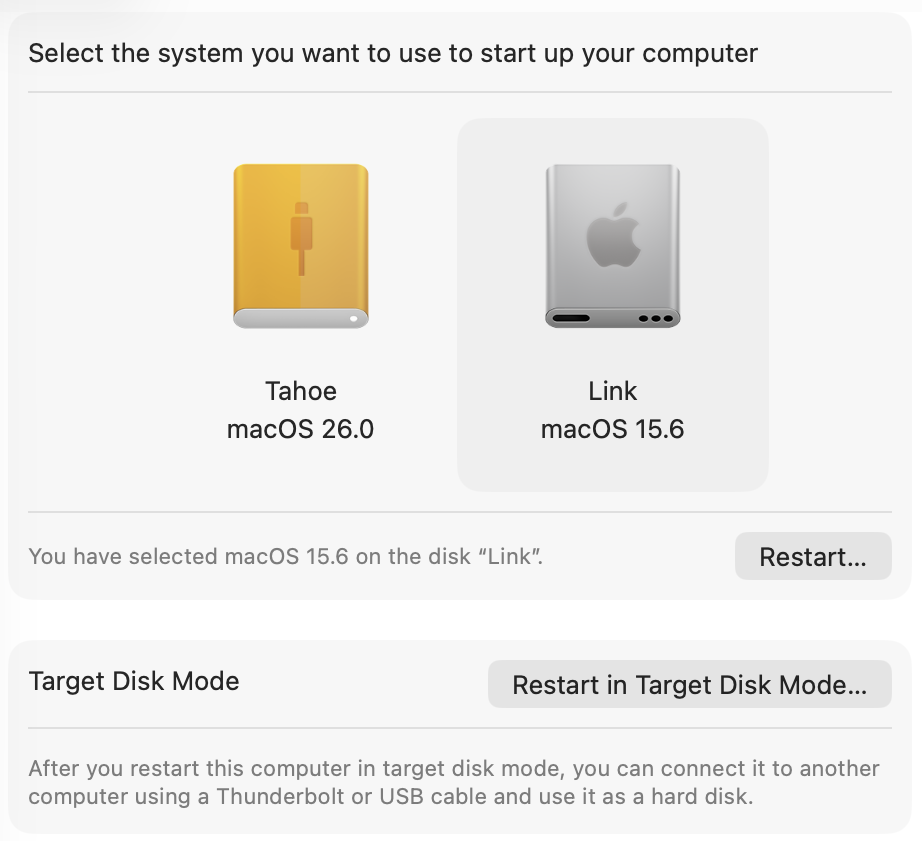
Sponsored by:
- DeleteMe: Making it quick, easy and safe to remove your personal data online.
- Squarespace: Save 10% off your first purchase of a website or domain using code atp.
Become a member for ATP Overtime, ad-free episodes, member specials, and our early-release, unedited “bootleg” feed!