In short
The hosts debate whether to pivot an audio podcast to video for Apple/YouTube visibility, then do a “follow-up” roundup of WWDC-related Apple OS changes (macOS 27 “Golden Gate” and iOS/macOS 27 betas), plus practical notes on Apple Intelligence, Spotlight indexing, the Passwords app’s weak-password fixing, and UI/design changes (window corner radii, Liquid Glass, icons).
Guest backgrounds
No external guests appear in the transcript. The “guests” are the hosts themselves: Casey, John, Marco, and others mentioned only as writers/sources (e.g., Adam DeMassi, Basic Apple Guy, Steve Trouton-Smith, Florian, Francois Lagunas, Hartley Charlton, Jason Paul).
Key claims
- Apple doesn’t “invite” them because Apple deprioritizes audio-only podcasts; they argue video would complicate production and isn’t audience-driven.
- macOS 27 Golden Gate reduces window corner radius vs macOS 26 Tahoe, improving content visibility, but creates mismatches with pill-shaped controls.
- Spotlight indexing may be pre-created in OS 26.6 so later upgrades (e.g., iOS 27) avoid full rebuilds.
- Passwords app can “agentically” fix weak/compromised passwords by using headless Safari to find and submit password-change forms, even without standardized URLs.
- Touch ID can be used for admin access in macOS 27; Siri waitlist can be bypassed via defaults write on Mac.
Notable examples
- Rivian “Utah Road Trip” demo typo: Francois Lagunas attributes it to makeup on his hands; footage was re-shot immediately; the software was later acquired by GoPro and powers Quick (Q-U-I-K).
- Tesla shipping CarPlay as a hypothetical pressure point on Rivian.
- “Mickey Mouse hands” cursor creases return in macOS 27.
Written by AI. May contain mistakes. Listen to the episode to check what was said.
Chapters
Tap a time to open that second in VOThe Dilemma of Video Podcasts
0:45 to 2:15
Hosts debate the pros and cons of transitioning to video podcasts.
“But it would so complicate the production of the show and the editing of the show that I don't think it's enough motivation for us.”
Press Access and Freedom of Speech
2:15 to 5:00
Discussion on the relationship between press access to Apple and the freedom it provides.
“Honestly, it does help to a degree that we don't have to worry about losing our press access because we don't have any.”
The Podcasting Landscape and YouTube
5:00 to 7:47
Exploration of why podcasters might pivot to video and the implications of that shift.
“That's like, how many shows, especially member specials, have you started, Casey, by saying, I think this is going to be a short one?”
Follow-Up on Tesla and Rivian
7:47 to 9:10
Hosts catch up on the latest news regarding Tesla's CarPlay and Rivian's vehicle developments.
“since they were prominently featured in the over-the-shoulder device close-ups, that caused him to fat-finger the title.”
Rivian R2 and Road Trip Demo
9:10 to 11:15
Discussion on the Rivian R2, its road trip demo, and user reactions.
“Like, this is sketchy, unofficial info or whatever, but keep an eye out for 26.6 and see if, I guess you'll have to do it the Marco way, like see if your disk space suddenly goes down by a lot.”
iOS Spotlight Index Speculations
11:15 to 12:50
Hosts discuss speculations around upcoming changes in iOS relating to Spotlight indexing.
“They did a 1.1 for Liquid Glass, but it's a good 1.1.”
Password App Upgrades
12:50 to 14:00
Overview of new features in the password management app regarding automatic updates.
“So let's talk about the password app, or the passwords app, excuse me.”
Introduction to Passwords App Discussion
14:00 to 14:22
The hosts introduce a discussion about the Passwords app and its challenges.
“So, yeah, as I said in the headline for this item, a reference to Casey's from our Nuggets of Wisdom ATP Dev member special, Passwords app does the hard thing.”
Inside Baseball on Show Notes and Mac OS
14:22 to 16:42
The hosts discuss their internal show notes and the contributions each makes.
“I think we've said many times that John is far and away the person, even when he had a jobby job, far away the person that puts the most effort into our internal show notes that we run the show off of.”
Recalling EWorld and its History
16:42 to 18:09
A nostalgic dive into EWorld and its relevance to Mac OS naming conventions.
“anything to do with the external show notes it's all casey 100 that's why all the bad jokes that there?”
Show all 50 chapters
Discussion on Microsoft Bob
18:09 to 19:28
The hosts share their experiences and thoughts on Microsoft Bob and its user interface.
Touch ID in Mac OS 27
19:28 to 20:41
The hosts explore the new Touch ID feature for admin access in Mac OS 27.
“This was back in the day that there was still at least some experimentation.”
Siri Updates and Defaults Command
20:41 to 24:10
The hosts discuss new Siri features and a command to bypass waiting lists.
“But every time you needed to elevate your privileges, eventually do the equivalent of sudo or sudo or whatever you pronounce that word.”
Liquid Glass and App Development Challenges
24:10 to 24:58
A look at the implications of Liquid Glass for app developers in Mac OS 27.
“Like the support for 26 and Tahoe is going to be kind of a thorn in app developer sides for probably at least another two years.”
Onboarding and User Preferences
24:58 to 25:57
Discussion on the onboarding process for Mac OS 27 and user input on transparency settings.
Onboarding and User Preferences
27:27 to 28:55
Discussion on the onboarding process for Mac OS 27 and user input on transparency settings.
“They also have all sorts of different materials that you can choose from to make sure that you're doing what you think is best for your body.”
Debate on macOS Window Design
29:20 to 33:50
Discussion on the corner radius changes in macOS 26 and 27 and their impact on usability.
“All right, this might get me in a lot of trouble, but there was a lot of consternation with regard to the corner radius of macOS Windows.”
The Mickey Mouse Hands Controversy
33:50 to 36:20
Exploration of the return of the Mickey Mouse hand icons in macOS 27 and community reactions.
“They fixed the corners and didn't fix the other parts that are next to the corners.”
Analyzing New Finder Icons
36:20 to 42:00
A detailed look at the changes in Finder icons between macOS versions and the implications of icon design.
“And just 26 was like, well, we think it looks good and it's visually harmonious, but nothing works.”
Improving Icon Clarity and Design
42:00 to 45:38
Discussion on the improvements in icon design from Tahoe to Golden Gate and the impact on user experience.
“And by refracting, they just mean like make it seem as if the edges of the thing are made of rounded glass so that when you see the things through it, it kind of bends the light a little bit.”
Touch Mac Features and User Interaction
45:38 to 49:12
Exploration of new touch features in macOS and their implications for user interaction.
“I am so happy to see the return of sharpness and contrast.”
Apple's Human Interface Guidelines Update
49:12 to 54:14
Analysis of the updates to Apple's interface guidelines regarding icon use in menus.
“and says, here's how it looks in 26 and 27.”
Discussing macOS Icon Guidelines
56:00 to 58:10
Learn about the clarity and confusion in Apple's icon guidelines for macOS menus.
iOS 27 Features and Animation
58:10 to 1:00:17
Explore the new pull-down animation in iOS 27 and its visual appeal.
“Also, much of what we were saying was way beyond macOS.”
iPadOS 27 Menu Changes
1:00:17 to 1:01:28
Discover the updates in iPadOS 27, including the left-aligned menu bar.
“Let's talk about tvOS 27, which in John's defense, there was almost no mention of in the keynote.”
tvOS 27 Hardware Support
1:01:28 to 1:02:39
Learn about the hardware changes and support dropped in tvOS 27.
“We're done with tvOS, which again, in John's defense, that makes sense.”
Sponsor: Quince
1:02:39 to 1:04:39
Promotional segment detailing Quince's diverse product offerings and quality.
“Now, you've potentially heard one of our former Quince spots or maybe on a different podcast.”
Apple's AI Tech Talk Insights
1:04:39 to 1:10:02
Get insights into Apple's AI architecture and their approach to privacy.
“Thank you to Quince for sponsoring the show.”
Apple's Privacy-Focused AI Architecture
1:10:02 to 1:12:18
Learn about Apple's AI models and their privacy architecture in Siri.
“And when we talk to models behind the scenes, those models are not any of the models that Google uses to power any of its customer-facing products.”
Apple's World Knowledge Service
1:12:19 to 1:14:06
Discover how Siri uses Apple's own knowledge service instead of Google.
“But Apple's World Knowledge Service, I don't know if we ever talked about it on the show, but like the rumor was they're making a service that knows things about the world.”
Challenges with Siri's Knowledge Index
1:14:07 to 1:16:30
Understand the limitations of Siri's access to real-time web data.
“And Dan Morin's had some things to say about that.”
Frequency Manipulation to Avoid Activating Siri
1:16:31 to 1:18:39
Learn how audio manipulation is used to prevent Siri activation during presentations.
“This is a good opportunity, Marco, for you to address the thing that people kept posting to you this week on Mastodon.”
The Effectiveness of Audio Filters
1:18:40 to 1:21:06
Explore the challenges of using frequency filters to prevent device activation.
“So I tried recreating this effect, even just like first in an audio editor.”
Apple Foundation Models Explained
1:21:07 to 1:23:40
Get insights into the Apple Foundation models and their collaboration with Google.
“I, you know, especially if you're playing over a phone speaker or something, I'm not sure it's going to work.”
Distilling AI Models: Apple and Google Partnership
1:23:41 to 1:24:00
Learn how Apple refines its AI models using techniques from Google's Gemini.
“And what that means is basically you, you have some finished model that someone's already trained and you, uh, you You know, you don't want to have to go through all the effort of training your thing the same way.”
Apple's Foundation Models Explained
1:24:00 to 1:26:30
Discover the intricacies of Apple's foundation models and their development.
“You know, if your competitor comes out with a better model than you, you ask that model questions and use the answers to train your model.”
Understanding Dense and Sparse Models
1:26:30 to 1:27:45
Learn the differences between dense and sparse model architectures.
Apple's Model Specifications and Capabilities
1:27:45 to 1:31:15
Explore Apple's latest model specifications and their intended use cases.
“the model is divided into many expert sub networks a small router network decides which experts are relevant for each token and only those exports are activated.”
Routing and Model Selection in Apple's AI
1:31:15 to 1:33:35
Understand how Apple manages model selection and the implications for user experience.
“And Apple does not give you that choice.”
Advancements in Device-Based AI
1:33:35 to 1:35:50
Learn about the innovations in handling AI models on devices with limited memory.
“I don't think there's a pop-up menu in Siri where you can pick the model that you want.”
Apple's AI Strategy and Future Directions
1:35:50 to 1:38:00
Delve into Apple's strategic approach to AI and its implications for future development.
“I don't know that either, but I just thought I'd throw that out there.”
Apple's AI Innovations and Privacy
1:38:00 to 1:39:18
Learn how Apple is using novel AI techniques while prioritizing user privacy.
Understanding Apple's Private Cloud Compute
1:39:18 to 1:40:52
Explore how Apple's private cloud computing ensures data security and privacy.
“Google and NVIDIA to extend our private cloud compute infrastructure to NVIDIA GPUs in Google's cloud while maintaining Apple's unmatched privacy guarantees.”
Trust in Software and Security
1:40:52 to 1:43:30
Discuss the importance of trust in software security and the measures Apple takes.
“And obviously the server that receives a request has to, of course, decrypt it because how could, you know, it has to know what you said to do the work.”
Apple's Shift in Server Strategy
1:43:30 to 1:45:54
Examine Apple's potential shift from its own silicon to using NVIDIA GPUs.
“Like, you know, like they write the software, they could lie and say it's end to end encrypted and just be lying through their teeth.”
Apple and NVIDIA's Complicated Relationship
1:45:54 to 1:47:38
Learn about the historical and current relationship dynamics between Apple and NVIDIA.
“And so XAI is renting whole data centers to Google.”
Travel Router Discussion
1:50:16 to 1:51:54
Discover the features and benefits of using a unified travel router for connectivity.
“By the way, if you're not an ATV member and you're like, oh, you're going to put State of the Union in overtime?”
Exploring the Unified Travel Router
1:52:00 to 1:54:16
Learn how a Unified Travel Router can enhance your internet connectivity while traveling.
“It's, imagine, like five or six credit cards stacked on top of each other.”
Personal Experience with UTR
1:54:16 to 1:57:36
Hear about a personal experience using the UTR in a vacation home setting.
“So this is one of those things that it is exceedingly nerdy.”
Cool Features of the UTR
1:57:36 to 1:59:04
Discover unique features of the Unified Travel Router, including remote camera recording.
“And what's interesting about the fact that the UTR can be on, on teleport is that if I wanted to, I could actually bring one of the Unify security cameras and connect it to the UTR.”
Transcript
Automatic transcript. May contain errors.0:00Marco Arment:I'm happy to report that we have not yet been classified by the U.S. government as dangerously capable. Therefore, you're still able to listen to our show.
0:10John Siracusa:Do you think that Apple has classified us as dangerously capable and that's why we aren't getting invites? No, that's not it.
0:17Marco Arment:I think the world of audio-only podcasts was never super high on Apple's list, but it sure is invisible now. I think they just don't care. I mean, we should probably talk about the idea of should we really be doing video? I don't think any of us are super into that idea. But, you know, if we want to continue to have that kind of visibility to the rest of the world, that might be a good idea. But it would so complicate the production of the show and the editing of the show that I don't think it's enough motivation for us. But I don't know. How do you guys feel about that? I don't want to pivot to video.
1:04John Siracusa:So I think there's a couple things here. It's a little rude of me to say this, but I think all three of us have faces for radio. And so there's that. Secondly, I know for me and for John, our physical spaces are not really conducive to doing video. Like, I have done it. It can be done. Every time I'm asked a guest on a podcast, which doesn't happen that frequently, to be clear, I'm not trying to like humblebrag here, but on the occasions that it does happen, I often ask up front, are you doing video for this? And annoyingly, the answer is typically yes. and if the answer is yes, I have to go through this whole internal dance of, do I really want to clean up the rest of the office?
1:47John Siracusa:Do I really want to just, do I don't want to do this at all? Like, it's just not for me. It's not what I enjoy. But the flip side of that is, I think it's clear that that's where attention is, certainly for Apple, though honestly, I don't really care if Apple pays that much attention to us. It would be lovely to be able to go to WBDC, but it's really not that big a deal. They're not going to pay it. Do you think we said suddenly start doing video they're going to pay attention to us no they're not well no no that's fair but my but they seem to ignore everything that is not video these days or print for that
2:17Marco Arment:matter yeah i mean and to be clear like we we were never like super reliably getting press access but it has really turned to zero in recent years like the last couple years where i think it was always zero i think the only time it happened was an aberration otherwise constant zero which again I'm fine with. Honestly, it does help to a degree that we don't have to worry about losing our press access because we don't have any. And so we are able to be really honest and really direct. That's more difficult. I know when I have had times in my career where I've had press access with Apple, I have worried about losing it.
2:53Marco Arment:I don't think that ever made me do anything majorly different from how I would have otherwise done it. But I'm sure it had to have a minor impact or some kind of like subconscious biasing that like i maybe i would soften things or or not go near certain things because i was afraid of of losing that access whereas when you have nothing to lose it it does give a certain degree of freedom but i don't know and going back to the video thing for a second maybe maybe a good guiding principle on this for us to keep in mind is like i don't think any of our audience has asked us for that but that's a very good point i think that The reason why YouTubers have pivoted into a lot of podcasts is because they're easier.
3:33Marco Arment:You don't need to write and edit nearly as much as you do for other formats that succeed on YouTube. If you can just have a casual conversation and do minimal editing and minimal writing, that is much easier. So there's a reason why YouTubers like it. And there's a reason why some podcasters enjoy it because they think they can get YouTube audience with their podcast. And that's, of course, very tempting. What podcast wouldn't like more listeners or more of an audience? And so I think that's why people are doing it. But if we are happy doing what we are doing and our audience is happy with us doing it this way and we're all happy with the numbers and how everything is going, I don't think we should feel compelled to have to push into an area that none of us seem like we actually want to do.
4:24Marco Arment:just for the idea of possibly basically trying to become YouTubers in a way that it seems like none of us really have that in us. Nobody wants to see us. It's a young attractive person's game. It's not for us.
4:40John Siracusa:We have, as is tradition, a whole pile of follow-up. However, I think we might make it through follow-up. Typically the week after WWDC, John basically explains to us that we are going to do a full follow-up episode. But John, to your credit, I think we're going to make it past follow-up. So let's see what we can do. Let's see how it lands. That's a bold statement.
5:02Marco Arment:That's like, how many shows, especially member specials, have you started, Casey, by saying, I think this is going to be a short one?
5:09John Siracusa:Every time. We don't have much to say about this. This is up there with, oh, I'm not going to buy that. Anyway, have you seen the R2 reviews recently? They're looking good. Anyway.
5:19Marco Arment:Waiting for the R3X and CarPlay. Tell me about it.
5:22John Siracusa:We need... I'm trying to get through follow-up, and I'm derailing myself. We need to have... I'm really rooting for Tesla. Hear me out. Hear me out. What? Hear me out. That's a hot take. I'm really rooting for Tesla Ellipsis to start shipping CarPlay, because I believe in my bones that the second Tesla ships CarPlay, Rivian's going to be like, oh, yeah, totes. We're right there, too. Absolutely.
5:46Marco Arment:But they want to control every pixel of their amazing experience. Don't even get me started. I think once, if Tesla ships CarPlay, have there been any, I know there was rumor about that a few months back, but is there anything more recently about that?
6:00John Siracusa:Not since like a month or two back where they said it's totally going to be talked about at WWDC and then it totally wasn't.
6:05Marco Arment:Yeah, well, maybe it'll be a fall thing. Maybe it's a never thing. I don't know. But yeah, I think you're right. I think if Tesla ever ships CarPlay, that will put a lot of pressure on Rivian to finally cave. But that's probably going to take years. I do think that the Rivian R2 is probably going to do what the Model 3 and Model Y did for Tesla, which is like it's going to make them all of their money, even though we're all going to think it's fairly boring. It's also going to be a really good overall car. And I'm personally very interested in the R3, but that seems further out. We'll see. Yep.
6:40John Siracusa:I don't know. I haven't, I've been away all this past week, as everyone knows, and I haven't looked too much into the R2, but the little bits that I've seen is that it is incredible and that the places where they, you know, had to skimp in order to make it cheaper, that's reasonable. And the places where you really don't want them to, you know, cut corners and cheap and be super cheap, they didn't. So it's supposedly real good. But anyway, speaking of Rivians, let's talk it's road trip. Jason Paul sent us a link to the Utah Road Trip demo typo, which is excellent. And the frustration on the dude typing at the iPad is just palpable.
7:17John Siracusa:You can see it right on his face. It's amazing. That's what you got to watch the video for. Just watch. You got to watch the guy's reaction after he does the typo. It's great.
7:23Marco Arment:Because he knows exactly what he did. And you could just see in his face, he's like, oh, crap.
7:27John Siracusa:Yep. Like, I can't believe this autocorrect just got me right now. But anyway, it's delightful. But Florian also wrote in to say, at the time of that ill-fated demo, I was working for the company that made that software. Francois Lagunas, the guy who made the typo, was the CTO and is still a dear friend. He swears to this day that it was the amount of makeup they made him wear on his hands, since they were prominently featured in the over-the-shoulder device close-ups, that caused him to fat-finger the title. From his recollection, they made the team shoot the do-over as soon as the live event ended, so that they had the footage as soon as possible to edit into the published, quote-unquote, recorded video of the event.
8:03John Siracusa:In any case, it worked out okay in the end. And the company ended up getting acquired by GoPro not long after. And that software still is the architecture powering the video editing featured in their Quick app, Q-U-I-K. Cool. It doesn't surprise me they did the recording right after. Basically, they've still got the same clothes on. It's the same room. It's the same sound. We're going to fix this up immediately. Don't go anywhere, guys. You've still got one more thing to do. So that's fun. And hand to make up. You don't think about hand to make up. But hey, if they're going to shoot your hands in a close-up, got to put on that hand to make up.
8:34John Siracusa:All right. There has been a little bit of rumbling. I've heard this kind of, not literally whispered, of course, but I've heard this kind of being talked about here and there. And so we can't credit this to anyone, but an anonymous person said, word on the street is that iOS, or I guess all the OSes. All the OSes, 26.6, yeah. Thank you. All the OSes, 26.6, actually create the new Spotlight Index. It just creates it. It doesn't use it. So if people update their devices when 26.6 is released, the index will already be there when they update to iOS 27. or whatever, 27, sorry. Yeah, I wonder if something is going to keep the index up to date.
9:10Like, this is sketchy, unofficial info or whatever, but keep an eye out for 26.6 and see if, I guess you'll have to do it the Marco way, like see if your disk space suddenly goes down by a lot. But as people were saying, it's going to take like, you know, it's been taking like a day or two to rebuild the index after installing like, you know, for example, iOS 27 beta. But if they do this and they roll it out in the 26.6 update, by the time everyone updates it's 27 and won't have to rebuild the index maybe it will just incrementally like maybe it'll just create the index and let it sit there and then when you install 27 os it will just incrementally update whatever has happened since it rebuilt the whole index but clever idea uh watch for that can i tell you guys how much i have to resist putting
9:53Marco Arment:it on my phone yeah because like because i'm traveling next week and so or this week and so i i'm like i'm gonna i'm resisting i should not do it in the car on the way to the airport yeah I should not have beta one on my phone when I'm about to travel. But oh, my God. I like honestly, I'm more tempted on my Mac because now that I've had it on my my like my travel laptop, which I am bringing with me. But now that I have it on my laptop, every time I go back to my desktop laptop, I'm just like, oh, my God, everything is so much lower contrast. The toolbar suck. Everything is blurry. The icons are dim.
10:30Marco Arment:Like, everything, like, once you are using Golden Gate for even a small amount of time, when you go back and see Tahoe, you're just like, oh my god, what were they thinking? Everything is so much better on Golden Gate. And it's not like, look, it's not perfect. There's still a lot about this design that I think they need to keep iterating, and I'm sure they will. but Tahoe looks like such an aberration when you when you see Golden Gate and get used to it even
11:00John Siracusa:for like five minutes and do you say that because of functionality because of the way it looks or
11:04Marco Arment:yes honestly I haven't had time to do much functionality with it yet it's really just the way it looks like the basis of just like how how like windows and toolbars and icons look and the menus without all the weird menu icons. They did a 1.1 for Liquid Glass, but it's a good 1.1. It's still most of the same style, but the tweaks they have made combine to make a pretty big overall improvement. Every time I'm back on Tahoe or iOS 26, and I see a bunch of blurry text fading under a background-less bar, I'm just like, oh god, please please let let me install these betas on my devices very very soon one more i gotta make it one more week so maybe i'll get to beta 2 but i'm after once beta 2 is out i'm i'm in that's it i'm
11:54John Siracusa:jumping in john when do you plan on properly running you typically don't run the betas at all is that right well no i'm it depends when i when 26 was coming up i was running all the 26 betas because i had to to get my apps to work in 26 uh once 26 came out i kept running the betas for a while and i said why am i doing this and so i switched to like the mainstream 26 uh and i've just been going back and forth on you know on that um and so yeah whatever i have like 26.5.1 or whatever the latest 26 is and on that same machine for reasons that i tuted about and think i mentioned maybe on last show i don't remember um i ended up having to partition the main drive so i could install 27 beta because if you install 27 beta on an external drive apple intelligence doesn't work because as we've discussed on past episodes, Apple Intelligence refuses to work if you boot from an external drive for reasons, I think supposedly security reasons, but I don't know the details.
12:46But anyway, that's just the way it is. So yeah, I've got 27 beta and 2651, both on the same machine that I just flopped back and forth between them.
12:55John Siracusa:All right. So let's talk about the password app, or the passwords app, excuse me. Hartley Charlton writes at MacRumors, the passwords app can now automatically update weak and compromised passwords. We talked about this some last episode. Apple describes the system as agentic, with Apple Intelligence and Safari securely navigating through websites, signing in and upgrading accounts to strong passwords without the user needing to intervene beyond an initial tap. The feature displays as a live activity when active. Yeah, the last episode, I was like, there's no way they could be doing this unless the websites support all of the, you know, well-known URLs for password changes.
13:28And by the way, ATP.fm now supports that as well. I mentioned in the last show, and I was like, oh yeah, we should do that because we have optional passwords now. Anyway, but surely that's how they have to do it. And like, well, how can they have a button that says fix these 10 bad passwords? Does it what does it expect all 10 of those websites to support this standard so it knows where the URLs are? And the answer apparently is, nope, it's just going to wing it. It's just going to say, well, this is the website. I'm going to I'm going to run a little Safari, headless Safari in the background.
13:54And I'm going to let this little LM powered agent try to find its way to the password change form and change your password for you. So, yeah, as I said in the headline for this item, a reference to Casey's from our Nuggets of Wisdom ATP Dev member special, Passwords app does the hard thing. Says, nope, we're just going to try it. We're just going to do it. So good luck, Passwords app. Good luck.
14:20John Siracusa:All right. So let me do a little inside baseball to introduce our next follow-up segment. I think we've said many times that John is far and away the person, even when he had a jobby job, far away the person that puts the most effort into our internal show notes that we run the show off of. And you can tell that it's sometimes abundantly obvious that this is the case because I'm going to talk now, starting now about Mac OS 27. And you look at the time that it takes for this chapter, these chapters. There's just lots of images. First of all, second of all, I still, I still bristle when you characterize me having doing far and away, most of the effort, blah, blah, blah.
14:56Just say, I do it all. just just say i know occasionally you'll put in an item i know occasionally marco puts in an item but honestly just say i do it all yeah i mean yeah we both know that going a totally different
15:09John Siracusa:direction i saw you being like no you know no casey does this marco does that meaning like broadly for the whole show but john cheesy peasy anyway so take a look at the time stamp everyone we'll see how long the mac os section i mean to give an example show me the text that you typed in the show notes for this week's episode. Excuse me, sir. Excuse me, sir. I know you're on vacation. I know you're on vacation. Not only that, but I am the chief transcriber in chief for WWDC. Mostly because Google Docs cannot handle both of us doing it at once. 100%. And I just backed off. I said, Casey wants to do this.
15:45He's going to be taping it. I said that, to be fair to Casey, he did do the notes transcribing for the keynote, but he didn't need to do it because I would have done it. But I'm still saying for first approximation, it's just...
15:54John Siracusa:it's all john oh my yes that does mean that mac os comes from but usually apple does that too because they like save ios for last when they used to go os by os because like ios is an important one and they save the good stuff to the end you know yep i hear you well anyway take a look at your podcast player hopefully overcast and see how long the the mac os section takes i still contend it's mostly just lots of images to take up a lot of vertical space but we'll see all i know is so i am the the the chief note taker in chief of the uh of the external show notes and i've got like 10 or 12 bullets for mac os 27 and i've got one each for ios ipad os tv os watch os so we'll see and that's a good example by the way casey does all of the external facing show notes even though i occasionally go in there and add a line or two casey doesn't even notice because when he's done with he never looks at them again also but i would never say that i have anything to do with the external show notes it's all casey 100 that's why all the bad jokes that there?
16:46That's Casey.
16:47John Siracusa:Also, very true. Rude, but very true. People sometimes attribute jokes to me, and I feel like saying, that's not me. That's Casey. All right. I'm going to stop derailing us or something. MacOS 27. I'll read the OS. Don't worry. Yeah, exactly. Adam DeMassi writes, John said, quote, Golden Gate does sound like a codename rather than a public name. Well, he might have been remembering that Golden Gate was actually the codename for Big Sur. It was also apparently the codename for eWorld 1.1 and you even brought receipts to this little endeavor yeah i do you guys know what eWorld is yeah wasn't that the like faux aol it's like an online service yeah i'm pretty sure i don't know this for a fact but i was having having used the world when it was new i'm pretty sure the company that made the mac app for aol which you probably aren't familiar with but anyway there's a mac app for aol and i think that company that made that app essentially white labeled it to apple and said here you can have the app and then apple just obviously changed all the strings and stuff and then changed all of the graphics e-world's whole idea was there was this like a i don't know how to describe the art style but sort of a an impressionistic kind of a cartoony art style of a little village with buildings and stuff back when everyone thought the internet was going to be a a giant gif of a town with little people in it anyway that was e-world uh and yeah e-world 1.1 golden gate i did not know that the big sir one i probably knew and then forgot so yeah there's only so many california names and they get reused either of you ever use microsoft bob no i don't know i've only seen magazine pictures of it
Read the full transcript
18:18Marco Arment:i i used it on i was i was traveling to new york when i was a kid once and and a friend who wasn't casey i actually have multiple friends who i would meet in new york um but i a friend had it on his computer and i used it for like a couple of days on this trip it was wild like so this was the thing where you know again this is like probably early to mid 90s back when there was still a lot of experimentation in like what should computer uis be uh and and what should be like the the metaphor the that structures all your applications and documents and everything together and microsoft bob was an experiment that microsoft did somewhere in the mid 90s that was like what if we just arrange things like in a house and you could go to different rooms in the house like very much a like you know like the the the early generation of nerds had probably you know done a little bit of acid one weekend and came up with this idea in somebody's hot tub and it's like okay well that's a cool idea it didn't work really well at all um but i believe that's where clippy came from i think clippy was like an offshoot of bob or clippy escaped bob yeah i mean but there was This was back in the day that there was still at least some experimentation.
19:32Marco Arment:Before we had all settled on basically the desktop with applications and files, there were other ideas. It wasn't that long after that that the Palm Pilot happened. And the Palm Pilot also had a totally different structure of how should your data and applications be structured, which actually was far closer to what we have on iOS today than PCs were. um but yeah e-world was e-world was a little bit after that i believe but it was that was back in the day when like nobody was quite sure what the internet would end up being for consumers yet and there were things like aol and compu serve and everybody wanted their own online service and that's i guess where e-world came in yeah i mean it was just 100 like the aol mac client except that they had that graphic or click on the house and then it would just i mean it was really skin deep.
20:21It wasn't like Bob where there was like a you know, there was very few graphics and things fit on a floppy disk. But you can find screenshots of it online. It had a pretty cool art style. But it did not last long, thankfully. Neither did Bob. I want to also say that this diversion into Microsoft Bob should not be counted towards my time. But I will take full credit for the derailment. Reclaiming my time.
20:45John Siracusa:You can now use Touch ID for administrator access in mac os 27 john what does that mean i always wondered about this i'm like well there must be some reason for it but if you had like a mac with touch id and you needed to like do something oh i want to drag a file out of the slash library folder and it's like it was a in the finder and be like well you can't do that because it's not owned by you but uh if you enter your password because you have an admin account if you enter your password we'll we'll you know do it for you with administrative privileges or whatever and it would always make you enter your password lots of other stuff it would be like oh you know autofill do touch ID or whatever.
21:19It would ask you for touch ID. But every time you needed to elevate your privileges, eventually do the equivalent of sudo or sudo or whatever you pronounce that word. It would always throw up a dialog box. You had to type in your password. And I was like, I don't know. It's just weird. For whatever reason, 27, you can touch ID to do stuff as admin. I don't know why they changed their mind. I'm glad they did. All right.
21:43John Siracusa:You can skip the Siri wait list. thanks to friend of the show, Steve Trouton-Smith. You can do a defaults right, which we will put in the show notes, and that will let you, I guess, just start using the new Siri. Is that right? Yeah, it doesn't show you the waitlist thing. I was going to say that it's fine for us to put this out there because just our super nerdy listeners, which are in the grand scheme of things, few in number, will know about this, but it has since leaked out into the media. So now everybody knows this. So hurry up and do it before Apple somehow disables this. I did it and got immediately into Siri.
22:13Marco Arment:Yep, and it's only for the Mac, though, to be clear. It only works on Mac OS Golden Gate. I mean, where are you going to write sooner defaults write command on your phone? Yeah, I would love to skip it on my test phone for iOS 27, but there seems to be no way to skip that yet, except, I guess, be Joanna Stern.
22:30John Siracusa:And speaking of Steve Trouton-Smith, he also pointed out that there is a change in Apple's documentation. The key UI design requires compatibility. Well, let me just read what it says in the documentation. The system ignores this key when you build for iOS 27 or later iPadOS 27, well, basically all the 27 or later OSs. So this is the thing that said, don't use Liquid Glass for my app, please. And Apple's saying, tough noogs. You're going to have to use it if you compile against any of the OSs 27. I think they might have said that last year, too. Like, oh, we have this key. You can put it in your app, and you don't have to upgrade to Liquid Glass.
23:03We'll just run you using basically the old metrics, all the old controls and the old everything. That time is over. Update for 27. No choice.
23:12Marco Arment:Yeah, I think we were adequately warned. and that kind of key usually only does last a year or two. So that makes sense. It's time to get on board. That being said, like, all of the problems of Liquid Glass from 26, like, if you were kicking the can down the road and you didn't want to deal with them with your app, you still have to deal with them. Because even if Golden Gate fixes some of your biggest, you know, nitpicks or issues, which, honestly, in that kind of context of, like, app developers maintaining things, it's not really going to help that much it's just nicer in certain ways but all the things about having different metrics for controls than iOS 18 and different behaviors and things, you still have to deal with that as long as you support iOS 18 or iOS 26 and for most apps that's going to be a little bit you're probably still dealing with supporting all these things for at least another year for me with Overcast I'm thinking this is probably a good time like this like once i launched my 27 version this fall i can probably drop support for ios 18 then but i that's even that's pretty aggressive given where the numbers actually are for most apps these days so i understand why people still want this key to work because then they can keep shipping one ui for their app instead of now kind of two and a half is what they'll have to do, but it's going to be a bumpy time.
24:41Marco Arment:Like the support for 26 and Tahoe is going to be kind of a thorn in app developer sides for probably at least another two years. Yeah, I hope you spent the last year working on that issue and not saying, oh, they gave me a key. I don't have to worry about it because if you did that, you're scrambling now. Yep.
24:58John Siracusa:All right. During onboarding, and I think this is coming from one John Syracuse, during onboarding for Golden Gate, the liquid glass slider where you decide how transparent you want it to be, well that's part of the ongoing of the onboarding process which is pretty interesting that is what that means is uh you know i always just assume everyone will just leave it on the default but now i wonder i mean maybe most people probably still leave it on the fault because people just hit continue continue continue i don't care continue later continue they just want to get through it but yeah it's part of it's part of like the the onboarding after you install or update to the os so everyone's going to at least see that slider and i'm sure apple will be monitoring where those numbers i say i'm sure but honestly i don't know what kind of metrics apple gathers about this stuff apple tends not to gather much info but we do know that they have some numbers so it's not really talked about it like what kind of anonymous usage info is actually gathered from like mac os and ios um yeah i hope apple is looking at where this slider goes i bet people will either not touch it or put it all the way to the right i put it all the way to the right and then some people put all the way to the left because they're young and they think it's cool
26:02Marco Arment:i i still this this slider still baffles me like it still just feels like we didn't feel like deciding so we're going to give you this zero to one floating point setting that changes one thing about liquid glass that honestly isn't even that much first of all it isn't that impactful of a change and second of all the range between zero and one of like how they look is not that different Most importantly, going all the way to the right does not make it opaque. There's reduced transparency for that if you want it. But just to be clear, the slider makes it less transparent. And all the way to the left is not fully clear either.
26:40Marco Arment:So whatever you want, this is kind of a weird milquetoast middle of the road kind of like, well, we can give you a little bit of control, but it feels like a very precise control. It just isn't. And by the way, they give you a picture of Apple Park with some crap floating on top of it. you know, like a glass style. Be aware that that picture scrolls. So you can scroll the picture just to see how does it look with an image scrolling underneath the controls. Oh, interesting. Before you move on from that, as Marco pointed out, the underlying setting, which is called NS glass tint amount, does go from zero to one.
27:15If you set it to a value higher than one, it is ignored. Unfortunately, this is the first thing I did. I'm like, oh, the slider goes from zero to one, 15. What does 15 look like? 15 looks like one.
27:26John Siracusa:We are sponsored this week by Lisa Lisa is tunnel visioned on making great mattresses And furniture that supports those mattresses And I really dig that Lisa mattresses They have all sorts of different options Including a pet bed Which isn't exactly a mattress But it's close enough And I think that's adorable You should see the little image on their website You should go check it out We'll tell you the URL at the end So you can see this adorable little puppy Sitting on one of their pet beds But they do mattresses for all sorts of different sizes and shapes of people, including children, including their Plus mattress, which has a little bit extra support and cushioning right where it counts.
28:02John Siracusa:And that's really cool in my book. They also have all sorts of different materials that you can choose from to make sure that you're doing what you think is best for your body. They offered to send a mattress to me so I could give it a shot and make sure that it's worth talking to you folks about. And so we needed a new mattress for Michaela, actually, and we ordered a natural hybrid mattress for Michaela, but I slept on it for a couple of nights before Michaela did, so I could make sure I'd done my due diligence. And let me tell you, I am a mattress snob. Most people I know are. This was a great mattress and a great night's sleep.
28:34John Siracusa:And what's great about Lisa is all their mattresses have a lot of these same qualities. They have a lineup of beautifully crafted mattresses tailored to how you sleep. Each mattress is designed with specific sleep positions and feel preferences in mind. They have a little quiz you can go and do, if I'm not mistaken, and you can check out what is the best mattress for you. It's really, really cool. So, if you're interested in this, go to Lisa.com for 25 % off select mattresses, plus get an extra$50 off if you use the promo code ATP, which is exclusive for our listeners. That's L-E-E-S-A.com, promo code ATP for 25 % off select mattresses and an extra$50 off.
29:13John Siracusa:Support our show and let them know we sent you after checkout. Again, lisa.com, promo code ATP. Thank you to Lisa for sponsoring the show.
29:25John Siracusa:All right, this might get me in a lot of trouble, but there was a lot of consternation with regard to the corner radius of macOS Windows. And, John, would you like to just briefly recap why perhaps you, or if not you, others were upset about this in macOS 26, please? Yeah, they They made the corner radius very large, means the corners were very, very rounded, which means there are a larger number of pixels that you don't get to see in the corners of a window. And this is especially important in Tahoe because the way the UI works is that if you're looking at a picture, like an image or something, the image goes edge to edge.
30:04So you're losing all four corners of that image if that image is in a window because all four corners are curved. As opposed to like go back...
30:13Marco Arment:But John, it respects your content. Yeah. Go back like several versions when there was an opaque tile bar. The title bar had rounded corners. But when you viewed an image in a window, the image started where the title bar ended. Like under the title bar is where the image started. And those were sharp corners because the title bar ended. And then there was just a right angle and you could see all the pixels in the image. And then when you went to the bottom of the window for many, many, many years in macOS 10 slash macOS, the bottom corners of the window were sharp as well. So if you put an image in a window, you could see all the pixels in the image.
30:44and apple has slowly eaten away at that and 26 was like we're taking the whole corners like there could be something there could be a big thing in there there could be a that could be like a little signature that you wouldn't even see in the corner of like a picture if it's a painting they were just chopping it all off um and some people didn't like how it looked uh some people did like how it looked but the bottom line is the job of the window is to show the content and it annoys me when they decide you don't need to see the corners uh and they decided that because of concentricity which is they had all these little you know their controls had semi-circular end caps on them and they could make the corners match the radius of the semicircular end caps such that if you put a central point where the center of the corner is and you traced out an arc the arc on the window edge would exactly match the arc on the controls that's concentricity where you'd see concentric circles drawn from a central point and then macros 27 as we discussed last episode uh decreased the corner radius of the window so you can see more of your stuff and there was much rejoicing and many people who were there live have said uh since we recorded last week that it was cheering from the live audience for the fact that they fixed the window radius so it's not just me but as i pointed out last episode uh they you know i'm i'm i endorse this change uh they made a smaller corner radius on all the windows but it no longer matches the corner radius on the floating controls and so now it is the exact opposite of concentricity you have two very different corner radii radiuses uh and yeah it's hard anyway all this is difficult for me to explain graphically so i'm glad that sammy cito posted some images to explain this and we'll put this link in the show notes you when you look at this image you'll understand what i'm talking about 26 you're like oh everything looks nice and everything matches in 27 doesn't match anymore to be clear i totally endorse the change in 27 but it is fighting against the other parts they didn't change in liquid glass which are the little capsule shape buttons yeah and i think this is
32:36Marco Arment:one of those cases where the i can see why they went for the tahoe design because from a like visual isolated context it does look better the problem is it doesn't work better in practice with computer uis and that is i think where where apple has gone a little bit too far in you know when their designers get a little bit too too pure and theoretical about things this is kind of their failure mode and this has happened numerous times over their history with numerous designers in charge too and you know fortunately they tend to eventually correct those things and in this case it took a year but they corrected it so i'm glad to see that like there is no question in my mind like yeah when you're looking at a screenshot the mac os 26 version does look better but unfortunately design has to interact with the real world and sometimes that requires compromises on the pure ideal aesthetics and you have to actually run into you know what people actually need in reality yeah again you have to ask what is the job of a window um and this the design they have now is awkward and bad because also the little floaty buttons and toolbars were also designed poorly uh with you know if if you design from the start you would say okay the job of the window is to show the content and let's let everything fall from that and what they've done is taken a design that totally didn't do that job and fixed one part of it without fixing the other so of course they don't match it's still better than it was again i still endorse the change but it just highlights hey we fixed one thing but looks like maybe this entire idea was bad because now we fixed that one thing and we see some other stuff that also looks bad with it and needs to be fixed and it's going to be a while before they rewind all this stuff but baby steps one thing
34:21John Siracusa:at a time i gotta tell you based only on these screenshots i agree with the slug of this post which is y 'all better shut up seriously is this what you really want to see window corners and And based on this screenshot alone, it looks freaking terrible in Mac OS 27. It looks awful. Yeah, because it's a mismatch. They fixed the corners and didn't fix the other parts that are next to the corners. You know how you can fix the other parts that are next to the corners? You can make those radii also match the, you know, like there's a way to do it, but they didn't do it.
34:50Marco Arment:Right. Like in this case, like it's a little bit easier on the search box compared to the toolbar. But like, but yeah, like the search box, the reason why this is a mismatch is that they made the search box and the toolbar pills instead of round rects. So, you know, basically like what we used to call ovals in kindergarten. It's like they are, this is a text field that is a perfect oval around the left and right side. It's not an oval. Don't get the geometry people on you. Well, okay. Whatever. But it's close. It's a capsule shape. It has semicircular end caps on a rectangle. Right. And the problem is, as the height of that increases, that means the radius has to increase too.
35:31Marco Arment:So it does significantly constrain your design in a way that, well, now you have to have very, very large corner radii on the window to match all these pill shapes or capsule shapes of the controls. In previous versions of macOS, those weren't exact pill shapes. They were round rects. So yes, they had rounded corners, but the entire left and right side didn't have to be a continuous curve. So that gives you way more flexibility. And search fields were pill shapes at one point. But the way they made that work is they just put bigger margins around them. The corners of the window were practically square and the search field was pill shaped back in the day.
36:10They just moved it farther from the edges so it didn't look weird. I mean, just again, it's about holistic design. Design is like everything together. Does it work well? Does it look good? does it look harmonious? And just 26 was like, well, we think it looks good and it's visually harmonious, but nothing works. And so they're just trying to fix it without changing everything. And you get 27.
36:31John Siracusa:I think what, what has tentatively sold me on 27 being the improvement is what Marco said a couple of minutes ago that, yeah, this looks worse in, in this microcosm or in this, this like, you know, zoomed in view, but it actually affords you a much better view of the content behind all this. So maybe they really are respecting our content. Who'd have thunk it? All right, 9to5Mac has noted that the Mickey Mouse hands are back in macOS 27 Golden Gate. And they also indicated or said, the world is healing. Do you know about the Mickey Mouse hands? Was this news to you? No, we had talked about that, I think at some point, semi-recently, I guess when 26 came out.
37:09I still hate the hand icons in 26 and 27. They didn't change the shape of the hand icons much. I think maybe it looks like the pointing finger is tilted a little bit. But yeah, what we're talking about is Mickey Mouse, the character, wears white gloves with like three little creases on the back of the hand. And for I don't know how long, for ages and maybe since classic macros, I think so. The various hand cursors, the pointing hand that you click on links with in a web browser, the big hand that when you hold on spacebar in Photoshop, you can move the canvas around. And the grabby hand where it's like grabbing something.
37:41all those hands look like a white glove because they were white black outline with a white cursor with three little mickey mouse creases on the the back of the glove and in 26 they took off the creases because i don't know that they didn't want it to be whimsical anymore in 27 they brought them back which to me seems petty but i endorse it that's incredible uh all right in mac os 27
38:07John Siracusa:there are a bunch of new icons. And I don't know, they're different. I don't know what else to say, but the Finder one, I don't know what they're doing here. The basic Apple guy says, honey, the Finder icon sucks again. And I disagree. I know what he's getting at. And we'll get more from the basic Apple guy in a little bit. But if you go to the link we'll have in the notes, you can see the Tahoe and Golden Gate Finder icons. And the main sin of the Golden Gate Finder icon is they made the Bluetooth light again. I don't know who's obsessed with making a light blue finder, but just back off, man.
38:39Like, it's got to be like a deeper blue. That's the way it's supposed to be. But they also changed the shape of the profile face. Like, the finder icon, which used to be the macOS icon, is like a face that is, you know, the two eyes and a smiley face that looks like a face head-on, but it is blue on the left and white on the right. And the right-hand part of it also looks like a face in profile. So it's kind of like a two-face thing. Some people call it two-face. anyway uh in tahoe the profile face had a completely vertical line under the nose of the face and now it is more curved the original version of this was more curved so i think the golden gate shape is actually an improvement the color is just too light so maybe i should file a feedback on that just darken up the color you're on the right path just darken up the color and maybe extend the white part to the edges of the squircle and then maybe just give us back the
39:31Marco Arment:old icon yeah i think at that point you're at the old icon which honestly is better yeah well not really because this there's been so many variations if you look at the original like classic mac os one from mac os 7.6 or whenever it first appeared it wasn't the finder icon it was the booting up mac os 7.6 like splash screen face it had a vertical line that extended past the bounds of the thing it has looked very different over the years so anyway i think golden gates design is
39:55John Siracusa:better than toves i just missed the color i think we just need steven hackett to get upset about this and then it'll get changed. That's how it worked last year, right? Something like that. All right. And then we have a bunch of other ones by Basic Apple Guy and they are side-by-side in their post. And I don't know, do you want to go through these? Do you just have broad comments about them? Yeah, we'll go. I mean, again, follow the link to Basic Apple Guy's post about this because he posted a ton of images that show Tahoe versus Golden Gate. And I just want to make the point that we talked about this back when Tahoe came out in WWC 2025 with the advent of Tahoe and Icon Composer.
40:29and just to recap they introduced a new format for icons which is dot icon files it's amazing no one had ever used that extension before but apple got it dot icon and it's basically a bunch of resources in a little package and instructions for compositing them and the resources can be bitmaps or vector images and what this means is if you go into an application package on tahoe and you dig around in there you're like where's the icon you probably won't find a bit mapped image of the icon unless it has one of those for legacy reasons or fallback reasons what you'll find are these icon assets shoved into an asset catalog that have the ingredients of the icon and they are composited in real time by mac os to make the icon and part of the reason they do that is because tahoe introduced this idea of uh on mac os anyway and i guess on ios as well of icon themes where you can have light mode, dark mode, the clear icons.
41:24All that is doing is changing the formula for how those pieces in the dot icon files are composited to make the final icon. So ideally in Apple's world, you just have a bunch of vector shapes and a bunch of instructions for compositing them. And then we can make that icon look good in light mode, in dark mode, in clear mode, and in you know whatever um another thing that you can do by moving to the icon format to this recipe and ingredients composited together is that you can change essentially all the icons in every single one of your os's without having to redraw your icons so that's what we're looking at here as far as i can tell pretty much all these icons and basic apple guys posts are the same icons as in the same contents of the dot icon files that were assembled into the assets dot car file and whatever this like the resources are the same they didn't redraw the icons all they're doing is changing the recipe for how they're composited and you would think how big a difference could that possibly make obviously the finder icon has changed we just got done saying that the shapes are different but these icons we're looking at our notes and most of the ones in this blog post that we'll link i think they're basically the same icon but changing the compositing makes the world of difference marco mentioned it before when he said that um when he upgraded 27 then when look back at 26 and everything looked blurry these are way zoomed in in our show notes so i'd encourage you to like move back from your screen or like shrink them down or whatever but the smaller these icons get the you know the more they are icon size and not blown up to this giant size the more you can see how blurry tahoe's compositing was like everything is in this weird haze and all the edges are blurred and take that same resource and render it in the new way and there's two things about the new way of rendering one crisper edges and two they added a new refraction feature to the recipe where each individual layer can say, should this layer refract what's behind it?
43:14And by refracting, they just mean like make it seem as if the edges of the thing are made of rounded glass so that when you see the things through it, it kind of bends the light a little bit. Anyway, I think for the most part, the Golden Gate versions of every single one of these icons is an improvement because things that were blurry and indistinct and low contrast in Tahoe become sharp and higher contrast. And the few cases where they added refraction, like the freeform icon, I think look great, especially at large sizes. Small sizes kind of lost. But what do you think? Do you think this is an upgrade or a downgrade?
43:48Oh my God.
43:48Marco Arment:I think this looks like an eye test. When you look at the Tahoe icons and then you look at the golden head icons. One or two? Yeah, exactly. The Tahoe icons look like I don't have my reading glasses on and i need to put them like and then you put the and then you look over at golden gate you're like ah crispness like maybe look alan dyer seems like he's about in his 40s maybe he just needs reading glasses and he doesn't know that yet it looks like when you when you see tahoe it looks like eye strain this is part of what i like this is part of why i am so anti blurry text ever appearing in a ui because when you are of middle age and you need reading glasses when you see blurry text, your eyes, like you instinctively think, I have to squint or, you know, look through the bottom of my glasses or whatever it is, like whatever your accommodation is for seeing things more sharply.
44:42Marco Arment:You know, you kind of instinctively think I'm the problem and you and you do whatever that accommodation is instinctively and then it doesn't get fixed. And that's what eye strain is. And so when you look at blurry text in a UI, it reminds you of eyestrain and then also can cause eyestrain, which is one of the many reasons why that's a bad idea in a UI design. And so to kind of do that across the whole system in a broad, diffuse way, to have everything be a little bit soft and blurry all the time is not a good design. So I am, again, very thankful when I see these icons like, ah, crispness. And you know what?
45:30Marco Arment:When I have to tweak my overcast icon to work well in 26 and 27, that's going to be a little bit of a pain in the butt. In this case, I don't care. Worth it. I am so happy to see the return of sharpness and contrast. And that's the overall message here. Some of these designs probably need a bit more tweaking to look as good as they can. But overall, it is way sharper and higher contrast. You don't have to do anything to your overcast icon. That's the point. Like the new version of Icon Composer will show you, if you just open up your icon file that you've been using in Tahoe, it will show you in the app, here's how this icon looked in Tahoe, and here's how it's going to look in Golden Gate.
46:15No changes to the icon. Again, this is just changing how the software composites your stuff. Now, you can change. i think the one thing they added in 27 is you can flip the little bit for each layer that says refraction yes no and you can change the amount of refraction and angle all sorts of other crap like that but i think that is the only new feature but like i said apple didn't update for the most part didn't update these icons the exact same icon will look different in 26 than it does in 27 which is you know it's wild but it's like a fallout of them deciding that their icons are going to be ingredients and recipes instead of baked in bitmaps now there's nothing stopping you from making your icon an icon composer and just putting in one layer that's 100 opaque bitmap like you can still do that there's no one stopping you from making a bitmap icon lots of apple icons incorporate bitmaps in them but it seems like if you look at all of apple's icons they prefer you just use a bunch of vector shapes and that gives apple the freedom to essentially change the look of every single icon without asking developers or their own developers to change anything about their icons they just change the rendering now it's it's somewhat limited they're not going to change them in radical ways but uh this is the thing to keep an eye on it's a it's a bold new uh regime for icons going from like photorealistic bitmaps in 10.0 to uh you know a bunch of ingredients and recipes and already from 26 to 27 26 they rolled out 27 they're changing the look so i wonder if next year we're gonna have a thing an icon composer that says hey the same icon with no changes here's how it looks in 26 here how it looks in 27 here's how it looks in 28 and don't remember remember you also have to check what is light mode dark mode clear mode is that all of them or is there one
47:50Marco Arment:more i'm forgetting yeah it's light dark and like kind of yeah uncolored clear yeah so fascinating i think some of the icons are downgrades i think the little robot guy looks a little bit worse but uh he's a pale shadow of his former self anyway well that's the thing like i like when i saw my overcast icon for the first time on on 27 i was like oh that's a little it's a little bit too sharp in certain ways because i had designed it to try to fight against all that softness in 26 so like there are certain you know colors or layer effects or things that like i might dial back slightly for the 27 version so that it looks more normal um you know it's kind of like when you see like when you are when you have like stage makeup on and then you go into the regular world and you look ridiculous you know like in different contexts you might actually make different decisions depending on how it is being rendered and where so i i think you can make tweaks to the recipe on a per os basis but i'm not entirely sure yeah i'll have to see i'm pretty sure you can't include multiple icons for different os's i did that that thing that i talked about in the past episode where i bent over backwards to use my little bitmap icons on pre-26 and i'm going to still keep doing that if i can i'm not i i know icon composer lets you tweak the icons for different modes like oh do you want to make a tweak that's in dark mode only like in dark mode you want to turn off this layer effect but light one you want to turn on but i don't know if it lets you do that on a per OS basis.
49:11I know it previews your icon and says, here's how it looks in 26 and 27. But, and I think there might be one other, one or two other things they added besides refraction. I think they might have let you do like inside, outside glint effects on stuff. Anyway, brave new world of icons.
49:27John Siracusa:All right. There's been a lot of chatter and understandably so about how Apple is basically quarterbacking to get touch Macs ready to rock. Curtis Hard writes, in Mac OS 27 and a scroll view, has a new refresh controller, which takes an NS refresh controller, which allows native Pult to refresh. Try it in Safari on a web page. Yeah, that's going to feel so weird to do on a Mac, but you know, touch Macs, you got to do it. Steve Charlton-Smith appears yet again. AppKit isn't just getting touch gesture support, but NS toolbar now has iOS style fluid morphing animations when used with a touchscreen too.
50:02John Siracusa:Long presses trigger a right click, momentum pinch and scroll work great. Very clearly telegraphing upcoming touchscreen Macs. Anywhere you see a liquid glass stretch or highlight effect on ios now functions in the same way on mac os when used with touch here's calculator on mac os showing off some of the fluid interactions and we'll put a link in the show notes it has this tweet or toot or whatever they're called and a couple follow uh have gifs that indicate what what steve is talking about yeah although willy effect where like on your phone when you like i don't know people don't do this they just press buttons but if you were to press your finger on the button on a phone and move your finger around you can see the button kind of stretches and follows your finger all that stuff is in mac os controls if it when used with touch and they added a whole bunch of new apis a whole bunch of new things you can set on it to say do you uh it was recent this isn't the notes because it just came out today but i was recently showing that there's keys that you can set to make all the menus look essentially like ipad menus in you know and if you pull down the menu and keep your finger down on the screen and move it around you'll pull the menu a little bit i don't think those effects really add anything, but they're part of liquid glass.
51:04That's the liquid part of it. I mean, they don't take away too much because I feel like they don't bother you if you don't intentionally trigger them, but I think it's just basically a waste of time. But anyway, all that's coming to the Mac. So do you plan to touch your screens? Oh no, definitely not.
51:18John Siracusa:Well, John, that's not even a question for me. I don't plan to, but there are definitely occasions, especially if I'm like flip-flopping between iPad and Mac, which doesn't happen often to be fair, but it does happen. And there's definitely occasions that I've like started to reach up to like swipe at something just briefly. I don't feel like, and here I hear this is Casey one-on-one. I don't feel like there's anything that this solves in my life. Like it would be nice, I guess, to occasionally be able to do this, but I sitting here now, I don't yearn for a touchscreen Mac that said, uh, when I don't remember what report it was and I'm sure we talked about on the show, but when they talked about how when you use touch there'll be like contextual menus or something like that that pop up like path style like around your finger i'm sure there's a german controls that are more suited to fingers than to mouse blenders right exactly that could be interesting it could be really cool so we'll see what happens yeah i mean it's the type of thing that once you start doing it you can't go back like that's why everyone wants it and judging by my children's laptop screens they're constantly touching them even though they're not touch screens so i guarantee both my kids will be touching their screen like the same amount they do now which is to say all the time you can't i hope they put that oleophobic coating on the screen because that will just help me keep their screens i'd be less gross but uh i won't do it because i don't tend to use laptops and if i did use a laptop i wouldn't do it because i don't want to get into that habit because it makes the screen uglier for me but you know i have an ipad i touch it all the time so uh yeah once once you go touch
52:43Marco Arment:you can't go back i wonder like you know because i as i've as i have with my most recent um like laptop laptop i have the the nanotexture screen and i've told i've said on the show many times how much i absolutely love nanotexture and i i don't plan to buy any any future laptops without it as long as if they are offered with it and i wonder like you know one of the downsides of nanotexture is that it is harder to clean um and you know it does it just like the the other type of screen i guess the glossy type of screen it does get those like keyboard imprint uh lines in the middle of the screen that are...
53:19Marco Arment:Oh, yes, yes, yes. ...that slowly become impossible to clean. I don't know how to clean those. Once you get to a certain point of those imprint marks, they seem to be permanent. And that's always been the case even before nanotexture. I wonder, when Apple says nanotexture, that refers to a few different processes they've had over time. The original Pro Display XDR was the first one, and that did one version of it. and then the current Mac laptops that offer it are a different version of it, and then the iPad Pro that has it is yet a different version of nanotexture. I wonder if maybe they would move to the iPad Pro version of it for the Touch laptop and whether that would be easier to clean.
54:02No, they'll just make a fourth version. They'll just keep refining it. Yeah, I imagine it'll be more like the iPad one, but maybe a newer version.
54:09John Siracusa:All right. Apple has updated the human interface guidelines So the HIG for menus, it says in the HIG, use menu item icon sparingly and with purpose. Icons allow people to find menu items more quickly and help clarify what selecting an item does. Use an icon to highlight the most common actions and key features of your app, file system locations, connected devices, visual concepts like rotating or flipping an image, and user-generated content like folders and documents. Don't display an icon if you can't find one that clearly represents menu item. And they give a very curious example of the seven days of the week where they've chosen odd choices for icons for each day of the week with a little gray X below it indicating don't do this.
54:49John Siracusa:And then they have a different version that's just the text for the seven days of the week. And they have the little green checkmark. Yes, do that.
54:55Marco Arment:Yeah, I love that. I love that the don't do this is just Tahoe. Yep. The idea is you have to have come up with an icon for every item. So good luck. Yeah. Like this thing we literally told you a year ago, this is the right way to do it. And now we're saying this exact same thing is the wrong way to do it. And just this is the clarifying from last episode. We were like, well, is there a way to turn off the icons? Is it some kind of user setting? Is it a developer choice? I'm pretty sure it is only developer control. I didn't see anything in the UI for it. But regardless, the important point is regardless of how this is implemented in terms of who gets to decide which icons appear where, apple's advice to developers has now reverted essentially to its pre-26 advice which is don't put an icon in every menu item that's not what we want you to do so the put an icon in and again the 26 interface guidelines also did not say to put an icon in everything we read them on the show to clarify but they were like but you know put them on most stuff i guess and repeat them in this weird way it was like the guidelines were incoherent last time the guidelines didn't say you must put an icon in every menu item but in practice what apple did was basically put an icon on almost every menu item and it was ridiculous and the advice was vague and didn't make it clear when am i supposed to use icons or not should i copy what apple's apps do like the 26 guidelines didn't give developers enough information to know what they should do the earlier guidelines for all the other years of the mac os did give clear advice and now the advice is once again clear and not only is it clear it is the pre-26 advice which is don't put icons everywhere they do say in a subsequent part of this uh to as they say apply uniform visual treatment across menu items in the same group for visual consistency and balance provide icons for all menu items in a group or none of them and it's showing like if there's a group of menu items like like a divider and then there's menu items for doing stuff with windows like move and resize or full screen or whatever if they have icons to let you know like when this is the tile thing that tiles to the right half of the screen this is the thing tiles to the left or whatever they should all have icons and not just like one or two of them because these are all commands where icons are useful so again the advice is clear default your default should be no icons but if you think an icon as they say will help clarify what selecting an item does then do use an icon but all icons that do that similar all menu items that do that similar thing should also have icons so yeah back to sanity wasn't there a convention in the past maybe i mean maybe i just like misinterpreted this wasn't there a convention in the past that menu items in mac os would have an icon only if they matched a toolbar item in that app and it would be the same icon as the toolbar item i think the the hig might have said that at one point but i don't think that was uh strongly suggested for a while maybe maybe it was in the pre-26 ones but yeah the tool thing with toolbar icons is they have changed so much over the years that i think they probably just deleted that advice in menus if it was ever there just because it adds confusion because like well you know in the current design system it's impossible to do that because the pictures on the toolbars would never fit in toolbar icons like if you think about the toolbar images and like mac os 10.0 those wouldn't fit in menus especially in the pre-retina days this was just literally impossible but yeah all right that is the end of the mac os section you can
58:09John Siracusa:look at your time stamp now and compare it to where we were so very very long ago don't forget to subtract the Microsoft Bob time.
58:17Marco Arment:Oh, yeah. That's very important. Also, much of what we were saying was way beyond macOS. Like, the icons are universal. Whose side are you on? I'm just saying, look, we're talking about Apple OS's 27 and Microsoft Bob. Well, that was the macOS section. The icons were, yes. We have the same problem as Apple. Maybe we should have just talked about improvements, trust and safety in AI.
58:37John Siracusa:Well done. All right. With regard to iOS 27, Mario Guzman writes the new pull down animation for Sierra Siri AI and iOS 27 is pretty nice. It's basically the old pulse refresh animation from iOS six. Nice, fun, fluid. The animation will also start from where you drag your fingers. So it won't always be animating in from the center. And at a glance, this looks pretty great. Yeah. Check out the movie and the toot that we'll link in the show notes is basically you pull down from the top and it's like, you're pulling a black blob from the top, but like it bends down the top of the screen. And once the black blob gets far enough away from the top of the screen the screen like snaps closed behind it and that blob becomes the floating siri thing i'm still not a big fan of the glossy black transparent refracting look for siri stuff but it is at least consistent and it is mostly legible and these little fun bits where you get to pull out a little blob of ink are also fun All right, that was the end of the iOS 27 section.
59:33John Siracusa:Let's move on to iPadOS 27. And Steve Trout and Smith writes, the iPad's menu bar is now left aligned and can be set to display permanently. When hidden, it will still show the app name so you know which app is currently front most. yeah whoever was insisting we can't just put a menu bar on the ipad like isn't that surrendering it's like what if we center it then it's like we're doing something different and then 27 said just put just left align it like just the menu bar is left aligned just do it uh and make an option to have it permanently visible and when it's not visible make sure you show the app name it's like there's just slowly like we you know we tried for a decade or whatever to come up with a ui that's better than the mac ui we couldn't do it not to say it's not possible but all i can say we didn't do it.
1:00:13So let's just do the things we know work.
1:00:16John Siracusa:That is the end of the iPadOS 27 section. Let's talk about tvOS 27, which in John's defense, there was almost no mention of in the keynote. We should talk about hardware support, which is to say tvOS 27 drops support for the Apple TV HD from 2015 and the Apple TV 4K first generation from 2017. As I have lamented many times recently and having come fresh off of a vacation where I brought, I believe it's the HD from 2015, whatever the, I think this is the first one that allowed for apps. Wow. This is an old Apple TV and it shows. Yeah, it's not great. And I would love, as I've said so many times, I would love to trickle down and upgrade my travel slash tailgate Apple TV to something nicer.
1:01:01John Siracusa:And apparently this is as nice as it will ever be because it will not get the tvOS 27. and I'm not really sad about that since it's already hurting so bad, but give me a new Apple TV, Apple, please. Please. I want it. Please. I'm kind of surprised that the Apple TV 4K got dropped, but then I saw what year it came out. I was like, okay. Yep. It seems so recent. Apple TV 4K, that's the new one. No, first generation was 2017. Yeah. Yep. Turns out Apple TVs don't come out that often. Yep. Who knew? Watch OS 27. We're done with tvOS, which again, in John's defense, that makes sense. Watch OS 27. Let's also talk about their hardware support.
1:01:34John Siracusa:uh hartley charlton mac rumors says apple confirmed that the only apple watch models compatible with watch us 27 are series 9 series 10 series 11 ultra 2 ultra 3 and se 3 initially they had incorrectly said that the series 9 was not supported but that was an oops it is supported so again 9 10 11 not the ultra 1 but yes for ultra 2 and 3 and yes for the se 3 when they said the 9 wasn't supported i'm like really jeez this is harsh i'm glad the 9 came back in but still this This is, I mean, Marco would know better than I. Is this the most harsh hardware cutoff ever for a watchOS release?
1:02:08Marco Arment:Yeah. And I think that's, it's a casualty of the very slow update pace they chose for the Apple Watch SoCs. You know, as we talked about in, whenever new Apple Watches come out, they have gone like two or three versions in a row having the same processor on Apple Watches. So this is what happens. It's like all of a sudden when you want to cut off a processor that was used for three generations in a row, you end up slicing off a whole lot of models. So that's why this is happening.
1:02:43John Siracusa:We are sponsored this week by Quince. Now, you've potentially heard one of our former Quince spots or maybe on a different podcast. And you might think to yourself, well, Quince just does clothing, right? Oh, no, my friend. Oh, no, not at all. Not only does Quince do clothing for people who buy men's clothing, for people who buy women's clothing, but they do child clothing. In fact, Declan got some stretchy pants, some kind of sweatpants that he really, really enjoys. And Michaela got this absolutely adorable long-sleeve dress with hearts in different colors all over it and pockets, which I don't know anything.
1:03:19John Siracusa:And even I know that that's really exciting. They do stuff for the home, for travel. They do bags and accessories, jewelry, beauty and wellness, all sorts of different things. And what's great about Quince is that all of their clothes are really well made. I had gotten a set of linen pants at the end of last summer. I've been so excited to bring them to the beach this summer so I can use them in their like native habitat. And then I forgot them at home. I'm genuinely upset by this. I literally came home from the beach today and I completely forgot to bring them. I'm very sad. But I've got plenty of summer left, including one more beach trip.
1:03:51John Siracusa:So there's plenty of opportunity to put on these excellent linen pants that I got from Quince. So if you are interested in any of the stuff that they offer, including but not limited to clothing, one of the great things that Quince does is that they work directly with ethical factories. So this way you cut out the middle people and you're paying for quality, not brand markup. Like I said, they have things beyond clothes. They have upholstered sofas. They have ceramic cookware, premium bedding, etc. You can almost do your entire house with just Quince stuff. And that's pretty awesome in my book.
1:04:23John Siracusa:So elevate your summer wardrobe. Go to quince.com slash ATP for free shipping on your order and 365 day returns. It's now available in Canada as well. That's Q-U-I-N-C-E dot com slash ATP for free shipping and 365 day returns. Quince.com slash ATP. Thank you to Quince for sponsoring the show.
1:04:46John Siracusa:Apple's AI Tech Talk. So when we were there two years ago, I believe it was, what they did was they had the keynote. And then most of us, I don't remember if we were told to or if it was optional or what the deal was, but most of us were shuffled into the Steve Jobs Theater. And that's when we saw I Justine. Who was she talking to? I can't recall. She was talking to John Giandrea and maybe Mike Rockwell. And I forget. It was some Apple executives. Yeah. And she, I mean, I really like I Justine, but she was clearly giving nothing but softball questions to Apple. I don't know if they did anything last year or not.
1:05:19John Siracusa:It doesn't really matter. But this year, what they did was selected media was invited to an on-the-record technical deep dive into the bold new architecture enabling Apple intelligence capabilities. That's Apple's description. I'm assuming that quote is from The Verge. But it has quotation marks around it, so I'm assuming it's Apple talking when they say that. So it was Craig Federighi, Amar Subramania, I think I got that close to right, who's the vice president of AI, Mike Rockwell, who's the Siri lead, and Sebastian Marino Mess. the software VP. There are some images from TechRadar, which we'll put in the show notes of Steve talking in front of various diagrams and whatnot.
1:05:55John Siracusa:That's Craig, not Steve. Oh, God. Sorry. Yes. Thank you for the correction. Good grief. Yeah. This was given in the developer center. It's a tiny... I've never even been in this room, maybe I've walked by it, but a tiny little room. Steve Jobs Theater is big. Oh, this wasn't in the theater. My bad. That's where I thought it was. No, this was in the developer center, that tiny room that has like four rows. It's where the talk show live was like during like the COVID lockdown year. Do you remember? My bad. I didn't realize. Yeah, but it's so small. It's like four or five rows deep. It's just a one tiny little room.
1:06:27And I don't understand why they didn't do this as a WWDC session or publicly broadcast this or whatever, because it was clearly on the record. Press was there. And, you know, people were taking pictures. I don't know if anyone just recorded the whole thing on their phone, but I kind of wish they did because everybody was forced to say, here is what my AI transcription note taking app wrote. Here's what the fastest typist at our company wrote. Like we're going to read a little bit from Chance Miller from 9to5Mac. I'm assuming had really good fingers and typed all this stuff up. But even that had typos or maybe it was anyway.
1:06:57Tons of info in this AI tech talk that I guess is not really. I mean, is it relevant to developers? there's there's so many wwc sessions you could argue like do developers need to know this or is this just like apple talking about a cool thing that they did sometimes it's a little bit of each you're like well it does help if developers know what's under the covers it'll give them an idea to how to correctly assess a feature and know if it's right for them but it's just cool um and so they did this to explain their ai architecture fascinating but i've had to piece it because i wasn't there i had to piece it together from everybody's reports and some of the they they only invited a tiny select set of press because the room is tiny you can't fit that many people i don't know why they didn't do this in the chief job theater maybe they thought most people aren't interested in this nerdy crap uh craig fattery is interested in this nerdy crap clearly because he's dirty um but like the what the the press that they invited some of them were into it and some of them were like ah they just talked about ai and like they latched on to a few of like the inter-company drama things but i would have loved to learn even more so i learned as much as i could by looking at what other people reported and now we'll piece it together here
1:08:02John Siracusa:All right. So we have those images, like we said, and I'm going to read a bunch from Chance Miller, as John said. So according to Federighi, and these are as best as we know, either verbatim or near verbatim quotes. Yeah, this is people attempting to transcribe. So if there are errors, it's just errors in transcription. Of course, we don't have the Gemini app as our app. In fact, none of that client code is part of how we run on iOS. For these models, we use none of the models that Google deploys to their customers, nor do we use the infrastructure and means by which they deploy models to their customers.
1:08:34John Siracusa:And then when it comes to the knowledge base, we of course don't use Google Search or anything like that as the foundation of our system. So I hope that's clear. The amount of Google Assistant we use is none. so here craig and i encourage people to look at these pictures in tech right this is the best images i could find because i think they were in the front row and there are slides behind them which i just released the slides man but anyway this shows an architecture diagram of like like the phone on the left with like a stack of round rec sewing like the system experience and the ai assistant and then down from that are the apps and then down from that is the system orchestrator and like it's showing like the block diagram and then there's a line going to the right showing the cloud part of it and we're going to talk about both parts of them but this first part where Craig's talking, he's like, look, you know, I know we did a deal with Google, but he's trying to explain, and I'm not sure how good a job he's doing, but I think what he's trying to explain is when we say we're using Google Gemini, that doesn't mean that like, you know, when you go to gemini.google.com and you type in that box, that's not what we're using.
1:09:29That is an entire like piece of software that under the cover uses Gemini models and stuff, but we're not using Google Assistant. We're not using the Gemini chatbot. And he goes further to say, we're not using the infrastructure that they use to run the backend for those services either. That is entirely a Google thing. As he says, the amount of Google Assistant we use is none. What he's trying to say is we wrote our own thing that uses models behind the scene that shares zero code with Google. And when we talk to models behind the scenes, those models are not any of the models that Google uses to power any of its customer-facing products.
1:10:11So this is Apple really trying to draw the line so you don't think like, oh, it's a shiny black blob where I get to talk to Google Gemini just like I do at Gemini.google.com. That's not it at all.
1:10:21John Siracusa:Continuing from Craig, the system orchestrator is key to the privacy architecture of our entire system. It's what coordinates requests against things like the app toolbox that provides access to actions within your apps, the spotlight semantic index to access personal content to help fulfill your request, and even things like on-screen context to understand what you might be looking at at the moment you're making a request. This, in turn, is built on a set of powerful on-device models. These handle everything from understanding speech to synthesizing the voice that speaks back to you to understanding visually the environment in the on-screen context, understanding text that might be on the screen, as well as a whole set of other models.
1:10:56John Siracusa:For some requests, models are capable of processing your Siri requests entirely locally on the device, but sometimes the system orchestrator realizes that it's a more sophisticated question and then it wants to draw on greater intelligence. It does that by contacting our models running in Private Cloud Compute. Private Cloud Compute hosts our third generation of Apple Foundation models, from our AFM Cloud and AFM Cloud Pro models to our AFM Fusion model and Image model. These are the models that are the product of our collaboration with Google. These are models designed specifically for our Apple intelligence experiences.
1:11:32John Siracusa:Finally, when you make a request involving current events or other elements of world knowledge, those responses are grounded by accessing Apple's world knowledge service. This is something that we've built over many years and provides a great source of information to satisfy your request. So that is kind of describing the layer cake to saying we have a whole bunch of models that are running on your device. And we wrote software, the system orchestrator that's above them, that when you give a query through Siri, which is an app that we wrote and it goes to the system orchestrator, which is an app that we wrote, and it decides where is it going to send your request.
1:12:00And we have a bunch of different models that run device that do all these things that we listed and even more. and it decides you know that's that's what happens when you're like i'm using i'm using uh you know google gemini to do something or i'm using like a codex coding agent like and you're just typing it's not like it takes what you type sends it to an lm gets a response there's a whole piece of software under there that is deciding you know there's the system prompt and all the other stuff but like it's composing prompts to send to different agents getting the responses back using those to figure out where and when it's going to send the next response like that's that's the product like we've talked a lot about like llms being commoditized is this a is this thing where anyone can have an llm and it's fine llms may be commoditized but the products that we're all using are not commodities uh it's kind of like saying like the underlying search engine technology may be commoditized but like the things that make the app or the things that you know index the web and all that stuff are not commodities because that's what makes a product good and here's apple describing the app that it made on all our phones and everything that does all this stuff that eventually yes sends requests to either an on-device model or a cloud model and private cloud compute but that is the very very last link in a long chain and you know requests are going back and forth all internally with all this stuff many times over before you get a response and that's you know that's what apple's saying that's what we wrote and so you again you should not expect this to look behave or be anything like google gemini because it just doesn't share anything with it except for the fact that the various underlying models that it is orchestrating among were created in collaboration with google in a fuzzy degree that we'll get to in a little bit and then even going so far as to say like when we have to find something like the world knowledge thing which is apple's fun phrase uh it doesn't go to google search either like yes i know they did a collaboration with google but it's not going to google search apple made i think this might have been in the notes and we never got to it in the past year.
1:13:54But Apple's World Knowledge Service, I don't know if we ever talked about it on the show, but like the rumor was they're making a service that knows things about the world. And so when you ask a question about the world, it doesn't go to Google search. It goes to Apple's World Knowledge Service. And Dan Morin's had some things to say about that.
1:14:10John Siracusa:Righto. So Dan tooted, I asked Siri AI what it knew about me. Well, about quote Dan Moore unquote. And it did a pretty well until I clicked on my hyperlinked name and got a Wikipedia entry for an entirely different Dan M. Fascinatingly, since Siri AI seems to largely be relying on Apple's web index, it doesn't appear to have the ability to access the web directly. Case in point, after my mistaken Wikipedia identification, someone did go out and create a Wikipedia page for me. But Siri AI can't see it yet, even if you provide it with URLs. So So Dan asks, what about this? And pastes in the URL.
1:14:45John Siracusa:And the response is, that URL currently leads to a, quote, Wikipedia does not know an article with this exact name, quote, page. If you're seeing a live page of that link, it may have been created very recently and hasn't been indexed by my search engines yet, or it might be a draft in the Wikipedia sandbox. If you're able to open it, what does the first sentence say? Why don't you tell me what it says? So this is the blessing and the curse of Apple creating its old world knowledge thing. part of what makes google valuable is their ability to crawl the web and keep their index up to date and apple google has made tremendous advances in that back in the old days you know you'd make a change to a page you have to wait for it to appear in the google index these days google index is aggressively and amazingly and in proportion to how much change in traffic things get and you can bet google is indexing wikipedia like crazy how good is apple going to be at keeping their world knowledge index up to date now granted this is asking a lot wikipedia page was probably created that day and then dan morin's asking it but just to show the way you know the siri ai works even if given the url it still won't just go out and get that url it says well that leads to a page that says there's no article with this name yeah i bet it does in the apple world knowledge index that was created for some time in the past but right now it doesn't hey Siri AI, why don't you go to that webpage right now and read what it says on it?
1:16:11And it's like, I can't do that. But if you open it up, what does it say? Oh. I'm not sure how they're going to resolve this.
1:16:23John Siracusa:That's staying in, baby.
1:16:28Marco Arment:Oh my God. This is terrible. This is altogether terrible. What is this playing? I guess I said the S-I-R-I. This is a good opportunity, Marco, for you to address the thing that people kept posting to you this week on Mastodon. Yes. So this has been going around that if you open up the audio for the WWDC keynote in an audio editor and show a frequency spectrogram, and I verified this is actually true, whenever they say the word Siri, they strip out these tight, narrow frequency bands at 3K, 4K, 5K, and 6K hertz. It's a tight enough strip that you don't really hear a difference. Like as a human listening to the presentation, it doesn't sound weird to you.
1:17:20Marco Arment:It doesn't sound muffled or muted because they're only doing these little tiny slices of the frequency spectrum. And the idea behind this is theoretically to be just enough of a reduction in the signal in key areas that it defeats the recognition of everyone's devices listening to that keynote like in the background so that everyone's phones don't activate when they hear somebody in the video say Siri. Because they said that a lot in this keynote. Yes. And this was actually there was a similar trick done back when Amazon did a Super Bowl commercial for the Alexa service. I believe it was in 2018 or 2019, something like that.
1:18:02Marco Arment:They did something similar with the audio of that commercial where when they when they said their hail word to their assistant, they they also stripped out some frequencies to to fix the same problem. So that that way everyone's Amazon Echoes wouldn't wake up in response to that. And Amazon even blogged about it, about the science behind why they were doing this and how it subtly defeated their recognition to serve this role. So everyone said, since Apple's doing this, that must be why. And then everyone else started saying, well, wait a minute. My phone and my wife's phone and all these other phones in the room kept activating during the keynote.
1:18:38Marco Arment:And I tried. the reason why I paid attention to this is that even even back when Amazon did their version of this back you know a few years ago I thought wouldn't it be a great overcast feature if I just detect like if you are playing out loud on a speaker or in a car if I try to detect when a podcast contains the word Siri or Alexa and apply that filter myself in overcast as it's playing so that podcasts don't trigger all your devices accidentally. Wouldn't that be a cool feature? So I tried recreating this effect, even just like first in an audio editor. So I would record myself saying Siri or Alexa or whatever and giving a command, and then I would play it over speakers, and then I'd see my devices activated.
1:19:21Marco Arment:And then I would say, all right, what filters in Adobe Audition or whatever do I need to apply to replicate this effect so it defeats that recognition? And back when Amazon did their Super Bowl commercial, I could not do it. No matter what I tried, I could not get the recording of my voice to not trigger the speakers. So what did I do when all this came out this week about Siri? I tried the exact same thing. And I went in and I was able to compare because now I had the real audio from Apple. So I opened that real audio up and I saw exactly how they stripped out those frequencies and exactly which ones were stripped out with what kind of response pattern.
1:20:00Marco Arment:and I figured out exactly how to replicate as close as possible to that process. And I applied it to a test file and I still couldn't replicate the effect. It would still wake up all my devices whenever I would play my voice coming over the speakers. Now, what some people have theorized is that maybe by recognizing my voice, maybe I'm giving it such a strong signal because it's me saying it, that my device would still activate it. But maybe somebody else wouldn't be able to activate my devices as easily. And that's certainly possible. But also with everybody saying that all of their devices were being woken up by the keynote anyway, it seems like this is not necessarily a very strong filter.
1:20:45Marco Arment:That basically the recognition of the term Siri by all the modern Apple devices out there seems like it actually might be sophisticated enough and sensitive enough that maybe this trick of muting these few frequencies doesn't even defeat it necessarily or doesn't defeat it enough if the voice is close enough to you or maybe if you haven't done like the personal voice training with the Siri setup process maybe yours is more sensitive or less sensitive I don't know but there's a lot of variables and it's not it doesn't seem super clear cut that this process works 100 % of the time yeah they should add some other way to mix it in there like some frequency you could add or something but I mean the main problem is as we've discussed every time we mentioned audio um that waveform that you're looking at your computer screen doesn't magically transfer into your brain it has to go through a whole bunch of other stuff and guess what the frequency response of speakers is not perfect so yeah you could put out the slice out these narrow slices but by the time that makes it through your audio chain to your speakers to the physical world through the air to your ears how much of that slicing out survives like you that you have to really the finer you slice it the more chance there is that just the the quality of the amplification and the speaker cone wiggling around end up smushing some other frequencies into the range where you could notch them out and now there's stuff there and it's it's really complicated i mean to be clear like this particular slice out would be very difficult to do in any kind of analog way if you try to do it like with a parametric eq you won't be able to you you need like an fft filter with that's what i'm saying but it's so narrow that like you think okay well now that i've cut that out there'll be nothing in that frequency band when the sound hits my ear And it's like, well, is the signal chain from that audio file to your ears so perfect that it's tiny, narrow slice of frequency is going to have no energy in it whatsoever because your speakers are that perfect?
1:22:37I, you know, especially if you're playing over a phone speaker or something, I'm not sure it's going to work. So it doesn't surprise me. What I'm saying is it doesn't surprise me that it is unreliable. Yeah.
1:22:46John Siracusa:All right. So coming back around, let's talk about what Amar had said during the same presentation. Again, they are the vice president of AI. We're super excited about our third generation of Apple Foundation models, or AFM, in partnership with Google. We've built a family of models spanning on device to the cloud. AFM Core, Core Advanced Cloud, and Cloud Image are custom builds for Apple Silicon, trained using proprietary data and refined using techniques. This was a potential transcription thing. Yeah, I don't know. I think the word they had for the transcription was different, so I looked at other sources, and another source had techniques.
1:23:19But anyway, refined using something.
1:23:21John Siracusa:from Gemini frontier models. Uh, and also our friend Steven Robles was there and did a video about all this, about a bunch of stuff, including this meeting. Uh, we'll put a timestamp link in, but, uh, what Steven said was that, uh, he thinks refined is another way of saying that they distilled the Gemini models to train Apple foundation model models. And what that means is basically you, you have some finished model that someone's already trained and you, uh, you You know, you don't want to have to go through all the effort of training your thing the same way. So instead, you ask questions of that other finished model and use the answers to train your model.
1:23:57That's distilling. Lots of companies are, you know, everybody does it. Apparently, it's just an open secret. You know, if your competitor comes out with a better model than you, you ask that model questions and use the answers to train your model. So your model is as good as theirs. It's not clear to me when they talk about all these models. First, they give them all Apple names. it's you know afm apple foundation model core core advanced core advanced cloud the name sound like old intel processes honestly um but they but apple gives them names and so that they're created in partnership with google trained using proprietary data so it's not like a finished model from google because they're training it and is the proprietary data apple's proprietary data google's proprietary data and then refined using techniques from gemini frontier models are you distilling bigger like it's hard to tell what they're doing physically speaking like are they starting they're all called apple foundation model so they were called that before the google deal google apple had foundation models this is afm 3 but they dropped the three for most of the stuff right so there was afm 1 and 2 that apple made all on its own and now they're doing three do they taking the models from afm 2 and just using those models and then distilling against google gemini models to train them or are they taking gemini models and training them with apple it's not clear but all i'm saying is that they were not exactly clear in like what is the origin of these models or they made it apple and refined with data from google where they made it google and refined with data from apple like clear as mud but they're basically saying this both cooks have some participation into this meal we're just not sure what they do all righty then some more details oh this this this little bit here like i know the names are just like afm core cloud blah blah blah afm cloud pro apple says this is this is amara talking again is our most capable model with quality similar to gemini frontier models again does that mean it is a gemini frontier model is that like because when they say frontier model they're saying like the best google models that they have this is afm cloud pro it runs only on servers it's presumably a big model it has an apple given name afm cloud pro and they said this one is the same quality as the best models google has is it just those models is it those models changed in some way uh because we have those stories about how apple is given access to these gemini models and is allowed to to tweak them and modify them or is it an apple model that is distilled against gemini models not entirely clear but apple's trying to characterize when we say all this afm stuff here's how you should think about it and afm cloud pro is basically they're like they're you know chat gpt 5.5 they're whatever like it's their it's their biggest thing all right then some more details with regard to
1:26:46John Siracusa:this same tech talk from above uh john can you go through some definitions for us to set the foundation though please yeah i had to look this up because they just start talking about them in the talk um and we're going to start reading from an apple press release which makes more sense in light of this talk or give some background for it so the first term is dense model uh and that the definition of that that i found is that every parameter in the network is activated for every input for example if a model has 70 billion parameters all 70 billion uh is that correct from that i might have miscopy paste it all 70 billion process each token that is correct um so yeah you've got the models are measured in a number of parameters and if it is a dense model anytime you give any request all 70 billion parameters participate in every single token that it produces tokens or sequences of words again i should find those links to the youtube videos that explain how lms work but it's a good idea to know how they work and that's a dense model which may be how you think all models work but that's not you know that was just like the sort of the most naive version of it then you have sparse models or mixture of x experts or moe the model is divided into many expert sub networks a small router network decides which experts are relevant for each token and only those exports are activated.
1:28:01So that's where, you know, for each token that's going through all 70 billion parameters don't participate in the processing of that token. Only the ones that another network decides are relevant. So you don't have to activate all of them at once. So that's dense model versus sparse model. And you'll hear those terms in this big Apple press release about their third generation foundation models. All right.
1:28:21John Siracusa:So with that in mind, Apple's announcement of its third generation foundation models happened over at machine learning dot apple dot com with you know we'll put the link in the show notes with regard to the on-device models afm core is a three billion parameter dense model so that's the one where if you ask it anything it's using all three billion parameters afm core advanced is a 20 billion parameter sparse model and our most powerful on-device model it's natively multimodal enabling helpful features like expressive voices and higher accuracy dictation. Built on cutting-edge Apple research, this model activates just one to four billion parameters at a time, depending on the request.
1:28:59John Siracusa:AFM3 Core Advanced is unlocked and optimized for our most capable Apple Silicon systems. So this is the model that you only get to run on whatever it is, M3 or better, iPhone 17 Pro or better, iPad M4. That's AFM3 Core Advanced. I took out the threes so just compare afm core is their 3 billion parameter dense model which is like all the parameters all the time it runs on lower devices and afm core advance is 20 billion but it's sparse so that's a big jump and you can kind of understand why only apple's top end devices can handle it even though all 20 billion aren't activated once it's one to four billion depending on the request but it's much more sophisticated model so that's that's the difference they were talking about on those slides about how you can't get the expressive voice and stuff.
1:29:47That's all AFM core advanced.
1:29:50John Siracusa:Righto. And then server-based models running on private cloud compute. There's AFM cloud, AFM cloud image, and AFM cloud pro. AFM cloud is optimized for speed, efficiency, and performance. AFM cloud image is for image generation editing and editing. Go figure. And AFM cloud pro powers our most demanding use cases like agentic tool use and complex reasoning. yeah so apple if you look at their talk and all the description of this like they don't come out and say this but every part of their architecture and i imagine most uh things like this is trying as hard as it can to use the smallest possible model it can get away with this is as opposed to for example me whenever i use any of these products i'm using like you know codex from the command line or something and it has like a slash models thing where you can pick which model you want whatever the biggest is i always pick biggest highest effort most thinking because i'm like i want the smartest one i'm not it's like well it would be much faster if you use a smaller one it's a waste of time to use the big one on these little dinky tests i'm like i just want the smartest all the time which means i run out of tokens a lot which is fine that's my own stupid choice that is not what apple wants billions of users to do so what they're going to do is you make a request and it's going to be like if we can get away with doing this with afm core there are 3 billion parameter dense model we're gonna even though if we gave it to afm cloud pro it would do a way better job we're not going to do that because computing is a scarce resource it costs money it takes time and even though it probably would give a better result although that is somewhat debatable because sometimes they say well if you give it to one of these big thinking models not only does it take longer but actually gives a worse result because it overthink it and blah blah blah but setting that aside my experience has been the bigger more powerful models do better no matter what you ask them i'm sure there are counter examples but my experience with code stuff is they do better but that's not what apple software wants to do so it's going to figure out what is the wimpiest model that i can send this to if none of the on-device ones will do it then i have to send it to the cloud but even when i send it to the cloud do we really want to send it to the one the afm cloud pro the one we pro the one we said that is comparable to Google stuff.
1:32:00That is like the line of last resort. But when I'm sitting there talking to like, you know, you know, chat GPT or whatever in a web browser, I'm at least picking the pop-up menus and say, yeah, go to chat GPT, super hard thinking, maximum, whatever, all the time, no matter what I'm asking it. And Apple does not give you that choice. They only have one model AFM cloud pro that is on that level. And I bet it gets very few requests by design. The only other thing is like if you do anything with images they just have one image model so everything there is going to afm cloud image uh but everything else they have so many choices before they get down to the quote-unquote good model underneath it all and i think that may come up when we get to um another denmore example maybe we skipped over it or maybe i removed from the notes but sometimes uh yeah maybe i get to get clipped out of the notes here sometimes when you ask siri ai in the current betas a question and it gives you an answer actually that's that's from my experience not dan morin sorry casey my goodness even you confuse you and dan morin yeah yeah um i don't know where it went in the notes though anyway sometimes you ask a question you get an answer uh as i did with uh siri ai and mac os you'd be like oh that's a pretty good answer uh and then when you ask the same question later to for example demonstrate it to a family member gives you a totally different worse answer and when i see that i'm like did you go to afm cloud Pro the first time, but then the second time I ran it, you did like a local on-device model and gave me a crap answer because that first answer was so much better.
1:33:31So yeah, Apple doesn't seem to give you control over that routing. I don't think there's a pop-up menu in Siri where you can pick the model that you want. And sometimes that difference shows through. Maybe if you don't, if you're not like experimenting like I am and asking the same question multiple times with the exact same wording, you won't notice that, but results may vary.
1:33:50John Siracusa:Traditional large language models, whether dense or sparsely activated, require all weights to reside in active memory, or DRAM. To break this barrier, AFM Core Advanced introduces a novel sparsely activated architecture built on instruction following pruning, or IFP, a technique developed by Apple researchers. And in fact, there's instruction following pruning of large language models for large language models from June 2025. That's also at machinelearning.apple.com. I forget if we ever talked about that paper, that Apple said had a bunch of papers on this topic. But here is the fruits of that labor.
1:34:23Apparently AFM Core Advanced does, in fact, this thing. And this is this paper, yeah, from June, from basically a year ago. All right.
1:34:30John Siracusa:Then there's also LLM in a Flash, efficient large language model inference with limited memory. Again, on machinelearning.apple.com. Filippone Stefano wrote an article about it, which we'll also link from Filippone. The LLM in a Flash paper addresses challenges and solutions for running LLMs on devices with limited DRAM capacity. It presents an approach for efficiently executing LLMs that exceed available DRAM capacity by storing model parameters in flash memory and loading them into DRAM on demand. Yeah, I think we did also mention that paper ages ago. Apple explicitly calls out the instruction following pruning for large language models sparse things.
1:35:06So they're definitely doing that because that was reading from a direct quote from their VP of AI or whatever. What is his name? Amar? Yeah, yeah. yes um and there's other people about uh about flash memory about like oh you don't have enough ram but you want to use a bigger model you can store part of it in a flash and like swap it in or whatever that makes me wonder if one of the reasons apple intelligence is disabled on external drives is that apple just doesn't want to deal with having to guess at the performance characteristics of external drives if they're doing if they are in fact doing this technique this lm in a flash thing where some of the model is in ram and some of it is on flash apple knows the character the speed characteristics of all of its internal ssds and so maybe it's one that's an external drive they're like how about we just disable entirely because i'm sure plenty of the drives are fast enough but if they're not it has a terrible experience or like a performance falls off a cliff i'm just speculating i have no idea if this is true if someone knows for sure please write in and tell me why why can't i boot from an external drive uh and use apple intelligence but you can't and maybe this is one of the reasons or it could be that this LLM in a flash thing isn't even used in any of the 27 OSs.
1:36:13I don't know that either, but I just thought I'd throw that out there.
1:36:15John Siracusa:All right, with that in mind, coming back to Apple's Foundation Models announcement, instead of forcing the entire model into DRAM, the full model is stored in flash memory, or NAND. Because NAND to DRAM bandwidth is too slow to swap weights token by token, as standard MOE, or mixture of experts, models require AFM3 Core Advanced makes routing decisions per prompt. A lightweight, dense block selects a fixed set of experts during initial processing, periodically reselecting them during generation. To minimize data movement, the model relies on a high percentage of always active shared experts alongside input-dependent routed experts swapped into DRAM only when needed.
1:36:50John Siracusa:This design also introduces crucial inference time elasticity. Rather than using a single model for all tasks or managing an ensemble of smaller models, FM Core Advanced uses a predetermined number of active parameters tailored to each specific use case. This allows weights to be loaded incrementally across requests of varying difficulty, scaling the model size for beyond traditional DRAM limits while minimizing latency. So this is them saying that this specific model, AFM3 Core Advance, does use the things from the flash paper, it sounds like. But of course, Apple Intelligence hasn't been able to run one boot from an external drive since its introduction in 2024.
1:37:28And also the AFM Core Advance only runs on the highest end hardware so that can't be the root reason why they do this but i wonder if it contributes to it but anyway all that is to say if you think apple just like bought models from google stuck them on servers and sent requests to them that's not how this works at all like that's i feel like it's the biggest point of this tech talk is with all those things on the diagram and craig fader e pointing out like you know they would google's participation they were an important part of this and we'll get to some even more important parts of them in a second but apple is the one writing the software that's on top of it and apple in fact has made many advances all those all those ai people that apple hired that you know eventually left to go to other ai companies they actually did interesting novel work i'm not sure if this stuff is like the equivalent things are happening at all the cutting edge ai companies but i do want to give apple credit for like they're not just like we failed we can't do anything let's just use a third-party product and slap a siri face on it not at all like these papers and the fact that they're using them and the description of how they use them and how it gets them to be able to run models that otherwise wouldn't run on device and essentially how how it makes it possible for apple to ship 27 os's to literally billions of apple devices and not destroy any all their servers like they they can't do the thing that everyone else is doing which is like every request goes to a server don't run anything on device they're trying so hard to run everything on device that they possibly can using lots of interesting techniques to make models that shouldn't fit on your phone actually fit on your phone and shuffling between them and like all it's fascinating and it shows that they are not i mean they're behind like because they're not the cutting edge like their competitors are but they're using what they're good at basically writing client-side software to innovate in that area uh on top of the underlying technologies that makes the models themselves and trains
1:39:18John Siracusa:and stuff like that then coming back to amar to bring this model to production we work with both Google and NVIDIA to extend our private cloud compute infrastructure to NVIDIA GPUs in Google's cloud while maintaining Apple's unmatched privacy guarantees. Andrew Cunningham over at Ars Technica writes, to do this while still making the same privacy promises, Apple's new iteration of private cloud compute is using NVIDIA's confidential computing, Intel's trust domain extensions, and Google's Titan security chip to provide layers of protection similar to what Apple provides for its own servers. To provide additional protection, Apple keeps a cryptographically verifiable append only ledger of all Google Cloud hardware that is part of the PCC fleet.
1:39:57John Siracusa:And Apple's devices will only trust hardware, excuse me, software on these servers that is signed by Apple. The Google Cloud servers don't yet support all the same protections as Apple's own private cloud compute servers, but Apple says it will gradually be ramping towards the complete set of protections throughout the summer preview period.
1:40:15Marco Arment:So what does a cryptographically verifiable append-only ledger sound like to you? Yeah, it's not blockchain. It sounds like it. Isn't that exactly what a blockchain is, right? Don't say blockchain. Yeah. I mean, all this stuff, as has been pointed out when we talked about private cloud compute, like Apple is doing everything that it possibly can to mathematically show and prove and guarantee that You are talking to servers that behave in the way that Apple says. And that way is Apple can't see it because it's all end to end encrypted. So Apple can't see it. And obviously the server that receives a request has to, of course, decrypt it because how could, you know, it has to know what you said to do the work.
1:41:00But the other guarantee that Apple gives is the software that runs on those servers will never save any of that. It doesn't even log stuff like it doesn't like no data that comes into that server that is decrypted in memory and then process. and chuck back out is saved in any way. And so that's private cloud computing. There was 2024 where they talked about that. They gave a big paper on it and everything. And that's part of the promise is our software behaves in this way. We can't see your data. We don't save your data. We can never see it. If anyone asks us to get it, we don't have it. We never kept it.
1:41:32It is transiently there and disappears. And that entire time it's encrypted and kept in this hardware. And then we don't save anything about it. It's thrown away. Apple has its own servers with those, you know m3 ultra m2 ultras whatever they were that we saw being made in that factory runs apple silicon runs their models they've had that for i guess since 2024 that's private cloud computing they just continued to call everything on their servers private cloud compute so we're wondering about this several episodes ago what would they do they're just calling it private cloud compute and what they mean by that is those m2 ultra apple silicon servers that apple made and also nvidia gpu is running in google's cloud because we saw google has a similar uh architecture to pcc uh and those those things that casey listed there if you go to the uh andrew cunningham article at arstechnica that will be in the show notes those are links so if you want to learn what is nvidia's confidential computing what is intel's trust domain extensions what is google's titan security chip those are the pieces of the puzzle that are building up towards making google able to run servers that apple calls private cloud computing even though they share essentially nothing with apple's private cloud computing other than the promises that they fulfill and as this article says that they're not quite up to the standards of apple's private cloud compute but the idea is they will be before the 27 os is ship if they're not how we know like again apple gives these uh images to security researchers so they can mathematically prove that uh when you run a request it's really running against this image and security researchers have at it prove to yourself that we're not saving any data there's no secret nsa side channel that sends every request in plain text to some server or logs it like you have the binary image this is it prove to yourself because the executable binary is you know it's it's just machine code you can see what it does you can decompile it and you security researchers should be able to prove see we're not saving it anymore and then also what you should be able to prove is that thing that we gave you that's the thing that's running on the server and all the stories i've said about this is that in the end you have to there is a root of trust in believing that apple is not lying to you that's true of every piece of software in the world lots of times people send and ask adb questions like they say apple says my message is sent and encrypted but do we have to just take their word for it?
1:43:52The answer is yes. Like, you know, like they write the software, they could lie and say it's end to end encrypted and just be lying through their teeth. But security researchers would discover that they were lying in most cases. In the end, there is some root of trust. You know, if you keep digging down and like, what is that paper that we've linked to a few times? Musing on trust or whatever, something like that about talking about if you had a compiler that was corrupted in some way that you couldn't trust anything because the compiler builds all your other programs uh i wish i could remember what that one yeah i know what you're thinking of yeah find it for the notes maybe um so yeah but you do have to trust them when they say we want some software that do this and also you have to trust that it doesn't have bugs which sometimes it does it's supposed to do this but it doesn't actually do this as a bug in it somewhere um but yeah that's it seems like i mean the question is those apple silicon servers with the m2 ultras in them how long will apple keep doing that have they already given up on that effort and said well it's a cool thing we tried it but that was under the old regime and now what we're going to do is what everybody else does which is we're going to run nvidia gpus which is interesting because apple hates nvidia's guts and hasn't done anything with nvidia for ages but apparently they'll use their gpus and servers and it's also interesting because google which is running these servers google has their own like tpus there's tensor processing units that are really good at running google's models those are google makes its own silicon these tpus we've talked about in a long time ago on the show that are different than nvidia gpus why isn't apple using those well if apple uses nvidia gpus they're not tied to google so if and when the deal ends with google or they don't like google hosting their stuff they could go to anybody and say hey do you have a data center filled with nvidia gpus that we can run our stuff on they probably do only google has dpus i think i don't think there's any sort of third party uh thing for that now i'm not sure how much stake to put in that because if i was sending these things to google i would just run on their tpus and if we have to go elsewhere then just like port it or whatever but maybe that's more difficult but anyway seems like apple might be giving up on the idea that they are going to run apple silicon servers uh in their own data centers and build their own hardware and whatever that factory was in arizona or in texas and instead they're just going to do what everyone else does and just pay some hosting provider like aws or google cloud to uh rent racks full of ndvd gpus And at this point, Google did a deal with XAI, Grok, whatever, like they built out data centers that they aren't using because no one wants to use Grok because it sucks.
1:46:23And everyone hates Elon Musk. And so XAI is renting whole data centers to Google. So it could be that when you talk to Siri AI, it ends up going to an XAI data center that is being rented by Google where it's running NVIDIA GPUs. Gracious. What a world that we live in. But yeah, this seems like a change in Apple's stance. And again, notably the first time that I'm aware of since back when NVIDIA had a bum GPU in like an iBook or something that like the relationship between Apple and NVIDIA soured.
1:46:57Marco Arment:I believe it was a MacBook Pro. Was it? Yeah. And like that was so long ago. Like you would say it's so long ago. Surely none of those people are still there, but Phil Schiller is still there. But yeah, they're still sore about that. But this is one degree separated, I guess. like they the deal is the google will run servers for them because google's running good at running servers and i'm not sure if apple dictated that and by the way the servers you run for us they should use nvidia gpus and not your tensor things not your tpus but uh that's the shape of it apple
1:47:23John Siracusa:and nvidia together again sort of sitting in a tree c-o-m-p-u-t-i-n-g sitting in one of elon muck's data centers you're gonna spell out uh yeah inference i don't know yeah so again i this is not you know getting back to video podcasts it's not a visual medium and we don't have good images the tech radar images are blurry because it's like taken from a phone in an audience or whatever but please do look at the block diagrams um and i think they did at one point they like highlighted things in a particular like color i think it was all shades of blue so it was tough to see on the screen not a great choice but basically they said um all the things in blue are apple and all the things in this different shade of blue are google and like everything was apple the only things that were google were like you know tinted shaded stuff in the cloud thing so they weren't forthcoming with exactly like is it a google model that we change as an apple model that we just still like they didn't go into that level of detail but their big emphasis here was most of the stuff you see in criai is software apple wrote and they didn't say this but like it's clear that you kind of need the part that google provided or otherwise none of this works but Apple was really emphasizing we did a lot of work for this and I mean I guess it's like also when it falls on its face and doesn't work right or you're unhappy with how it goes don't blame Google because that wasn't up to them that was up to us
1:48:42Marco Arment:alright thank you to our sponsors this episode Quince and Lisa and thanks to our members who support us directly you can join us at atp.fm slash join one of the many perks of membership is ATP Overtime our weekly bonus topic this week on Overtime we're going to be talking about by popularly request the wbdc state of the union session there was a whole bunch of stuff covered there we're going to go over that in overtime because it just couldn't fit in the show you can join or listen at hb.fm slash join thanks everybody and we'll talk to you next week now the show is over they didn't even mean to begin because it was accidental oh it was accidental John didn't do any research Marco and Casey wouldn't let him Cause it was accidental It was accidental And you can find the show notes at atp.fm And if you're into Mastodon You can follow them At C-A-S-E-Y-L-I-S-S So that's Casey List, M-A-R-C-O, A-R-M, Anti, Marco, Arman, S-I-R-A-C, U-S-A, Syracuse.
1:50:03Marco Arment:So it's accidental. Accidental. They didn't mean to. Accidental. Accidental. Tech Podcast. So long. By the way, if you're not an ATV member and you're like, oh, you're going to put State of the Union in overtime? non-members hate when we put stuff in overtime because they don't get to hear overtime and like i get it you know but like here's the thing i'm pretty sure in multiple past years possibly also including last year we didn't cover state of the union at all because what happens after wwc is there's tons of follow-up and tons of news and things happen and state of the union just gets pushed off and pushed off and then we look up and it's a month later and it's like i guess we'll just delete state of the union from the notes because like it's it's old news now like we can't really like go back to it it's just it's it's already done and gone that's what overtime is for that's why state of the union is it so don't be sorry about it i mean we're sorry like you know and it is developer type stuff and it's not like how can state of the union be in overtime that should be part of a regular episode when we didn't cover it at all uh people didn't notice but now it's in overtime somebody will complain so anyway i will say that the solution to this is to become a member can confirm all right uh i wanted to spend just a couple of minutes talking about trip
1:51:13John Siracusa:results. So I just went to Cape Charles for the last week. This is our happy place on the eastern shore of Virginia. And I brought a truly asinine amount of equipment and computing related things in no small part because I had to record this very show, but also because I'm me. And I wanted to talk about the Unified Travel Router, which we talked about at some point in the past. But to refresh your memory, the standard operating procedure for travel routers is a GLINet, which I don't know how to verbally describe how big a GLINet router is, but they're small but not tiny by any stretch. And a few months ago, Unify came out, or Ubiquiti came out with a Unify travel router, which is exceedingly small.
1:52:00John Siracusa:It's, imagine, like five or six credit cards stacked on top of each other. That's probably not exactly right, but that's kind of what I'm talking about. And what a travel router does is it if you have a single internet connection which presumably you do but you would like to broadcast that to your entire family's constellation of devices then what you can do is you can use a travel router be that a glinet or the unify travel router to log into or connect to whatever the internet source is so in a best case scenario you plug ethernet right into this little baby travel router but more realistically you are in a hotel or something like that.
1:52:35John Siracusa:And you have the travel router log into the hotel Wi-Fi and go through that whole painful dance. But then the travel router broadcasts its own Wi-Fi that your phone and iPad and Mac and your spouse's phone and Mac and iPad and your children's iPads and switches and so on and so forth, they all connect to the UTR, the Unified Travel Router. And that is figuring out how to get you to the internet. Now, the pro move, in my personal opinion, which you can do either by hand or the Unify travel router does automatically, is to set your Wi-Fi that this portable router is broadcasting to be the exact same SSID and password as your home Wi-Fi.
1:53:19John Siracusa:So this way, everything just jumps on the nearby Wi-Fi thinking effectively that it's at home. It's particularly critical if you're a dork like me and bring one or maybe two Sonos speakers with you when you are on a long trip like this, because then the Sonos speakers say, ah, yes, I'm at home. And even though some of my friends are not here, I'm at home. So I will work just the way I always do, which is great. This kind of reminds me of, uh, I don't know, there's lots of animated shows that have done this, but like some, some animated character or person who has to be in water, like maybe it's a mermaid or something, or those like they dry out that wherever they go, they bring like a, a fishbowl or a bowl of water or whatever with them.
1:53:55And it just occurs to me that Casey, wherever you go, you have to bring speakers with you because you wither and die without constant music playing.
1:54:01John Siracusa:Correct. That is pretty much correct. I really want to argue with you, but I can't. You're the guy in Ponyo with the sprinkler thing and he's pumping the water as he walks around because he's got water. There you go. I have never seen it. Maybe we'll do it for a member special. I was just about to say. Anyhow. So, yeah. So this is one of those things that it is exceedingly nerdy. most people, even perhaps most nerds, want nothing to do with it. And that's perfectly fair. No argument. But one of the things that I was interested to do, because this was the first time I had taken the UTR to travel to something larger than a hotel room.
1:54:38John Siracusa:And the UTR is very small and doesn't use a lot of power. And it seems like it's really meant for the space of like a car or a hotel room, but not the space of an entire house. And when we stay at Cape Charles, we stay in a standalone house. I would guess it's like 1 ,500 square feet. So not small, but by no means voluminous either. And I don't know what that would be in metric. I'm sorry. I have no idea. But anyways, it's three bedrooms. It's got like, what is it? Two and a half bathrooms, which is basically perfect for our family. And I was really worried and I brought a GLI net with me as well, because I assumed that the, the UTR just wouldn't have the oomph to, to broadcast wifi throughout the entire house.
1:55:26John Siracusa:Now this was the, the GLI net was set up for success because it so happens that the cable modem and the router for the house were fairly centrally located, which was excellent. But I have to say, UTR worked great. I was very impressed. I in fact didn't want to say anything to Margo about this or John for that matter but when I was talking on ATP I was connecting via ethernet I think I did talk about this last week via a really janky like 50 foot ethernet cable running through the kitchen of the house over to where the UTR was which actually had a Ubiquiti Flex Mini I think it is hanging off of it so I could connect more than one thing via ethernet because again I'm a dork anyways but I had it so the laptop was connected ethernet to a little tiny five port switch which was connected to the UTR which was in turn connected as a client to the house's router but by the way the UTR supports teleport which is kind of sort of like tail scale but just for unify stuff and so what teleport is is it's a wire guard based VPN that's mostly zero config or very little config.
1:56:45John Siracusa:So I was going Ethernet to switch to UTR to router via VPN to Richmond to talk to YouTube. And I got to say it worked freaking great. I'm stunned. I'm telling you. No latency. It's astonishing that this worked at all, much less did so with effectively no latency. So I don't have too much more to say other than that. Teleport on the UTR has been a little wonky for me. It used to almost never work. Again, teleport being the VPN thing. It used to almost never work. Now it mostly works, but occasionally it'll just kind of forget to be connected to teleport, which isn't the end of the earth, but I prefer all of our traffic to be encrypted through whatever the house's router is and merge or ingress onto the internet from our house, like our literal home in Richmond.
1:57:34John Siracusa:But all in all, it actually worked really well. And what's interesting about the fact that the UTR can be on, on teleport is that if I wanted to, I could actually bring one of the Unify security cameras and connect it to the UTR. I guess it would have to be a wifi camera or I would have to use like a POE injector or whatever, but I could connect it to the UTR. And as long as it's on teleport, it will record the camera in the travel situation to my setup at home. Why would you do this? I have no idea except to make sure that Penny isn't climbing on the furniture. But other than that, I have no answer.
1:58:10John Siracusa:But the fact that you can is really freaking cool. So they are not a sponsor. They should be a sponsor. They are not a sponsor, but you should really consider the Unified Travel Router if you're traveling. And I find that even if I didn't use it at the house, I would consider bringing this anyway because it is so darn small. And when you're in the car, if you set it up, you know, hook it to your phone to tether off your phone, or if you do like me and borrow a hotspot from the library or what have you. It is a really excellent way to get the kids online quickly and easily in the car. And what I have is a little anchor battery pack connected to the UTR, which is in turn connected to the hotspot.
1:58:50John Siracusa:And it works great. So this is probably something you should not want in your life because you are really in a bad state if this is something that excites you as much as it excites me. But I got to tell you, I freaking love this thing. It's great. You
From the publisher
- Pre-show:
- Follow-up:
- It’s Road Trip (via Jason Paul)
- Indexing for the new Spotlight
- Passwords app does the hard thing
- macOS 27
- “Golden Gate” was the codename for macOS Big Sur… and eWorld 1.1
- You can use TouchID for Administrator access
- There’s a way to skip the Siri waitlist (via Steve Troughton-Smith)
- sudo defaults write "/Library/Preferences/FeatureFlags/Domain/GenerativeModels.plist" "EnhancedSiriWaitlist" -dict-add Enabled -bool NO
- ST-S points out the change in Apple’s documentation
- The Liquid Glass slider is part of Golden Gate onboarding
- Corner radius ∆s, illustrated
- Mickey hands are back
- They can’t leave well enough alone, Finder icon edition
- General Golden Gate icon changes
- Touch Macs are coming
- You can resize the iPhone Mirroring window
- HIG updates for menu icons
- iOS 27
- iPadOS 27
- tvOS (Apparently it’s still an OS in the lineup —Ed.)
- watchOS
- Apple’s AI Tech Talk
- Images
- Quotes
- Dan Moren vanity searches
- An aside on Apple filtering out some frequencies during utterances of “Siri”
- Stephen Robles’ SiriAI review (timestamp link to 5m47s)
- 3Blue1Brown transformers video
- Apple’s announcement for third-gen models
- Instruction-Following Pruning for LLMs
- LLM in a Flash: Efficient LLM Inference with Limited Memory
- Ars Technica’s write-up
- Post-show: Casey’s trip results
- Members-only ATP Overtime: The WWDC 2026 Platforms State of the Union
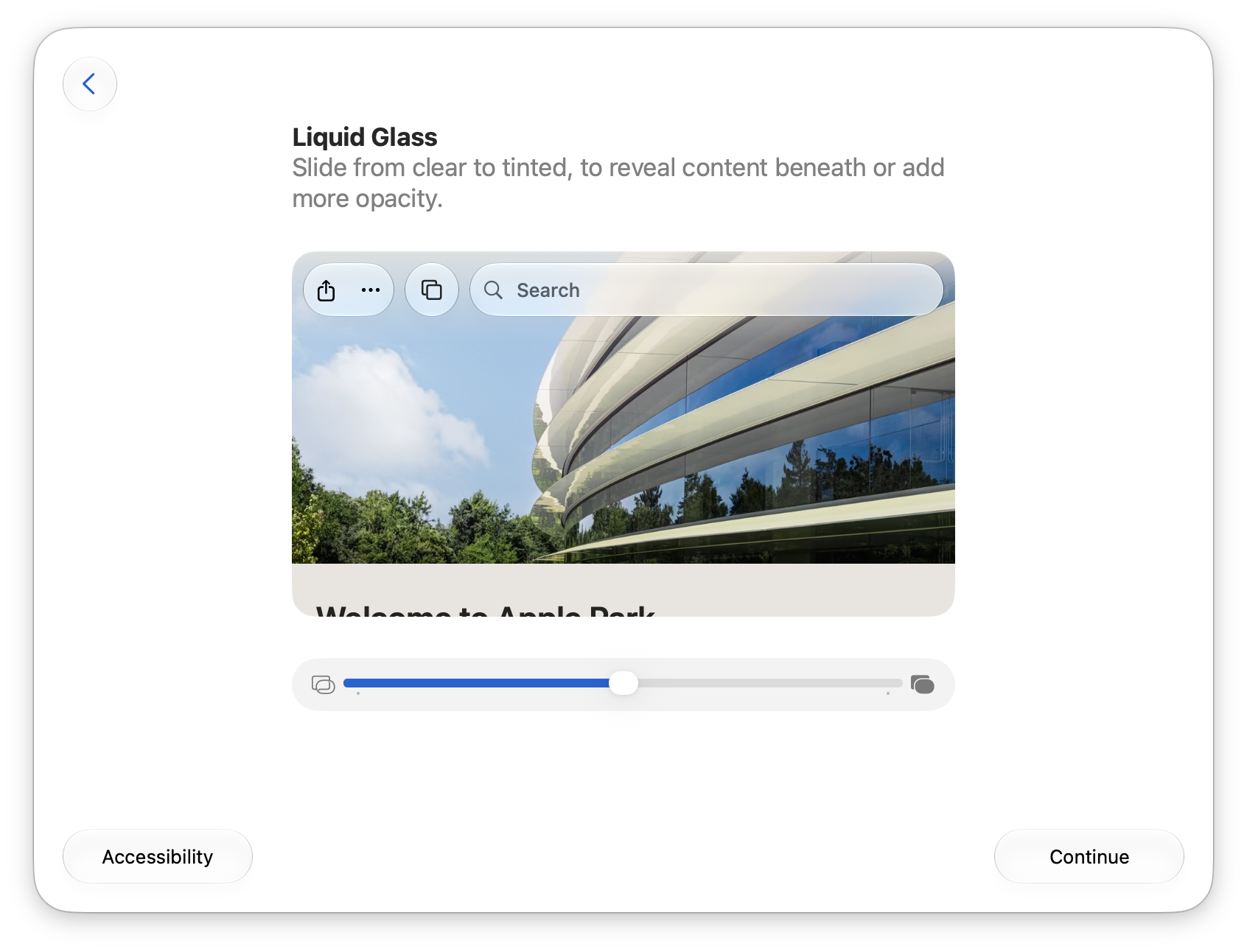
Sponsored by:
Become a member for ATP Overtime, ad-free episodes, member specials, and our early-release, unedited “bootleg” feed!