In short
The hosts discuss John’s hardware upgrades (new Mac and new iPhone/AirPods), the messy but ultimately successful Apple migrations, and how to donate to St. Jude during childhood cancer awareness month. They also cover sponsored segments (Daft Music, Click for Sonos) and a “Marco offset” fundraising gimmick tied to consumer purchases.
Guests
No guest interviewees appear in the transcript. The main speakers are John (host), Marco (co-host), and “ATP”/Relay hosts mentioned for the upcoming telethon.
Guest backgrounds
Not applicable (no named guests; only hosts). John is a developer who previously used a long-running Mac Pro; Marco is a co-host who reacts and contributes to the fundraising framework.
Key claims
- Apple’s phone-to-phone iPhone transfer/setup is fragile; iCloud is the only “properly vetted” path.
- Migration Assistant can show long “starting up”/indeterminate progress when moving multi-terabyte libraries, but it can still complete successfully.
- St. Jude research has worldwide impact; the episode cites 18 highly cited St. Jude scientists (Nov 2025 list).
- AirPods Pro 3 (AirPods 5 in transcript) have improved noise cancellation (can work while vacuuming).
Notable examples
- iPhone transfer failed multiple times, including an accidental camera-control press that triggered erase/restore.
- Mac migration of ~4TB via Thunderbolt 5: “starting up” for hours before progress resumed.
- Photos library moved to external storage; search inside the Photos app worked quickly afterward.
Written by AI. May contain mistakes. Listen to the episode to check what was said.
Chapters
Tap a time to open that second in VOJohn's New Computer Transition
0:46 to 2:18
John talks about transitioning to a new computer and the emotions involved.
“This is the saddest sound of you getting a new computer I've ever heard.”
Childhood Cancer Awareness Month
2:19 to 4:25
Discussion about Childhood Cancer Awareness Month and fundraising for St. Jude.
“that in a second but september is childhood cancer awareness month and that means it is time for atp to work in concert with relay and with saint jude children's research hospital to try to raise money for St.”
Consumerism and the Marco Offset
4:55 to 7:31
Discussion on consumerism and the Marco offset concept for donations.
“Marco, we're going to talk in just one second about all the absolute consumerism that the three of us have participated in this year.”
John's iPhone Upgrade Experience
7:32 to 12:19
John shares his experience upgrading to the iPhone 18 Pro and the setup process.
“We all have gotten some amount of treats.”
iPhone Transfer Challenges
12:20 to 14:00
Exploration of challenges encountered during the iPhone transfer process.
“I didn't know what to do with the cable.”
iPhone Transfer Troubles
14:00 to 21:00
Learn about the challenges and frustrations of transferring data to a new iPhone.
AirPods 5 Features and Issues
21:04 to 27:38
Discussion on the new AirPods 5's features and some peculiar behaviors.
AirPods 5 Features and Issues
27:42 to 28:25
Discussion on the new AirPods 5's features and some peculiar behaviors.
“They're constantly issuing new updates to Daft Music.”
Setting Up the Mac Studio
28:25 to 29:18
Discussion on the setup process of the Mac Studio, including specs and initial impressions.
Migration Assistant Challenges
29:18 to 31:29
Details the experience and issues faced when using Migration Assistant for transferring data.
“I was deferring that until I got done with the setup process.”
Show all 38 chapters
The Migration Process Explained
31:29 to 38:09
A detailed account of the migration process, including troubleshooting and user experiences.
Photos Library Management
38:09 to 41:46
Exploration of copying and managing a large photos library on external drives.
Search Functionality in Photos
41:46 to 42:05
Discussion on the search capabilities within the Photos app and user satisfaction.
Photos App and New Setup Experience
42:05 to 44:15
Discussion on experiences with the Photos app and new setup with a keyboard and mouse pad.
“satisfied with that experience i think i'll be okay with my photos library and external drive And that drive enclosure has not spontaneously disconnected so far.”
Apple Store Experience and Watch Series 12
46:14 to 49:55
Discussion about visiting the Apple store, new Apple Watch, and product colors.
“Yeah, so I went to the Apple store for my pickup.”
Apple Watch Series 12 Features and Design Changes
49:56 to 56:00
Analysis of design changes and features in the Apple Watch Series 12 compared to previous models.
“So since you've brought this up, we do have some follow-up we're going to get to later, but let's just do it now.”
Discussion on Apple Watch Features and Experiences
56:00 to 1:05:46
Hosts share insights and personal experiences with the new Apple Watch, discussing its colors and features.
“Yeah, that's why everything will tell you never to do this.”
Discussion on Apple Watch Features and Experiences
1:05:49 to 1:06:00
Hosts share insights and personal experiences with the new Apple Watch, discussing its colors and features.
“Thank you to Quince for sponsoring the show.”
Performance Insights on M6 Mac Mini
1:06:00 to 1:10:00
Discussion about the performance improvements of the new M6 Mac Mini, especially in transcription tasks.
“I haven't had time because I've only had it set up for a few hours.”
Personal Style and Watch Preferences
1:10:00 to 1:11:02
The hosts discuss their preferences for different Apple Watch models based on seasonal styles.
“The 42, the 46, and the Apple Watch Ultra all look fine on us.”
Concerns on iPhone Duo Dev Tools
1:11:02 to 1:17:24
The hosts express their frustrations with the timeline and accessibility of development tools for the iPhone Duo.
“I don't know what that was back to follow up now.”
Apple's Developer Support Challenges
1:17:24 to 1:24:01
A discussion on the challenges developers face due to Apple's secrecy and timing around product releases.
“Like, it's very frustrating and demoralizing is dramatic, but I can't think of a better word.”
Apple's Product Release Challenges
1:24:01 to 1:25:11
Discussing the implications of Apple's product release timelines and developer readiness.
Apple Photos Library on External Drives
1:25:11 to 1:26:40
Analyzing Siri's incorrect claims about searching in Photos libraries on external drives.
“Quote, if you move your Apple Photos library to an external hard drive, you will lose the ability to search for specific people, pets, or objects.”
M5 Ultra GPU Performance Insights
1:26:40 to 1:27:48
Exploring the performance deltas of Apple's M-series chips, particularly M5 Ultra.
“Preliminary M5 Ultra GPU Geekbench scores have come in.”
The Validity of Readiness Scores
1:27:48 to 1:29:26
Discussing the reliability and value of readiness scores from health devices like Apple Watch.
“They are unvalidated against health outcomes.”
Comparing Health Metrics Across Devices
1:29:26 to 1:34:05
Examining the inaccuracies in health metrics provided by wearable devices and their entertainment value.
“It is merely a consumer facing product with some fun numbers for you.”
iPhone Duo DevTools Overview
1:34:05 to 1:35:28
Introduction to the new iPhone Duo DevTools and current Xcode versions.
“And let's start with, as we talked about earlier, the iPhone Duo DevTools are released.”
User Experience with iPad Design
1:35:28 to 1:38:07
Casey shares insights from using the iPad design in the Duo simulator and challenges faced.
“leaving gaps between them a little bit of jank, but it does look pretty cool.”
Discussion on App Development Challenges
1:38:07 to 1:41:33
Learn about the development challenges and priorities for app features.
“It'd be like if you had two Safari instances and wherever you want to one Safari window, the other one went there, too.”
Navigating App Adaptations for New Devices
1:41:33 to 1:45:21
Explore considerations for adapting applications for new hardware.
“And I am trying furiously to get work done as quickly as I possibly can.”
Navigating App Adaptations for New Devices
1:45:27 to 1:45:50
Explore considerations for adapting applications for new hardware.
“And thank you to our members who support us directly.”
Managing a Fleet of Mac Minis
1:46:56 to 1:52:00
Insights on the challenges of managing multiple Mac Minis and the MDM experience.
“I enabled Remote Desktop to eventually, you know, kind of govern them all.”
Challenges of MDM Management on Mac
1:52:00 to 1:59:47
Discover the complexities and frustrations of Mac enrollment in MDM management.
“But it is incredibly complicated and incredibly clunky.”
Remote Management Solutions and Workarounds
1:59:47 to 2:04:59
Learn about innovative remote management solutions for Mac machines during updates.
“and all that stuff is done, then you can have automated software updates, which when you're running a bunch of servers is pretty useful.”
The Role of Macs in AI Management
2:06:00 to 2:09:59
Explore how Macs can be optimized for AI tasks and the challenges involved.
Proposing Agent Mode for macOS
2:10:00 to 2:12:30
Discussion on the potential benefits of an 'Agent Mode' to streamline macOS for AI users.
“but also be be able to kind of isolate it to only some of your data only some of your credentials things like that.”
Challenges of Using Macs as Servers
2:12:31 to 2:13:14
Understanding the difficulties faced when utilizing Macs for server tasks.
“os 28 feature that would be so maybe think about an apple like make all of these stupid hacks i'm doing unnecessary.”
Transcript
Automatic transcript. May contain errors.0:00John Siracusa:What are you talking to us through right now?
0:02Casey Liss:Oh, yeah. So if you've noticed that the tone of my voice is colder and not as warm as it used to be, that's the sound of an ARM CPU. Intel just had that extra soul that's just missing from these modern ARM CPUs. All right. Well, I'm excited for you. I'm on my new computer if this recording goes wrong. you know, the last one, I just realized that the big Mac Pro that's still sitting next to me, I had for more than half of the life of the show for like seven years. Is that right? Wow. I think so, right?
0:36John Siracusa:Wow. I mean, that sounds right. Yeah. Yeah.
0:38Casey Liss:Anyway, and it has served me well during those seven years, but my microphone is now plugged into a new computer.
0:45John Siracusa:Oh, we're going to talk about this more later.
0:47Marco Arment:This is the saddest sound of you getting a new computer I've ever heard. I know, right? It's just a tide me over computer. I know, but it's also a huge upgrade. Are you able to feel happy about this? Do you enjoy it? Does it feel fast? Does it feel good?
1:04Casey Liss:Oh, yeah. No, I mean, I'll talk about it when we get to all our new products, but the whole household is happy because now I no longer need to hog my wife's computer to do dev work. So everybody, there is much happiness in the house about this.
1:16Marco Arment:She bought it for you here.
1:18Casey Liss:Please. Yes.
1:20John Siracusa:I am very excited for you. When you had told us in Slack, I don't know, a day or two back, that you were starting your migration, which we will talk about later in the show, Marco and I, our immediate reaction was, it's the end of an era. And again, as much as I poke fun at you, John, I know how much you love that computer. And it pains me to be serious and to be kind with you about this because I love making fun of you for it so much. But I know how much you loved the Tower Mac Pro, and I know how sad you are that you do not have a spiritual replacement. Or maybe at best, you do have a spiritual replacement, but certainly not a more literal replacement.
1:54John Siracusa:And so it did serve you well. It was very expensive, but you got a lot of use out of it. And I am sad. I am genuinely sad for your loss, although I'm excited for you to join. What is it, five years ago, six years ago, whatever it was. So I'm happy for you, even if you sound slightly morose. it is still september as we record this there's a bit of september left and actually this month believe it or not or this year september actually goes into october and we're going to talk about that in a second but september is childhood cancer awareness month and that means it is time for atp to work in concert with relay and with saint jude children's research hospital to try to raise money for St.
2:36John Siracusa:Jude. St. Jude, I hope by now you're familiar, but like I said, they're a children's research hospital and they do incredible, incredible work to try to meet their mission of no child dying in the dawn of their life. And generally speaking, that relates to childhood cancer, but it's not exclusively cancer. They do all sorts of absolutely banana stuff. And one of the many things that they offered for us to talk about, although we could say whatever we want, but one of the things they offered was that St. Jude has produced 18 of the world's most highly cited scientists in November 2025. The 2025 list of highly cited researchers recognized 18 St.
3:13John Siracusa:Jude scientists as among the world's most impactful, the most in St. Jude history. These researchers authored multiple scientific papers ranging in the top, excuse me, ranking in the top 1 % by citations for their fields for roughly 10 years. This is a small example of how I know we have a very international audience, and I'm very glad for that, but it would be a reasonable conclusion to say, oh, well, St. Jude is in America and their healthcare system is barely a system, which yes and yes, but why does that help me, says the person not in America. Well, it's for things like this. It's because their research, the research done at St.
3:47John Siracusa:Jude really does have a worldwide impact. And we've talked in the past this month about how they have more concrete and explicit worldwide impacts with things like shipping medicine overseas and stuff like that. But really, St. Jude is a tremendous, tremendous place. And to remind you, the reason we do this, or one of the many reasons we do this, is because our dear friend Stephen Hackett, his eldest child was stricken with childhood cancer at something like six months old. That child is now 16, 17 years old or something like that. And that's all because of St. Jude Children's Research Hospital.
4:15John Siracusa:and I will tell you before Marco can explain the Marco offset I will tell you that in just a couple of weeks actually a week and a half as I record this on Friday October 2nd at noon one true time zone I will be joining several other relay hosts in doing our 12 hour telethon which we call the podcast-a-thon it will be broadcast on Relay's YouTube channel you can see me if past years say anything about this you can see me make a fool of myself for 12 straight hours. And who doesn't love that other than me? So check it out on Relay's YouTube channel. And if you're interested in donating, I will tell you this URL a few times.
4:52John Siracusa:Let me start now. stjude.org slash ATP. S-T-J-U-D-E dot org slash ATP. Marco, we're going to talk in just one second about all the absolute consumerism that the three of us have participated in this year. I feel guilty about that. What can I do?
5:07Marco Arment:Well, do I have the solution for you? If you're wondering how much should I give to St. Jude or how can I make myself feel better about all these purchases that I just made or I'm about to make I have a solution for both of those simultaneously so what you do is you calculate the Marco offset this is your suggested minimum donation to St. Jude whatever the base price is of the family of products that you just bought or going to buy so for instance an iPhone pro what's the base price 1099 1199 whatever it is something like that Yeah. So whatever your total after everything is for that transaction, call it sales tax, AppleCare, storage upgrades, case, any kind of accessories, whatever it is.
5:49Marco Arment:Suppose your total after everything is$1 ,500 and the base price of that family device was$1 ,100. Your Marco offset is$400. That is the suggested minimum donation to St. Jude if you can swing it. The theory is you kind of saw that as like an add-on to this purchase that you maybe didn't necessarily need or maybe could have waited a little bit more. That was just an add-on to that. So maybe you can spare another add-on to St. Jude. And if you do, you are hereby absolved by the powers vested in me by the Flying Spaghetti Monster. You are hereby absolved. I actually do have that for all of these purchases.
6:25Marco Arment:No more guilt for you. You can go on freely knowing that you've done the right thing, even though you bought something ridiculous. Now, also, if you want to get level two of the Marco offset, you take whatever money you spent on paid AI plans or API costs for this month, and you add that on to the existing Marco offset to get level two. Level three is instead of doing that for this month, you do it for the whole year of your paid AI plan and API costs. So you can make yourself feel better about buying consumer devices that you might necessarily not need right this moment. And for using AI for your benefit, all of that guilt can be absolved by simply donating to St.
7:06Marco Arment:Jude in these amounts as your suggested minimum donations. Thank you very much.
7:11Casey Liss:It feels like we're going a little bit behind on fundraising this year. Maybe it's because the podcast has been pushed out. I know we get a lot of fundraising during the podcast-a-thon because people just demand to see all the various relay hosts making fools of themselves. And that's a great time to donate. But yeah, don't wait. If it goes into October because of the podcast on, that's fine. But we really want to try to like beat the total from last year. So please give if you can. Don't put it off.
7:33John Siracusa:Yes. Excellent. Thank you, John. All right. Again, one more time. Stjude.org slash ATP. S-T-J-U-D-E dot org slash ATP. All right. We all have gotten some amount of treats. I think this year, John, you are the treat winner for the year. I'm very impressed. you have gotten a trio of treats. Can you tell us about all of them, please?
7:53Casey Liss:Sure. I'll start with my iPhone 18 Pro. I'll start by saying goodbye to my iPhone 16 Pro because I'm on the every two year phone plan along with my wife. We alternate years. And so my 16 Pro was my first experiment in babying my battery because the battery life was so good on the 16 Pro. I'm like, you know what? I'm going to set an 80 % limit and see how long I can last on that. And it turns out I lasted maybe like 10 and a half months before I said, you know at 80 battery towards the end of the first year some days i feel like it's a little low um so i cranked it back up to 90 and then eventually i just went to 100 because i'm like oh this thing's on its way out the door i'm going to be replacing it so let me just put it on 100 um anyway uh just an update on that the battery health at the end of two years i guess more than 10 months i said one year in 10 months sorry at the end of two years my iphone 16 pros battery health is at 95 and that is after 451 cycles which is not particularly impressive i bet people have batteries phones that they charge 100 on magsaf all night that have the same stats but i'm happy with how it went i liked uh only charging to 80 during the whole year my ipad is permanently on 80 because it never leaves my bedside so it doesn't need to be um and when i went to 100 it kind of felt like getting a whole new battery you know like wow this phone still has amazing battery life because i'm using the last 20 for the last two months so good job uh iphone 16 pro uh iphone 18 pro um battery wise i did set it to 80 because i think it'll be fine with this phone as well but um first the important stuff the case situation shockingly resolved itself amazingly well this year i guess over the past couple years have just been you know a problem with like the camera control or i guess i guess maybe it was just the last time two years ago with the camera control and getting cases with with the big opening there and then the camera control but uh the button passed through but not having the open bottom blah blah blah anyway I, um, for new listeners, my preference is to have a leather case for grip essentially, uh, with an open bottom, because when I swipe up from the bottom to unlock the phone, I don't like going over the lip of a case.
9:53Casey Liss:Um, I, I think the last time I got Apple's clear case, which has had an open bottom for many years now, I got the Apple beats case, which also has an open bottom and is also from Apple and was fine. I've tried silicone cases without the open bottom and reconfirmed that I really wanted to have the open bottom. um but this year bull strap as soon as the the iphone 18 pro was announced bull strap had for order immediately the case this is before you could even order the phone so the first thing i ordered uh this year was my bull strap leather open bottom case with the camera control button uh and it arrived before the phone and i put it on my phone problem solved i mean it's a very expensive case but it is exactly what i want uh and it's on my phone now so boy this turned out to be a non-issue this year i just bought the case they wanted oh and it is the for the bra effect on the back uh the bull strap case has a kind of curved lip curved leather color lip around the camera plateau but nothing is covering the camera plateau so it protects the edges of the camera plateau but it doesn't cover any portion of the camera plateau uh and i think this is great like i really don't like the ones like ryan london only has one with like a metal wall around the camera plateau and i find that unpleasing on my fingers so yeah got it in one bull strap case we'll put a link to it in the show notes again it is expensive but it is exactly what i want so thumbs up um the other thing to note about my iphone 18 pro uh is the setup process i'm going to give myself a thumbs up this year for not having to call verizon for the second phone in a row hey congratulations yeah i mean e-sim maybe maybe i'm going to chalk that up to e-sim making things better or whatever but yeah the number actually transferred successfully even in my house on iphone day that's usually the problem is i'm doing it on you know the day that everyone gets their iPhones.
11:34Casey Liss:Phone number transferred over fine. Then I had to do battle with Apple's setup process. I once again chose the same thing I chose for the past several years, which is phone to phone transfer on the idea that it would potentially be the fastest and also have the most fidelity, even though iCloud restoring from iCloud backup, the fidelity of that has gotten much better over the years. It may actually have parity with phone to phone transfer, but I always want to try phone to phone transfer first. This year, I also decided to try connecting them with a cable because I figured the iPhone 16 Pro has sufficient enough speed from its USB port.
12:12Casey Liss:Maybe I didn't even bother looking at the specs. Maybe I'm wrong. But anyway, it's a thing I tried.
12:16John Siracusa:Wait, now hold on. Which cable though? Because obviously there's like a million different choices here.
12:21Casey Liss:I didn't know what to do with the cable. I ended up using a Thunderbolt 3 cable. Maybe that was the wrong choice, but I connected them butt to butt. And I could put that they're both mag safe so i could put them on mag safe chargers so they're also charging you know what i mean yeah yeah so anyway i'm doing phone to phone transfer i'm doing the you know the whole procedure he makes the little fuzzy code make the camera see the picture of the little fuzzy circle and they go through and it says finish on your other phone and i got them on mag safe chargers and you know they're doing their thing and they're i don't know if it's using the wire it's they're connected with the wire but i have no idea if it's using it because it's not telling me i don't know whatever i just leave i leave them there i go off to do something else come back like an An hour and a half later, to an error on the screen that says, oh, the transfer failed.
13:05Casey Liss:Sorry.
13:05John Siracusa:You were definitely using the cable then. Because I can tell you, I did not buy any phones this year, not yet anyway. And so I didn't have this process in my house. But based on my prior experiences and based on the handful of texts I got from random friends, some nerdy, some not, the iPhone transfer and then later setup process is such a dumpster fire. And it is my belief, based on no fax. It's just an assertion. But my assertion and belief is that the only properly vetted way to transfer between iPhones is via iCloud. I don't think Apple ever tests anything else. They claim to support it. And I don't want to do an iCloud backup for the same reasons you cited, John.
13:47John Siracusa:But I think that's the only one that Apple ever properly tests. And everything else, it's just a happy miracle if it works.
13:53Casey Liss:And iCloud will get you back, quote unquote, up and running sooner. Because if you're doing the phone-to-phone transfer, you have to leave both phones alone and not touch them for a long time. whereas the iCloud transfer it will let you at least you start using your new phone immediately even though half your apps won't be there and stuff or whatever so that was that was attempt number one which i was like you know all things considered that wasn't that bad like i don't know when it failed maybe it could have failed within the first 10 minutes but i only looked at it an hour and a half later because i assumed it would succeed uh then what followed that was a comedy of errors of me trying to it's kind of like a video game where your first try on the level you get pretty far and then you try to level a bunch more times and you can't even get close to where you got the first try that's what it felt like uh and the basic problem is that when you're doing a phone-to-phone transfer um first of all the two phones have to be near each other i got rid of the cable at this point i ditched the cable like forget about the cable we're just going to do phone-to-phone transfer wireless okay the phones have to be near each other if they're not near each other they get angry and the transfer won't work also you have to do stuff on both phones phone will say do this do that then you go go to this phone and do that and type your code in on this phone and type the unlock code for that phone on this phone like you're going back and forth between the two phones so you got to be juggling that as well and the final thing is when you're essentially done with the old phone when you no longer really have to interact with it anymore you hope um it puts up a sheet or whatever they call a little card like a little little white square from that takes up the bottom part of the screen and it says finish on other phone or something like that you've seen this right yep yep yep and it has little x in the top of that sheet uh and it just and it's like a spinner it says finish another phone i'm like fine i'm perfectly happy to finish another phone now you may be tempted to say finish another phone all right well i can just i guess i can just dismiss this um this white box here and just finish on the other phone no if you hit that x the thing ends um and when i say the thing ends what i mean is not only are you no longer transferring between the phones but you have to start all the way from the beginning as in it makes you erase yeah the destination phone has to be restored the new phone erase it so no matter how far you think you were through the process you have to erase it and how far might you be well there's a bunch of stuff you have to do it's like uh you know set up siri set up all your apple pay cards sign into your apple id like you can skip a lot of these and i highly recommend skipping them because they take a long time when you get up to that point where it's like uh you know finish another phone or whatever you may have been there for five, 10 minutes already going back and forth through card issuers, entering three digit codes from the back of your cards to set up Apple pay, setting up the Hey dingus stuff.
16:31Like there's a bunch of stuff that you're doing before, you know, you accidentally
16:35Casey Liss:dismiss the thing or whatever. So, uh, the second time I believe what happened is that that little white card on the old phone disappeared, but the, the new phone didn't know it disappeared. And I was like, is this going to work? No, eventually it said, I don't know what's up with the other phone. I don't know what happened that time. It just didn't work. The third time really got me because the third time I'm like, all right, third time's a charm. I'm going to do it this time. I've been through the process twice already. I know exactly what all the steps are. I know which ones I can skip. So I'm doing it like a pro.
17:03Casey Liss:I'm like, I can skip this. I can skip this. And by the way, I'm skipping them because I just want to get across the finish line. I can always set up this stuff later. I can set up Hey Dingus later. And by the way, last year, the Hey Dingus one is the one that really got me because it was like, hey, set up Siri here. Say, how's the weather say set a timer for three minutes say all these things or whatever but it makes you say say hey dingus set a timer for three minutes uh if you do that last year or not last year last phone because the other phone was nearby it would answer me and when it answered set a process over erase
17:34John Siracusa:the new phone oh gosh i swear to you they don't test this i swear to it now this year i think they
17:40Casey Liss:improved it but i did do the thing where i took the new phone what i felt like was a safe distance away not out of the room but away and then i whispered to it i whispered to it so the new
17:52John Siracusa:thing but if you whisper to it then you're not doing the good you're not doing a good job of
17:56Casey Liss:like giving it sample material i think you can skip that step anyway so anyway that's that's up to the third try i'm like i know all the tricks i'm getting through on the third try everything went i was did all the stuff skipped all the things i could skip it was careful not to activate the elephant or whatever and i'm like now i just need to sit there they're doing their transfer i just need to connect them both to power um because that's the other thing i would suggest not trying to have them on chargers when you do this for reasons i'll get to in a second um but they need to be on chargers because at this point on my third try their batteries are drained a little bit from you know the hour long anyway uh so i go over they were plugged in during the hour long thing but anyway just the going through it the batteries are a little bit drained so i carry them both over to our little household charging station where i have tons of cables to plug in and i plug the new phone into a cable and put it down and i take the old phone and try to plug it into a cable and you know these phones have buttons all over the outside of them and i guess i squeezed a little bit too hard when i was plugging in the cable and i accidentally pressed in the camera control on my old phone oh transfer over erase new phone oh my god this is so bad john erase and i'm like no like i adjusted the last all i needed to do was plug it into power and then let it sit there but because i pressed the camera control accidentally that obviously means erase you know end it entirely no confirmation nothing uh erase and restore the phone and every time you erase it it's got anyway fourth time i was super duper careful and i actually got it transferred and it went fine but boy that was just ridiculous like you would think that on they would like make it more resilient like they would make it a bit kind of like a on the max which i'll get to in a bit like make it like a locked mode where the old phone like none of the buttons do anything anymore and it's just locked in but instead it's the most fragile state if you do anything on the old phone it's like well obviously whatever you're doing takes priority and screw that transfer even if that transfer had been running for an hour or whatever it doesn't matter right so yeah they get set up um i guess the only thing i've done with my phone that's interesting is i took a picture took one of my usual pictures of my dog at the foot of my bed with most of the lights off in my room uh and it's better at low light photography with the big aperture all right Because I've taken that same photo of my dog a hundred times in various poses.
20:07Casey Liss:So I have lots of history to compare to. And all I do is pick up my phone, point it at the dog, and press the camera control, the shutter button. And so I can say, yeah, noticeably better low-light performance than my iPhone 16 Pro, presumably due to the larger aperture. So thumbs up on the camera so far.
Read the full transcript
20:24John Siracusa:Well, that's exciting. I mean, I'm sorry for the absolute disaster that was the transfer process. Yes, but at least the aperture or the variable aperture is showing some signs of improvement.
20:37Casey Liss:It could have gone worse. But the main thing I'm happy about is I like the color. I like the case. Everything's all settled. My new phone was like, other than the silly setup process, was the best thing. The best new phone setup process I've had in a couple of phones.
20:49John Siracusa:I'm sorry, what color and what storage did you get?
20:52Casey Liss:Oh, I have 512 because I'm a little bit over 256. I'm like a 380 in my storage. So I've got a 512 and it's black. okay thank you airpods 5 with wireless charging case meaning the ones that have the um volume control thingy on them um so a couple things to note about these i forget if we mentioned this before but apparently these are ip57 as compared to ip54 this is a waterproofness and dust ingress rating so the old airpods 4 and airpods pro 2 were ip54 but the airpods pro 3 are ip57 and ip57 the five stands for how much like dust can come into it so five is ingress of dust is not entirely prevented but it must not enter in sufficient quantity to interfere with the safe operation of the equipment so dust can get in but it can't screw it up and then the seven is the important part the seven means immersion in water up to one meter for 30 minutes the four means it can take like splashes of water but the seven means you can put this in up to a meter of water for half an hour and it should in theory still work so that's impressive and i'm excited to get even more waterproof airpods although i don't plan to test that uh the other things to note about the airpods five some odd behaviors and unfortunately two variables changed at once here i got new airpods and also i got a new phone so i'm not sure if i should blame this on my new phone or on the new h3 chip in the airpods or whatever but here's the odd behavior first when i put these things in my ear and start playing music it pretty much all the time does a thing with the sound that makes me think did i accidentally enable head tracking you know that like you ever accidentally enable head tracking and it's like oh no i don't want this where is that turn it off it always does like a thing where i hear sound like in one ear and then it transfers to the other ear before they even out it's not head tracking it's disabled right i have disabled head tracking everywhere but it always does this weird thing where the sound travels usually from my left to my right for a second before they settle in and they even out really weird um the volume control i had to watch a youtube video to figure out how to do it i've seen it a million times i said it in the apple keynotes when they added it to the airpods pro years ago oh it's a little area and you swipe it with your finger to change the volume so i finally get a pair that has this and i try to swipe with my finger to change the volume and i cannot do it weird i'm like what is the secret tell me the secret and so i found a youtube video where someone was like listen here's what you have to do grab it like this put your finger above the flat area swipe downward starting above the flat area and then ending after the flat area and do that periodically and you'll hear a little boop and it will go and you know do the reverse for up and down so the video helped thank you to that nameless video that i did not save that taught me how to use the volume control i am glad to have it um the other weird thing so one of the reasons i don't use um noise cancellation that much in my 4 and probably won't use it much in my AirPods 5 is noise cancellation means there's a little microphone that's listening to the outside world so it knows how to cancel those sound signals and if you're wearing a hood or a hat or something that rubs against the your the AirPods the rubbing against them can make like noise on the microphones I don't know if you've ever experienced this with the AirPods Pro but definitely with the regular AirPods if you rub something on the microphones you're like like I don't want to do it by a microphone but you know the sound of something rubbing up against the microphone extremely unpleasant especially in the winter when i have like hats on and stuff that are like rubbing on the airpods covering my ears so i'm like oh i don't want that so i turn off noise cancellation the airpods 5 with wireless charging case do this weird thing where when i'm taking them out again i have noise cancellation off take out the right airpod i always take out my right one first put it in the case then when i go to take out my left airpod i get staticiness when my finger touches the little microphone thing and the microphone thing is in the exact same place as it was on the airpods 4 so it's not like i'm like you know hitting a thing that wasn't there before but now when i take off the left airpod it's as if it has turned on noise cancellation briefly because i hear that loud you're rubbing your finger against a microphone and it's playing that rubbing into your ear thing very weird minor issues i'll see if they settle down if there's a firmware update or whatever but some oddities and as for the actual noise cancellation it is better than the forest my usual test is can i wear them with noise cancellation enabled while vacuuming and the answer with the forest is no not unless i really crank the volume like the test the real test is listen at a comfortable volume then take out the vacuum turn it on start vacuuming do not change the volume on your airpods because if you crank them up enough and it'll work in any condition but then when you turn off the vacuum cleaner like oh this is way too loud i've been blowing my ears out right the fives can have better noise cancellation and I can just about listen to podcasts while vacuuming.
25:35Casey Liss:So thumbs up. I don't think I'll do this often and it's not what I prefer and it probably would be better if I raised the volume a little bit, but I can listen to podcasts while vacuuming. So believe the hype about the slightly better noise cancellation in these.
25:47John Siracusa:All right. So now generally speaking, you don't use noise cancellation. Like if you were on a plane, which I know is your favorite place to be, would you use noise cancellation?
25:53Casey Liss:I use the big over ear Sony, like mega expensive noise cancellation headphones for that. I figure what they are with it. Whatever the latest MX, the highest MX number is. That's, that's what I have. But, but day to day, you don't, you use it. You don't use it generally. No, I don't use it at all really for that reason. Cause like in the wintertime, the hats rub on it in the house. When I'm listening to like watching a TV show on my iPad on my bed or whatever, like I can hear the noise cancellation. If that makes sense, especially since they're, you know, they're not, they're open ear things. Like I can hear the effect of it and there's not noise that I really want to cancel anyway.
26:26Casey Liss:So I don't use it. And it used to be for battery life too, But so far, the battery life on these has been great.
26:59Marco Arment:albums, artists, playlists, and you can pin everything within the library. They have a directory of custom-selected mixtapes, and this is picked by humans, not AI. In fact, they even have a new feature that you can check any track for AI that will flag recordings that have AI fingerprints left behind by the music generators, so that you can tell if you want to listen to AI or not, you can easily tell what's AI inside Daft Music. They have a radio feature that shazams every song from internet radio tracks as they play. You can import and subscribe directly from Spotify and Tidal. And all of this is very lightweight on your machine because it's written with native code, SwiftUI and AppKit, and they have features always powered by the latest Apple techs, like just Core AI.
27:42Marco Arment:They're constantly issuing new updates to Daft Music. There's AirPlay support that came recently. A wonderful feature called instrument isolation that you can actually mute the vocals or drums or bass or everything but those things live during playback, all done on device. There's a 10-band equalizer, 3D cover art support, and so much more all in Daft Music. So go to daftmusic.app, that's D-A-F-T music.app, daftmusic.app, or just search for Daft Music in the iOS or Mac app store. So daftmusic.app, thank you so much to Daft Music for Mac and iPhone for sponsoring our show.
28:25John Siracusa:this is this is the real the real deal all right tell me about the max studio can you first remind
28:30Casey Liss:us what are the basic specs of this please this is an m5 max max studio with 64 gigs of ram and a four terabyte ssd it's the max with all the cores working i think those are the only options um and then i have an external four terabyte ssd we linked all these things in a past episode but that's that's the setup what color did you get yeah so the setup process like i had prepared the way pretty well the setup process was surprisingly easy uh it does fit on the corner of my desk where i wanted it to go although the hole that's underneath it means that the foot doesn't have as much uh contact friction with everything else so i'm not sure what i'll do there like it's a little bit easy to move although people shouldn't be reaching back there to touch it anyway um i basically have almost every port filled in in the back of it which doesn't feel great but when you're coming from a mac pro with a million ports like this is just the way it is uh obviously i'm glad i didn't need an additional port i don't have anything the hdmi port uh but i think that's it every other port on the back of this machine has something plugged into it but yeah all the wires uh you know reached and everything i didn't i haven't yet done the thing where i'm going to connect all of my external SSD cases to the back of my desk.
29:41Casey Liss:They're currently sitting on my desk. I was deferring that until I got done with the setup process. I only got the computer two days ago, so it hasn't happened yet. But I will probably do that in time for next week. But maybe not in time for the next episode, which we're recording early. Anyway, the transfer process, the migration assistant. I haven't done this in seven years. I'm usually a big fan of migration assistants. I don't start fresh, I use Migration Assistant. But here's the thing with Migration Assistant. I feel like this app, for all its amazing capabilities, has not kept up with the advancement in storage size.
30:16When this thing was made, how much data was Migration Assistant
30:20Casey Liss:moving? How many files was it moving? The numbers must have gone up at least by an order of magnitude since then. And so a lot of things in the app don't give you any feedback that would let you distinguish, is this stuck or is this just taking a long time to do a thing and eventually it will be done? Now for this one, I had, I mean, it's kind of overkill since my 2019 Mac Pro just has Thunderbolt 3, I think, right? But the M5 Mac Studio has Thunderbolt 5. So I had a Thunderbolt 5 cable, certified real Thunderbolt 5 cable. And I'm going to connect my Mac Pro to my Mac Studio with a Thunderbolt 5 cable while I do migration assistant.
31:00Casey Liss:And one of the things Migration Assistant has done for many years is it'll like test your connection and say, this connection has been tested to support these speeds. So I know it found my cable. I know it tested it and it tested it at really high speeds. So I'm like, great, this will help because I'm transferring four terabytes. My Mac Pro had a four terabyte SSD. Mac Studio has a four terabyte SSD. I'm going through Migration Assistant, go through the stuff, type these numbers in this computer, blah, blah, blah. I was basically just screen sharing to my Mac Pro from another Mac so I could see its screen and, you know, doing all the stuff.
31:29Casey Liss:and it says what do you want to transfer defaults to everything being checked off i'm like yep transfer everything go to the next thing and then you get uh an indeterminate progress bar with like the progress bar where uh the filling goes back and forth left right left right you know that thing um and i think it says like starting up or something like that and it stayed on starting up for a really long time so long that i had time to start googling migration assistant stuck on starting up you know these type of questions and if you google that boy will you find years and years of people who said hey i tried to use migration system between two macs and it showed a progress bar going back and forth and it says starting up uh and it's not making any progress what's the deal years of it like i'm not gonna say decades because i think the longest one oldest one i saw was maybe six or seven years old or whatever but this is not a new thing it's not a good feeling when you do a query like that and you get that answer then i start going through some of them i'm going through like reddit posts from multiple years ago and it's like yeah i've let it run for 20 hours and it still says starting up like oh no i have a podcast tomorrow 20 hours and people are saying should i just let it go people are saying they called apple care and here's what apple care told me to do or whatever then you start getting this sort of uh received wisdom like you know folklore stuff where a couple of people said um here's what you have to do start over okay and then when you get to the screen where it tells you like what do you want to transfer it's got a little checkboxes next like do you want to transfer the apps you want to transfer this user account you want to transfer system settings like the screen where it comes where everything is checked off by default said look when you get to that screen do not leave that screen until it calculates the sizes of all those things because they all just say calculating like for the sizes right you have to stay there until it calculates all the sizes so this is slightly complicated by the fact that next to the next to each item it says calculating but then eventually the word calculating disappears and it's replaced by a number like let's say 10 gigabytes but that doesn't mean it's done calculating because if you keep watching that 10 will change to 12 then to 15 then to 30 and you're like how do i know when it's done calculating i guess i have to wait until none of the numbers are changing anymore anyway the calculating process takes a long time a long time because i guess it's counting up every file and every side i don't know what it's doing it's a four terabyte drive with literally millions of files on it but here the thing the thing i came up with is like look the sizes should total about four terabytes because my disk is full so i'll wait until the i'll wait until the first i'll wait until nothing says calculated it says you know nothing says calculating anymore because it does just like one or two of them and then eventually it'll start on the third or whatever it doesn't do them in order i don't know but some of them just say calculating for a long time i'll wait until all the numbers add up to roughly four terabytes and they're not changing anymore and then i'll hit the continue button so i did that because many things on the internet said you should do this of course in that same thread there's a bunch of angry people years later coming back to the same reddit thread saying after doing that how long do you have to wait how long did it take to finish please tell me but they're long gone because this is years ago right you know this is the sad people coming back wait i found your thread how long did it take after that so i waited for all the calculating to be done i hit continue and then it says starting up and shows an indeterminate progress bar going back and forth and it stays there for a long time give me an order of magnitude are we talking minutes hours i mean i'm just i'm just trying to remain calm and i just go and do something else for a while and i look back at it and it's like all right it's been 30 minutes i'm doing some more googling i'm not finding any more folklore wisdom except for a bunch of people a bunch of people from back in the day are like learning that you should never do this over wi-fi i'm like way ahead of you like i know i know i'm not doing it over wi-fi i'm not even doing it over ethernet i'm doing it over thunderbolt and by the way the uh the migration assistant app is not reassuring and the bottom it says like what your current connection is and it says none the whole time that's great but when you click on it when you click on it or go see like the connection test thing it will tell you what it tested all the connections for so it's like obviously this is not none because you said this connection has been tested and it just gave this data rate or whatever it's and it tests all of them so you've got an ethernet connection i tested that and gave this data rate and you've got a thunderbolt connection i'm like but the thing just says none all right so i just let it sit there for a while i figured okay i will give this let's say three hours to be on the screen that says starting up or preparing whatever the hell it says it is not a progress bar that's going anywhere it is a back and forth progress bar and there's no other visibility into this there's no log window to bring up there's nothing else that you can see to let you know that this is making progress or not maybe before i waited for all to calculate it would have also completed if i had waited the same amount of time who knows but i just found something else to do and put it out of my mind and probably probably about an hour in maybe 50 minutes in to the starting up thing i glanced over from what i was doing on my wife's computer and i looked back at my computer and i said it's not going back and forth anymore now there's an actual progress bar all right and that's when i sent you guys screenshots with my fingers crossed emoji where she's like it's it's going and it's giving me a data rate and the data rate kept climbing i think it was topping out at like over a gigabyte per second uh which is great uh and it took maybe four hours to finish and it did finish and the computer rebooted and it had pretty much all my stuff in it and i was once again amazed at the thoroughness of migration assistant i think it let me inherit all of my time machine backups including the network ones on the new computer which is amazing like i didn't take it up on that offer i wiped the time machine backup because i just wanted to start fresh because i'd know from experience that the network ones get corrupted easily but i think it let me do all that all my settings were there all my stuff from user local was there just like everything was in there all you know it was really amazing backblaze was a little bit angry and i had to corral that back into a reasonable state but yeah pretty good uh after getting over that hurdle but this is this is the this is the flaw in migration system they need some way like for phases that previously were like well this isn't going to be that long we can show an indeterminate progress thing here they can't do that anymore like what if you have millions and millions of files like i do what if you have four terabytes of data spread over millions millions of files there's no way to tell whether this is ever going to complete and most people won't have the patience to wait an hour for it to get to the part where the progress bar begins right before you start seeing that once it begins it gives you a time estimate and you can see it progressing as long as that progress bar is moving you think things are happening but wow uh a little bit scary i'm not sure what i was going to do like i could have tried restoring from time machine backup or something else like that but i really wanted to do the machine to machine transfer so i'm glad it eventually worked and then after that i've just been on intel purge which is you know go to system report go to like you know about this mac blah blah you eventually get to this what used to be called system profiler and that will list every app that knows about on your system including what architecture the app is using although it lists a bunch of them as either unknown or other or something but anyway i went through every intel app i had and either deleted it and updated to an arm version i cleaned out user local rebuilt everything for arm didn't rebuild everything some things i didn't rebuild eventually will like when i need them but the stuff i knew i needed i rebuilt uh for arm build new versions of uh things that i wanted new versions of yeah that's going pretty well um did a network time machine backup that's still running to my synology right now um did a super duper clone oh the uh the enclosure with my two uh sata ssds working okay but one time i think yesterday both drives which were both mounted just disappeared entirely from my computer and disk utility disk utility could not see the enclosure which is what everybody says oh don't get external enclosures they just you know your drives disconnect when that happened disk utility couldn't even see the enclosure anymore and my solution was to turn off the enclosure and back on because it's got a power switch hasn't happened since then i have no idea what caused it maybe i'll try plugging it into power instead of making it bus powered but i've got my eye on that one uh but anyway i did do a super duper clone did two super duper clones to it because now i'm cloning my photos drive and my um what do you call it uh and my main drive to two separate volumes on there uh and i did a time machine backup to it and that worked and now the synology time machine backup it was taking forever because it's way slower.
40:01Casey Liss:But yeah, I'm almost completely up and running. And during that, while all that stuff was going on, I was doing dev work on my computer instead of my wife's. And she loved that and I loved it. And it's nice and fast. And so far, I haven't missed the RAM that the Mac Pro had. This is not.
40:14John Siracusa:Well, so sounds like a little bit of a troublesome journey for both the phone and the computer. But ultimately, it sounds successful.
40:23Casey Liss:Yeah, it could have been worse. Oh, an update on photo searching. My photos library did success. This is another thing. copying your photos library following apple's instructions and their support note that we put in a past episode copying my two terabyte ish uh photos library to an external drive following their instructions the copy went really fast because hey i got i bought a fast thunderbolt 5 ssd and i have a you know a copy went surprisingly fast for two terabytes worth of library and then following the apple's instructions for how to open it and then it says and then you want to designate your system photos library so go to you know settings general and there's a button that says use a systems photo system photo library and i click that button and photos beach bulb and that beach ball stayed there for 20 25 minutes oh geez and then eventually wasn't there anymore and it was successful that is another instance of no regular user is going to tolerate amount of waiting and i was like look what's my alternative i've learned that sometimes it's just gonna block i mean the rest of the computer was fine but photos was 100 beach bowling for 20 minutes doing you know i have a big photos library there are a lot of photos like i get it i don't know what it was doing but it did eventually succeed and my photos library did move there and then i deleted my photos library from the internal ssd freeing up half of my space and then once it was all said and done and once it had done all iCloud syncing and everything i did search inside photos on my uh photos library that's on an external drive and i searched for pictures of cats and pictures of fences and both of those things worked and you did this within photos within photos i don't know or care anything about spotlight finding photos but within the photos app when i search for some word that you know it it works it works it worked fast uh i'm satisfied with that experience i think i'll be okay with my photos library and external drive And that drive enclosure has not spontaneously disconnected so far.
42:18John Siracusa:So far. I thought that we were of the understanding that searching within photos was never really up for grabs. It was searching outside of photos and spotlight. That was the problem.
42:29Casey Liss:Well, there's a follow up item in the second where we'll see what Apple's intelligent agent has to say about this. But just experimental evidence. I did not try any kind of spotlight search for photos like as in command F in the finder because I don't care. all i care about is that search inside the photos app works and it does good deal so all in all sounds like success all around yeah so far so good i mean yeah i'm uh it's nice to have everything all in one place i think that time on my wife's computer has really made me appreciate this more made her appreciate it more obviously too but just being back on my own computer with my bigger screen my own keyboard and mouse oh that's another nice thing i got to treat myself so i i gave myself a new mouse pad um wow the old one was fine but you know there's that new nice new mouse pad feeling right so i have a new mouse pad and of course my keyboard that i bought on ebay turned out not to be a scam it was in fact a new sealed inbox apple extended keyboard with a full size control key in the lower left corner and no stupid globe thing there and touch id so here i am new keyboard new mouse pad not a new mouse although i do have plenty of spares up of those up in there as well so yeah it's got that it's got that new mac feeling that's awesome congratulations
43:42Marco Arment:that's uh you really have uh you've you've earned this over a very very long time hopefully i won't
43:50Casey Liss:have this computer for seven years but uh tune in seven years from now to see how that goes
43:53John Siracusa:good gracious uh does the new computer feel appreciably faster than the mac pro did oh yes
44:00Casey Liss:okay all right good deal remember my computer was slower than a phone and it showed up like like xcode builds are so much faster yeah no idea everything is a lot faster
44:16Marco Arment:we are sponsored this episode by click for sonos a premium sonos companion app no lag no hassle just music click for sonos is the fastest native sonos app it runs on iphone ipad mac apple watch even apple tv and the apple vision pro and of course one purchase covers all those devices now as an apple nerd you probably expect things like widgets live activities shortcut support click has all of those plus so much more you know lock screen support control center support on the mac they have a menu bar item and they have all sorts of amazing features for sonos users so for instance instant control song changes show up the moment they happen with no lag.
44:58Marco Arment:They have unified search across all the different Apple Music platforms, Spotify, Plex, Tidal, Deezer, Pandora, Sonos Radio, and so much more, all searched together at once in one unified list. They have amazing tailored scenes. You can have one tap to change volume, speaker groups, music, and sleep timers, including a timer that ends at the end of the current song. And it is all backed by these amazing features. Things like, you know, for audiophiles, You have Lossless and Dolby Atmos support, Arc Ultra speech enhancement and Dialog Sync. And this is an actively updated app. There's ongoing updates all the time.
45:33Marco Arment:There's been eight major releases already this year with more on the way. Click for Sonos is just the best Sonos companion. Again, no lag, no hassle, just music. You can get lifetime access for 50 % off using our special link, click.dance.atv. That is, click is spelled C-L-I-C. So it's C-L-I-C dot dance slash A-T-P. That gives you lifetime access for 50 % off. Click dot dance slash A-T-P. Thank you so much to Click for Sonos, the fastest native Sonos client, for sponsoring our show.
46:13John Siracusa:All right, Marco, you also got some treats. What's going on there?
46:17Marco Arment:Yeah, so I went to the Apple store for my pickup. of my new Apple Watch Series 12. And I got to see all the other products. Very briefly, the iPhone Pro colors, I think, are fine.
46:32John Siracusa:I actually, I went today. I needed to go to the mall anyway. And so I just popped in briefly to look at the two new colors. Actually, I didn't even look at black, come to think of it, I should have. But I saw Glacier and Burgundy. And they clearly are not as cool as orange was. but I actually really like both of them quite a bit.
46:53Marco Arment:I find, at least from seeing it in the store for a few minutes, I find that the Glacier, which is that light blue color, the Glacier is lighter than I expected it to be and the Burgundy is darker than I expected it to be.
47:05Casey Liss:I think that's fair. Yeah, seeing a YouTuber with a Burgundy, like Apple's videos made it seem so much lighter than the spy shots but now that I see other YouTubers doing it in different lighting conditions, it looks more like a spy shot. So I think the burgundy is pleasingly darker than it appeared to be in Apple's videos.
47:20Marco Arment:Yeah, it's very dark. Like in moderate to low light, it could be confused for black. It is very dark. And I think that is fine. I mean, that is kind of like, you know, the style this year is a lot of like reds and purples and stuff. So yeah, that makes sense. I think honestly, they went even darker than maybe the style would suggest, but I'm not a style expert. so I'm actually very happy sticking with my 17 pro for one more year for lots of reasons as the various reviews have come out of the 18 pro it does seem like it's not really that necessary to upgrade every year even for idiots like us and so I'm I for the moment I'm going to stick with my 17 pro now that being said part of the reason is that I'm waiting for the duo so I know I have to get one of those at least for development and everything so that's going to throw a wrench in the plans.
48:10Marco Arment:But for the moment, happy with my 17 Pro. 18 Pro does not really do it for me. And in the same way, I also didn't ever get the Apple Watch Series 11. I'm coming from a Series 10. And I actually, for various developing and testing reasons, I ended up having the Series 10 in both of its sizes. One of them came refurbished later on. And I just got a Series 12. I decided to go with the smaller size Series 12 again. I spent a good amount of time wearing both sizes on the Series 10. I wear one for a few months and switch the other one for a few months. What really got me with the Series 10 is about a month ago, I was out with some friends and they took a picture.
48:56Marco Arment:And I saw the picture of myself afterwards. And all I could see was this giant screen on my wrist. i'm like hmm i don't i don't like that i like i think i want to start reducing that um and so i went with the smaller size series 12 uh i got the white ceramic which i think is awesome i'll get to that in a moment but just just a little bit more on sizing the ceramic is actually a little bit bigger especially it's i think it's like one millimeter wider than the other materials and also there's been a change in the screen proportions with series 12 we're going to get to a little bit in the follow-up.
49:34Marco Arment:But I think, in my opinion, I think the small size looks way better on me than the bigger one in this model of watch. And also, I would even like it to be a little bit smaller. I think it could even go like maybe two millimeters smaller and still look great on my wrist, which I think, I mean, I forget. I should know as a watch nerd. I think my wrist is like 6.75 inches, something like that. I don't know. Something in that ballpark.
49:59John Siracusa:All right, well, hold on. So since you've brought this up, we do have some follow-up we're going to get to later, but let's just do it now. And so Sebastian writes, the Apple Watch Series 12 display is smaller than the Series 10 display. I got mine yesterday, and I noticed it immediately. Also, the speaker grille is linear again, while in the S10 and S11, they're Series 10, Series 11, the speaker grilles, they were speaker grilles with small holes. Both of those are very disappointing changes, in my opinion, according to Sebastian. the series 10 was a regression from the 789 with thicker bezels and they made it even thicker with the 12 so this has been a common refrain and there's a picture that sebastian took that makes it fairly clear like i'm not trying to argue that this is incorrect this did not even register to me maybe i'm just not observant enough but did not even register well there
50:45Marco Arment:are some changes oh and by the way before i follow up i just took out one of those little flexible tape measure things i have a six and a half inch wrist and and i think that i think the small size is definitely the right size for that. Anyway, that being said, there are a few changes to the little some little tweaks to the design. Oh, my series 12 just rebooted itself. That keeps happening. Version version 1.0 of the software. Anyway, as it reboots, I'll tell you, the black part, like the crystal of the watch is a bigger proportion of the watch's height. So it has gotten thicker and the watch body below it has gotten thinner so as you look from the side you see more of the height is black than it was before so i think that that might be contributing to part of the way of the difference in the look honestly i think that makes it look better but that's just me maybe now that being said people have taken side-by-side pictures and indeed the screen bezels are a little thicker on the 12 than they were on at least the 10 and i think the 11 as well.
51:52Marco Arment:To me, I actually prefer this. Now, part of it is because I don't use a watch face with a solid color background. My watch faces have black backgrounds, so I don't even notice this. But when the Series 10 first came out, we noticed as we used, and we talked about it, that the screen, by being pushed closer to the edges, it actually warped a lot of the content in the corners and edges of the screen to slightly be in the curvature of the crystal. And I actually didn't like that. Like, it looked kind of cool for a second, but it made it a little harder to read because a little bit of the screen content was actually on the slope.
52:35Marco Arment:And I didn't think that was a very good idea. It was great that they could brag about thin bezels, but it actually worked worse. That's why even though the outgoing, I don't know if the current ones do, But the outgoing large size, the 46mm Series 10 and 11, actually has a bigger screen than the Apple Watch Ultra. But because of that curvature around its edges, where the Apple Watch Ultra is flat edge to edge, I actually preferred, for large screen use, the Ultra by far. Now, I think the Series 12, by having it pull the margins a little bit in and actually have thicker bezels a little bit, I think it's actually better because it helps pull that content away from those curved edges.
53:18Marco Arment:And more of it is on the flat face of the watch. That, to me, makes it more useful.
53:24Casey Liss:It definitely does seem like a conscious change because Apple was bragging so much when they got the bezels smaller and smaller on the Series 10 and 11. and they just loved it so much but it seems like they also learned that there are usability issues it also makes me think about the 20th anniversary phone that is rumored that is going to take the screen and wrap it all around exactly the same way uh have they unlearned that lesson for the phone are they going to use that setting that pulls in the screen image tune in next september to see how that goes but for now it seems like the watch team at least has made a conscious decision on the series the series series of phones with that have curved top class things to pull in the screen image so yes it does mean that when you take a head-on picture of them there is more black border around the new phone than the old phone but that may provide better usability and also
54:10Marco Arment:better readability yeah um the as sebastian wrote the speaker grills on the series 10 and i think 11 are like a bunch of tiny holes previous and now series 12 models it's two slots this again as a series 10 owner i prefer the slots because the little holes on my series 10 have had a little bit of sunscreen in them for a year and a half and i can i have not been able to get it out so like the top speaker grill on my series 10 just has these little tiny white dots like nothing i have done can get that out of there so hopefully the switch back to the slot might make it easier to clean plus now my watch body's white anyway so i might not notice as much oh also my outbound series 10 i had the um the gold series 10 it significantly changed color throughout its life oh the gold dlc coating tarnishes uh and and i've if you do some searches on reddit you'll find this and in like you know if i flip it over i could see like the parts that that like rub against my skin are actually a different color than the rest of the case i tried never do this i tried polishing cloths never do this and they tell you never do this and ai will tell you never do this but i tried it and it helped uh but it still did not uh restore the original color never do this that is something that if you want a partial restore uh jewelry polishing cloths never do this um might maybe
55:38Casey Liss:help you but don't why are you saying never to do it that it will damage the finish or something well what polishing is is abrasion you don't you don't mean like the apple like microfiber
55:48Marco Arment:polishing like explain what you know i mean like like a jewelry like a you know a fine metals polishing cloth like from amazon you know like a jewelry polishing cloth they have like tiny abrasive uh yeah it's like it's an it's a very very fine abrasive compound uh and if you you know rub metal with it it gets it shinier but it does that by removing a layer of metal now a dlc coating uh which is what apple uses to coat to color these watches is very thin so if you do too much of any kind of abrasion on it, you will rub off the coating and you will just expose the metal color underneath it.
56:20Casey Liss:Thus the admonition to never do this.
56:22Marco Arment:Yeah, that's why everything will tell you never to do this. I did not find that to happen on mine, but that's, hey, all bets are off if you try this yourself. That being said, that is something to be aware of. If you pick the gold, anything that's not the natural color of titanium or steel, the coatings they use can tarnish. And in this case, it absolutely did. and it kind of turned me off the gold now anyway. But going back to the white ceramic, so far, love it. I was a little concerned that it would be a little bit too much of a cream color because in Apple's pictures and stuff, it's kind of hard to tell.
56:57Marco Arment:Like, is it white or is it cream? Well, I can tell you having the actual ceramic watch and then I have their version of the white sport band which they I believe call sand is the color. I have it right here next to the white sport band from the previous generations. And it is not that different. It is a little bit more of a warm tone, but it's a very subtle difference. They call the watch Pearl White and they call the band Sand. I think those are pretty accurate color names. It is not like I was afraid it would be more like Starlight. Like they're, you know, like they're kind of warmer versions of this.
57:36Marco Arment:It's not. It is closer to white than Starlight. and so i like it a lot and i think it looks very like fresh and cool it will restrict what band choices will look good with it but because you know because there's no metal to match like nothing with metal lugs will match it but so far i'm very happy with it and uh and that's it so far i haven't tested all the um you know spying on people features because those aren't released yet
57:59Casey Liss:for what i have right now it is wonderful did you compare the new ceramic series 12 with your old
58:05Marco Arment:ceramic series 5 or do you not have that anymore i should dig around in my kind of archive i don't think i have it anymore i think i sold it oh there was one other saga oh gosh trying to pair this watch for developer mode this has changed now i don't know if this is series 12 thing if it's a watch os 27 thing maybe some combination thereof if it's an xcode 27 thing trying to get this watch to show up in Xcode and be usable for development was ridiculous. The way developer mode works in Apple devices in the modern way is there's a secret setting called developer mode that you have to enable. This setting will not even show up until you try to issue a build to the watch from Xcode.
58:52Marco Arment:Then Xcode will error out and say, developer mode isn't enabled on this device. Then you have to, at that point, go to the device, go to the bottom of the security screen, find the developer mode, turn it on, and it'll say, all right, we got to reboot. So it reboots. Then after it reboots, it asks you, you sure you want to turn this on? Then you do the passcode thing. And then finally, you have developer mode on. Then you can go back to Xcode and issue a build. And after it downloads all the symbols, it will eventually work for that device. Okay. The watch, previously, you would have the little dance where you'd plug the phone into the computer, and the phone would say, trust this computer, question mark.
59:30Marco Arment:And you have to, If you had the watch at that point paired to the phone, then the watch would also have its own tap, tap, trust this computer. And you have to type in the code and everything. Well, no matter what I did, I could not even get that to happen with the new watch. I couldn't get it to even say, trust this computer. What am I doing here? Tried searching, tried AI-ing, tried finding any kind of documentation. I rebooted everything under the sun. I installed both of their day one security updates, like everything. thing i did everything all of the usual dances could not figure it out eventually i don't know how i've how i found this but somehow i figured out uh that there is i think maybe i eventually found like a k-based article in the new xcode device hub there's a like in the device list where normally it would show the devices that were waiting for pairing or that you know need to develop mode or whatever it's not even there you had to hit the little plus and say pair nearby device.
1:00:27Marco Arment:Now, the screen that shows up when you say that has three pictures, like a kind of multi-device icon, Apple TV, and Vision Pro. Now, if you look at this, you might miss the tiny little Apple Watch that's in the multi-device icon. It kind of looks like this is not the right pairing screen for anything that's not an Apple TV or a Vision Pro or maybe an iPad or something. who knows but it kind of looks like this is not the right screen it is then only then with your mac saying waiting to pair on this weird screen only then will the developer mode option magically show up on the watch will it tell you this no no it will not you have to just know that when you're looking at the waiting to pair screen then you go into the watch and find the developer mode thing and then turn it on.
1:01:22Then, of course, we have to reboot,
1:01:24Marco Arment:blah, blah, blah, go to the pairing screen. Okay, you reboot. It says you sure you want to do developer mode? Yes. By the way, the Series 12, I think, reboots faster than previous Apple watches, which is not saying a lot, but it is useful. Okay, you finally reboot. The watch is finally in developer mode, and you plug in the phone, and you're waiting for that tap-tap, trustless computer, and it just doesn't happen. What the hell? You know where it is? Not that it's going to tell you this. When you plug in the phone, then the time that you would normally find the trust this computer prompt on the watch, it's not ever going to tell you.
1:02:03Marco Arment:You just have to know to go back to the security screen, to go to the developer mode screen, to scroll to the bottom of the developer mode screen where nothing has ever been before and nothing has told you anything is there, but you just have to know to scroll there and then at the bottom of it it says marco pro or your computer name here and then you can tap that to pull up the trust this computer screen crazy only then can you finally use your watch for development oh my god sounds fun this took me hours you mentioned the uh the icon leading you to
1:02:44Casey Liss:to believe that like that button is only if you have like an apple tv or whatever because it didn't look anything like a watch i had a similar experience when i had to um set up apple apple care on my mac studio and i was doing it through system settings because it bugs you to do it there i'm like oh yeah i have to do that and i go through it all and it's like yeah do this blah blah blah and then it says okay like on the apple pay screen where it wants you to fingerprint authenticate or whatever to apple pay for your apple care plus uh it says okay so here you go this is apple care for an m6 m5 pro mac mini right like uh no and so i back out i go back through it again i'm like yeah all right i'm doing this on the mac studio through its own system settings it's leading me to say so you've got a mac studio it's going to cost you this much for this blah blah blah blah it's like it knows it's a mac studio you go through the app play screen okay so here's that apple care for the m6 m5 pro mac mini right Alright.
1:03:39Casey Liss:I just went through with the payment and when it was done, my Mac Studio has AppleCare. But like, yeah, just a couple of missing string constants here and there. An icon that doesn't make you think this is for watches because they can only put so many devices on it can lead you astray.
1:03:56John Siracusa:We are sponsored this week by Quince. Let me tell you, today in Richmond, Virginia, it has been cold, it has been rainy, and it has been gross. And today was the first time since, I don't know, March that I wore jeans. I didn't wear shorts because generally speaking, that's all I need around Richmond. And so when I put on my jeans, I thought to myself, oh, maybe it's time to take a look through my closet and kind of take an assessment of my wardrobe. And when the seasons change and it starts to get cool, that's a great time to do it. And let me tell you, if you want to refresh your wardrobe, Quince is a great way you can do that.
1:04:29John Siracusa:Quince focuses on high quality wardrobe staples made with premium materials like 100 % Mongolian cashmere, organic cotton, and merino wool. The styles are timeless, versatile, and designed to become the dependable pieces you reach for day after day. Further, everything at Quince is priced 50 % to 80 % less than similar brands. They work directly with ethical factories and cut out the middle people. So you're paying for high quality, not brand markup. So I was given a little bit of money to spend at Quince over the last few months. And one of the things I got was the Comfort Stretch Traveler five-pocket pants.
1:05:00John Siracusa:And these are a really great in-between where they're more formal than like jeans. but I wouldn't say they're quite as formal as like slacks or something like that. They're this very nice in between. And this is a very true story. Earlier today, I was starting to think about what I was going to pack for the podcast on next week. And it occurred to me that my comfort stretch traveler five pocket pants would be the perfect thing to wear during the podcast on a little bit more formal than jeans, but not so formal that I feel like I've gone overboard. So if you want to get yourself some of these or some of the many, many, many other things that Quince offers, including stuff for your house, stuff to travel with, stuff for women and for babies, all sorts of different things.
1:05:39John Siracusa:You can do all of that and you can find your next fall favorites at Quince. Download the Quince app for app exclusive offers or go to quince.com slash ATP. Get free shipping on your order and 365 day returns now available in Canada and the UK too. That's Q-U-I-N-C-E.com slash ATP. Thank you to Quince for sponsoring the show.
1:06:03Marco Arment:speaking of m6 max minis oh yeah i got a new mac mini um got my m6 mac mini and i'm happy to say it is fast you don't say i haven't done like formal benchmarks i'm i just like installed my transcriber consumer app and just saw like how fast can it go like how many transcription minutes per real minute can it do like what is its x speed of like you know it's transcribing at 200x 300x so far i've seen it peak at like 380x real-time transcription um i didn't see it sustain that though i've seen it sustain in like the the low to mid 300x's um whereas the m4 mac minis before it would usually sustain more like 240x so i've gone from like 240-ish to like 320 to 330-ish you know something like that um but again these are not like formal numbers yet i haven't done controlled testing yet.
1:07:01Marco Arment:I haven't had time because I've only had it set up for a few hours. But so far, it seems like the M6 is a substantial jump over the M4 in the area of transcription, which makes sense. If you look at Apple's quoted numbers and some of their own performance claims and what they've focused on and what has changed, that does make sense. The only thing that I would really wish for, and if anybody is listening to this at Apple who has any input in this, the 27 os's have the new advanced dictation model that apple has touted that runs on the highest end hardware this is like the like it's like that new that new form of model where it's like the sparse uh mixture of experts or whatever it was like that like this like this new advanced architecture of these models it's supported only on like the iphone 16 pro and up and the m3 i I believe, end up.
1:07:53Marco Arment:Well, I have that. I have a bunch of them. All of my Mac minis are M4s or M6. So I can run it, but there appears to be no API for that model on Mac or iOS. I have tried. I have run tests. You have this amazing new transcription model on this hardware, and there's apparently, as far as I can tell, no way for apps to use it, and that's unfortunate. So I really hope Apple gives us an API for that. And even if it's as simple as like a flag to the speaks transcription API that on those supported devices can use the higher end model, please, I would love that.
1:08:30Casey Liss:Well, you know, since you're running this on your own Mac minis, like forget about I know you run transcription on the phone, too, but forget about the phone for a second and just think about your Mac mini farm where you're doing transcription. Private APIs. Send your agent to find them. They're in there somewhere.
1:08:44John Siracusa:That's a good point.
1:08:45Casey Liss:You can use them. That's a really good point. No one can stop you. i never thought about that thank you that's actually a really good idea i am the devil on your shoulder telling you to use an agent to reverse engineer apple's os and find those damn
1:08:57Marco Arment:apis because it will find them oh that's really good oh i like that a lot thank you okay i will like that until you're in private api hell like me where nothing is documented and things don't work you're like what the hell private apis i'm just gonna walk away whistling like a cartoon
1:09:12Casey Liss:character right now and yeah i mean the good thing is when the disaster happens it'll just be it won't be on everybody's phones it'll just be on your mac mini farm so you'll you'll reap what you sow
1:09:20Marco Arment:and it'll all crash at once uh foreshadowing for the after show by the way oh 50 of the mac minis
1:09:25John Siracusa:use private apis and 50 don't and 80 of the time it works every time all right so you good with your treats yeah all right so for me uh aaron and i upgraded from series 10 aluminum watches to series 12 uh i had gone for a few years with the small watch now i'm back on the big watch which seems fine to me. I think when it got less tall, it made a big difference to how I perceive it on my wrist, which isn't to say that Marco's wrong about him or me for that matter. I think our wrists are roughly the same size.
1:09:57Marco Arment:Yeah, and to be clear, like all three, like the 42, is it now? The 42, the 46, and the Apple Watch Ultra all look fine on us. It's just a matter of like, what's your current style? I like a bigger watch in the summer and a smaller watch in the winter. Why? I don't know. But that's just what I like. So all summer, I wore the 46. All winter last year, I wore the 42. And a lot of the summer, I switched to the Ultra because it was even bigger. It's just personal style.
1:10:26John Siracusa:In any case, so both of us got Series 12 aluminums, and it's nice. That's about all I got. I mean, I'm not trying to be snarky. It's just a two-year newer watch. Seems faster. Battery life is way better. Seems good. I really just don't have that much more to say other than the bezel difference. I think Marco, you nailed it in saying that because I have a black background like you do, did not even register that the bezels are different. Uh, it's, it's, it's fine. It's good. I shouldn't say it's fine. It's good. Yeah. There's no complaints. It's good. That's about all I got.
1:11:02Marco Arment:Awesome. All right.
1:11:04John Siracusa:So back to follow up. I don't know what that was back to follow up now. Uh, the iPhone duo dev tools, uh, there was a delay and there was much consternation, including for Marco and myself. And we're going to cover the actual tools themselves a little bit later in this very episode, or at least that's the plan. But Oscar Echeverry wrote, I'm genuinely curious what Marco and Casey would have Apple do differently with regards to the dev tools for the iPhone Duo. What are your opinions around how Apple would be able to both protect its product secrecy while simultaneously providing more lead time for third-party developers to have access to dev tools before the Duo's release?
1:11:38John Siracusa:I'm very curious to hear what Marco's thoughts are. We did not confer in advance. Uh, for me, 27.1, the Xcode 27.1 beta should have been released that day. Like I, I'm not clear, maybe I'm missing something obvious, but I'm not clear why that is impossible. Like, obviously it's not what they did, but what precludes that from happening? I don't really get why that can't happen. Um, the other thing I'll say, and I just recently, in the last like 48 hours, I just found out that this is at least slightly a thing. But the other thing I'll say is they should give us access to hardware. Now, in a perfect world, that means give us some hardware.
1:12:14John Siracusa:Do a DTK type thing. But yes, your reaction is exactly correct. There's no way that's happening. Not a chance. In a perfect world, it would be great, but it's not happening. So what's the next best thing? And Marco and I were talking about this a bit privately, but they are doing, I don't think they're officially called labs. I forget what the official name is. Marco, do you remember?
1:12:32Marco Arment:I don't know. I don't even know.
1:12:34John Siracusa:It doesn't matter. but they're basically doing labs like the one that Marco and I did together for the vision pro a couple of years ago now, three years ago, something like that. And, um, what they are doing is in Cupertino in New York and in a, in Battersea and one, and I think one in India. And I think one in, in like, um, Japan ish area. I don't have the list in front of me. They're doing these things where you can come in for a day or sometimes two and presumably get time with a physical iPhone duo. And I really, really, really, really support this approach. Genuinely. I love this approach.
1:13:10John Siracusa:I wish there was more, particularly in America, than literally one in New York. And that is the only one the East Coast gets. And I'm sorry if you live anywhere between, I don't know, San Francisco and New York, because you're screwed. You're going to have to find a way to get to either San Francisco or New York. I don't love that. I get that this is complicated. I get it's hard, but if Apple wants the particular, well, I was gonna say indie developers, but if Apple wants developers to have this thing or to have their apps ready to go on day one, you got to put in the work Apple. And yes, I think a lot of us will recompile and it'll be passable on day one.
1:13:48John Siracusa:For all I know, that may be where I end up because I'm going next week doing other things. Um, but it, it, maybe it'll be passable for a lot of these apps on day one, but I won't be great. And I really wish they had more offerings, even just in New York, because selfishly, the one and only time they offered, I just, I can't make that day or two days happen. And so I really wish they took that more seriously. But ultimately, I still don't really understand why we couldn't have gotten Xcode 27.1 on day one. But Marco, convince me I'm wrong. Nope.
1:14:23Marco Arment:I'm pretty much with you. You nailed it. Like, I'm not asking for Apple to give developers access to this kind of stuff at scale before they've announced it. And they don't. Like Apple, they follow a very predictable pattern where when they're launching new hardware like this, they bring a very small number of select developers like Netflix, you know, or maybe a couple of game developers like they'll bring them in and show them the hardware before they've even announced it and that way they can have something to demo during the keynote but that's a very that you're talking like you know you can count them on one hand usually like how many developers would have access to that before the keynote then the keynote happens the thing is announced to the public and at that point usually like an hour after the keynote that same day developers get an SDK that gives us a simulator for the new hardware and for all the new abilities, any new APIs that are enabled by the new hardware, we get an SDK that day.
1:15:24Marco Arment:That's the part that didn't happen here. Now, I'm glad that they did give it to us. I mean, what was it, a week and a half later? Something like that? Something like that. That's great. But this is already like, this is a very compressed timeline for developers because the Duo has all these different screen sizes and aspect ratios and positions it can be in and changes so much about the layout of common system controls and system interaction patterns that it's a lot of work. And we have one month before they're in customers' hands. So losing, I mean, at the time it was six weeks. Losing one and a half of those six weeks felt like a needless delay for developers.
1:16:09Marco Arment:Now, it wasn't arbitrary. I'm sure the answer was it wasn't ready yet. And in fact, when they did give us the SDK on Friday, there were some things about it that were kind of rough that it's like, oh, yeah, it isn't ready yet. Or at least you can tell they really pushed it out hard. And even then, they couldn't get it out more than a week or less than a week and a half after the event. so it's not that they were artificially holding it back but they obviously weren't prioritizing it enough to get it out there on day one it wasn't ready yet on day one was it was the was the problem and look this stuff happens i understand it's software none of my stuff's ever ready when i want it to be ready um preach but i'm not the biggest company in the world like that's not my job to be that and to do that.
1:16:56John Siracusa:And, yes, and, you are not relying on a bunch, like thousands, tens of thousands, hundreds of thousands of other people to leverage your work product, right? Like, it'd be one thing if Apple just, you know, wanted to be late for something that only affects Apple, but Apple wants all of us, developers, to be ready on day one. And if you want us to be ready on day one, help us be ready on day one, right? Like, it's very frustrating and demoralizing is dramatic, but I can't think of a better word. It's just frustrating that we're begging for table scraps just so we can get a not embarrassing version of our apps ready for day one.
1:17:39Marco Arment:Yeah, because here's the thing. On day one, we will have one-star reviews from people who say that our apps aren't ready or don't look good or don't work well. or the touch targets aren't reachable or something. We will get one-star reviews every single day from day one until we fix those problems. Every day counts.
1:17:59John Siracusa:But Marco, there's no way that actually happens.
1:18:02Marco Arment:I assure you what happens. And the thing is, every part of this is an Apple-created problem. Why don't we have time with the hardware? Well, with the exception of some of these labs that fortunately are happening, I mean, we'll see how many people can actually get into them and everything. But that helps. But developers don't have early access to hardware for the most part. Okay. We don't have earlier access to software than four and a half weeks before the release. Okay. Why can people rate apps on a brand new phone that developers haven't had access to, but yet our apps are still available on that phone?
1:18:37Marco Arment:Good question. That's an Apple problem. Why do app ratings matter so much to developers? That's an Apple problem. Why is it a five-star system when no one ever does anything but one or five? That's an Apple problem. Like, every single one of these, like, these are all Apple-created problems. So there are some things that Apple could do differently here. They could give us, they could prioritize the release of the SDK on day one every single time. They could make one-star reviews not possible on a brand new platform for the first month or two or whatever. Or they could make them matter less. or they could do a different system that isn't just one star or five stars.
1:19:17Marco Arment:There are so many ways they could solve this problem. And we just don't question them because this has just been how it's, this is how it's been for 20 years almost. Like this is just how it's been. And so we just assume this is the way it has to be. But every single part of this can be improved. Every part of this is an Apple created situation and it is within their control to improve it.
1:19:40Casey Liss:Oscar didn't ask me to answer this question, but the reason I put it in here is because you two are all angry about, uh, the way the whole, uh, duo dev tool situation worked out. And, uh, I, I thought it was, uh, worthwhile thinking about, okay, well, if you're mad about this, what would you, what would you rather have happened? What would have made you happy? Uh, and my answer to that is something that is difficult for all the reasons that you've mentioned, but is still the actual answer, which is, uh, whatever Apple is releasing, whatever product they're releasing that they've held secret, because we assume they're going to continue to do that and honestly i think that's fine it's fine to have something secret for a long time but whatever your secret thing that you're revealing that requires developer support the casey's point like it's not just a thing that you put out there you actually want developers to do something in response to it however big that changes is it just like oh make the screen a little bit taller or is it like it has two screens and it bends like however big that changes you need to scale the amount of time developers have to update their apps based on how big a change you just made which means the actual solution is not oh make sure you have the dev tools on day one because that just frustrates people who are impatient like casey the real answer is it wasn't just me dad the real and marco the real answer is i want credit for my impatience yeah the real answer is people should not be able to have to buy and have in their hands a duo for another whole month and apple's like well we can't do that the holiday season and this and iphone time is always here and blah blah and that gets back to well these are all choices that you made apple like i understand why it's difficult but that's the actual solution not the day or week and a half or whatever it's you have to give a longer time between the time that you announce the product and the time when consumers are allowed to buy it to give your developers more time if the change requires more work if it's a small change then give them a few weeks or a month if it's a duo size change i feel like two months would be more appropriate.
1:21:35Casey Liss:And you're like, well, they can't give two months, they're going to miss the holiday season, the things are ready to manufacture. But like, I understand. But that is the actual solution. You have to give developers time enough to make their changes doesn't actually matter where you have the dev tools on day one, and stuff like like, whenever they have them, they have the only thing that matters is how long from the time developers get the dev tools to when they have to have their app updated for your new device. And if Apple cares about that, they have to give developers a sufficient amount of time which runs afoul of all the other things i said and i will add by the way that the secrecy screws them here too because if you're not following the minutiae of xcode releases which are probably not if you're a developer but like apple walls off the people who are working on secret projects even within apple that's just compartmentalization they've always done it they continue to do it which means the team that is working on the iphone duo dev tools like the simulator with the bendy phone and all the new apis or whatever they are actually walled off from the rest of the xcode team a subset of them are disclosed on the on the the bendy phone right and a bunch of other ones aren't disclosed on the bendy phone and so they're working on the version of xcode that's going to have the dev tools that know about the iphone duo and the other xcode people are working on xcode that doesn't know about the duo because they don't know about it and so on day one the main xcode team is like well here's the latest version of xcode and then the iphone duo team comes out and says surprise we've been working on one with the bendy phone and they're like okay well we have the real xcode that we're shipping to consumers here now we have to like merge your changes and they said well don't worry about it we'll ship 27.1 and that's our version you just ship 27.0 we're going to ship 27.1 that's got the bendy phone in it okay but then they're like but we're about to release 27 another version of 27 it's like okay you call that one 27.2 and you can release that one but 27.1 isn't ready yet and so you end up with a 27.2 beta that comes out before 27.1 because the team that was working on it in secret hasn't had time to merge there you know what i mean like this is this is part of the fallout of secrecy and i'm not saying they can't do that but they just have to add that to their timeline of like all right well that just delays how long it's going to take before developers have tools to do this and now how much time do you think it should take the average development team to adapt their app for this bendy phone with three screens and the amount of time they're giving i feel like is maybe a little bit tight and in the end that's the root problem it's not going to be solved by always making sure you have the sdk available on day one it's solved by pushing out the date the consumers get the product and that brings its own whole host of other problems so i gotta move the whole iphone date up out of september because now i need more time like this is the situation they're in like in the end it'll you know apple will again reap what they sow they'll have fewer apps ready on day one and all the bad things that happen to developers with one star reviews will happen and we'll all get through it together but yeah uh the solution i feel like is to actually give adequate time for things to happen which is i'm going to say one of the hardest problems in computer science one of the hardest problems in management period is uh providing those timelines apple does a pretty good job of having timelines and keeping things on them but there is some collateral damage and the duo and app readiness is going to be one
1:24:41John Siracusa:of those collateral pieces of collateral damage yep now that is annoyingly the rightest answer of us which i shouldn't be surprised but you're exactly right photos libraries on external drives larry feyman writes i was so happy to hear you address this issue again on atp i was even happier to hear jason snell help solve this long-standing problem regarding photos library on an external drive i spent countless hours on the phone with apple geniuses trying to solve this to no avail i really hope i'm wrong and that the new enhanced series wrong too here's a summary of what mac os 27 Siri has to say on the matter.
1:25:12John Siracusa:Quote, if you move your Apple Photos library to an external hard drive, you will lose the ability to search for specific people, pets, or objects. This happens because modern macOS uses a system wide spotlight indexing for these advanced searches, which only works if the library is stored on your Mac's internal drive.
1:25:27Casey Liss:Oh, swing and a miss, new Siri. Sorry, I tested it on your latest OS. And it works just fine inside the Photos app. If they mean you will lose the ability to search for specific people, pet, or objects when you're searching through command f in the finder or through spotlight then that is correct but that's not what they said so i would continue to caution people they're like well surely if i ask siri it will have this knowledge base of apple's product knowledge and it will give me the right answer that continues not to be the case it will very often give you answers that lead you to settings that do not exist or at or do exist but at a different path and no it's not because it has outdated knowledge because they move things around sometimes it just makes up stuff like oh go to this and that and it's like no there's nothing there's no setting called that in system settings there never has been and there never will be um in this case it gives what i think is on its face an incorrect answer about how this works maybe the kernel of truth that it is that is feeding this plausible llm generated text is the fact that spotlight searching won't work and maybe it is also true that macOS uses the system-wide spotlight indexing system for these advanced searches but the combined answer makes this person think that they won't be able to launch photos and search for cats and you will.
1:26:37Casey Liss:It does work. All right.
1:26:40John Siracusa:Moving right along. Preliminary M5 Ultra GPU Geekbench scores have come in. We didn't have these last episode. All right. So looking at the performance deltas, the increases through different generations, M1 to M2 is about 34 % better. M2 to m3 15 better m1 to m3 is a 53 change and then m3 to m5 ultra about a 60 change great and the m1
1:27:09Casey Liss:m3 comparison in there is because we skipped a generation so if you're just looking at one to two and two to three you're like oh 34 15 but then look to m3 to m5 is 60 well you're jumping you know there's a delta of two there so the one to three comparison is the uh closest one and that was a 53 % gain and this is 60. So still, this is the best M whatever ultra increase two generation increase chump, I think. Although I didn't actually do M1 to M3. But anyway, look at the chart. We'll put a link in the show notes. The M5 ultra has good GPU gains, but a lot of that goodness has to do with the fact that there never was an M4 ultra.
1:27:48Casey Liss:So its comparison is to the M3
1:27:50John Siracusa:ultra and in that comparison it looks pretty good all right then let's talk readiness score this is a new thing in the apple watch uh i have slept with my watch on uh like three or four nights but not enough to get hey hey baby um hey girl uh but anyways i haven't slept with it enough to get a readiness score because i think you need to have it on overnight seven times or something like that. But cardiologist Michael Katz pointed us to an article by physician scientist Eric Topol that says, readiness scores on devices like the Apple Watch are proprietary scores that integrate different metrics for each of the wearables.
1:28:27John Siracusa:No algorithms have been disclosed. They are unvalidated against health outcomes. So there's a whole substack about that. Then back to Michael Katz, it is infuriating to hear about new sensors, the marketing, and wellness in the absence of any meaningful evidence.
1:28:41Casey Liss:doctors are mad that this is just made up stuff uh but i mean i do feel like it's mostly for entertainment value and i'm sure apple has a million disclaimers saying this is not real health advice blah blah blah blah blah um but it is worth pointing out that a lot of these things these sensors do is just like this might be a fun thing to tell people um setting aside like you know heart arrhythmia and you know dangerous conditions where your blood oxygen is too low or whatever things like readiness scores and even the sleep tracking it's they just take a bunch of numbers and grind them up and they give you some kind of score and you should mostly just view that as like well whatever they're doing to i can move this number around whatever they're doing to calculate the number presumably me moving the number around does something but the readiness scores and stuff cardiologist is saying that's not really a thing just enjoy it for entertainment
1:29:26Marco Arment:value but don't put too much stake in it yeah and this is i mean this is honestly true of every device that offers this you know you have whoop bands and aura rings and fitbits and all these different health wearable things that also do similar things and they all do stuff like this they all have some kind of metrics or stats in their apps that try to tell you like you know you're this is your energy for the day even like my um my suunto watch and the garmin watches like
1:29:55Casey Liss:they all they all do this and they're all using their own algorithms with their own data that they don't tell you so there's no way to like even judge it like oh this one is accurate and This one is not like there's this is not this is not a scientific endeavor. It is merely a consumer facing product with some fun numbers for you.
1:30:11Marco Arment:Yeah. And as always, these are, you know, as John was saying, like, it's not really medical advice. It's something that can like maybe direct you to seek medical advice if it detects some kind of problem or detect something that might be a problem. But they're not medical devices. Now, also, it's less about like, oh, the Apple Watch gave me a 7 and the Woot Band gave me a 6, and more about that device measuring things relative to itself and your own experience with that device over the last X days or months. getting a baseline for each device and having it measure relative measurements to itself on you in the past that is actually potentially useful for certain things but you can't compare them or treat them as absolute value so it's same thing with like when the apple watch tells you the amount of calories you burn in a workout these are estimates based on stats and heuristics and things it's not actually measuring how many calories your body is burning it can't but what it is measuring is some amount of heart rate or movement or some combination thereof.
1:31:19Marco Arment:And you can compare that today to what you did at your workout two days ago or last week or whatever. And you can say, oh, this was a harder workout than the last one. Or this was an easier workout. Like that relative to the same device measuring the same kinds of things a few days earlier, that could be a helpful thing to give you a relative idea. These just aren't absolutes. And you can't compare them between devices. but you don't usually need to.
1:31:45Casey Liss:The problem with even those measures is like, well, how are they calculating that number? Are they weighting something in there that I've massively changed a number that turns out to be heavily weighted in their algorithm? So it's changed my score a lot, but in the end, I haven't actually changed the thing they're trying to tell me about. Like if you read this article by Eric Topol, he spends some time railing on heart rate variability and how that like these, a lot of these things incorporate heart rate variability into the algorithms to try to give you some score. And he's saying there's no evidence that heart rate variability should be a factor at all in this algorithm and could lead to misleading results because it's now weighted in to give you whatever your score is.
1:32:19Casey Liss:But no one has no one has shown in a scientific study that measuring heart rate variability is a useful thing to do with respect to the thing they're trying to show. So yeah, I just you got to take it all with a big grain of salt. And even for things like, you know, the calorie burn one again, because it's got to give some kind of estimate. Because they don't tell you here are the numbers we're incorporating into the algorithm that derives the calorie burned thing you don't know if it's just like well you know if it's some particular sensors like measuring your body heat or something i don't think this is the case but like and it happens to be like a hot day or you're running a fever or something and it skews your score like if you don't know what it's incorporated into the algorithm first of all you can't no scientist can validate yes this algorithm is giving you actionable data and second you don't know if even just the relative thing like you may be changing a variable that actually is unrelated to the thing it's trying to measure but you change that variable a lot and it makes your score yo-yo up and down but in reality you're not actually changing the number of calories burned because of the way they calculated anyway it's it's tricky like i do feel like the main um the main purpose the main value of things like this is simply getting people to take notice of some aspect of their health or activity and in a way that they weren't before Like that's the gamification, like even just like closing the rings.
1:33:34Casey Liss:That's just, that's basically just a video game. It's like a Tamagotchi. Like you got to close your rings. What, what does closing the rings do? I don't know. I just like them to be closed in the end. It is making you be slightly more physically active than you were before. And there, there is a foundation for being slightly more physically active than you were before is good. And that's the level these things are working at. It's like herd you towards what we hope are outcomes that are scientifically proven as in doing more physical activity instead of less is better if you're doing very little little activity.
1:34:02Casey Liss:Adding a little bit more can help your health.
1:34:05John Siracusa:All right, let's get to topics. And let's start with, as we talked about earlier, the iPhone Duo DevTools are released. John, you took us through a kind of overview as to all the different versions of Xcode that are currently out right now. But yes, 27.1 landed, I believe, Friday as we record this. And it's interesting. I think Marco had said earlier, or one of you had said, that it's a very stripped-down version of xcode and the device hub simulator whatever you want to call it for the duo only includes safari
1:34:37Casey Liss:and nothing else or maybe settings maybe yeah it's definitely it's coming in hot but i did add a 3d model of the phone which is the thing i suggested last episode like we were talking about iphone mirroring i'm like how are they going to do the phone and iphone mirroring oh they should have do a 3d model that you can fold well they do have a 3d model i think this is from device hub iron vey posted a video of it uh and if you apparently if you hold on the option key you can control the folding state and it even does the effect or whatever uh these these just follow the link to iron base uh post to see the pictures of it but i put some things in the notes here if you look at the bottom one with the thing closing notice how the screen is disconnecting from the frame a little bit so yeah coming in hot i feel like it like for people who aren't looking at the exact image and this is from a video so like they they show a 3d model of the phone folding, but it's clear that the, the screen portion of the 3d model is not connected to the frame of the phone portion because the screen is folding faster than the frame portion, leaving gaps between them a little bit of jank, but it does look pretty cool.
1:35:35John Siracusa:Yeah. I mean, I've been using this a fair bit. Um, what I have discovered and I don't want to go on too long about this because I don't think that's the purpose here, but what I've discovered it is I saved myself past Casey is both wonderful and an apple. And the reason I say that is because just a few months ago, I really took a hard look at my iPad design and really revamped it and made it no longer actively embarrassing. I wouldn't say it's perfect, but it's, it's efficient. And when you open up the internal screen, I can never remember what the official names for these are. But anyway, if you open up the internal screen, it shows, for a call sheet anyway, it shows the iPad version of it, and it looks mostly good.
1:36:20John Siracusa:It's a little cramped compared to an iPad because, of course, it is. But mostly pretty good. Mostly okay with it. And on the outer screen, I have some fiddling to do with, like, toolbars and stuff. But by and large, it mostly looks like the iPhone version. Mostly pretty good. however where past casey is a jerk is that i kept kicking the can around some of the i'll say esoteric and someone will probably uh disagree with me here but some of the esoteric stuff around ipad for example i never really use windowing an ipad i'm genuinely incredibly glad it exists but i almost never use it i almost never use stage manager or anything like that and And so having multiple instances of call sheet running concurrently was never really a thing I did.
1:37:05John Siracusa:And thus, I never really made it work. It does work out of the box the way the released version of call sheet is on the Duo simulator. However, if you navigate in one of the two side-by-side call sheets that you have running concurrently, if you navigate on the left-hand side, the right-hand side does it too. And so I need to properly support... Shoot, I forget the... What is it? rather than just lumping everything into one macro window.
1:37:35Casey Liss:I would not call that working, by the way, for two side-by-side instances. I would say that is in the realm of not working.
1:37:40John Siracusa:Well, sure. I just mean it's not crashing or anything.
1:37:43Marco Arment:Yeah, I would also say you might be the first person to ever actually try to run your app this way. This is not something that a lot of people are doing. And you might do it in Safari, oftentimes accidentally because you tear a tab off the window or something when you're trying to... It's just this is not a a style of of multitasking that people frequently do intentionally on iPads for most apps. So I think while I while John is technically correct that this is not like the right behavior and it's not acceptable behavior.
1:38:16Casey Liss:It'd be like if you had two Safari instances and wherever you want to one Safari window, the other one went there, too. It's like, well, what's the point of this?
1:38:21Marco Arment:Yes, exactly that. But I would also say fixing that should not take priority over almost any other need for your app for your customers.
1:38:30John Siracusa:I agree. But what it boils down to is at this point, I feel like I need to make that work at least for the most part. And as I sit here tonight, it's mostly there. It's not 100 % there, but it's mostly there. I think as long as I have another couple of days to work on it, I'll get it there. but with regard to most of the other stuff, I actually am sitting far prettier than I expected and I think that's because by and large, I am using out-of-the-box controls. Not 100%, but for the most part and that means that this is not the absolutely ruinous experience that I worried it was going to be. Now, I think my kind of minimum viable product is just, does it work appropriately or reasonably in, you know, the, the modes that the duo supports of which there's like 312 of them.
1:39:22John Siracusa:Um, does it, does it actively, does it actively embarrass me or not? And right now it does actively embarrass me, but I think I'm pretty close. I'm within striking distance of not active embarrassment.
1:39:31Casey Liss:Do you have any plans for tent mode?
1:39:34John Siracusa:Uh, not really. I haven't thought too much about that because the lower stakes stuff is front of mind at the moment. If you or listeners have suggestions, I'm all ears.
1:39:43Casey Liss:Here's my suggestion. Because I keep thinking of Apple's demo of like, yeah, there's tent mode. But then like you put it on like your nightstand and it shows like a nice like clock or whatever, like an alarm thing. If you put call sheet in tent mode as like a little nightstand thing, it should have like a little screensaver of floating heads of like the last 10 people you looked up.
1:40:00John Siracusa:You know, that is one way you could do it. Another thing I am considering is if you're actively watching a movie. Now, maybe that's because you've told call sheet you're watching a movie or show or whatever. and in call sheet has for a long time supported live activities where you can go into call sheet and say start a live activity and it will put something in the dynamic island so you can always get to it lickety split um even better if you're integrating with plex or jellyfin and or channels i believe has duration as well if i know the duration then intent mode i could show like the poster art in a tick a status bar not a back and forth status bar mind you john but an actual status bar or a progress meter, excuse me, I keep saying status bar progress meter, showing how far you are through the movie or show or what have you.
1:40:47John Siracusa:Like I could do something like that. I haven't thought too much about that. Like I said, I want MVP for now. And I think I'm going to get there before launch day. And then inevitably, and I have a feeling Marco's going to say the same once we get the hardware or perhaps spend time with the hardware, one or both of us can make it to New York. We'll see that all of our assumptions are wrong and we're going to need to rejigger everything, but I just want it to be not actively embarrassing and I'm within striking distance. And while this simulator is not perfect, it has been sufficient enough for me to get my work done as opposed to like, I think it was Greg Pierce was fussing on the internet, which is not his style about how rough it's been for him.
1:41:26John Siracusa:So I don't know what he's hitting that I'm not. But either way, it's been fine for me and I'm glad it's here. I'm glad it was only a week and a half late and not later. And I am trying furiously to get work done as quickly as I possibly can. Marco, what do you got going on?
1:41:42Marco Arment:Basically that I had a busy family weekend. So I didn't actually, I wasn't expecting it to drop on a Friday afternoon. So I thought I'd have another week. So I've only just started like over the last couple of days. But so far, it's fine. I am not doing anything very like deluxe for this adaptation until I have the hardware. I'm doing the like a normal job. Make sure controls look decent, get stuff away from the edges whenever it's possible without causing a lot more bugs. That's what I'm doing. I'm not doing any kind of redesigns yet, like just a basic adaptation so my apps don't look broken.
1:42:21Marco Arment:And for now, that's it. And then once I actually have the hardware and start to use it, and by the way, start to see how it sells, then I will start evaluating whether to do deeper optimization for it. But I think it's probably going to sell very well, as I've said before. Even though very well for a specialty version of the iPhone, that's only going to maybe be 3 % to 10 % of iPhones that are sold. I'm trying to avoid the Vision Pro scenario, where the Vision Pro was just a massive distraction for all of us for months in various ways. I mean, for Apple, it was a massive distraction for years.
1:43:07Marco Arment:But it ended up that any work I did trying to make Overcast work on the Vision Pro was a waste of time. I hate to say it so bluntly, but it was a waste of time. It was a huge distraction, and I wish I would have spent that time working on the app for everybody else, all my other customers instead of the literally like 35 that I end up using on the Vision Pro. And I don't think, I'm not saying the Duo is going to do that, it's not, but I don't know how much of my time the Duo is worth. It's not worth zero. The Vision Pro is worth zero. The Duo, I'm sure, will be worth more than zero. I'm sure it will sell and people will like it and it will probably stick around as a form factor indefinitely into the future.
1:43:49Marco Arment:So, it is worth optimizing my app for the Duo. But But is it worth an entire month? Maybe. Hopefully not. Is it worth multiple months? Almost certainly not. So try to do something like, you know, make like a tent version of Overcast. No one's going to do that. Like what I was saying with Casey with your multi-window on your iPad. No one's going to do that with our apps. Or close enough to no one that we shouldn't spend almost any of our time doing stuff like that. when there are needs that all of our iPhone customers can benefit from when we work on the regular rectangle version of the app, whatever we're going to call the regular iPhone screen.
1:44:37Marco Arment:All the work that we do on the Duo has to be put in context of this is going to benefit less than 10 % of our iPhone customers and possibly a lot less than 10 % of our iPhone customers for a while and maybe forever. so i'm going to accommodate the duo but i'm not really going to focus my design efforts on the
1:45:01Casey Liss:duo you know the left and right safe area insets are going to benefit probably a larger number of people when the uh edge-to-edge screen iphone 20th anniversary phone comes out next year because presumably a lot more people will buy that than bought the duo and so just basically having your apps understand non-zero values left and right will go a long way to getting ready for that, I bet.
1:45:21Marco Arment:Yeah, definitely. All right. Thank you to our sponsors this episode, Daft Music, Click for Sonos, and Quince. And thank you to our members who support us directly. You can join us at atp.fm slash join. One of the many perks of membership is ATP Overtime, our weekly bonus topic. This week in Overtime, we're going to be talking about a new Ubiquiti home Wi-Fi product that does full duplex MLO. This is some pretty advanced stuff. Covering that in Overtime, You can join and listen at ATP.FM slash join. Thanks, everybody. And we'll talk to you next week.
1:46:17Casey Liss:find the show notes at atp.fm.
1:46:21Marco Arment:And if you're into Mastodon, you can follow them at C-A-S-E-Y-L-I-S-S. So that's Casey Liss, M-A-R-C-O, A-R-M, N-T, Marco Arment, S-I-R-A-C, USA, Syracuse. It's accidental. Accidental.
1:46:45John Siracusa:They didn't mean to. Accidental. Accidental.
1:46:50Marco Arment:Tech Podcast. So long. So I run a bunch of Mac Minis. You do. When I first launched the Overcast transcription, when I first announced, rather, the Overcast transcription cluster in the data center, my 48 Mac minis, I had mentioned that the way I had set these up was literally just setting up 48 Mac minis, like manually. I enabled Remote Desktop to eventually, you know, kind of govern them all. But the setup was literally just clicking through the setup screens 48 times. in some in some of them like installing the betas as they came out for the first summer like over and over again manually like it was ridiculous yeah we had some follow-up about like mdm and stuff like that yeah exactly like people like of course all of the like mac admins out there who run fleets of macs they're like oh my god you're not running an mdm this is crazy what has also happened now one of the reasons i hadn't been running an mdm service before is that the cheapest ones I could find were like seven or eight bucks per month per device.
1:47:57Marco Arment:So this would be a substantial amount of money to manage my fleet of MacMitties. And when you looked at the features they offered, it was more geared at managing employee devices for a whole team of employees at a business. They weren't really solving a lot of needs I had, and it was going to cost a lot of money. So I just did it all without that. In the meantime, this past spring, Apple launched a new Apple business platform that included kind of a basic free MDM service right from Apple. So I signed up for that. And so I wanted to give an update on where the Mac minis stand and my experiences using the Apple business MDM.
1:48:38Marco Arment:And this is being my first MDM experience ever. so first of all a small update on my Ubiquiti high availability setup I mentioned briefly a few episodes back that I had gotten a second router and was running it in Ubiquiti's high availability shadow mode where you basically have like a hot spare router effectively and I was splitting the internet connection between the two of them with the Ubiquiti WAN switch that doesn't work oh cool my Ubiquiti WAN switch just doesn't work reliably. It works for a while and then doesn't. And I don't know what the problem is, so I'm currently investigating alternatives.
1:49:21Marco Arment:Apparently you can just use any switch if you configure it right to isolate the level whatever and the subnets and VLANs and stuff. So I have to figure all that stuff out. But not pleased with the WAN switch so far. But anyway, that's... And by the way, try to find any documentation on the ubiquity WAN switch on the internet. I challenge you. There is none. And as far as I can tell, I'm the only person who ever bought one. Not recommended. Anyway, a few months back, there was a remote desktop security vulnerability that was patched in Apple Remote Desktop. And this vulnerability allowed access to anybody with the public IP address.
1:50:06Marco Arment:If the machine was open to the public internet, anybody could perform this exploit, whatever it was, and gain access to the machine and install whatever they want and run it. I had Mac minis at a hosting company that had public IP addresses. Not many. I had four of them there.
1:50:24John Siracusa:Oh, no.
1:50:25Marco Arment:And right as all of this was happening, I'm like, you know, I should probably take those back in-house, put them with the rest of the data center Mac minis. I should probably you just get those out of there and that way i can centrally manage them all because having these on these public ip addresses was always a bit of a pain because it was like out of my management system like if i had to like reboot them or log in like with a kvm or screen share for them it was always a little bit clunky or would require me to go through their ui or submit like a support ticket or something and like it was a big pain so i'm like i'm just gonna bring these in-house so i I ended things with them and I started to realize like, you know, when that exploit came out, I'm like, I need to patch all these machines.
1:51:10Marco Arment:I need to make sure they're all are running at least 26.2, I believe it was. How do I do that with 48 machines? Do I actually have to go on 48 machines and go and click, click, click and type in the password and do all like the software update steps 48 times? So I'm like, all right, I'm going to get these all on MDMs. I got Apple business going, this is not an easy system to understand.
1:51:37John Siracusa:I can't say I find that surprising.
1:51:39Marco Arment:Yeah. Fortunately, we have AI now. Back then, it was not as good and not as available and didn't know as much. Now, it's better. So a lot of my questions, I was able to find better answers to. And a lot of them, I was able to have AI generate me config profiles or generate me shell scripts to run that would fix problems or that would set things up a little bit better. But it is incredibly complicated and incredibly clunky. There's two different ways you can enroll a Mac in MDM management. One is if you physically have access to it and you're restoring it from scratch or setting it up from scratch, you can use the iPhone configurator app to set up a special mode where your profile gets locked to it.
1:52:25Marco Arment:Or if it's already set up and you don't want to restore it, you don't have physical access like in a data center, you can just like from the macOS control panel, you can like add like log in that way and add the configuration that way. And it's like there's some difference between those two modes. For my purposes, they don't matter that much. But anyway, you can do it. But it is incredibly cumbersome and time consuming because there are so many steps that need to be done individually and can't be automated or skipped. And there's so many manually typed logins and passwords and so many 2FA codes that have to be sent to my phone and then typed in through a physical keyboard or a screen share or something.
1:53:12Marco Arment:I cannot tell you how much I hate that of the like three different Apple accounts that are required to do this kind of setup, they all require 2FA. And there's no, as far as I can tell, there's no way to have them not have 2FA.
1:53:25Casey Liss:Just be glad those Apple accounts weren't getting locked every 24 to 12 hours. That's fair. Although I will say people probably write in with this. If you had done this in the other order and gotten the Apple business thing before you bought the Mac Minis, isn't there a way that you could buy the Mac Minis from Apple so they come out of the box like pre-enrolled or primed to enroll themselves?
1:53:46Marco Arment:Yes. And I can't, I didn't do that when I bought them. You can do that. Time travel, but.
1:53:51Casey Liss:Yeah.
1:53:52Marco Arment:If you buy new ones like through your business reps, they can auto enroll them so they get so that auto configure as soon as you plug them into the internet. But the process that I do, like the ones that I've restored from in-person use, I've currently done, I think about 12 of them this way. The ones when you restore and use configurator on your phone, like during setup to like do that, it ends up with the same result as that. It just takes more steps. But oh my God, there's so many steps. And if you get anything slightly wrong, restore it, start over.
1:54:24John Siracusa:That sounds familiar from earlier this episode.
1:54:26Marco Arment:Yep. It's so cumbersome. And I can tell you all these stupid logins and passwords and 2FA codes. And the other thing is like almost every step that or every few steps when you're setting up a new Mac shows a spinner. And you just have to wait. Why can't we batch some of these things so that you can ask me all the questions you need to ask me and then do all the slow stuff as one batch? I know that's not always possible, but it seems like it's not even considered at this point. There's also the onboarding slash setup screens in macOS. There are so many times when you click a button and the button does not change state, but it is waiting.
1:55:09Marco Arment:So the button does not get disabled or it doesn't become a spinner. The button pops back up and is still enabled. And there might even be a spinner on the other side of the window. but you can still click the button again. So it's unclear whether are you, should I be waiting right now? Like John was saying earlier, like there's so many cases like you need to be waiting but the interface does not fully support that mental model because some button is enabled again or it's silently spinning somewhere else but not displaying a spinner to you. It's so incredibly sloppy. And this is the first experience for new Apple customers like when they get a new Mac, it needs a lot more attention from Apple.
1:55:54Marco Arment:Honestly, it's very sloppy and it's full of rudimentary, like, you know, level 101 interface bugs and shortcomings that Apple is above that in every other way. And yet here we are like the very first experience you get when setting up Mac OS is just amateur hour. But anyway, so many long spinners so much waiting for apple or the system to do something that's unclear like why does agreeing to the terms and conditions have a spinner that sometimes lasts 15 or 20 seconds i have no idea why does creating a user account take so long i don't know there's probably a reason but why i don't know it's a long time why does activating the mac take so long and then after it's activated why does it take a full minute to reboot it can't do anything else why not reboot immediately like there's so many of these steps and every single one it's just like why am i waiting right now and maybe i'm sure there's a good reason for some of them but like it's so slow it's so cumbersome and then you just have to like wait for a while stare at it and then like click another button and then wait some more because they didn't batch those two things also mdm has the capability to skip certain setup screens which is great i love that that's a very common need if you're setting up or, you know, re-imaging or whatever, a whole bunch of Macs, a lot of those setup screens you either don't want to face or you don't want your users to face, or you've already set a policy in place that makes that decision for you.
1:57:24Marco Arment:So for instance, on these Macs, I don't use FileVault because it's a lot easier not to in various ways. So I just don't use FileVault. There's no sensitive data on them. There's no customer data on them. There's no personal data on them. The only thing on them is a binary of my transcriber app. and there's nothing sensitive in it. There's no credentials. There's like, there's nothing in it. Every single time there's a software update. Why do I have to keep saying no thanks to FileVault? It's like, because MDM, at least this version of MDM can't skip it. Every version of Mac OS, every even point updates, when these machines install them and reboot, I have to say something like, you know, adjust the liquid glass slider or choose my age range.
1:58:08Marco Arment:I'm an adult. There's always something. welcome to apple intelligence welcome to the new image playgrounds do i want to use the the new image playground training feature no i don't want to be presented with any of these things aren't there defaults for admins and the answer to some of them is yes but not all of them because it seems like apple not only i've played about this before not only does apple not respect users at all during that setup process by showing us so much crap over and over again and there's so many steps you can like this is like you know when when people say like the org chart is showing you can see this with like whatever decision makers at apple are in charge of like keeping the the prompts to the user during setup to a minimum they don't have enough power in the company like they are being overruled or something like it's awful there's so many prompts with everything Every single version of something new is more prompts.
1:59:07Marco Arment:And Apple is adding them faster than the MDM team can give you ways to skip them. So anyway, that sucks. So many unskippable screens. They have to click through and click through and click through. Macs are so not made for this. And Apple never lets you forget it. They are not made for automated management. They are not made for bulk deployment. They're not made for bulk management. And it is so incredibly cumbersome. But once you get through all of that, once you have MDM configured, enrolled, all the things are deployed properly and all that stuff is done, then you can have automated software updates, which when you're running a bunch of servers is pretty useful.
1:59:56Marco Arment:Or so I thought. Oh, no. So this morning I was riding the train from the city. I open up my laptop for the first time in the morning and I'm checking my transcript progress and all my other vital stats that are not like super urgent. And I see all of my transcript machines are down. Oh, gosh. Hmm. They haven't reported anything since two in the morning. Well, that's suspicious. That sounds like a software update time. last night all of my transcription machines at the same time upgraded to Mac OS 27 Golden Gate oh great
2:00:38John Siracusa:that's stupendous
2:00:39Marco Arment:I probably shouldn't have allowed that I admit that was on me okay I probably should configure these so that first of all it doesn't do major updates automatically I should probably also configure these so that it doesn't do them all at the same time maybe do them in batches maybe have like some test ones that i do first like i admit i should probably you know this is this is mdm newbie having newbie problems i i fully admit that so why did the uh mac os golden gate upgrade take all of them down because every single one of those machines was waiting on the on the screen that says software update complete your Mac has been updated to Mac OS 27 Golden Gate.
2:01:26Marco Arment:Oh my gosh. Continue. Cool. These are so not made for this. Again, when I say that Macs are so not designed for this and actively fight this kind of use, this is the kind of crap I'm talking about. Every single machine was stuck with this. Now, also, whatever state they're in to be stuck on this, my background tail scale demon wasn't running either. so I couldn't reach them by any of their tailscale IPs which means I couldn't reach most of them.
2:01:57John Siracusa:This is why you need a KVM in your life.
2:02:00Marco Arment:Well, funny that you mention that. Oh! A friend of ours at GLINet recently sent me a couple of their remote KVM products. The Comet Q and the new POE one. I forget the exact name. And it just so happened that last week I installed both of them in the data center on two different Mac minis. And so that is how I was able to actually start fixing this. Because I was able to, on the train, over tethering, log into the GLINet Comet Q interface. So what this is, it's basically, it's a KVM device. It plugs into the USB-C slash Thunderbolt port on the back of a Mac mini. and it fully emulates to the Mac Mini, a screen, keyboard, and mouse, but it projects it to you over a web browser.
2:02:55Marco Arment:And it has built-in Tailscale client support. So the Comet Q, KVM, shows up as a Tailscale host name so that as long as I'm logged into Tailscale on any of my devices or whatever, I can access its IP address in a web browser, log in directly, and have KVM from anywhere to that machine. so that worked because that's not remote desktop to the mac it's it shows up as hardware devices so i was able to log into that proceed through the software update complete screen on that mac get through like the set the liquid glass slider like all this all this bs that i do not care and i wish i could skip another welcome you know the little animation of the little tubular glass like oh my god but so i get through that and then i enable and once i'm through that software update complete screen then tail scale runs again so then i can use regular remote desktop after that which is a little bit faster so then i close that i go to remote desktop to that machine then i remote desktop from that machine yep i was gonna say i see where this is going yeah if i had seen the movie inception i would probably make an inception joke here but like so through remote desktop to the machine that i had unlocked i then made a sub remote desktop from that one to the other machines on its local network can you go from that machine back to the original machine again probably yeah i didn't try that and i'm doing all this on a moving train over tethering i saw that in that at &t commercial in the 80s it felt well it felt glorious because the truth is it was fine like yeah you know a couple of cursor jumps here and there like you know a couple of minor moments of lag but i was on a moving train over cellular doing remote desktop to remote desktop like come on like that was amazing like it actually worked so i had to go log into each one of all of the mac minis and proceed it past the software update complete screen so then i could start administering it again and it could start running its software
2:05:02Casey Liss:again you know speak speaking of uh your ai buddies uh one thing you might want to consider doing in this scenario is um use computer control on a spare home mac mini and tell it to do 48
2:05:13Marco Arment:machines worth of clicking oh yeah that would be wise i'm not sure how well it does with screen
2:05:18Casey Liss:reading that because like it obviously won't be able to use like its accessibility views of the stuff but i'm i don't know if it'll work i'm just saying like when i think of you manually doing anything on these 48 machines that are enrolled in mdm and makes me think well if they're already not working and there's nothing and they're all disposable they're all they're all uh you know cattle's not not pets yeah right throw throw a computer control mac mini at them and say yeah go finish all these software updates and if it hoses all the machines how much worse off are
2:05:46Marco Arment:you i don't know worth considering yeah i mean at this point so i'll tell you i actually have never used any of those features of the ai apps yet i'm trying to keep that kind of thing a little bit contained and so same on my to-do list is to designate one of these mac minis as my agent machine and give it like you know only the credentials it needs and only the access to the things it needs and have it be able to do that kind of stuff like so this is like an ideal
2:06:12Casey Liss:scenario like i said there's no data there's no personal anything on any of these machines and as to the degree that you can isolate them you can like oh you know go nuts like the worst you can do is hose the mac mini i've given you access to right exactly and you know and it's funny like
2:06:25Marco Arment:everyone else is like man i wish i could have a mac mini to run ai stuff and i'm like i have some
2:06:32Casey Liss:but what you needed to do is to you need the ai to manage the other mac minis you have like this is what mdm is supposed to do this makes me think like um maybe in an upcoming episode this will come up in my long queue of stuff to add in but there have been some recent rumors about apple potentially getting back into the server game and if you're wondering like who cares about Apple servers why would anyone bother with that well if Apple's hardware turns out to be good for various tasks for various reasons like transcribing audio or bang for the buck for getting M4 Mac minis or whatever what the server hardware would bring is presumably that hardware would actually be tailored to the things that these Mac minis are not which is hey can I run a software update on X serve and not have to click through a welcome screen I'm assuming the answer would be yes
2:07:18Marco Arment:well the thing is like if apple does get into the the server game like that are they really selling to us or are they selling to like you know google and aws like i it doesn't we'll see like if that rumor ends up being a thing i'll sell to anyone who will buy them if the x server is any lesson right but like basically are they running mac os or are they going to run like the private cloud compute os like mac os 10 server yeah right i know what was the name of the os
2:07:44Casey Liss:was like they had it was some name for their server os but it was like some ios based thing i forget what it was but someone told us at some point but yeah like this is all just rumors but just all i'm pointing out is that the it's like you said the mac minis mac minis are not made for this you can use them for it but they're not made for it and i think you're totally right about the team that makes the os is always going to be outrunning the mdm team's ability to skip those things because yeah like just think of every new version of mac os has some new bs in there they They remove old BS sometimes, but there's always something new.
2:08:15Casey Liss:And do you think the MDM team gets a heads up so they have time to update all the MDM stuff so it knows how to skip all the new screens? Hell no. They probably don't even see those screens until two days before the keynote because they weren't disclosed on whatever features they're advertising.
2:08:26Marco Arment:If they even see it before the keynote. It's very obvious that all of the enterprise and business and IT admin support stuff within Apple is not a high priority. They don't get the resources they need. They don't get told about stuff ahead of time enough. Like that's very clear. And I think that's been true for a while. I hope that like, you know, as as Apple figures out its role in the A.I. age, I think what we're already seeing is like there is there is a role for people to have computers that they can carefully designate as A.I. running computers and give it only stuff it needs and everything like that.
2:09:05Marco Arment:And, you know, obviously, this is this is going to stay mostly a nerds and businesses thing. like it's not going to really be a thing you know consumers will just install the meta thing and
2:09:14Casey Liss:give it access to everything consumers will have the uh the home hub uh screen device or whatever where it will be the same type of thing a tiny home device running ai answering your questions
2:09:23Marco Arment:but not anything like a server well and and when it comes to like running the chat gpt or meta or claude apps to automate your computer doing things most people are just not going to care about security and access and are just going to give it access to everything but nerds and businesses care and so there is a market as we see right now that's why mac meetings are so hard to get last year because it were for the past year rather because everybody was wanting to run open claw and stuff on them and and and do exactly this like give them an always-on connection so you don't have to worry it's not like running on your laptop and you close it and it can't do stuff but also be be able to kind of isolate it to only some of your data only some of your credentials things like that.
2:10:07Marco Arment:Apple can lean into this. Apple's role in AI so far is they make really good chips that run AI really well. And they have a really capable OS in macOS that all of the AI apps launch great features like day one on macOS in their macOS apps. And when it comes to like, I want an AI to automate tasks that involve different apps on my system, possibly through MCP, possibly through accessibility APIs, or like scraping or whatever else. And I want to be able to have a web browser that's also being directed by the AI and all this stuff. The fact is, Apple's other platforms that are iOS based are too locked down for any AI to have access to that except Apple.
2:10:53Marco Arment:See also the EU BS. But anyway, not for today. The Mac is the one platform that they can all use and that people actually want to use. Obviously, Windows and Linux can do this too, but nobody wants to do that. So the Mac is like Mac OS is through no help from Apple. It is like the best platform to run most AI stuff on that people are actually wanting to run. and Apple could embrace this and one way they could embrace this is by making some kind of like mode for the OS maybe it requires MDM I hope not maybe it's just like a mode it could be like developer mode where you gotta like you know wave some wands near your Mac and maybe know where the setting is then but some kind of mode that macOS can be in that you don't have all of these stupid prompts you don't have all these you know like after it reboots after a software update you have to click this button before any of your software runs.
2:11:50Marco Arment:Like, have a mode to run, like, agent mode for macOS or something, automated mode, whatever they want to call it. Call it agent mode. Take advantage of the AI hype. Agent mode for macOS. That would be a great feature for macOS 28. Agent mode would skip all this crap. It would, like, so much of the stuff that my setup script does for me now, like, removing all of the icons from the dock besides the apps I actually use, having like you know a launch d configuration that makes make sure this one app is always running and if it ever quits restart it like there's so much stuff like that that you can do now manually but would be so much better if apple just gave it some thought and some time and what a great os 28 feature that would be so maybe think about an apple like make all of these stupid hacks i'm doing unnecessary.
2:12:41Marco Arment:Make it so that other people can do this. And all the IT admins save them so much time. Because if they don't do this, running Macs as servers just sucks. I'm doing it because the hardware and software, like the applications I'm running and the hardware I'm running them on are great. But macOS is just fighting me at every turn, trying to run this, not like somebody setting up a new iPhone for the first time. Please, let me use my computer like a computer and optimize it for that a little bit, please.
From the publisher
- 🗣️ It’s St. Jude time! 🗣️
- Follow-up:
- New treats
- John
- iPhone 18 Pro
- AirPods 5 with Wireless Charging Case
- IP57
- Dust protected
- Immersion, up to 1m, for 30 minutes
- Oddities
- Volume control
- IP57
- Marco
- Apple Watch S12 Ceramic
- Mac mini
- Casey: Apple Watch S12 Aluminum
- John
- How should Apple have handled iPhone Duo dev tools? (via Oscar Echeverri)
- Photos libraries on external drives (via Larry Fieman)
- Preliminary M5 Ultra GPU Geekbench scores
- Apple watch “Readiness Score” seem to be mostly bunk? (via Michael Katz)
- New treats
- iPhone Duo dev tools released
- Post-show: Marco’s Mac mini update
- Members-only ATP Overtime: Ubiquiti’s new home Wi-Fi that does “full-duplex MLO
- Previously discussed on ATP #672: Wi Hyphen Fi
- The Disappointing Truth about Wi-Fi 7
- Introductory video
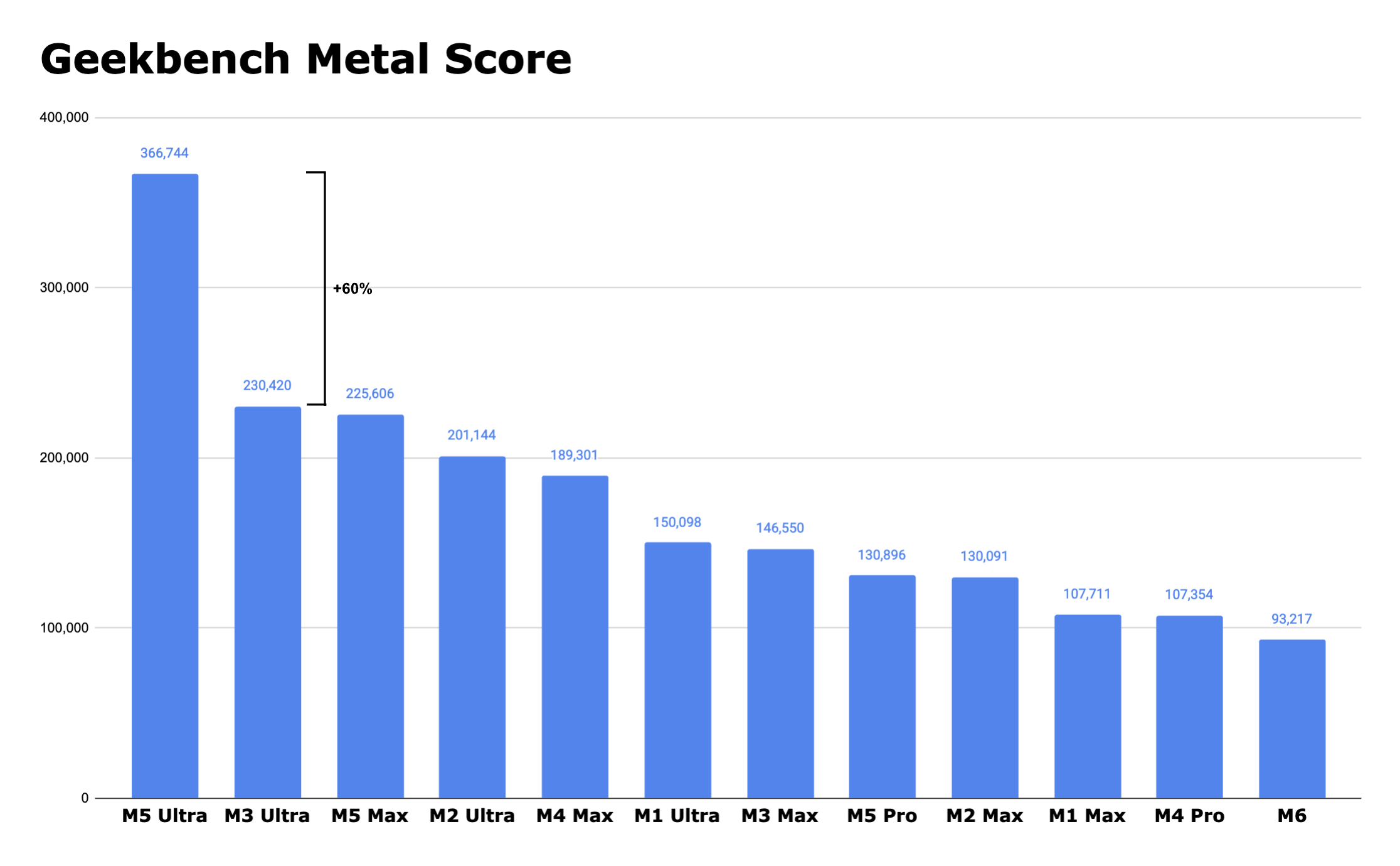
Sponsored by:
- Daft Music: Made for Apple Music.
- Clic for Sonos: A premium Sonos companion. No lag. No hassle. Just music.
- Quince: Elevated essentials and staples that last.
Become a member for ATP Overtime, ad-free episodes, member specials, and our early-release, unedited “bootleg” feed!